Produit terminéview
The EPOS Adapt 361 is an over-ear Bluetooth headset designed for professional use. It features Active Noise Cancellation (ANC) to reduce background noise, optimizing focus in busy environments. The headset is optimized for Unified Communications (UC) and allows seamless switching between multiple devices. Its ergonomic design and comfortable ear pads provide noise dampening and comfort for extended wear. The headset is crafted from high-quality materials with a matt black finish.
Please note: During a brand transition period, products may feature either EPOS | SENNHEISER or EPOS branding.
Qu'y a-t-il dans la boîte
- EPOS Adapt 361 Headset
- Clé USB-C BTD 800
- USB-C Cable with USB-C Connector
- Audio Cable (2.5 mm Twist Lock and 3.5 mm Jack Plugs)
- Pochette de rangement
- Fiche de conformité
- Guide de sécurité
Guide d'installation
1. Charger le casque
Before first use, fully charge the headset using the provided USB-C cable. Connect the USB-C end to the headset and the other end to a compatible USB power source. The LED indicator on the headset will show charging status.
2. Connexion via Bluetooth (sans fil)
- Mettez le casque sous tension.
- Activate Bluetooth pairing mode on the headset (refer to the headset controls for specific button presses, usually a long press on the power button or a dedicated Bluetooth button).
- On your device (PC, smartphone), enable Bluetooth and search for available devices.
- Select "EPOS Adapt 361" from the list to pair.
3. Connecting via USB-C Dongle (BTD 800)
For optimal performance with PC and Microsoft Teams, use the BTD 800 USB-C dongle.
- Plug the BTD 800 USB-C dongle into an available USB-C port on your computer.
- The dongle will automatically pair with your headset. The LED on the dongle will indicate connection status.
- Ensure the headset is selected as the audio input/output device in your computer's sound settings and communication applications (e.g., Microsoft Teams).
4. Connecting via Audio Cable (Wired)
For wired connection, use the provided audio cable.
- Connect the 2.5 mm twist-lock end of the audio cable to the headset.
- Connect the 3.5 mm jack end to the audio output of your device.
Mode d'emploi
Commandes du casque
The EPOS Adapt 361 features intuitive controls for managing calls, media, and headset functions. These are typically touch-sensitive or button-based on the earcups.
- Marche/Arrêt : Appuyez sur le bouton d'alimentation et maintenez-le enfoncé.
- Contrôle du volume : Use the dedicated volume buttons or touch controls.
- Annulation active du bruit (ANC) : Toggle ANC on/off to manage ambient noise.
- Bouton Microsoft Teams : A dedicated button on the BTD 800 USB-C dongle allows for quick access to Microsoft Teams functions.
- Gestion des appels : Answer/end calls, mute microphone using designated buttons.
- Contrôle multimédia : Lecture/pause, passage au morceau suivant.
- Invite vocale : The headset provides voice prompts for status updates.
Utilisation du microphone
The headset features two advanced microphones optimized for voice pickup, ensuring clear communication during calls.
Connectivité multipoint
The headset supports multipoint connectivity, allowing it to be connected to two Bluetooth devices simultaneously, enabling seamless switching between them.
Conception pliable
The robust, foldable design allows for easy storage and portability in the included storage pouch.
Entretien
Nettoyage
Wipe the headset with a soft, dry cloth. Avoid using harsh chemicals or abrasive materials. Do not immerse the headset in water.
Stockage
When not in use, store the headset in the provided storage pouch to protect it from dust and damage. The foldable design facilitates compact storage.
Dépannage
- Aucun son/Mauvaise qualité audio :
- Assurez-vous que le casque est chargé et sous tension.
- Verify Bluetooth connection or dongle connection.
- Check device's audio output settings.
- Ensure the audio cable is securely connected if using wired mode.
- Le microphone ne fonctionne pas :
- Vérifiez si le microphone est coupé.
- Verify headset is selected as the input device in your application settings.
- Problèmes de connectivité :
- Redémarrez le casque et l'appareil connecté.
- Re-pair the Bluetooth connection or re-insert the USB-C dongle.
- Assurez-vous qu'aucun autre appareil n'interfère avec le signal Bluetooth.
- Active Noise Cancellation (ANC) Performance:
- Assurez-vous que la fonction ANC est activée.
- Check that the earcups are properly seated over your ears for optimal seal.
For advanced troubleshooting and firmware updates, utilize the EPOS Manager and EPOS Connect software.
Caractéristiques
| Nom du modèle | ADAPT 300 Series (Model 361) |
| Technologie de connectivité | Avec ou sans fil (Bluetooth 5) |
| Technologie de communication sans fil | Bluetooth |
| Réponse en fréquence | 22000 Hz |
| Prise pour casque | 2.5 mm Jack |
| Placement des oreilles | Sur l'oreille |
| Contrôle du bruit | Annulation active du bruit |
| Appareils compatibles | PC |
| Type de contrôle | Commandes multimédias, tactiles |
| Caractéristiques spéciales | ActiveGard, Comfortable, Detachable Cable, Ergonomic Design, Foldable, Hands-free, Microphone Included, Microsoft Teams Button, Multipoint, Noise Cancellation, Rechargeable Battery, Sub Band Coding (SBC), Unified Communication, Voice Prompt, apt-X Technology |
| Poids de l'article | 8.5 onces (241 grammes) |
| Dimensions du produit | 7.8 x 5.4 x 4.2 pouces |
| Piles | 1 batterie lithium-ion (incluse) |
Images du produit
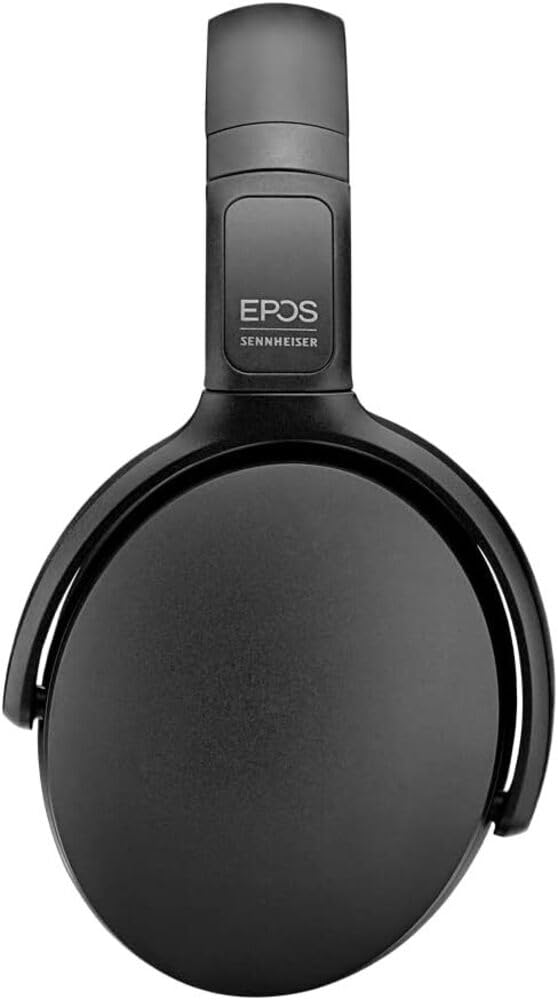
Image 1: The EPOS Adapt 361 Headset, showcasing its sleek black design and comfortable over-ear earcups. The adjustable headband is visible, designed for a secure and personalized fit.
Garantie et assistance
Pour obtenir des informations sur la garantie et une assistance technique, veuillez consulter le site officiel d'EPOS. website or contact EPOS customer service. Details regarding specific warranty periods and service procedures can be found in the documentation included with your product or on the manufacturer's support pages.
The included Compliance Sheet and Safety Guide provide additional important information.


