Introduction
This manual provides detailed instructions for the installation, operation, and maintenance of your Toocki Wi-Fi 6 USB Adapter. This device is designed to provide high-speed wireless internet connectivity and Bluetooth 5.4 functionality to your desktop or laptop computer. Please read this manual thoroughly before using the product to ensure proper setup and optimal performance.
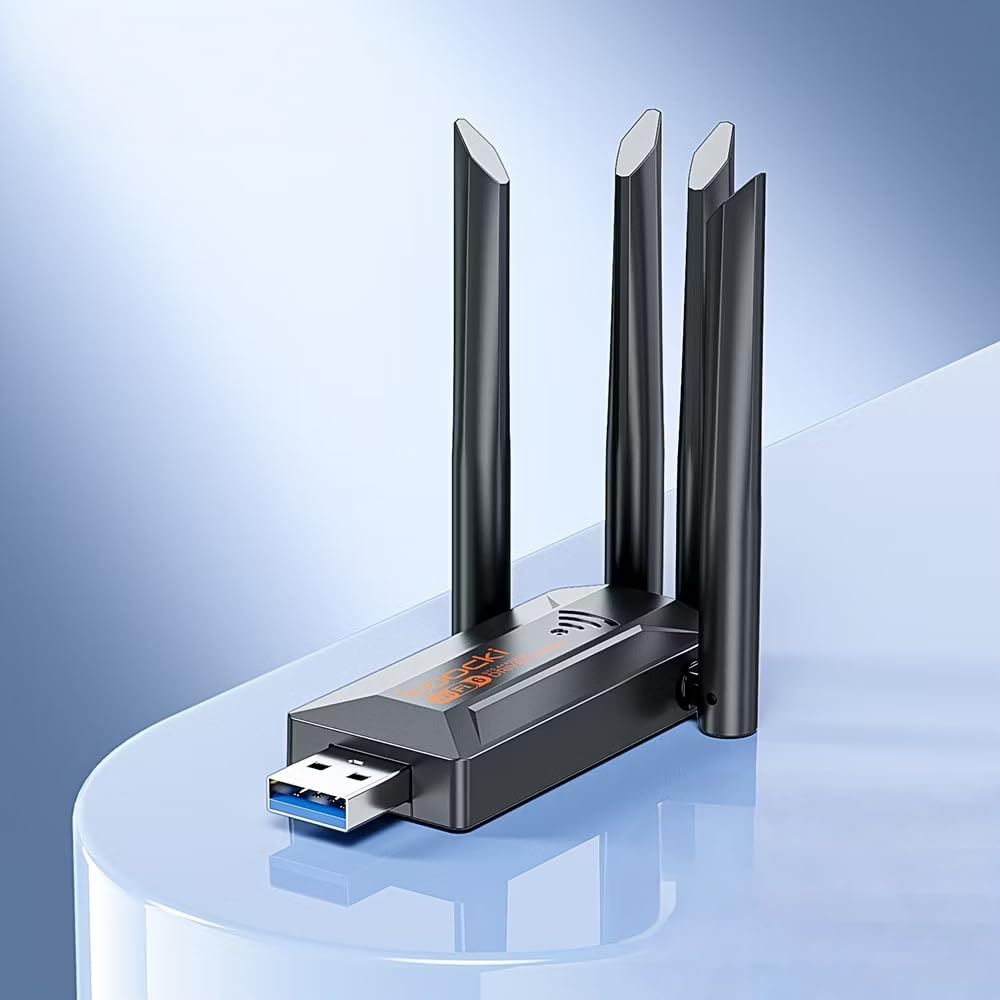
Image: The Toocki Wi-Fi 6 USB Adapter, showcasing son design compact et ses quatre antennes réglables.
Consignes de sécurité
- Tenez l'appareil éloigné de l'eau, du feu, d'une forte humidité ou d'environnements chauds.
- N'essayez pas de démonter, de réparer ou de modifier l'appareil.
- Évitez d'exposer l'appareil à la lumière directe du soleil ou à des sources de chaleur.
- À utiliser uniquement avec des ports USB compatibles (USB 3.0 recommandé pour des performances optimales).
- Tenir hors de portée des enfants.
Contenu du colis
Vérifiez que tous les éléments sont présents dans votre colis :
- Toocki Wi-Fi 6 USB Adapter (1 unit)
- Manuel de l'utilisateur (ce document)
Note: The product is designed for driver-free installation on Windows 10/11. No separate driver CD is included.
Produit terminéview
The Toocki Wi-Fi 6 USB Adapter integrates advanced Wi-Fi 6 technology and Bluetooth 5.4 into a compact USB device. It features four high-gain external antennas for improved signal reception and transmission.

Image : Intérieure view highlighting the Wi-Fi 6 smart algorithm chip, indicating enhanced signal stability and wider coverage.
Caractéristiques principales :
- Prise en charge du Wi-Fi 6 (802.11ax) : Provides stronger signal stability and wider coverage.
- Connectivité double bande : Supports both 2.4GHz and 5GHz frequencies for flexible network options and speeds up to 900Mbps.
- Bluetooth 5.4: Enables stable, multi-device connections for peripherals like mice, keyboards, and headphones.
- Quatre antennes à gain élevé : Enhances signal strength and extends wireless range.
- Interface USB 3.0: Ensures rapid data transfer speeds.
- Installation sans pilote : Plug-and-play compatibility for Windows 10/11.
- Double fonctionnalité : Acts as a Wi-Fi receiver and an AP/Hotspot.
Instructions d'installation
1. Connectez l'adaptateur
- Assurez-vous que votre ordinateur est sous tension.
- Locate an available USB 3.0 port on your desktop or laptop. For optimal performance, use a USB 3.0 port (typically blue inside).
- Carefully insert the Toocki Wi-Fi 6 USB Adapter into the USB port.
- The operating system (Windows 10/11) should automatically detect and install the necessary drivers. A notification may appear indicating successful installation.
2. Adjust Antennas
The adapter features four adjustable antennas. For best signal reception and transmission, position the antennas vertically or at an angle that provides the strongest signal in your environment. Experiment with different orientations to find the optimal setup.

Image: The Toocki Wi-Fi 6 USB Adapter with its four antennas fully extended, ready for use.
Mode d'emploi
1. Connecting to Wi-Fi (Receiver Mode)
- After successful driver installation, click on the Wi-Fi icon in your computer's system tray (usually bottom-right corner for Windows).
- Une liste des réseaux sans fil disponibles apparaîtra.
- Select your desired Wi-Fi network (either 2.4GHz or 5GHz band, if both are available).
- Saisissez la clé de sécurité réseau (mot de passe) si vous y êtes invité.
- Click "Connect". Your computer should now be connected to the internet wirelessly.

Image: Illustration of the adapter functioning as a Wi-Fi receiver, enabling a desktop PC to connect to a wireless network without cables.
2. Using as an AP/Hotspot (Transmission Mode)
The adapter can also create a Wi-Fi hotspot, allowing other devices (phones, tablets) to connect to your computer's internet connection.
- Ensure your computer is connected to the internet via an Ethernet cable or another Wi-Fi adapter.
- On Windows 10/11, go to Settings > Network & Internet > Mobile hotspot.
- Toggle the "Share my Internet connection with other devices" switch to On.
- Vous pouvez personnaliser le nom du réseau (SSID) et le mot de passe sous « Modifier ».
- Other devices can now search for and connect to this hotspot.

Image: Illustration demonstrating the adapter's Wi-Fi transmission function, creating a hotspot from a connected PC to share internet with mobile devices.
3. Connexion Bluetooth 5.4
The integrated Bluetooth 5.4 allows for stable connections with multiple Bluetooth-enabled devices.
- On Windows 10/11, go to Paramètres > Appareils > Bluetooth et autres appareils.
- Assurez-vous que le Bluetooth est activé/désactivé. On.
- Cliquez sur « Ajouter un appareil Bluetooth ou autre » et sélectionnez « Bluetooth ».
- Mettez votre appareil Bluetooth (par exemple, casque, souris, clavier) en mode de couplage.
- Sélectionnez votre appareil dans la liste et suivez les instructions à l'écran pour terminer l'appairage.

Image: The Toocki Wi-Fi 6 USB Adapter connected to a laptop, symbolizing its Bluetooth 5.4 capability for multiple device connections.
Entretien
- Nettoyez l'adaptateur en l'essuyant avec un chiffon doux et sec.
- Évitez d’utiliser des nettoyants liquides ou des solvants.
- Ensure the adapter is not obstructed to allow for proper heat dissipation.
- When not in use for extended periods, it is recommended to safely remove the adapter from the USB port.
Dépannage
Pas de connexion Wi-Fi :
- Vérifiez le port USB : Ensure the adapter is firmly inserted into a working USB port. Try a different USB port, preferably a USB 3.0 port.
- Installation du pilote : For Windows 10/11, the driver should install automatically. Verify in Device Manager (search "Device Manager" in Windows) under "Network adapters" that the Toocki adapter is listed and has no error symbols. If not, try restarting your computer.
- Emplacement de l'antenne : Réglez les antennes pour une réception optimale du signal.
- Paramètres du routeur : Ensure your Wi-Fi router is powered on and broadcasting a signal. Check if other devices can connect to the same network.
- Réseau Profile: Oubliez le réseau et essayez de vous reconnecter.
Vitesse Wi-Fi lente :
- Port USB 3.0: Ensure the adapter is connected to a USB 3.0 port for maximum speed. USB 2.0 ports will limit performance.
- Intensité du signal : Check your Wi-Fi signal strength. A weak signal can lead to slower speeds. Move closer to the router or adjust antennas.
- Congestion du réseau : Too many devices on the same network or channel can cause slowdowns. Try switching to the 5GHz band if available and less congested.
- Ingérence: Other electronic devices (microwaves, cordless phones) can interfere with Wi-Fi signals.
Bluetooth ne fonctionne pas :
- Bluetooth activé : Verify Bluetooth is enabled in Windows Settings.
- Appariement de l'appareil : Assurez-vous que votre appareil Bluetooth est en mode de couplage et à portée.
- Ingérence: Reduce distance between devices and remove any obstructions.
- Redémarrage: Try restarting your computer and re-pairing the device.
Caractéristiques

Image: Visual representation emphasizing the 900Mbps dual-band Wi-Fi 6 features for faster, more stable connections.
| Fonctionnalité | Détail |
|---|---|
| Marque | Toocki |
| Modèle | Adaptateur USB Wi-Fi 6 |
| Interface matérielle | USB 3.0 |
| norme sans fil | Wi-Fi 6 (IEEE 802.11ax), IEEE 802.11ac, IEEE 802.11n, IEEE 802.11g, IEEE 802.11b, IEEE 802.11a |
| Taux de transfert de données | Jusqu'à 900 mégabits par seconde |
| Bandes de fréquences | 2.4 GHz, 5 GHz |
| Version Bluetooth | Bluetooth 5.4 |
| Antennes | 4 antennes externes à gain élevé |
| Appareils compatibles | Ordinateur de bureau, ordinateur portable |
| Prise en charge du système d'exploitation | Windows 10/11 (Driver-Free) |
| Dimensions du produit | 30L x 20W x 60H Millimeters (approx. 3 x 2 x 6 cm) |
| Poids de l'article | 30 gramme |
| Couleur | Noir |
Informations sur la garantie
This Toocki Wi-Fi 6 USB Adapter comes with a Garantie de 6 mois from the date of purchase. This warranty covers manufacturing defects and malfunctions under normal use. It does not cover damage caused by misuse, accidents, unauthorized modifications, or external factors. Please retain your proof of purchase for warranty claims.
Assistance clientèle
If you encounter any issues or have questions regarding your Toocki Wi-Fi 6 USB Adapter that are not addressed in this manual, please contact your retailer or the manufacturer's customer support.
For support inquiries, please refer to the contact information provided with your purchase documentation or visit the official Toocki website.


