1. Produit terminéview
The YESIDO KM27 is a 2.4G wireless video intercom doorbell system designed for enhanced home security and convenient communication. It features a 4.3-inch indoor display screen, infrared night vision capabilities, two-way audio communication, and supports video recording to a TF card for monitoring purposes.
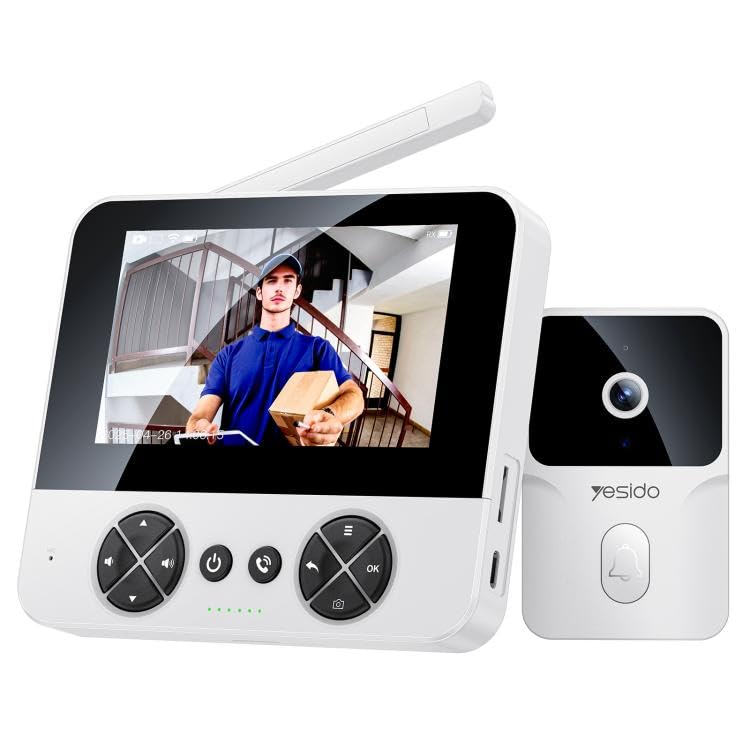
Image 1.1: The YESIDO KM27 wireless video intercom doorbell system, showing both the outdoor doorbell unit and the indoor display unit.
2. Contenu du colis
Vérifiez que tous les éléments sont présents dans le colis :
- Sonnette extérieure
- Indoor Display Unit (4.3-inch screen)
- Câble de charge de type C
- Matériel de montage (vis, chevilles)
- Manuel d'utilisation
3. Instructions de configuration
3.1 Chargement des unités
Before initial use, fully charge both the outdoor doorbell unit and the indoor display unit using the provided Type-C charging cable and a DC5V/1A power adapter (not included). The outdoor unit's 1000mAh lithium battery provides approximately 6 months of standby time on a single charge.
3.2 Installing a TF Card (Optional)
To enable photo and video recording, insert a TF card (up to 256GB, not included) into the designated slot on the indoor display unit. Ensure the card is inserted correctly.
3.3 Installation de la sonnette extérieure
- Choose a suitable location near your door, ensuring clear visibility and within the wireless range of the indoor unit (up to 50 meters indoors, 300 meters in open air).
- Marquez les points de perçage en utilisant le support de montage comme gabarit.
- Percez des trous et insérez des ancrages muraux si nécessaire.
- Fixez le support de montage au mur à l'aide de vis.
- Attach the outdoor doorbell unit to the mounting bracket. The unit is IP65 waterproof, suitable for outdoor conditions.
3.4 Placing the Indoor Display Unit
Place the indoor display unit in a convenient location within your home where you can easily view the screen and hear notifications. Ensure it is within the effective wireless transmission range of the outdoor unit.
4. Mode d'emploi
4.1 Mise sous/hors tension
Press and hold the power button on both units to power them on or off.
4.2 Answering a Doorbell Call
When a visitor presses the doorbell button on the outdoor unit, the indoor display unit will ring and show a real-time video feed. Press the 'Answer' button on the indoor unit to initiate two-way voice intercom with the visitor.
Image 4.1: The indoor display unit showing a visitor and enabling two-way communication.
4.3 Interphone bidirectionnel
After answering, you can speak to the visitor through the indoor unit's microphone and speaker, and hear their response through the outdoor unit's speaker and microphone. This allows for clear communication with low latency.
Vision nocturne infrarouge 4.4
The outdoor unit is equipped with infrared night vision, allowing for clear visibility of visitors at the door both day and night. This feature automatically activates in low-light conditions.

Image 4.2: The outdoor unit utilizing intelligent infrared night vision for clear visibility in darkness.

Image 4.3: Comparison demonstrating clear night vision capability of the YESIDO KM27.
4.5 Enregistrement photo/vidéo
Pendant un appel ou en direct view, press the 'Record' button on the indoor unit to take a photo or start video recording. This function helps maintain a record of door activity.

Image 4.4: The outdoor unit automatically capturing photos or recording videos when the doorbell is pressed.
4.6 Ajustement des paramètres
The indoor unit features shortcut keys for adjusting volume and screen brightness. There are four selectable ringtones with adjustable volume levels.
5. Entretien
5.1 Chargement
Regularly charge both units. The outdoor unit's battery life is approximately 6 months on standby. The indoor unit should be charged as needed.
5.2 Nettoyage
Wipe the units with a soft, dry cloth. Avoid using abrasive cleaners or solvents that could damage the surfaces.
5.3 Gestion des cartes TF
Répéter périodiquementview et gérer les photos enregistréestage on the TF card. Format the card if necessary to free up space or resolve recording issues.
6. Dépannage
- Pas de vidéo/audio : Ensure both units are powered on and fully charged. Check that they are within wireless range. Restart both units.
- Portée sans fil faible : Reduce obstacles between the outdoor and indoor units. Ensure the indoor unit is not placed near sources of interference (e.g., microwaves, large metal objects). The external industrial-grade antenna provides a range of 300 meters in open air and 50 meters indoors (through walls).
- La batterie se décharge rapidement : Ensure units are fully charged. Excessive use of live view or recording can reduce battery life.
- Problèmes d'enregistrement : Check if a TF card is properly inserted and has sufficient free space. Format the TF card if necessary.
- L'écran ne répond pas : Try restarting the indoor display unit. If the issue persists, ensure it is charged.
7. Spécifications
| Matériel | PC + ABS + TPU |
| Contrôleur principal | V821 |
| Puissance du haut-parleur | 1W |
| Capteur d'images | GC0328C5 |
| Mode de transmission | Sans fil 2.4G |
| Compression vidéo | MJPEG, H.265 |
| Alimentation électrique | Type-C, DC5V/1A |
| IPC Battery | 1000 mAh (batterie au lithium) |
| Écran LCD | 4.3-inch TFT, 480x272 pixels |
| Résolution de la caméra | 1 MP |
| Résolution de capture vidéo | 1080p |
| Indice d'étanchéité | IP65 |
| Plage de transmission | 300m (open air), 50m (indoors) |
| Prise en charge de la carte TF | Jusqu'à 256 Go (non inclus) |
| Outdoor Unit Standby Time | Environ 6 mois |
| Caractéristiques spéciales | 2-Way Audio, Infrared Night Vision |
| Dimensions du produit | 20 x 10 x 8 cm |
8. Informations sur la garantie
Specific warranty details for the YESIDO KM27 are not provided in the product information. Please refer to the retailer or manufacturer's official website for warranty terms and conditions, or contact their customer service directly.
9. Assistance clientèle
For technical assistance, troubleshooting, or further inquiries regarding your YESIDO KM27 Wireless Video Intercom Doorbell, please contact the retailer where you purchased the product or visit the official YESIDO support channels.


