1. Introduction
1.1 Produit terminéview
The NORQIN 27-inch Embedded Industrial Panel PC is an all-in-one touchscreen computer engineered for demanding industrial environments. It features an industrial-grade front panel with IP65-rated touch protection and a 10-point capacitive G+G touchscreen, ensuring reliable operation in various settings such as smart homes, info kiosks, automation systems, digital signage, and manufacturing facilities.
Designed for stable 24/7 operation, this panel PC is built to strict industrial reliability standards. It comes pre-installed with Windows 11 Pro OS, with optional support for custom systems like Linux, Android, or Ubuntu. The device integrates a high-performance, low-power processor for efficient and consistent performance.
Its compact and slim design allows for neat integration into walls or kiosks, supported by a VESA-compatible mounting system for straightforward installation. The industrial-grade touchscreen is waterproof and dust-resistant, supporting operation with gloves or wet hands. Connectivity is comprehensive, including 4xUSB, 6xCOM (4xRS232, 2xRS485), 2xLAN, 1xHDMI, and WiFi ports, making it suitable for smart workshops, CNC machines, industrial robots, production line management, catering POS systems, and other commercial applications.
1.2 Contenu de la boîte
Veuillez vérifier le contenu de votre colis dès réception :
- 1 × Industrial Panel PC
- 1 × Adaptateur secteur
- 1 × câble d'alimentation
- 2 × WiFi Antennas
- 2 × Embedded Buckle Kits
- 1 × Carte de garantie
- 1 × Wall-mounted VESA Bracket

2. Instructions de configuration
2.1 options de montage
The NORQIN Industrial Panel PC offers flexible installation options to suit various industrial and commercial environments. It supports VESA mounting (100x100mm) for wall-mounted or desktop stand installations, as well as embedded and snap-in configurations.
- Montage VESA : Use the included VESA bracket to mount the panel PC on a wall or a compatible VESA desktop stand. Ensure the mounting surface can support the device's weight.
- Embedded/Snap-in Installation: For integration into kiosks or control panels, utilize the provided embedded buckle kits. Follow the instructions for cutting the appropriate opening and securing the device.

2.2 Connexion de périphériques
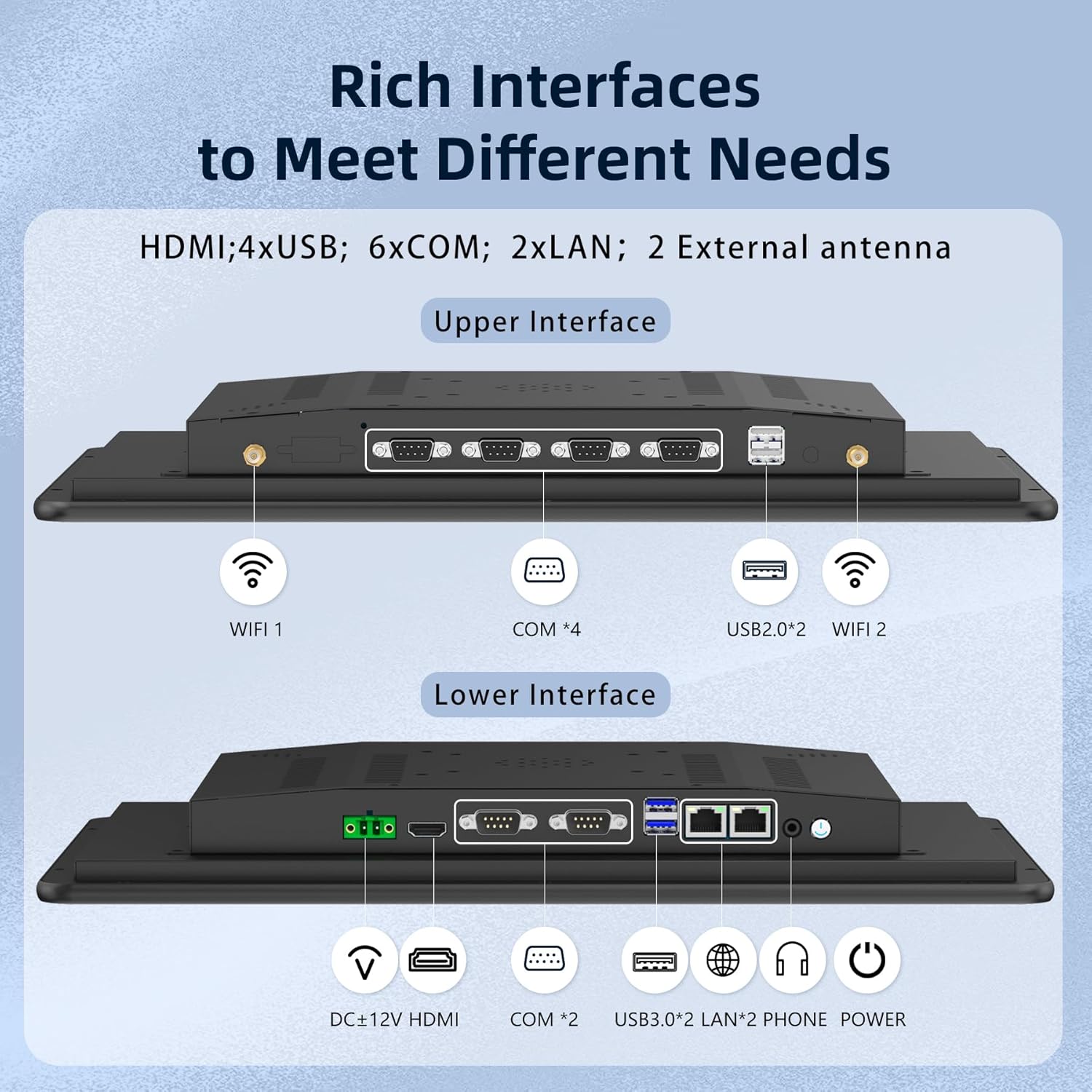
The panel PC is equipped with a rich array of I/O interfaces for versatile connectivity:
- Pouvoir: Connect the included power adapter to the DC+12V port and then to a power outlet.
- Sortie vidéo : Use the HDMI port to connect to an external display if needed.
- Ports USB : Utilize the 4xUSB ports (2xUSB 2.0, 2xUSB 3.0) for keyboards, mice, and other USB devices.
- Ports série: The 6xCOM ports (4xRS232, 2xRS485) are available for industrial control devices.
- Réseau: Connect to a wired network using the 2xLAN ports.
- Sans fil: Attach the two WiFi antennas to the designated ports for wireless network connectivity.
3. Mode d'emploi
3.1 Mise sous/hors tension
Press the power button located on the side or rear panel to turn the device on. To power off, use the standard Windows shutdown procedure or press and hold the power button for a few seconds.
3.2 Fonctionnement de l'écran tactile
The 10-point capacitive G+G touchscreen provides smooth and responsive interaction. It supports multi-touch gestures such as reducing, zooming, revolving, writing, erasing, and nudging. The screen is designed for precision, even allowing operation with gloves or wet hands.

Système d'exploitation 3.3
The panel PC comes pre-installed with Windows 11 Pro, offering a familiar and robust operating environment. For specialized applications, the device supports optional custom setups with Linux, Android, or Ubuntu.
4. Entretien
4.1 Considérations environnementales
The NORQIN Industrial Panel PC is designed to operate reliably in a wide range of temperatures, from -20°C to 60°C. Its IP65 rating ensures resistance against dust and water ingress, making it suitable for harsh industrial environments.

4.2 Nettoyage de l'appareil
Due to its IP65 rating, the front panel can be wiped with a damp cloth. For the rear chassis, use a dry, soft cloth. Avoid using harsh chemicals or abrasive materials that could damage the screen or casing.
4.3 Dissipation thermique
The device features a built-in cooling fan and back matrix heat dissipation holes to ensure efficient heat management and stable operation, even during continuous use. Ensure these vents are not obstructed to maintain optimal performance.
5. Dépannage
This section provides solutions to common issues you might encounter with your NORQIN Industrial Panel PC.
| Problème | Cause possible | Solution |
|---|---|---|
| L'appareil ne s'allume pas | No power supply; Loose power cable | Check power adapter and cable connections; Ensure power outlet is functional. |
| L'écran tactile ne répond pas | Software issue; Screen calibration needed; Physical damage | Restart the device; Recalibrate touchscreen via OS settings; Contact support if physically damaged. |
| No network connection (WiFi) | WiFi antennas not connected; Driver issue; Network configuration | Ensure WiFi antennas are securely attached; Check device manager for WiFi adapter status; Verify network settings. |
| Système lent ou bloqué | Overheating; Too many applications running; Low storage | Ensure proper ventilation; Close unnecessary applications; Free up disk space. |
If the problem persists after attempting these solutions, please contact NORQIN customer support for further assistance.
6. Spécifications
Below are the detailed technical specifications for the NORQIN 27-Inch Embedded Industrial Panel PC (Model WD01-27177-8128):
| Fonctionnalité | Spécification |
|---|---|
| Taille de l'écran | 27 pouces |
| Résolution de l'écran | 1920 x 1080 pixels (FHD) |
| Processeur | Intel Core i7-7500U (2.7 GHz) |
| BÉLIER | 8 Go DDR4 |
| Disque dur | Disque SSD de 128 Go |
| Carte graphique | Integrated Intel Graphics (8 GB RAM Size) |
| Système opérateur | Windows 11 Pro (Supports Linux, PC) |
| Type sans fil | 802.11a/b/g/n/ac (WiFi/BT) |
| Ports USB | 2x USB 2.0, 2x USB 3.0 |
| D'autres ports | 6x COM (4x RS232, 2x RS485), 2x LAN, 1x HDMI |
| Indice de protection IP | IP65 (panneau avant) |
| Source d'énergie | 12 volts CC |
| Poids de l'article | 17.16 livres |
| Dimensions du produit (L x l x H) | 26.14 x 15.86 x 1.94 pouces |
7. Garantie et assistance
7.1 Informations sur la garantie
Your NORQIN Industrial Panel PC comes with a standard manufacturer's warranty. Please refer to the included Warranty Card for specific terms, conditions, and duration of coverage. Keep your proof of purchase for warranty claims.
7.2 Assistance clientèle
For technical assistance, troubleshooting beyond this manual, or warranty inquiries, please contact NORQIN customer support. You can find contact information on the Warranty Card or by visiting the official NORQIN website: NORQIN Store on Amazon.


