GOOLOO GT6000 Jump Starter & DS200 OBD2 Scanner User Manual
Model: GT6000 & DS200
1. Introduction
This manual provides detailed instructions for the safe and effective use of your GOOLOO GT6000 6000A Jump Starter and GOOLOO DEEPSCAN DS200 OBD2 Diagnostic Scanner. Please read this manual thoroughly before operating the devices and retain it for future reference.
The GOOLOO GT6000 is a powerful portable jump starter designed to start vehicles with dead batteries, while also serving as a portable power bank. The GOOLOO DEEPSCAN DS200 is a compact OBD2 scanner that connects wirelessly to your smartphone, providing comprehensive vehicle diagnostics and maintenance functions.

Image 1.1: The GOOLOO GT6000 Jump Starter and GOOLOO DEEPSCAN DS200 OBD2 Scanner.
2. Informations importantes sur la sécurité
Always observe the following safety precautions when using the GOOLOO GT6000 Jump Starter and DS200 OBD2 Scanner to prevent injury or damage to the devices or your vehicle.
- Lisez toutes les instructions avant utilisation.
- Tenir hors de portée des enfants.
- Do not expose the devices to rain or extreme temperatures.
- Ne démontez pas et ne modifiez pas les appareils.
- Assurez une ventilation adéquate pendant l'utilisation et la charge.
- Portez des lunettes de protection lorsque vous travaillez avec des batteries de véhicules.
- Évitez de court-circuiter le démarreur électrique.amps.
- Use the jump starter only for 12V lead-acid batteries.

Image 2.1: The GT6000 Jump Starter features multiple safety protections including over-charge, short-circuit, and reverse-polarity protection.
3. GOOLOO GT6000 Jump Starter
3.1. Produit terminéview
The GT6000 is a high-capacity jump starter with a 6000A peak current, capable of starting all gas engines and diesel engines up to 12L. It also functions as a portable power bank with 100W bi-directional fast charging.

Image 3.1: Diagram showing the ports and controls of the GT6000 Jump Starter, including the BOOST button, jump cable socket, DC port, USB output ports, and IN/OUT PD100W port.

Image 3.2: The 3.2-inch LED display on the GT6000 shows battery level, charging power, low current mode, 'Ready to Start' status, low temperature reminder, and battery clips reversed warning.
3.2. Charging the GT6000
Before first use, fully charge the GT6000. It supports 100W bi-directional fast charging. A full charge from 0-100% takes approximately 1.4 hours.
- Connect the provided USB-C cable to the IN/OUT PD100W port on the GT6000.
- Connect the other end of the cable to a compatible 100W USB-C power adapter (a 100W car charger is included).
- L'écran LED affichera l'état de charge et le pourcentage de batterie.tage.

Image 3.3: The GT6000 charging, indicating 100W super fast charging capabilities.
3.3. Utilisation du démarreur électrique
Follow these steps to jump-start a vehicle with a dead battery:
- Insérer: Insert the smart jumper cable plug into the jump cable socket on the GT6000. Ensure a secure connection.
- Connecter: Connectez le câble rougeamp à la borne positive (+) de la batterie du véhicule et au cl noiramp à la borne négative (-). Assurez-vous que le clamps are firmly attached. If the LED display shows "Battery Clips Reversed", recheck the connections.
- Commencer: Once the GT6000 display shows "READY", start your car engine. If the engine does not start immediately, wait 20-30 seconds and try again. Do not attempt more than 3 consecutive jump starts.
- Retirer: Une fois le véhicule démarré, débranchez le câble.amps from the car battery first, then remove the jumper cable from the GT6000.

Image 3.4: Visual guide for the three steps to jump start your vehicle using the GT6000.
3.4. Utilisation comme batterie externe
The GT6000 can charge various electronic devices via its USB output ports and the bi-directional USB-C port.
- Connect your device's charging cable to one of the GT6000's output ports (5V/2.4A, 5V/9V/12V, or IN/OUT PD100W USB-C).
- The GT6000 will automatically begin charging your device.

Image 3.5: The GT6000 functioning as a portable power bank, charging a laptop and smartphone.
3.5. LED Flashlight Functions
The GT6000 includes an integrated LED flashlight with multiple modes:
- Lumière normale : Maintenez le bouton d'alimentation enfoncé pendant 3 secondes pour allumer la lampe torche.
- Lumière stroboscopique: Short press the power button again to switch to strobe mode.
- Signal SOS : Short press the power button a third time to activate the SOS signal mode.
- Éteindre: Short press the power button a fourth time or press and hold for 3 seconds to turn off the flashlight.
3.6. GT6000 Specifications
| Fonctionnalité | Détail |
|---|---|
| Courant de pointe | 6000A |
| Compatibilité moteur | Tous essence, jusqu'à 12.0 L diesel |
| Capacité de la batterie | 27000 mAh (99.9Wh) |
| Chargement rapide | 100W Bi-directional (USB-C) |
| Afficher | LED 3.2 pouces |
| Protections | 10 SuperSafe Protections (Over-Charge, Short-Circuit, Reverse-Polarity, etc.) |
| Lumière LED | 400 Lumens (Flashlight, Strobe, SOS) |
| Temps de veille | Jusqu'à 24 mois |
4. GOOLOO DEEPSCAN DS200 OBD2 Scanner
4.1. Produit terminéview
The DS200 is a wireless Bluetooth OBD2 scanner designed for comprehensive vehicle diagnostics. It connects to your smartphone via an app and supports full system diagnostics, bidirectional control, and various maintenance services.
4.2. Setup & App Installation
To begin using your DS200 scanner, you need to download and install the GOOLOO DEEPSCAN app on your smartphone.
- Téléchargez l'application: Rechercher "GOOLOO DEEPSCAN" in the Apple App Store (for iOS devices) or Google Play Store (for Android devices).
- Installer l'application: Téléchargez et installez l'application.
- S'inscrire/Se connecter : Follow the in-app instructions to register an account or log in if you already have one.

Image 4.1: The DS200 scanner and instructions for downloading the GOOLOO DEEPSCAN app from app stores.
4.3. Connexion à votre véhicule
The DS200 connects to your vehicle's OBD2 port, typically located under the dashboard on the driver's side.
- Locate your vehicle's 16-pin OBD2 port.
- Plug the DS200 scanner firmly into the OBD2 port. The scanner will power on automatically.
- Turn on your vehicle's ignition (engine off or running, depending on the diagnostic task).
- Open the GOOLOO DEEPSCAN app on your smartphone and follow the prompts to connect to the DS200 via Bluetooth.

Image 4.2: The DS200 scanner connected to a vehicle's OBD2 port, displaying diagnostic information on a smartphone.
4.4. Fonctions de diagnostic de base
Once connected, the DS200 app provides access to standard OBD2 functions:
- Lire les codes : Récupérer les codes de diagnostic des anomalies (DTC) de l'unité de commande du moteur (ECU) du véhicule.
- Effacer les codes : Erase DTCs and turn off the Check Engine Light (MIL) after repairs.
- Données en direct: View real-time sensor data, such as engine RPM, vehicle speed, coolant temperature, and fuel system status.
- Préparation I/M : Check the status of emission-related monitors to ensure the vehicle is ready for an emissions test.
- Données d'arrêt sur image : View un instantané des données des capteurs enregistrées lors d'un défaut lié aux émissions.
- Informations sur le véhicule: Récupérer le numéro d'identification du véhicule (VIN), l'identifiant d'étalonnage et les numéros de vérification d'étalonnage (CVN).
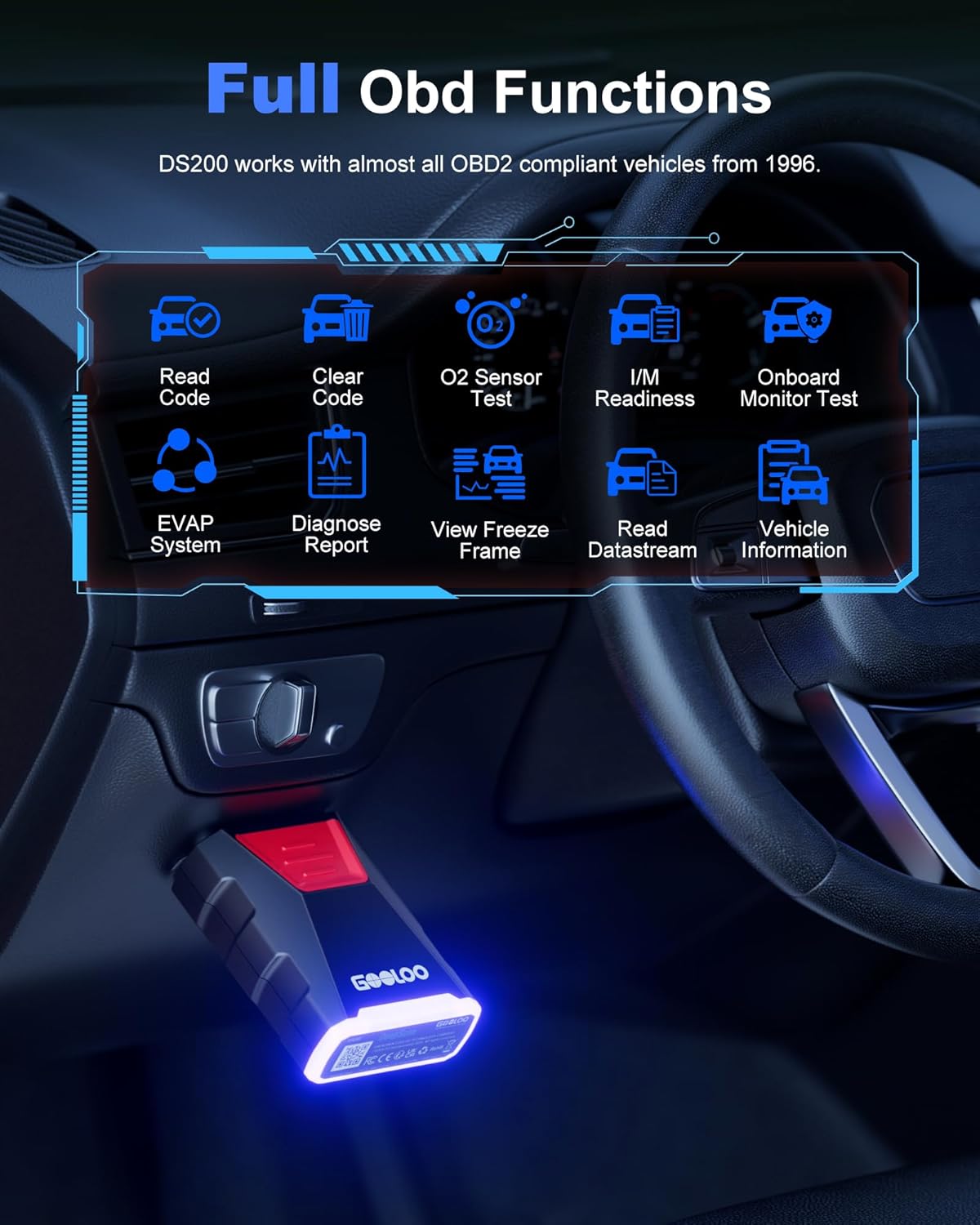
Image 4.3: The DS200 app interface displaying various full OBD functions like Read Code, Clear Code, O2 Sensor Test, and Live Data.
4.5. Fonctions de diagnostic avancées
The DS200 offers advanced features for in-depth vehicle analysis:
- Diagnostic complet du système : Scan all available electronic control units (ECUs) in the vehicle, including Engine, Transmission, ABS, SRS, BCM, etc., to read and clear fault codes.
- Contrôle bidirectionnel : Perform active tests to control various vehicle components (e.g., turn on/off wipers, headlights, fuel pump) to verify their functionality.
- Services d'entretien : Access common maintenance functions such as Oil Reset, Throttle Adaptation, EPB Reset, Steering Angle Resets, DPF Regeneration, ABS Bleeding, BMS Reset, and Airbag Reset.
- Test de performance du véhicule : Conduct tests to evaluate vehicle performance metrics like acceleration time, top speed, and engine load.

Image 4.4: The DS200 app interface listing 8 common maintenance services available for various vehicle systems.

Image 4.5: The DS200 app demonstrating bidirectional control, allowing users to troubleshoot faults by controlling components like wipers, mirrors, and headlights.
4.6. DS200 Specifications
| Fonctionnalité | Détail |
|---|---|
| Connectivité | Bluetooth 5.0 |
| Appareils pris en charge | smartphones/tablettes iOS et Android |
| Protocoles OBD2 | All standard OBD2 protocols, including FCA & CAN-FD |
| Fonctions | Full System Diagnostics, Bidirectional Control, 8 Maintenance Services, Full OBD Functions, Real-time Data Monitoring, Vehicle Performance Test |
| Couverture du véhicule | Most OBD2 compliant vehicles from 1996 onwards |
5. Entretien et maintenance
Proper care ensures the longevity and optimal performance of your GOOLOO devices.
- Nettoyage: Utilisez un chiffon doux et sec pour nettoyer l'extérieur des deux appareils. N'utilisez pas de nettoyants abrasifs ni de solvants.
- Stockage: Store the devices in a cool, dry place away from direct sunlight and extreme temperatures. For the GT6000, ensure it is charged to at least 50% before long-term storage and recharge every 3-6 months.
- Manutention: Évitez de faire tomber les appareils ou de les soumettre à des chocs violents.
- câbles: Inspect jumper cables and OBD2 connector for any damage before each use. Replace if frayed or damaged.
6. Dépannage
6.1. GT6000 Jump Starter Issues
- L'appareil ne s'allume pas : Assurez-vous que l'appareil est chargé. Appuyez sur le bouton d'alimentation et maintenez-le enfoncé pendant quelques secondes.
- Le véhicule ne démarre pas :
- Vérifiez que le clampLes câbles sont correctement connectés aux bornes de la batterie.
- Ensure the GT6000 has sufficient charge.
- If the battery is severely discharged, press the BOOST button on the GT6000 (if available and safe to do so, refer to specific product instructions for boost mode).
- The vehicle battery might be completely dead or damaged and require replacement.
- "Battery Clips Reversed" error: Déconnecter clamps and reconnect them to the correct positive (+) and negative (-) terminals.
6.2. DS200 OBD2 Scanner Issues
- Le scanner ne s'allume pas : Ensure the DS200 is fully plugged into the vehicle's OBD2 port and the vehicle's ignition is on.
- Connexion impossible via Bluetooth :
- Assurez-vous que Bluetooth est activé sur votre smartphone.
- Restart the GOOLOO DEEPSCAN app.
- Unplug and re-plug the DS200 from the OBD2 port.
- Check if the app requires location permissions, as some Bluetooth functions do.
- Aucune communication avec l'ECU :
- Vérifiez que le contact du véhicule est mis.
- Ensure the DS200 is securely connected to the OBD2 port.
- Confirm your vehicle is OBD2 compliant (most vehicles from 1996 onwards).
- Try scanning a different vehicle to rule out scanner malfunction.
7. Garantie et support client
GOOLOO products are designed for reliability and performance. For warranty information, technical support, or any questions regarding your GT6000 Jump Starter or DS200 OBD2 Scanner, please refer to the official GOOLOO webconsultez le site ou contactez directement leur service client.
Please have your product model number (GT6000, DS200) and purchase information ready when contacting support.


