Introduction
This manual provides detailed instructions for the safe and efficient use of your artfone CS181 senior mobile phone. Please read this manual carefully before using the device and keep it for future reference. The artfone CS181 is designed for ease of use, featuring large buttons, clear display, and essential functions for reliable communication.
Contenu du colis
- artfone CS181 Mobile Phone
- Batterie (800mAh)
- Câble de chargement USB-C
- Manuel d'utilisation
- Lanière (peut varier selon l'emballage)
Appareil terminéview
Familiarize yourself with the main components and design of your artfone CS181 phone.
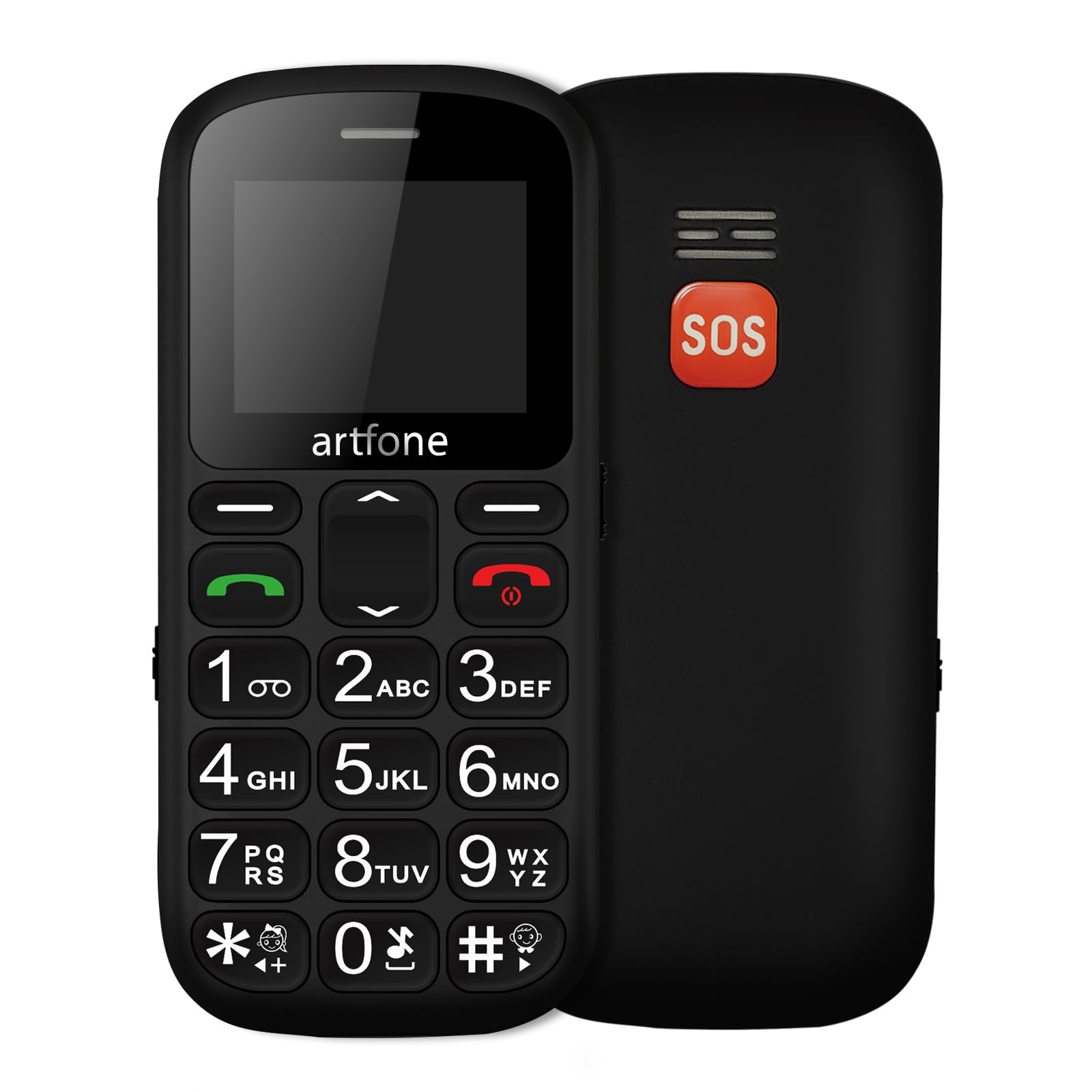
Image: Devant et derrière view of the artfone CS181 mobile phone, showcasing its large keypad and the SOS button on the rear.

Image: Diagram illustrating the dimensions of the artfone CS181 phone from various angles.
Installation
1. Installing the Battery and SIM Cards
The artfone CS181 supports dual SIM cards (2G GSM network). Ensure the phone is powered off before installation.
- Retirez la coque arrière du téléphone en la soulevant délicatement au niveau de l'encoche.
- Insert the 800mAh Lithium-ion battery into its compartment, ensuring the contacts align correctly.
- Locate the SIM card slots. Insert your 2G GSM SIM card(s) into the designated slots, ensuring the gold contacts face downwards and the cut corner aligns correctly.
- (Optional) If using a memory card, insert it into the memory card slot.
- Remettez le couvercle arrière en place jusqu'à ce qu'il s'enclenche correctement.

Image: Interne view of the artfone CS181 showing the battery compartment, dual SIM card slots, and memory card slot.
2. Charger le téléphone
Avant la première utilisation, chargez complètement la batterie du téléphone.
- Connect the USB-C charging cable to the charging port on the phone.
- Connect the other end of the cable to a compatible USB power adapter (not always included) or a computer's USB port.
- The charging indicator on the phone's screen will show the charging status. Disconnect the charger once the battery is full.
3. Mise sous/hors tension
- Pour allumer : Appuyez et maintenez le bouton enfoncé Alimentation/Fin d'appel bouton (bouton rouge) jusqu'à ce que l'écran s'allume.
- Pour éteindre l'appareil : Appuyez longuement sur le bouton. Alimentation/Fin d'appel Appuyez sur le bouton jusqu'à ce que les options d'arrêt apparaissent, puis sélectionnez « Éteindre ».
4. Paramètres initiaux
Lors de la première mise en marche, il vous sera peut-être demandé de régler la langue, la date et l'heure. Suivez les instructions à l'écran.
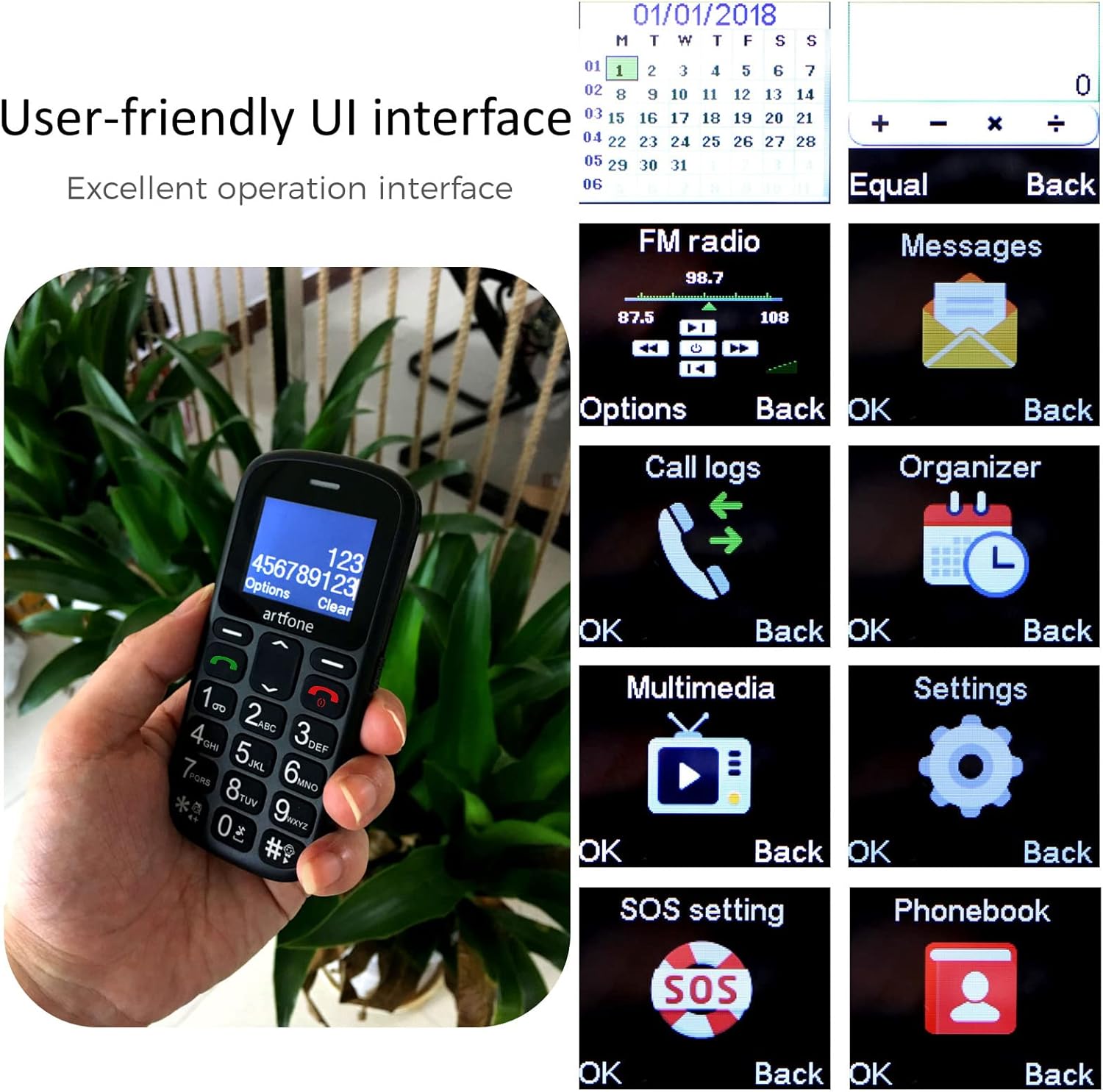
Image: The artfone CS181's user-friendly interface with large, clear menu icons for functions like FM radio, messages, call logs, and settings.
Mode d'emploi
1. Passer et recevoir des appels
- Pour passer un appel : Saisissez le numéro de téléphone à l'aide du clavier et appuyez sur la touche Appel bouton (bouton vert).
- Pour répondre à un appel : Appuyez sur le Appel button (green button) when the phone rings.
- Pour mettre fin à un appel : Appuyez sur le Fin d'appel bouton (bouton rouge).
- Annonce vocale : The phone can announce dialed numbers in English, German, French, Spanish, and Italian. This feature can be enabled or disabled in the settings menu.
2. Envoi et réception de messages SMS
- Accédez au menu « Messages ».
- Sélectionnez « Écrire un message » pour composer un nouveau SMS.
- Saisissez le numéro du destinataire ou sélectionnez-le dans vos contacts, puis rédigez votre message.
- Appuyez sur « Envoyer » pour transmettre le message.
3. Fonction d'appel d'urgence SOS
Le bouton SOS se trouve à l'arrière du téléphone et permet un accès rapide aux contacts d'urgence.
- Setting up SOS numbers: Aller à Menu > Settings > SOS Settings. You can pre-program up to five emergency numbers and an emergency SMS message.
- Activation de SOS : En cas d'urgence, appuyez sur la touche et maintenez-la enfoncée. Bouton SOS for 3 seconds. The phone will automatically dial the pre-programmed numbers in sequence and send the emergency SMS.
- Annulation de la demande de SOS : If activated by mistake, you can cancel the SOS call within 3 seconds by pressing any key.

Image: A finger pressing the prominent orange SOS button located on the back of the artfone CS181 phone.
4. Lampe de poche
Le téléphone comprend une lampe torche puissante pour plus de commodité.
- To turn on/off: Press the dedicated flashlight button on the left side of the phone.

Image: The artfone CS181 phone with its flashlight illuminated, showing the light beam and the location of the flashlight LED.
5. Radio FM
Écoutez vos stations de radio FM préférées.
- Accédez au menu « Radio FM ».
- Utilisez les touches de navigation pour rechercher les stations ou effectuez un réglage manuel.
6. Bluetooth
Connectez votre téléphone à des casques Bluetooth ou à d'autres appareils.
- Aller à Menu > Paramètres > Bluetooth.
- Activez le Bluetooth et recherchez les appareils disponibles.
- Select the desired device to pair.
7. Keypad Lock/Unlock
Prevent accidental key presses by locking the keypad.
- To lock: Press the dedicated keypad lock button on the right side of the phone.
- To unlock: Press the dedicated keypad lock button again.
8. Speed Dial Setup
Assign frequently called numbers to speed dial keys (1-9, *, #).
- Aller à Menu > Paramètres > Numérotation rapide.
- Select a key (e.g., "1") and assign a contact from your phonebook.
- To use: Press and hold the assigned speed dial key to call the contact.
Entretien
1. Entretien de la batterie
- Utilisez uniquement le chargeur et la batterie d'origine ou homologués.
- Évitez d'exposer la batterie à des températures extrêmes.
- Ne percez pas, ne démontez pas et ne court-circuitez pas la batterie.
- If the phone will not be used for an extended period, charge it partially and store it in a cool, dry place.
2. Nettoyage et stockage
- Clean the phone with a soft, dry cloth. Do not use liquid cleaners.
- Keep the phone away from dust, moisture, and direct sunlight.
- Évitez de faire tomber le téléphone ou de le soumettre à des chocs violents.
Dépannage
| Problème | Cause possible | Solution |
|---|---|---|
| Le téléphone ne s'allume pas. | La batterie est déchargée ou mal installée. | Chargez la batterie. Assurez-vous que la batterie est correctement insérée. |
| Impossible de passer ou de recevoir des appels. | Aucun signal réseau, carte SIM non insérée ou problème de carte SIM. | Vérifiez la couverture réseau. Réinsérez la carte SIM. Contactez votre opérateur. |
| SOS button activated by mistake. | Accidental press. | Press any key within 3 seconds of activation to cancel. |
| Mauvaise qualité d'appel. | Signal faible ou interférences environnementales. | Déplacez-vous dans une zone où le signal est meilleur. Évitez les obstacles. |
| Le clavier ne répond pas. | Le clavier est verrouillé. | Unlock the keypad using the dedicated side button. |
Caractéristiques
| Fonctionnalité | Détail |
|---|---|
| Marque | artfone |
| Nom du modèle | CS181 |
| Système opérateur | système d'exploitation Artfone |
| Taille de l'écran | 2.4 pouces |
| Connectivité | 2G, GSM (850/900/1800/1900 MHz) |
| Prise en charge de la carte SIM | Double SIM |
| Capacité de la batterie | 800 mAh Lithium-ion |
| Temps de veille | Jusqu'à 7 jours |
| Temps de conversation | Jusqu'à 5 XNUMX heures |
| Mémoire interne | 32MB + 24MB (RAM + ROM) |
| Port de chargement | USB Type-C |
| Caractéristiques spéciales | SOS Button, Large Keys, FM Radio, Bluetooth, Flashlight, Voice Announcement |
| Dimensions (L x l x H) | 121.6 mm x 55.4 mm x 14.3 mm (4.78 pouces x 2.18 pouces x 0.56 pouces) |
Garantie et assistance
Your artfone CS181 mobile phone comes with a standard manufacturer's warranty. Please refer to the warranty card included in your package for specific terms and conditions. For technical support, troubleshooting assistance, or warranty claims, please contact artfone customer service through their official weble site ou le détaillant où vous avez acheté le produit.
Pour plus d'informations, visitez le artfone Brand Store.


