1. Introduction
Thank you for choosing the Thomson 24-inch HD LED Smart TV, model 24HT2S15. This manual provides essential information to help you set up, operate, and maintain your new television. Please read it thoroughly before use and retain it for future reference.

Image : Avant view of the Thomson 24-inch HD LED Smart TV, showcasing its frameless design and key features like HD resolution and Dolby Audio.
Caractéristiques principales :
- TiVo OS with Voice Control: Intuitive interface combining live TV and streaming apps, personalized recommendations, and voice commands.
- Affichage sans fil : Mirror your smartphone, tablet, or laptop screen to the TV.
- Audio Dolby : Enhanced sound experience with improved dialogue, detail, and surround effects.
- HDR10 : Sharper contrast and realistic colors for an immersive viewexpérience de travail.
- Télécommande rétroéclairée : Easy navigation in low light with direct access buttons for popular streaming services.
- Adjustable Side Feet: Flexible positioning options for the TV.
- Triple accordeur : Integrated tuners for cable, satellite, and antenna reception.
2. Contenu de la boîte
Lors du déballage, veuillez vous assurer que tous les éléments suivants sont présents :
- Thomson 24-inch HD LED Smart TV (Model 24HT2S15)
- Télécommande
- Adaptateur secteur
- Manuel d'utilisation
- Carte de garantie
- Adjustable Side Feet (2x)
If any items are missing or damaged, please contact your retailer or Thomson customer support.
3. Installation
3.1 Déballage et placement
Carefully remove the TV from its packaging. It is recommended to have two people for this process. Place the TV on a stable, flat surface or mount it on a wall using a compatible VESA mount (not included).
Assurez une ventilation adéquate autour du téléviseur. Ne bloquez pas les ouvertures de ventilation.
3.2 Fixation du support
If you are not wall-mounting the TV, attach the included side feet:
- Placez le téléviseur face contre un chiffon doux et propre pour éviter d'endommager l'écran.
- Alignez chaque support avec les trous de vis correspondants situés sous le téléviseur.
- Secure the stands using the provided screws. The feet are adjustable from 30 cm to 60 cm distance.

Image: The Thomson 24-inch Smart TV showing its dimensions, including a screen diagonal of 60 cm (24 inches), width of 53 cm, and height of 37 cm with the stand. The adjustable stand feet are also illustrated.
3.3 Connexion de périphériques
Connect your external devices to the TV's ports. Refer to the diagram below for port locations.

Image : Une image détaillée view of the rear connection panel of the Thomson 24-inch Smart TV, illustrating various ports including 2x USB 2.0, Antenna input, Satellite input, 3x HDMI 1.4 (one with ARC), Service port, Headphone jack, AV IN, Digital Optical Audio Out, and LAN port.
- Pouvoir: Connect the power adapter to the TV and then to a wall outlet.
- Antenne/Satellite : Connect your antenna or satellite cable to the respective input.
- HDMI: Use HDMI cables to connect devices like Blu-ray players, game consoles, or set-top boxes. HDMI 1.4/ARC supports Audio Return Channel.
- USB: Insérez des clés USB pour la lecture de fichiers multimédias ou les mises à jour logicielles.
- LAN: Branchez un câble Ethernet pour une connexion Internet filaire.
- ENTRÉE AV : Pour les appareils plus anciens utilisant la vidéo composite et l'audio stéréo.
- Casque : Connectez des écouteurs pour une écoute privée.
- Sortie audio optique numérique : Connectez-vous à un système audio externe pour l'audio numérique.
3.4 Mise sous tension initiale et configuration initiale
- Branchez le téléviseur à une prise de courant.
- Appuyez sur le bouton d’alimentation de la télécommande ou du téléviseur.
- Follow the on-screen instructions to select your language, country, and perform channel scanning for your triple tuner (cable/satellite/antenna).
- Connectez-vous à votre réseau Wi-Fi en le sélectionnant dans la liste et en saisissant le mot de passe.
- Complete the TiVo OS setup, including signing in or creating an account.
4. Utilisation de votre téléviseur
4.1 Fonctions de la télécommande
The backlit remote control provides easy access to all TV functions, even in dim lighting. It includes dedicated buttons for popular streaming services.

Image: The Thomson Smart TV remote control, highlighting its backlit buttons, voice control microphone, and direct access buttons for Netflix, YouTube, Prime Video, Disney+, and Canal+.
- Bouton d'alimentation : Allume/éteint le téléviseur.
- Boutons numériques : Sélectionnez directement les chaînes.
- Pavé de navigation (Haut/Bas/Gauche/Droite/OK) : Naviguez dans les menus et sélectionnez les options.
- Retour/Sortie : Revenir à l'écran précédent ou quitter un menu.
- Volume haut/bas : Réglez le niveau du volume.
- Canal haut/bas : Changer de chaîne de télévision.
- Muet: Coupez ou réactivez le son.
- Maison: Access the TiVo OS home screen.
- Bouton de commande vocale : Activate voice commands (microphone icon).
- Direct Access Buttons: Launch Netflix, YouTube, Prime Video, Disney+, Canal+ instantly.
4.2 TiVo OS and Smart Features
The TiVo OS provides a unified platform for live TV and streaming content. Explore personalized recommendations and access your favorite apps.

Image: The Thomson Smart TV screen showing various streaming application icons like Netflix, YouTube, Disney+, Prime Video, Plex, DAZN, Canal+, and Pluto TV, indicating integrated smart TV capabilities.
- Accès à l'application : Navigate to the home screen to find and launch pre-installed apps or download new ones from the app store.
- Contrôle vocal : Press the voice control button on your remote and speak commands to search for content, launch apps, or control TV functions.
- Affichage sans fil : Use the Wireless Display feature to mirror content from your compatible smartphone, tablet, or laptop directly to your TV screen.

Image: An illustration demonstrating the voice control feature of the Thomson Smart TV, showing a remote control with a microphone icon and examples of voice commands like "Open Netflix" or "Play movies with Tom Hanks."

Image: The Thomson Smart TV displaying content mirrored from a smartphone, illustrating the Wireless Display and Google Cast features for seamless content sharing.
4.3 Améliorations de l'image et du son
- HDR10 : Experience improved contrast, brightness, and color accuracy with HDR10 content. This technology enhances both bright and dark scenes for a more dynamic picture.
- Audio Dolby : Enjoy rich, clear, and powerful sound. Dolby Audio optimizes dialogue, enhances detail, and provides an immersive surround sound experience.

Image: A side-by-side comparison of picture quality, demonstrating the enhanced contrast and color vibrancy of HDR10 on the right compared to standard SDR on the left, with a building and landscape scene.

Image: An illustration depicting sound waves emanating from a TV screen, with the Dolby Audio logo prominently displayed, signifying enhanced audio quality for an immersive viewexpérience de travail.
5. Entretien
5.1 Nettoyer votre téléviseur
- Écran: Essuyez délicatement l'écran avec un chiffon doux non pelucheux. Pour les taches tenaces, frottez légèrement.ampNettoyez le chiffon avec de l'eau ou un nettoyant pour écrans spécialisé. Ne vaporisez jamais de liquide directement sur l'écran.
- Cabinet: Essuyez le meuble TV et son support avec un chiffon doux et sec.
- Télécommande: Nettoyez la télécommande avec un chiffon doux et sec.
Prudence:
- Débranchez toujours le téléviseur avant de le nettoyer.
- N’utilisez pas de nettoyants abrasifs, de cires ou de solvants.
5.2 Mises à jour logicielles
Your Smart TV may receive software updates to improve performance and add new features. It is recommended to enable automatic updates or check for updates periodically through the TV's settings menu to ensure optimal functionality and security.
6. Dépannage
Si vous rencontrez des problèmes avec votre téléviseur, consultez les problèmes courants et leurs solutions ci-dessous :
| Problème | Cause possible | Solution |
|---|---|---|
| Pas de courant | Câble d'alimentation débranché ; problème de prise électrique | Vérifiez que le câble d'alimentation est bien branché. Testez la prise avec un autre appareil. |
| Pas d'image, mais le son est présent. | Source d'entrée incorrecte ; câble défectueux | Check the input source (e.g., HDMI 1, Antenna). Ensure cables are connected correctly. |
| Pas de son, mais l'image est présente. | Volume coupé ou trop faible ; problème avec le système audio externe | Unmute the TV or increase volume. Check audio settings and external audio connections. |
| La télécommande ne fonctionne pas | Piles déchargées ; obstruction ; télécommande non appariée | Replace batteries. Remove any obstructions. Re-pair the remote if necessary (refer to TV settings). |
| Impossible de se connecter au Wi-Fi | Mot de passe incorrect ; problème de routeur ; téléviseur trop éloigné du routeur | Verify Wi-Fi password. Restart your router. Move TV closer or use a wired LAN connection. |
| Smart features not responding | Network issue; temporary software glitch | Check internet connection. Restart the TV by unplugging it for a minute and plugging it back in. |
If the problem persists after trying these solutions, please contact Thomson customer support.
7. Spécifications
Detailed technical specifications for the Thomson 24HT2S15 Smart TV:
| Fonctionnalité | Détail |
|---|---|
| Marque | Thomson |
| Numéro de modèle | 24HT2S15 |
| Taille de l'écran | 24 pouces (60 cm) |
| Technologie d'affichage | DIRIGÉ |
| Résolution | 768p (1366 x 768 pixels) |
| Taux de rafraîchissement | 60 Hz |
| Rapport hauteur/largeur | 16:9 |
| Technologie de connectivité | Ethernet, HDMI, USB, Wi-Fi |
| Caractéristiques spéciales | Parental Controls, TiVo OS, Voice Control, HDR10, Dolby Audio |
| Dimensions du produit (avec support) | 8P x 53l x 37H cm (approx. 8 x 53 x 37 cm) |
| Poids | 3.33 kg |
| Composants inclus | Power Adapter, User Manual, Warranty Card, Remote Control |
| Langues prises en charge | Français, anglais, italien, espagnol, allemand |
| Classe d'efficacité énergétique | E |
| Informations sur les produits EPREL | https://eprel.ec.europa.eu/qr/1969520 |
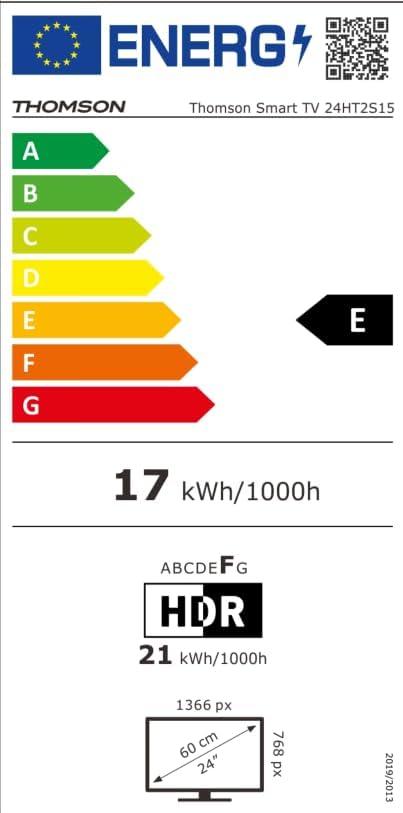
Image: The EU Energy Label for the Thomson Smart TV 24HT2S15, showing an energy efficiency class of E and energy consumption of 17 kWh/1000h for SDR and 21 kWh/1000h for HDR.
8. Garantie et assistance
8.1 Informations sur la garantie
Thomson products are covered by a 3-year warranty. For detailed information regarding warranty claims, returns, or defective products, please refer to the warranty card included in your package or visit the Thomson support website.
For specific information on purchases made via Amazon, consult Amazon's help pages regarding returns and defective products.
8.2 Assistance clientèle
If you require further assistance or have questions not covered in this manual, please contact Thomson customer support:
- Fabricant: Fluxview SARL
- E-mail: contact@streamview.com
- Website: www.streamview.com
- Téléphone: +4318900066
Please have your model number (24HT2S15) and purchase details ready when contacting support.


