1. Introduction
This manual provides essential information for the safe and efficient operation of your Thomson 43FT2S15 FHD LED Smart TV. Please read this manual thoroughly before using the television and retain it for future reference.
2. Consignes de sécurité
Respectez toujours les consignes de sécurité de base lors de l'utilisation de ce produit afin de réduire les risques d'incendie, d'électrocution et de blessure.
- N'exposez pas le téléviseur à la pluie ou à l'humidité.
- Ne bloquez pas les ouvertures de ventilation.
- Assurez-vous que le cordon d'alimentation soit correctement mis à la terre.
- Ne placez pas le téléviseur sur un chariot, un support, un trépied, un support mural ou une table instable.
- Débranchez le téléviseur pendant les orages ou lorsqu'il n'est pas utilisé pendant de longues périodes.
- Confiez toute intervention d'entretien à un personnel qualifié.
3. Contenu du colis
Vérifiez que tous les éléments énumérés ci-dessous sont inclus dans votre colis :
- Thomson 43FT2S15 FHD LED Smart TV
- Adaptateur secteur
- Télécommande
- Manuel de l'utilisateur (ce document)
- Carte de garantie

Image : Avant view of the Thomson 43FT2S15 Smart TV.
4. Installation
4.1 Installation physique
The Thomson 43FT2S15 TV is designed for table mounting. Ensure the TV is placed on a stable, flat surface.

Image: Diagram showing the dimensions of the Thomson 43FT2S15 Smart TV. The screen size is 109 cm (43 inches) diagonally, with a width of 95 cm and height of 60 cm (including stand). The depth is 6 cm.
Dimensions (L x H x P) : 95 cm x 60 cm x 6 cm (without stand, depth is 6 cm). The screen diagonal is 109 cm (43 inches).
4.2 Connexion d'appareils
Connect your external devices to the appropriate ports on the TV. Refer to the diagram below for port locations.
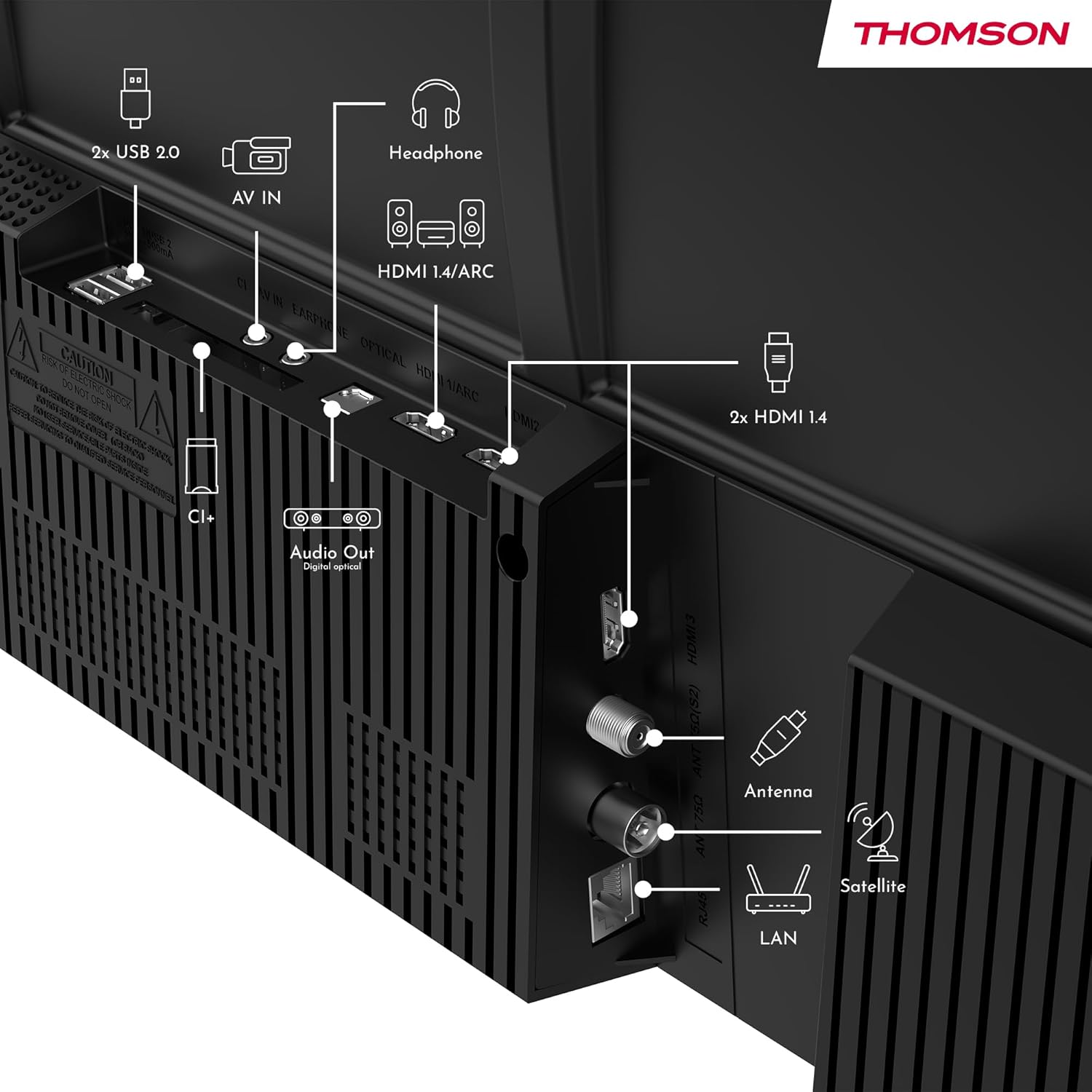
Image : Arrière view of the Thomson 43FT2S15 Smart TV showing various connection ports. These include 2x USB 2.0, AV IN, Headphone out, HDMI 1.4/ARC, Optical Audio Out, CI+, Antenna (DVB-T2/C), Satellite (DVB-S2), and LAN (Ethernet).
- HDMI: Connect external devices like Blu-ray players, game consoles, or set-top boxes. The TV has 2 HDMI 1.4 ports, one with ARC support.
- USB: For connecting USB storage devices. The TV has 2 USB 2.0 ports.
- Antenne/Satellite : Connect your terrestrial or satellite antenna for live TV.
- Réseau local (Ethernet) : Pour une connexion internet filaire.
- Wifi: Pour une connexion internet sans fil.
- Bluetooth : Pour connecter des accessoires sans fil compatibles.
- Sortie audio (optique) : Pour la connexion à un système audio externe.
- Casque : Pour connecter un casque.
- Emplacement CI+ : For inserting a Conditional Access Module (CAM) for encrypted channels.
5. Mode d'emploi
5.1 Mise sous/hors tension
Connect the power adapter to the TV and a power outlet. Press the power button on the remote control to turn the TV on or off.
5.2 TiVo OS and Smart Features
Your Thomson Smart TV is powered by TiVo OS, which integrates live TV, streaming applications, and on-demand services into a single, intuitive interface. Personalized recommendations help you discover new content.

Image: The Thomson Smart TV displaying the TiVo OS interface with various streaming apps like Netflix, Canal+, Prime Video, YouTube, and Disney+.
5.3 Commande vocale
Use the TiVo Voice Control feature to navigate channels, open applications, or search for content across different platforms using voice commands. The remote control includes a microphone for this function.

Image: The Thomson Smart TV remote control highlighting the voice control microphone, backlit buttons, and direct access buttons for streaming services.
5.4 Affichage sans fil
Mirror content from your smartphone, tablet, or laptop to the TV screen using the Wireless Display function. This allows for easy sharing of videos, photos, and applications.
5.5 Améliorations audio et vidéo
- Audio Dolby : Experience enhanced sound quality with Dolby Audio, providing clear dialogue and immersive, multi-dimensional effects.

Image: A Thomson Smart TV displaying content with visual representations of sound waves, indicating the Dolby Audio feature.
- HDR10 : Enjoy sharper contrast and lifelike colors with HDR10 technology, revealing details in both bright highlights and deep shadows.

Image: A split-screen comparison showing the difference between SDR (Standard Dynamic Range) and HDR10 (High Dynamic Range) image quality on a Thomson Smart TV, demonstrating improved contrast and color.
Télécommande 5.6
The ergonomic remote control features backlit buttons for easy navigation in low light conditions. It also includes direct access buttons for popular streaming services such as Netflix, YouTube, Prime Video, Disney+, and Canal+.
6. Entretien
Pour assurer la longévité et les performances optimales de votre téléviseur, suivez ces consignes d'entretien :
- Nettoyage de l'écran : Essuyez délicatement l'écran avec un chiffon doux non pelucheux. Pour les taches tenaces, utilisez un nettoyant pour écrans spécialement conçu pour les téléviseurs, à appliquer sur le chiffon et non directement sur l'écran.
- Nettoyage de l'armoire : Utilisez un chiffon doux et sec pour essuyer le meuble TV. N'utilisez pas de nettoyants abrasifs ni de solvants.
- Ventilation: Veillez à ce que les ouvertures de ventilation à l'arrière du téléviseur ne soient pas obstruées afin d'éviter toute surchauffe.
- Cordon d'alimentation : Vérifiez régulièrement l'état du cordon d'alimentation. En cas de dommage, contactez un technicien qualifié pour le faire remplacer.
7. Dépannage
Si vous rencontrez des problèmes avec votre téléviseur, reportez-vous aux étapes de dépannage courantes suivantes :
- Pas d'alimentation :
- Vérifiez que le cordon d'alimentation est bien branché au téléviseur et à la prise de courant.
- Vérifiez le bon fonctionnement de la prise de courant en y branchant un autre appareil.
- Essayez d'appuyer sur le bouton d'alimentation directement sur le téléviseur, et non pas sur la télécommande.
- Pas d'image/de son :
- Vérifiez que la source d'entrée correcte est sélectionnée (par exemple, HDMI 1, Antenne).
- Vérifiez tous les branchements des câbles entre le téléviseur et les appareils externes.
- Adjust the volume and ensure the TV is not muted.
- La télécommande ne fonctionne pas :
- Remplacez les piles de la télécommande.
- Assurez-vous qu'aucun obstacle ne se trouve entre la télécommande et le capteur infrarouge du téléviseur.
- Smart TV Features Not Working (Wi-Fi/Apps):
- Vérifiez votre connexion internet. Redémarrez votre routeur si nécessaire.
- Go to the TV's network settings to ensure it's connected to Wi-Fi or Ethernet.
- Essayez de redémarrer le téléviseur.
For more complex issues, please contact customer support or refer to the manufacturer's website.
8. Spécifications
Key technical specifications for the Thomson 43FT2S15 FHD LED Smart TV:
| Fonctionnalité | Spécification |
|---|---|
| Marque | Thomson |
| Modèle | 43FT2S15 |
| Taille de l'écran | 43 pouces (109 cm) |
| Technologie d'affichage | DIRIGÉ |
| Résolution | 1920 1080 x XNUMX XNUMX (Full HD) |
| Taux de rafraîchissement | 60 Hz |
| Rapport hauteur/largeur | 16:9 |
| Système opérateur | TiVo OS |
| Technologie audio | Dolby Audio (Dolby Atmos encoding) |
| Prise en charge HDR | HDR10 |
| Connectivité | Wi-Fi, Ethernet, Bluetooth, 2x HDMI 1.4 (1x ARC), 2x USB 2.0, Optical Audio Out, AV In, Headphone, CI+ |
| Accordeurs | DVB-T2/C/S2 (Triple Tuner) |
| Services Internet pris en charge | Netflix, YouTube, Prime Video, Disney+, Canal+, Browser |
| Dimensions (Produit) | 6 x 95 x 60 cm ; 6.5 kg |
| Classe d'efficacité énergétique | E |

Image: Energy efficiency label for the Thomson 43FT2S15 Smart TV, showing an energy class of E and energy consumption of 42 kWh/1000h (SDR) and 46 kWh/1000h (HDR).
Pour des informations détaillées sur le produit, consultez la base de données EPREL : https://eprel.ec.europa.eu/qr/1969521
9. Garantie et assistance
Your Thomson 43FT2S15 TV comes with a warranty. Please refer to the included Warranty Card for specific terms and conditions.
For technical support or service inquiries, please contact the manufacturer:
- Fabricant: Fluxview SARL
- Website: www.streamview.com
- E-mail: contact@streamview.com
- Téléphone: +4318900066
Please have your model number (43FT2S15) and purchase information ready when contacting support.


