1. Introduction
The GoPro Fluid Pro AI 3-Axis Gimbal Stabilizer is designed for videographers, vloggers, and content creators seeking enhanced video stabilization and intelligent subject tracking. This premium gimbal is compatible with mobile phones, GoPro cameras, and select compact point-and-shoot cameras, offering a versatile solution for capturing smooth, professional-quality footage. It features an integrated AI subject tracking module, a built-in fill light, and a robust design capable of supporting heavier camera setups.
2. Ce qui est inclus
Carefully unpack your GoPro Fluid Pro AI Gimbal Stabilizer and verify that all the following components are present:
- Gimbal Unit
- Module de suivi IA
- Mobile Phone Mounting Bracket
- GoPro Camera Mounting Bracket
- GoPro Finger Adapter
- Vis de pouce
- Base de trépied
- Gimbal USB-C Charging Cable
- Camera USB-C Charging Cable
- Étui à fermeture éclair
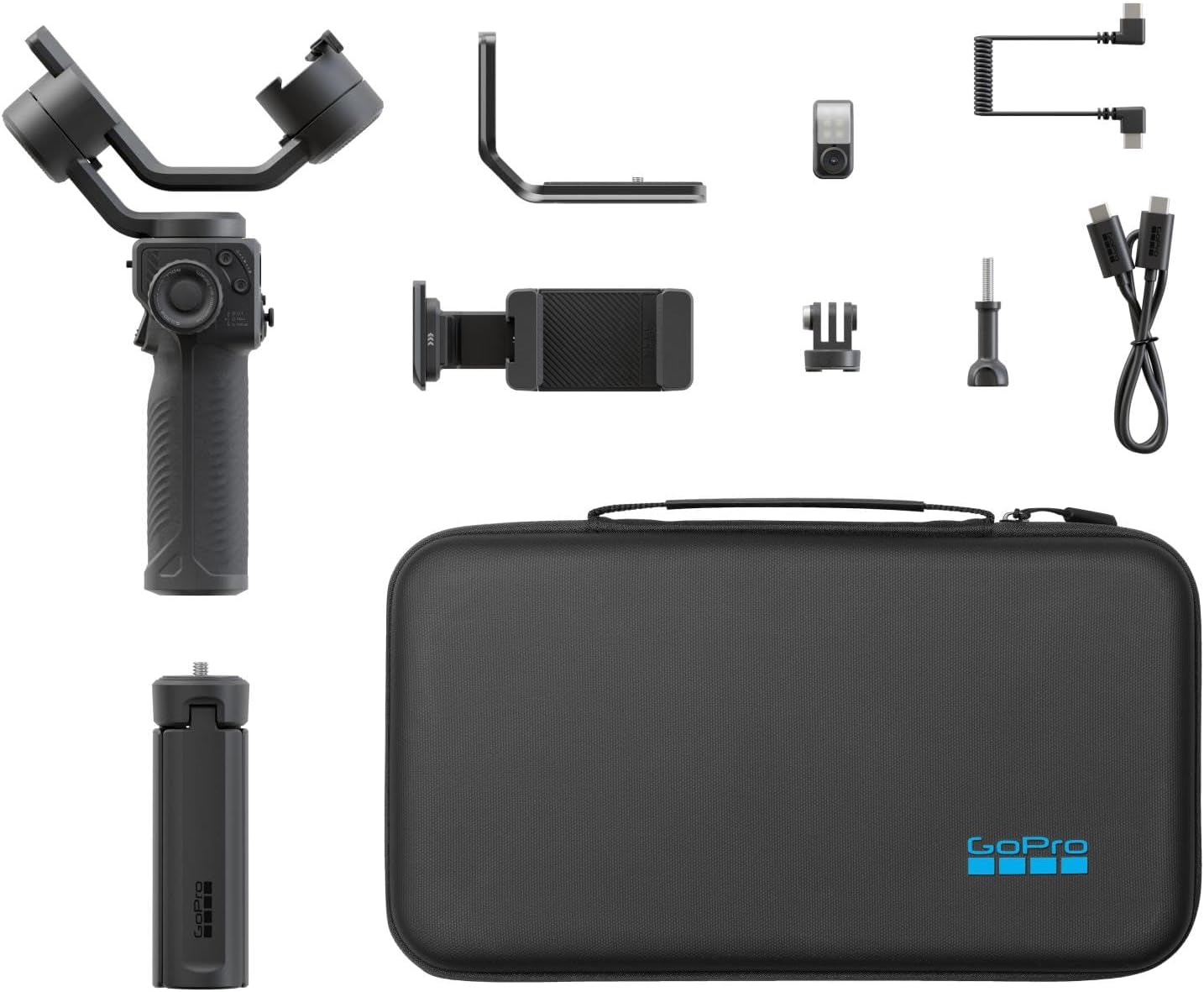
Image: All included components for the GoPro Fluid Pro AI Gimbal Stabilizer, neatly arranged with the gimbal, various mounts, cables, and zippered case.
3. Produit terminéview
The Fluid Pro AI Gimbal is engineered for stability and intelligent functionality. Its 3-axis design ensures smooth footage across various movements, while the AI tracking module provides precise subject recognition and follow capabilities. The integrated fill light enhances lighting conditions for superior video quality.

Image: The GoPro Fluid Pro AI Gimbal Stabilizer shown with a smartphone securely mounted, ready for use.

Image: The GoPro Fluid Pro AI Gimbal Stabilizer shown with a GoPro camera mounted, demonstrating its compatibility.
Caractéristiques principales :
- Professional 3-Axis Stabilization: Ensures smooth, cinematic footage by compensating for unwanted camera movements.
- AI Subject Tracking: An intelligent module that locks onto a person's face or body, automatically keeping them in frame with precision.
- Éclairage d'appoint intégré : Provides adjustable illumination for balanced lighting in various shooting conditions.
- Wireless Camera Control: Offers convenient control over compatible GoPro cameras (HERO9 Black, HERO10 Black, HERO11 Black, HERO12 Black, HERO13 Black) via Bluetooth.
- Compatibilité polyvalente des appareils : Supports mobile phones, GoPro cameras, and select compact point-and-shoot cameras with interchangeable mounts.
- Extended Battery Life & Device Charging: Long-lasting battery (up to 18 hours gimbal-only, 11 hours with AI tracking, 6 hours with AI tracking and 100% fill light) can also charge your phone or camera.
- Interface de contrôle intuitive : Easy-to-use controls, including a roller for precise motor rotation, focus, and fill light adjustments.

Image : Une image détaillée view of the gimbal's control panel, highlighting the joystick, mode buttons, and focus/roll wheel.

Image: A close-up of the AI Tracking Module and the integrated fill light, showing their placement on the gimbal.
4. Configuration et assemblage
4.1. Connexion de votre appareil
- Select the Correct Mount: Choose either the Mobile Phone Mounting Bracket or the GoPro Camera Mounting Bracket based on your device. For GoPro cameras, attach the GoPro Finger Adapter to the camera before mounting.
- Sécurisez l'appareil : Carefully place your smartphone or GoPro into the chosen mounting bracket. Ensure it is firmly secured and centered.
- Attach to Gimbal: Slide the mounted device onto the gimbal's quick-release plate and lock it into position.

Image: The gimbal with a smartphone attached, standing on its tripod base, illustrating a stable setup.

Image: The gimbal with a GoPro camera attached, standing on its tripod base, showing an alternative device setup.
4.2. Équilibrage du cardan
Proper balancing is crucial for optimal performance and battery life. Adjust the gimbal arms until your device remains level and stable when the gimbal is powered off. Refer to the detailed balancing instructions in the full user manual for precise adjustments.
4.3. Connexion des appareils
For wireless control, pair your compatible GoPro camera (HERO9 Black, HERO10 Black, HERO11 Black, HERO12 Black, HERO13 Black) or smartphone via Bluetooth. Consult your device's manual for specific Bluetooth pairing instructions.
5. Mode d'emploi
5.1. Marche/Arrêt
Press and hold the power button for 3 seconds to power the gimbal on or off.
5.2. Modes de nacelle
The gimbal offers various modes for different shooting scenarios. Use the mode button (M) to cycle through modes such as Pan Follow, Lock Mode, and POV (Point of View). Each mode provides distinct stabilization characteristics for creative control.

Image: A user holding the gimbal with a GoPro, demonstrating handheld operation and control access.
5.3. AI Subject Tracking
Activate the AI Tracking Module to enable automatic subject tracking. The module can be oriented for forward or rear-facing tracking. It identifies and follows a person's face or body, ensuring they remain centered in the frame. Hand gestures can also be used for easy self-capture activation.

Image: A user crouching to adjust the gimbal on its tripod, potentially setting up for AI tracking.
5.4. Integrated Fill Light
The built-in LED fill light can be adjusted for color temperature and brightness using the gimbal's controls. This feature is ideal for improving lighting in low-light conditions or for adding a professional touch to your shots.
5.5. Chargement de l'appareil
The gimbal's long-lasting battery can serve as a power bank to charge your smartphone or camera during extended shooting sessions. Connect your device using the appropriate USB-C charging cable.

Image: The gimbal connected to a smartphone via a cable, indicating that it is charging the phone.
5.6. GoPro Fluid App
Download the GoPro Fluid App for access to intuitive video and photo capture tools, advanced gimbal settings, and creative features designed to maximize your gimbal's potential.
6. Entretien
To ensure the longevity and optimal performance of your GoPro Fluid Pro AI Gimbal Stabilizer, follow these maintenance guidelines:
- Nettoyage: Utilisez un chiffon doux et sec pour nettoyer le stabilisateur. Évitez d'utiliser des produits chimiques agressifs ou des matériaux abrasifs.
- Stockage: Store the gimbal in its zippered case in a cool, dry place when not in use.
- Entretien de la batterie: For extended storage, charge the battery to approximately 50-60% every three months to maintain battery health.
- Évitez la surcharge : Do not exceed the recommended weight capacity for mounted devices.
7. Dépannage
If you encounter issues with your gimbal, consider the following common troubleshooting steps:
- La nacelle ne se stabilise pas : Ensure the device is properly balanced. Recalibrate the gimbal if necessary (refer to the full manual for calibration steps).
- Problèmes de connexion : Verify Bluetooth is enabled on both the gimbal and your device. Ensure your device is compatible with the gimbal's Bluetooth functionality.
- Problèmes d'alimentation : Check the battery level. If the gimbal does not power on, ensure it is fully charged.
- AI Tracking Malfunction: Ensure the AI Tracking Module is clean and unobstructed. Confirm proper lighting conditions for optimal tracking performance.
For more detailed troubleshooting or persistent issues, please refer to the comprehensive online user manual or contact GoPro customer support.
8. Spécifications
| Fonctionnalité | Spécification |
|---|---|
| Dimensions du colis de l'article L x l x H | 13.66 x 7.87 x 2.87 pouces |
| Poids du colis | 1.32 kilogrammes |
| Dimensions de l'article L x l x H | 3.15 x 7.87 x 14.17 pouces |
| Poids de l'article | 551 gramme |
| Nom de marque | GoPro |
| Description de la garantie | Garantie à vie limitée |
| Nom du modèle | AGMSS |
| Couleur | Noir |
| Nombre d'articles | 1 |
| Fabricant | GoPro |
| Numéro de pièce | AGMSS-011 |
| Composants inclus | Gimbal, AI Tracking Module, Mobile Phone Mounting Bracket, GoPro Camera Mounting Bracket, GoPro Finger Adapter, Thumb Screw, Tripod Base, Gimbal USB-C Charging Cable, Camera USB-C Charging Cable, Zippered Case |
| ASIN | B0FSNXF34L |
| Appareils compatibles | Smartphones and GoPro Cameras |
| Code UPC | 810116384327 |
| Compatible Camcorder Models | GoPro HERO10 Black, GoPro HERO11 Black, GoPro HERO12 Black, GoPro HERO13 Black, GoPro HERO9 Black |
9. Garantie et assistance
The GoPro Fluid Pro AI Gimbal Stabilizer comes with a Garantie à vie limitée. For detailed terms and conditions, please refer to the warranty information provided with your product packaging or visit the official GoPro website.
Pour obtenir une assistance technique, enregistrer un produit ou accéder à des ressources supplémentaires, veuillez consulter le site web suivant : GoPro Support Page.


