1. Introduction
This manual provides essential information for the safe and effective use of your TOPUTURE TP4 Foldable Walking Pad Treadmill with Incline. Please read this manual thoroughly before initial use and retain it for future reference. This treadmill is designed for walking and light running in home and office environments, offering a compact and versatile fitness solution.
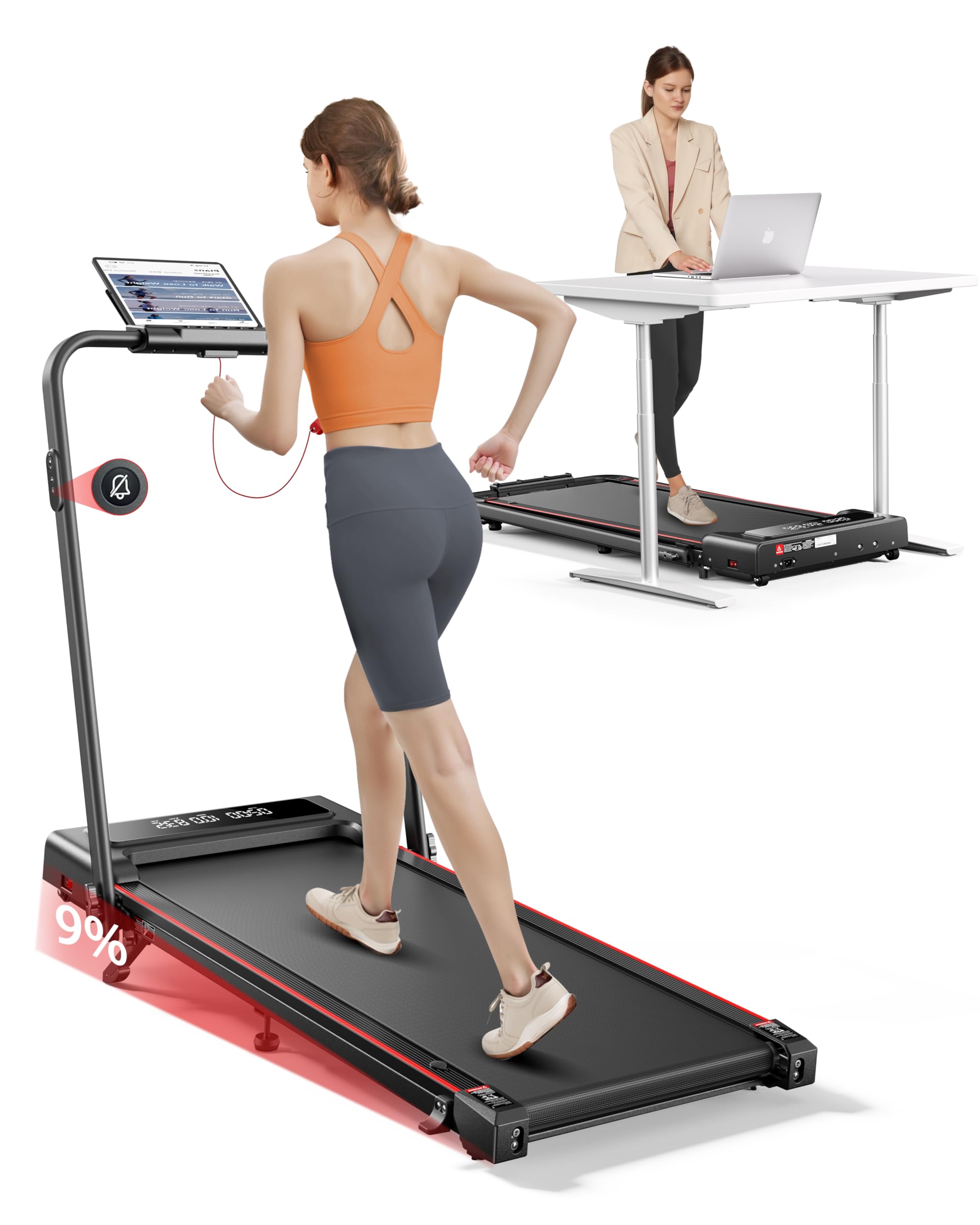
Image 1.1: The TOPUTURE TP4 Foldable Walking Pad Treadmill in both walking pad and treadmill configurations.
2. Consignes de sécurité importantes
Pour réduire les risques de blessures graves, veuillez lire attentivement toutes les instructions avant d'utiliser cet appareil. Le fabricant décline toute responsabilité en cas de dommages corporels ou matériels résultant de l'utilisation de ce produit.
- Placez toujours le tapis roulant sur une surface plane et stable.
- Veillez à laisser un dégagement suffisant autour du tapis roulant (au moins 2 mètres derrière et 0.6 mètre de chaque côté).
- Gardez les enfants et les animaux domestiques éloignés du tapis roulant pendant son fonctionnement.
- Do not use the treadmill if you weigh more than the maximum weight capacity (300 lbs / 136 kg).
- Portez des chaussures de sport appropriées.
- Si vous ressentez des douleurs, des vertiges ou un essoufflement, arrêtez immédiatement l'exercice.
- Débranchez le tapis roulant de la prise électrique lorsqu'il n'est pas utilisé ou avant de le nettoyer/de l'entretenir.
- N'utilisez pas le tapis roulant si le cordon d'alimentation ou la fiche est endommagé.
- Cet appareil n'est pas destiné à être utilisé par des personnes ayant des capacités physiques, sensorielles ou mentales réduites, ou manquant d'expérience et de connaissances, à moins qu'elles ne bénéficient d'une surveillance ou d'instructions concernant l'utilisation de l'appareil par une personne responsable de leur sécurité.

Image 2.1: Illustration of the multi-layer running belt designed for shock absorption and joint protection.
3. Contenu du colis
Carefully unpack the box and ensure all items are present and undamaged. If any parts are missing or damaged, contact customer support.
- TOPUTURE TP4 Walking Pad Treadmill
- Cordon d'alimentation
- Télécommande
- Clé de sécurité
- Trousse à outils (pour les ajustements mineurs)
- Manuel de l'utilisateur (ce document)
- Huile de graissage
4. Installation
4.1 Dépliage du tapis de course
The TOPUTURE TP4 comes pre-assembled. Simply remove it from the packaging and unfold it according to the following steps:
- Place the treadmill on a flat, hard surface.
- Soulevez délicatement la poignée jusqu'à ce qu'elle se verrouille en position verticale.
- Assurez-vous que tous les mécanismes de verrouillage sont bien enclenchés avant utilisation.

Image 4.1: Illustration of the treadmill's folding mechanism and compact storage dimensions.
4.2 Réglage de l'inclinaison
The treadmill features a manual incline adjustment to simulate uphill walking, increasing calorie burn and workout intensity. The incline can be set up to 9%.
- Dépliez le repose-pieds : Locate the adjustable footpads at the rear of the treadmill.
- Insérez la goupille : Utilisez la goupille fournie pour fixer le repose-pieds au niveau d'inclinaison souhaité.
- Ajuster le repose-pied central : Ensure the middle footpad is also adjusted to provide stable support.

Image 4.2: Visual representation of the 9% manual incline feature and its effect on calorie expenditure.

Image 4.3: Step-by-step instructions for adjusting the treadmill's manual incline.
5. Mode d'emploi
5.1 Mise sous/hors tension
Connect the power cord to a grounded outlet. Flip the power switch located at the front of the treadmill to the 'ON' position. The LED display will illuminate.
5.2 Utilisation de la télécommande
The treadmill is operated via a silent remote control. Ensure the safety key is in place before starting. The remote allows you to:
- Démarrer/Arrêter le tapis roulant.
- Adjust speed (increase/decrease).
- Switch between modes (Walking, Running, Climbing, Working).
- Activate mute function for quiet operation.

Image 5.1: The dual LED display showing real-time data and the remote control for easy adjustments.
5.3 Comprendre l'affichage
L'écran LED double affiche les données d'entraînement en temps réel :
- Temps: Durée de votre entraînement.
- Vitesse: Current speed in MPH or KM/H.
- Distance: Distance totale parcourue.
- Calories: Estimation des calories brûlées.
Modes de fonctionnement 5.4
The TOPUTURE TP4 offers four distinct modes to suit various fitness needs:
- Mode marche (0.6-5 MPH) : Idéal pour une utilisation occasionnelle en marchant ou sous un bureau.
- Mode de fonctionnement (5-7.6 MPH) : Pour des entraînements cardio plus intenses.
- Mode ascension (0.6-3 MPH) : Utilizes the incline feature for uphill simulation.
- Mode de fonctionnement (0.6-1.5 MPH) : Low speed for active work at a standing desk.

Image 5.2: Demonstrates the versatility of the treadmill in both walking and running configurations.
5.5 Connexion à l'application intelligente
Enhance your workout experience by connecting the treadmill to the dedicated smart app via Bluetooth.
- Téléchargez l'application depuis la boutique d'applications de votre appareil.
- Activez le Bluetooth sur votre smartphone ou tablette.
- Ouvrez l'application et suivez les instructions à l'écran pour la connecter à votre tapis de course.
L'application vous permet de :
- Sync exercise data in real-time.
- Access personalized training plans.
- Track your progress and set goals.
- Participate in running challenges.

Image 5.3: The smart app interface displaying workout statistics and training programs.
6. Entretien
Un entretien régulier garantit la longévité et les performances optimales de votre tapis roulant.
6.1 Lubrification
The running belt requires periodic lubrication to reduce friction and wear. Use the provided lubricating oil.
- Débranchez le tapis roulant.
- Soulevez le bord du tapis de course.
- Apply a small amount of lubricating oil evenly under the belt, about 10-20ml.
- Run the treadmill at a low speed (e.g., 1 MPH) for 5 minutes to distribute the oil.
- Lubrifier tous les 3 à 6 mois selon l'utilisation.

Image 6.1: Instructions for lubricating the running belt and adjusting its tension.
6.2 Nettoyage
Essuyez les surfaces du tapis roulant avec un chiffon humide.amp Essuyez le chiffon après chaque utilisation. N’utilisez pas de nettoyants abrasifs ni de solvants.
6.3 Réglage de la ceinture
If the running belt shifts or slips, it may need adjustment. Use the included tool kit to adjust the tension bolts at the rear of the treadmill. Refer to the detailed instructions in the tool kit for precise adjustment.
7. Dépannage
Si vous rencontrez des problèmes avec votre tapis roulant, consultez la section suivante consacrée aux problèmes courants et à leurs solutions :
| Problème | Cause possible | Solution |
|---|---|---|
| Le tapis roulant ne s'allume pas. | Cordon d'alimentation non branché, interrupteur sur la position « arrêt », clé de sécurité absente. | Check power cord connection, ensure power switch is ON, insert safety key. |
| La courroie de course glisse ou s'arrête. | Courroie trop lâche, lubrification insuffisante. | Adjust belt tension (refer to 6.3), apply lubricating oil (refer to 6.1). |
| Bruit inhabituel pendant le fonctionnement | Pièces desserrées, problème de moteur, frottement de la courroie. | Check for loose screws, lubricate belt, contact support if noise persists. |
| La télécommande ne répond pas | Battery low, interference. | Replace remote control battery, ensure no obstructions between remote and treadmill. |
8. Spécifications
| Fonctionnalité | Détail |
|---|---|
| Numéro de modèle | TP4 |
| Dimensions du produit (déplié) | 126 x 62 x 106.7 cm (50 x 23 x 42 pouces) |
| Taille pliée | 126 x 58.4 x 11.4 cm (50 x 23 x 4.5 pouces) |
| Poids de l'article | 25.4 kg (56 lb) |
| Matériel | Acier allié |
| Puissance du moteur | 2.5 CV |
| Plage de vitesse | 0.6 - 7.6 MPH (environ 1 - 12.2 km/h) |
| Pourcentage d'inclinaison maximaletage | 9 % (Manuel) |
| Poids maximum de l'utilisateur | 300 livres (136 kg) |
| Indicateurs d'affichage | Calories brûlées, distance, vitesse, temps |
| Caractéristiques spéciales | Compact Design, Foldable, Lightweight, Manual Incline, Shock Absorbent, App Control, Remote Control |
9. Garantie et assistance
9.1 Informations sur la garantie
The TOPUTURE TP4 Foldable Walking Pad Treadmill is covered by a TWO-YEARS warranty À compter de la date d'achat, cette garantie couvre les défauts de fabrication et de main-d'œuvre dans des conditions normales d'utilisation. Elle ne couvre pas les dommages causés par une mauvaise utilisation, un accident, des modifications non autorisées ou un entretien inadéquat.
9.2 Assistance clientèle
For any questions, technical assistance, or warranty claims, please contact our customer support team. To expedite your request, please have your order ID and product model number (TP4) ready.
Comment contacter le vendeur :
- Connectez-vous à votre compte Amazon.
- Go to "Your Orders."
- Find the relevant order ID for your TOPUTURE TP4 Treadmill.
- Click on "Contact Seller."


