Introduction
This manual provides instructions for the PERFASCIN RC833A FMB2 Replacement Voice Remote Control. It is designed to operate specific TCL TV models, including the C7K Premium QD-Mini LED TV and C7K QLED 55P79K. Please read this manual thoroughly before use to ensure proper setup and operation.
Contenu du colis
- 1 x PERFASCIN RC833A FMB2 Replacement Voice Remote Control
Produit terminéview
The PERFASCIN RC833A FMB2 remote control features a standard layout with dedicated buttons for navigation, volume, channel control, and direct access to streaming services. It also includes a voice control function for enhanced interaction with your television.

Image 1: Devant view of the PERFASCIN RC833A FMB2 Replacement Voice Remote Control, showing all buttons including number pad, navigation, volume, channel, and app shortcuts.
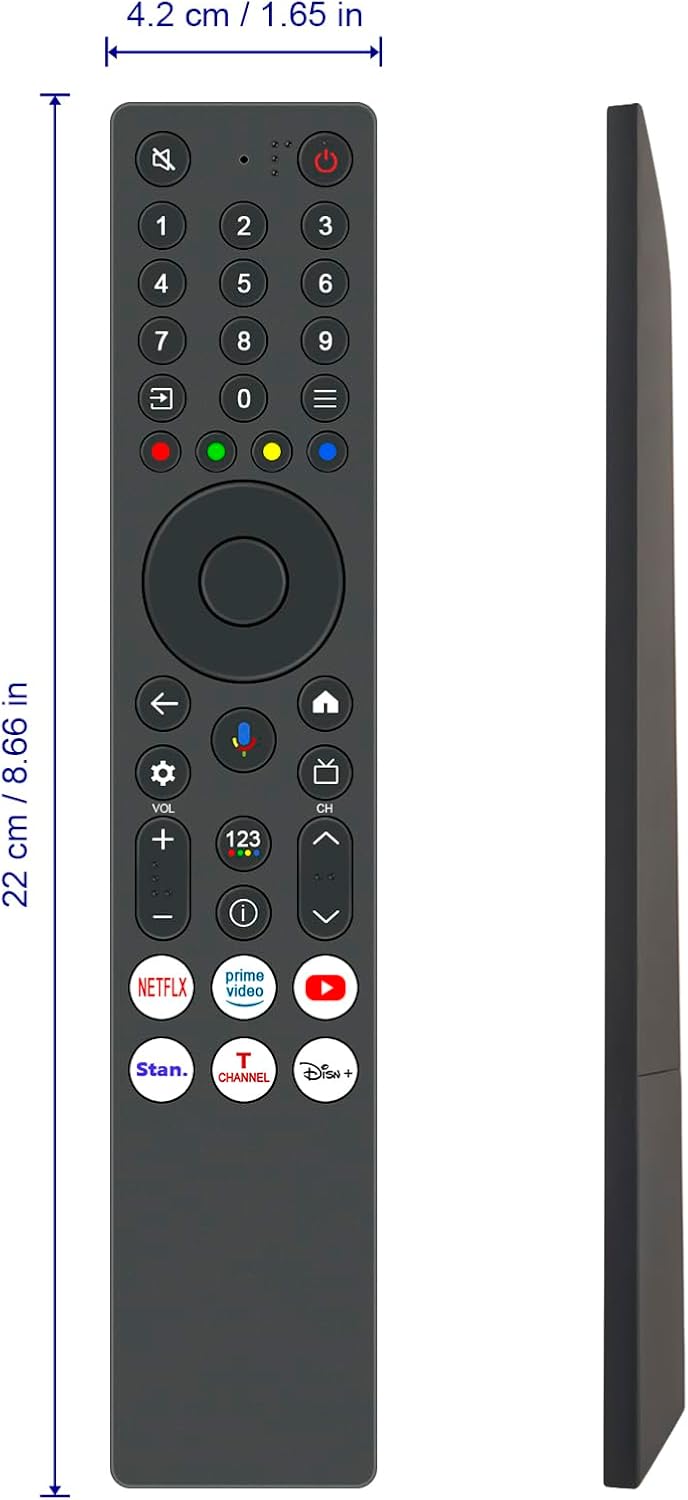
Image 2: Côté et avant view of the remote control, illustrating its physical dimensions (approximately 22 cm / 8.66 inches in length and 4.2 cm / 1.65 inches in width).
Fonctions des boutons
| Bouton | Fonction |
|---|---|
| Marche/Arrêt (Bouton rouge) | Allume ou éteint le téléviseur. |
| Mute (Speaker with cross icon) | Coupe ou réactive le son du téléviseur. |
| Pavé numérique (0-9) | Direct channel selection or inputting numbers. |
| Input Source (Arrow in box icon) | Sélectionne la source d'entrée (HDMI, AV, etc.). |
| Pavé de navigation (Haut, Bas, Gauche, Droite, OK) | Permet de naviguer dans les menus et de confirmer les sélections. |
| Back (Left arrow icon) | Revient à l'écran ou au menu précédent. |
| Voice Control (Microphone icon) | Activates the voice assistant for commands and search. |
| Home (House icon) | Retour à l'écran d'accueil du téléviseur. |
| Paramètres (icône d'engrenage) | Accesses TV settings menu. |
| Volume Up/Down (VOL +/-) | Règle le volume du téléviseur. |
| Canal Haut/Bas (CH +/-) | Change de chaîne de télévision. |
| Netflix, Prime Video, YouTube, Stan., T Channel, Disney+ | Direct access buttons for specified streaming applications. |
Installation
1. Installation de la batterie
- Localisez le compartiment à piles à l'arrière de la télécommande.
- Faites glisser le couvercle de la batterie vers le bas pour l'ouvrir.
- Insert two AAA batteries, ensuring the positive (+) and negative (-) terminals match the indicators inside the compartment.
- Faites glisser le couvercle de la batterie en place jusqu'à ce qu'il s'enclenche correctement.

Image 3: Arrière view of the remote control with the battery cover removed, showing the battery compartment for AAA batteries.
2. Pairing the Remote Control (for Voice Functionality)
This remote control is a voice remote and requires pairing with your TCL TV to enable voice commands and full functionality. The pairing process may vary slightly depending on your specific TCL TV model. Refer to your TV's user manual for detailed pairing instructions if these steps do not work.
- Ensure your TCL TV is powered on.
- Appuyez sur le Maison bouton de votre télécommande.
- Accéder à Paramètres sur votre écran de télévision.
- Sélectionner Télécommandes et accessoires ou une option similaire.
- Choisir Ajouter un accessoire or Associer la télécommande.
- Follow the on-screen prompts. You may be instructed to press and hold specific buttons on the new remote (e.g., the OK bouton et Maison button simultaneously, or the Contrôle vocal button) until an indicator light flashes or a message appears on the TV screen confirming successful pairing.
- Once paired, test the voice control by pressing the Contrôle vocal button and speaking a command.

Image 4: Gros plan view of the remote control, specifically highlighting the voice control button with its microphone icon.
Utilisation de la télécommande
Basic TV Control
- Pouvoir: Appuyez sur le bouton d'alimentation rouge to turn the TV on or off.
- Volume: Utilisez le VOL +/- buttons to adjust the sound level.
- Chaînes : Utilisez le CH +/- boutons pour changer de chaîne.
- Navigation: Utilisez le Haut bas Gauche Droite arrows and the OK bouton permettant de naviguer dans les menus et de sélectionner les options.
- La source d'entrée: Appuyez sur le Source d'entrée button to switch between connected devices (e.g., HDMI 1, HDMI 2).
Utilisation de la commande vocale
After successful pairing, you can use voice commands:
- Appuyez et maintenez enfoncé le Contrôle vocal bouton (icône microphone).
- Speak clearly into the remote control.
- Relâchez le bouton lorsque vous avez fini de parler.
- Examples of commands: "Open Netflix," "Rechercher « Des films d'action », « Quel temps fait-il ? »
Boutons de raccourci d'application
The remote includes dedicated buttons for quick access to popular streaming services:
- Appuyez sur le Netflix button to launch the Netflix application.
- Appuyez sur le Prime Video button to launch Amazon Prime Video.
- Appuyez sur le YouTube button to launch YouTube.
- Other dedicated buttons (Stan., T Channel, Disney+) will launch their respective applications.
Entretien
Nettoyage
- Essuyez la télécommande avec un chiffon doux et sec.
- Do not use liquid cleaners or abrasive materials, as these can damage the remote.
Remplacement de la batterie
- Remplacez les piles lorsque la télécommande devient lente à répondre ou cesse de fonctionner.
- Always replace both batteries at the same time with new AAA batteries.
- Ne mélangez pas des piles anciennes et neuves, ou différents types de piles.
- Retirez les piles si la télécommande n'est pas utilisée pendant une période prolongée afin d'éviter les fuites.
Dépannage
| Problème | Solution |
|---|---|
| La télécommande ne répond pas. |
|
| La commande vocale ne fonctionne pas. |
|
| App shortcut buttons not working. |
|
Caractéristiques
- Modèle: RC833A FMB2
- Modèles de téléviseurs compatibles : TCL C7K Premium QD-Mini LED TV, TCL C7K QLED 55P79K (RC833A-FMB2 G0401-000264)
- Dossier spécial : Recherche vocale
- Source d'alimentation : Piles 2 x AAA (non incluses)
- Matériel: ABS
- Couleur: Noir
- Dimensions: Approximately 22 cm (8.66 inches) x 4.2 cm (1.65 inches)
- Poids: Approximately 1 ounce (without batteries)
Garantie et assistance
For warranty information or technical support, please refer to the documentation provided with your original purchase or contact the seller directly. The manufacturer, PERFASCIN, may also offer support resources.
Pour obtenir de l'aide supplémentaire, vous pouvez consulter le PERFASCIN brand page on Amazon.

