1. Introduction
The LAUNCH CRP123I V3.0 Elite OBD2 Scanner is an advanced diagnostic tool designed for comprehensive vehicle system analysis. This device offers enhanced diagnostic capabilities for engine, anti-lock braking system (ABS), supplemental restraint system (SRS), and transmission systems, alongside a suite of reset functions and full OBD2 modes. It features a new processor, Android 8.1 operating system, a 5-inch touchscreen, and a 6000mAh rechargeable battery for efficient and reliable performance.

Image 1.1 : Terminéview of the LAUNCH CRP123I V3.0 Elite OBD2 Scanner's key features, including 4 system diagnostics and 7 special functions.
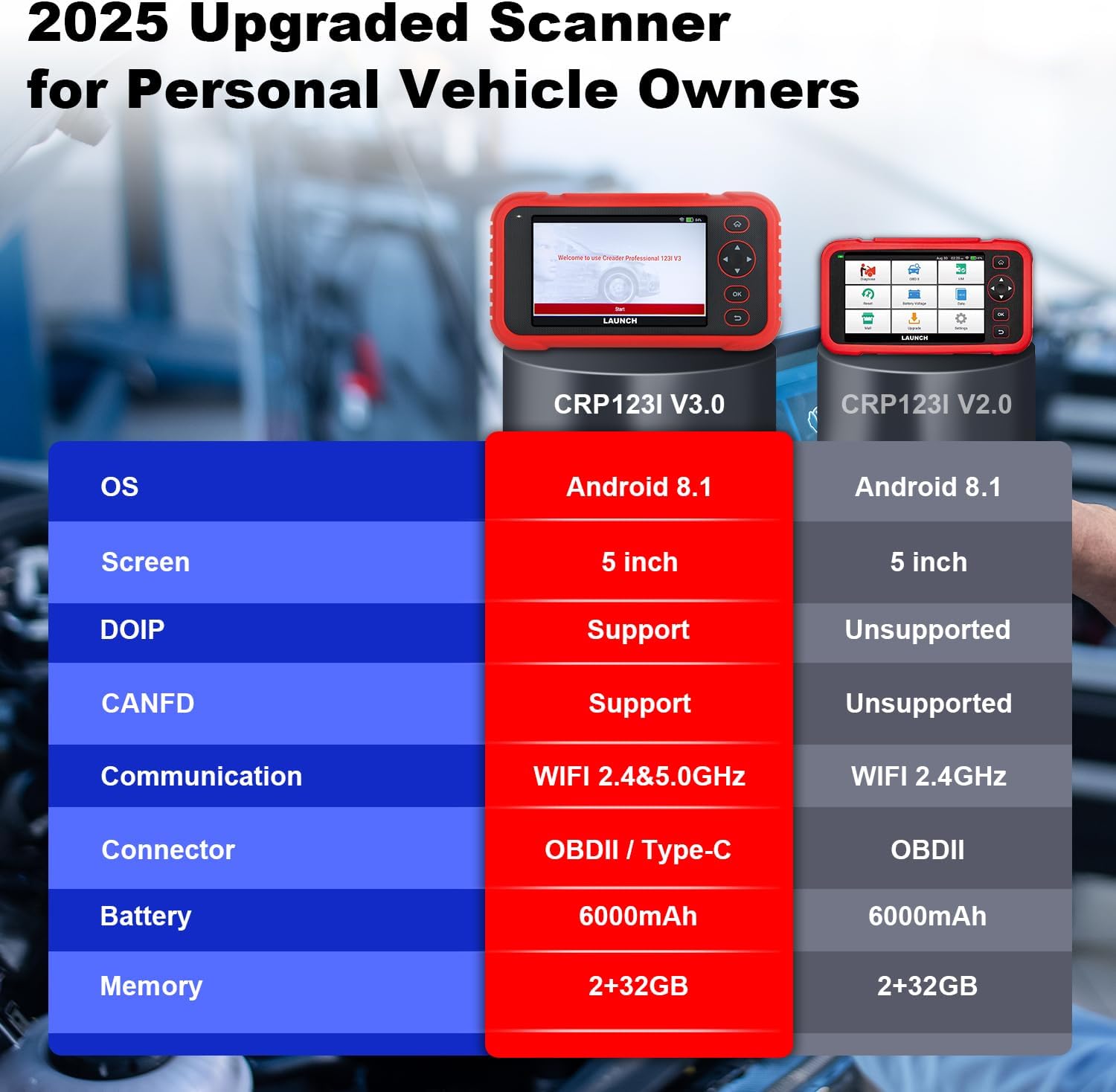
Image 1.2: Feature comparison between the CRP123I V3.0 and its predecessor, highlighting upgrades such as DOIP, CANFD, and dual-band WiFi.
2. Contenu du colis
Lors du déballage, vérifiez que tous les composants sont présents :
- CRP123I V3.0 Scan Tool
- Câble de diagnostic OBDII
- Câble USB
- Manuel d'utilisation
- Mallette de transport

Image 2.1: The complete package contents, including the scan tool, cables, user manual, and carrying case.
3. Installation
Suivez ces étapes pour la configuration et la connexion initiales :
- Mise sous tension : Ensure the device is charged. The CRP123I V3.0 features a 6000mAh rechargeable battery.
- Se connecter au véhicule : Locate your vehicle's OBDII port, typically under the dashboard on the driver's side. Connect the diagnostic cable from the scanner to the vehicle's OBDII port. The device supports OBDII and Type-C connections.
- Démarrage initial : The scanner will power on automatically or prompt you to press the power button. The 5-inch touchscreen will display the LAUNCH logo and then the main interface.
- Connexion réseau: For updates and online features, connect the device to a Wi-Fi network. The CRP123I V3.0 supports 2.4GHz and 5GHz dual Wi-Fi. Navigate to 'Settings' > 'Wi-Fi' to connect.
- Mise à jour du logiciel : It is recommended to perform a software update upon first use to ensure you have the latest features and vehicle coverage. Access the 'Upgrade' menu for one-touch lifetime free updates.
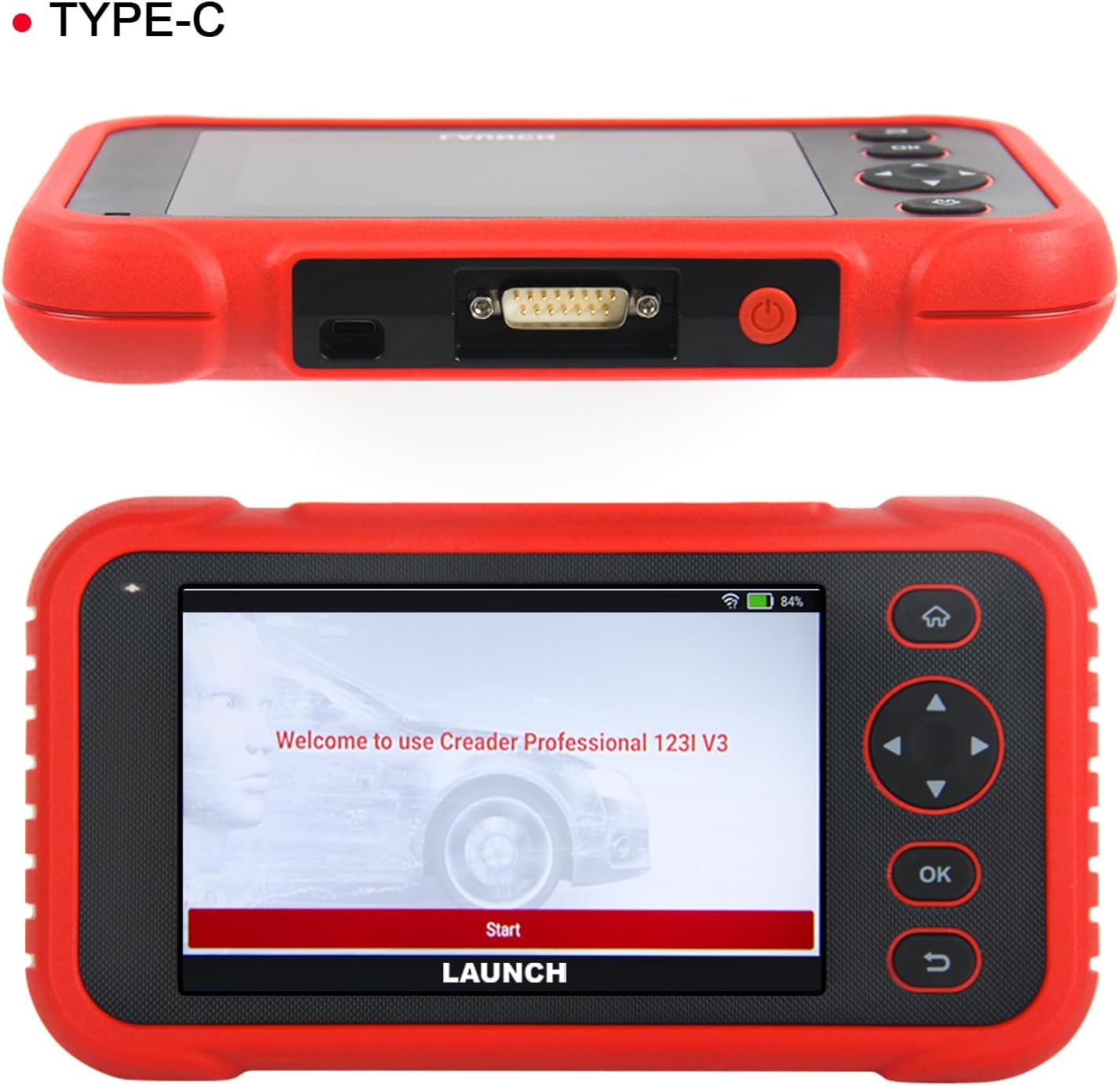
Image 3.1 : Haut view of the scanner showing the OBDII connector, and front view displaying the initial welcome screen.
4. Mode d'emploi
4.1. 4-Diagnostic du système
The CRP123I V3.0 allows for in-depth diagnostics of four major vehicle systems:
- Système moteur : Lit et efface les codes d'erreur du moteur, views live data, and turns off the Malfunction Indicator Lamp (MIL).
- Système antiblocage des roues (ABS) : Diagnoses ABS issues, reads/clears codes, and monitors live data related to braking performance.
- Système de retenue supplémentaire (SRS/Airbag) : Detects and clears airbag system fault codes, ensuring proper functionality of safety components.
- Système de transmission : Analyzes transmission performance, reads/clears codes, and displays live data such as transmission temperature.

Image 4.1: Visual representation of the four OE-level systems (Engine, SRS, Transmission, ABS) that the scanner can diagnose.
3.12 Fonctions de réinitialisation
The tool provides 7 frequently used reset functions for common maintenance tasks:
- Réinitialisation de l'huile : Réinitialise le système de surveillance de la durée de vie de l'huile après une vidange.
- Electric Throttle Relearn: Réapprend la position du corps de papillon après nettoyage ou remplacement.
- Réinitialisation de l'angle de braquage (SAS) : Réinitialise le capteur d'angle de braquage.
- Saignement de l'ABS : Effectue la purge du système ABS pour rétablir la sensibilité des freins.
- Appariement de la batterie (réinitialisation du BMS) : Réinitialise le système de gestion de la batterie après le remplacement de celle-ci.
- Brake Reset (EPB): Réinitialise les plaquettes de frein de stationnement électroniques après leur remplacement.
- Réinitialisation du FAP : Effectue la régénération du filtre à particules diesel.
Note: The availability of specific service functions may vary by vehicle make, model, and year.

Image 4.2: An illustration of the seven hot reset services available on the CRP123I V3.0.
4.3. Fonctions OBDII complètes
The CRP123I V3.0 supports all 10 OBDII test modes for comprehensive emissions-related diagnostics:
- Lire les codes : Affiche les codes de diagnostic d'anomalie (DTC).
- Effacer les codes : Erases DTCs and turns off the MIL.
- Données en direct: Affiche le flux de données en temps réel provenant des capteurs du véhicule.
- Préparation I/M : Checks the readiness of emission monitors.
- Arrêt sur image: Stores a snapshot of vehicle operating conditions when an emission-related fault occurs.
- Test du capteur d'O2: Récupère les résultats des tests de surveillance du capteur d'oxygène.
- Test du moniteur embarqué : Récupère les résultats relatifs aux composants et systèmes de transmission liés aux émissions.
- Test EVAP : Lance un test du système d'émission par évaporation.
- Informations sur le véhicule : Récupère les informations d'identification du véhicule (VIN, CID, CVN).
- Recherche de code DTC : Fournit des définitions pour les codes génériques et les codes spécifiques au fabricant.

Image 4.3: A comprehensive display of the professional full OBDII functions supported by the scanner.
4.4. Live Data Streams and Smog Test
Monitor up to 4 real-time data streams simultaneously on one screen. This allows for quick diagnosis and verification of repairs without switching views. The I/M Readiness function helps check emission system status, assisting in preparation for smog tests by identifying potential issues like faulty sensors or catalytic converter problems.

Image 4.4: The 4-in-1 live data graphic display feature, enabling visualization and analysis of multiple data streams.

Image 4.5: A real-time voltage monitor display, useful for assessing battery and charging system health.
4.5. Vehicle Identification and Diagnostic Reports
The scanner supports automatic VIN (Vehicle Identification Number) detection for quick vehicle identification. For vehicles that do not support AUTO VIN, you can manually input the VIN. After diagnosis, the tool can generate and allow you to share or print detailed diagnostic reports.

Image 4.6: The AUTO VIN feature, simplifying vehicle identification.

Image 4.7: The VIN scan function and options for sharing and printing diagnostic reports.
4.6. Couverture du véhicule
The CRP123I V3.0 is compatible with all U.S. road vehicles manufactured after 1996 that comply with OBD2/EOBD/JOBD standards. This includes over 10,000 models, covering most gasoline cars, many 12V diesel vehicles, light-duty trucks, and a small range of gasoline-electric hybrid vehicles. It also supports AutoAuth for FCA SGW to access 2018+ FCA SGW-equipped models.

Image 4.8: An illustration of the extensive vehicle coverage across different regions and vehicle types.
5. Entretien
To ensure optimal performance and access to the latest features and vehicle compatibility, regularly update the scanner's software. The CRP123I V3.0 offers lifetime free software updates.
- Mises à jour logicielles : Connect the device to Wi-Fi and navigate to the 'Upgrade' section on the main menu to download and install available updates.
- Nettoyage: Utilisez un chiffon doux et sec pour nettoyer l'appareil. Évitez les nettoyants abrasifs et les solvants.
- Stockage: Store the scanner in its carrying case in a cool, dry place when not in use.

Image 5.1: The 'Lifetime Free Updated' feature ensures the scanner remains current with the latest vehicle data and functions.
6. Dépannage
If you encounter issues with the CRP123I V3.0, consider the following:
- L'appareil ne s'allume pas : Ensure the battery is charged or the device is properly connected to the vehicle's OBDII port.
- Problèmes de connexion : Verify the OBDII cable is securely connected to both the scanner and the vehicle. Ensure the vehicle's ignition is on.
- Aucune communication avec le véhicule : Check if your vehicle is OBDII compliant (generally 1996 and newer for U.S. vehicles). Ensure the vehicle's battery has sufficient voltage.
- Fonction non fonctionnelle : Some functions are vehicle-specific. Confirm compatibility for your vehicle's make, model, and year.
- Performances lentes : Ensure the device has sufficient memory. Perform regular software updates.
For specific fault code definitions, use the built-in DTC Library or the Fault Codes Google Search feature.

Image 6.1: The DTC Search function, providing quick access to fault code explanations via Google.
7. Spécifications
| Fabricant | LANCEMENT |
| Modèle | CRP123I |
| Système opérateur | Android 8.1 |
| Taille de l'écran | 5 Inches (720P) |
| Mémoire | 32 Go |
| Batterie | Batterie lithium-ion 6000 mAh (incluse) |
| Connectivité | 2.4 & 5GHz Dual WiFi, OBDII / Type-C |
| Protocoles pris en charge | CANFD & DoIP, OBD2/EOBD/JOBD |
| Poids de l'article | 2.27 livres |
| Dimensions du colis | 9.84 x 7.09 x 2.76 pouces |
| Type d'ajustement automobile | Ajustement universel |
8. Garantie et assistance
The LAUNCH CRP123I V3.0 Elite OBD2 Scanner comes with a 5-year warranty. Enjoy lifetime free software updates to keep your diagnostic tool current with the latest features and vehicle compatibility. For any inquiries, technical assistance, or support, please contact our dedicated customer service team.
E-mail du support client: nina@hilson.com.cn
Our 24/7 professional service team is committed to providing one-on-one customer service to ensure your satisfaction.


