1. Introduction
The Radtel RT-6D PRO DMR Radio is a dual-band two-way communication device designed for both amateur radio enthusiasts and professional users. It supports DMR Tier 1 and Tier 2 digital operations, as well as traditional analog communication, across VHF (144-148MHz) and UHF (420-450MHz) frequency ranges. This manual provides essential information for the proper setup, operation, and maintenance of your RT-6D PRO radio.
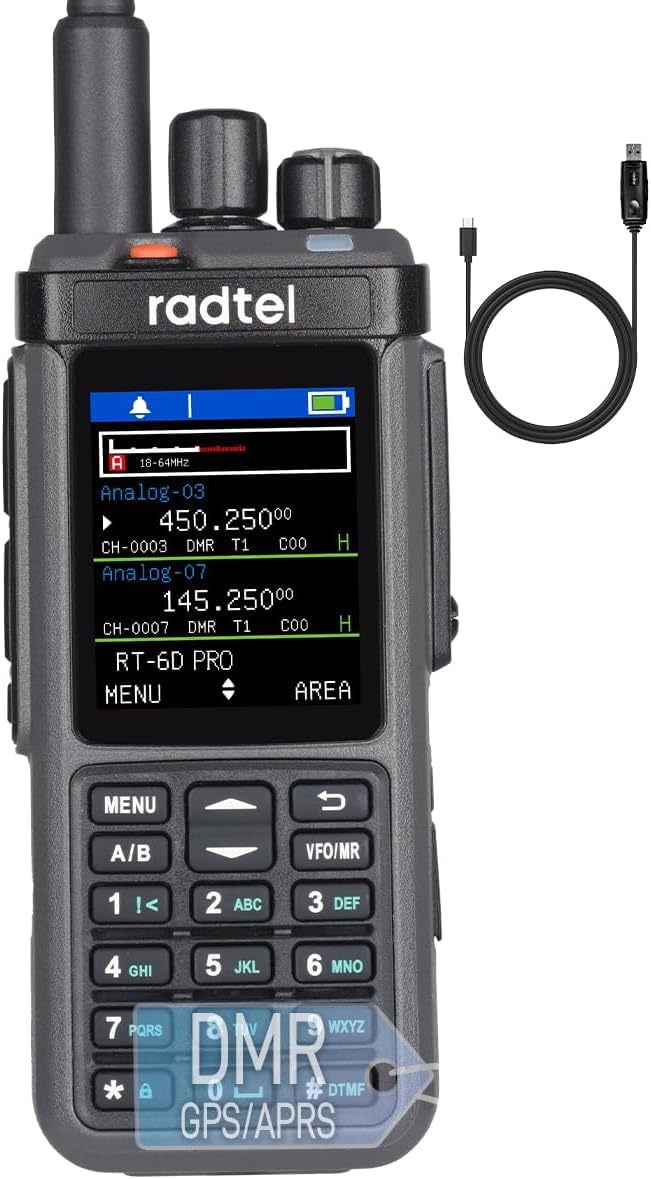
Figure 1: Radtel RT-6D PRO DMR Radio
2. Contenu du colis
Vérifiez que tous les éléments sont présents dans votre colis :
- 1x RT-6D PRO Main unit
- 1 batterie Li-ion de 2400 mAh
- 1 antenne double bande
- 1x clip de ceinture
- 1x Base de chargement
- 1x Type-C Power cable
- 1 manuel d'utilisation en anglais
3. Produit terminéview
3.1 Composants radio

Figure 2: Radtel RT-6D PRO Labeled Components
Familiarize yourself with the main parts of your radio:
- Antenne: Pour transmettre et recevoir des signaux.
- Bouton de canal : Utilisé pour sélectionner les chaînes.
- Bouton Volume/Marche/Arrêt : Contrôle l'alimentation et le volume audio.
- Voyant lumineux : Affiche l'état de la radio (par exemple, transmission, réception, charge).
- PTT1 / PTT2: Push-to-Talk buttons for initiating transmissions.
- Légende latérale : Bouton de fonction programmable.
- Clavier: Pour la saisie manuelle de la fréquence, la navigation dans les menus et les tonalités DTMF.
- Conférencier: Sorties audio reçues.
- Prise d'écouteur: Pour connecter des accessoires audio externes.
- Type-C Charging/Programming Port: For battery charging and connecting to a computer for programming.
3.2 Principales caractéristiques
- GPS and APRS Functionality: Integrated GPS for location services and APRS for position reporting.
- Mode promiscuité : Automatically scans and monitors digital channels for active talk groups and color codes.
- Port USB Type-C : Conveniently handles both charging and programming.
- Grande capacité de données : Stores 2,000 contacts, manages 90 Talk Group lists (up to 128 groups each), and accesses a global database of 500,000 contacts with CSV import capability.
- Channel and Zone Capacity: Supports 256 zones and 1024 channels.
- Cryptage : Operates with AES-256 encryption protocols.
- One-Touch Frequency Scanner: Simplifies signal identification.
- Alertes météo de la NOAA : Provides live weather feeds.

Figure 3: Radtel RT-6D PRO Feature Icons
4. Configuration initiale
4.1 Installation et charge de la batterie
- Alignez la batterie Li-ion de 2400 mAh avec le compartiment à batterie situé à l'arrière de la radio.
- Faites glisser la batterie en place jusqu'à ce qu'elle s'enclenche correctement.
- To charge, connect the Type-C power cable to the radio's Type-C port and a compatible power source (e.g., wall adapter, car charger, power bank, or computer USB port). The indicator light will show charging status.
4.2 Fixation de l'antenne
- Vissez l'antenne bi-bande dans le sens horaire sur le connecteur d'antenne situé en haut de la radio jusqu'à ce qu'elle soit serrée à la main. Ne serrez pas trop fort.
4.3 Mise sous/hors tension de base
- To power on, rotate the Volume/ON/OFF button clockwise until you hear a click and the display illuminates.
- To power off, rotate the Volume/ON/OFF button counter-clockwise until you hear a click and the display turns off.
5. Fonctionnement de base
5.1 Sélection du canal
Rotate the Channel Knob at the top of the radio to cycle through available channels. The selected channel will be displayed on the screen.
5.2 Réglage du volume
After powering on, rotate the Volume/ON/OFF button to increase or decrease the audio output level.
5.3 Transmission et réception
- To transmit, press and hold one of the PTT (Push-to-Talk) buttons (PTT1 or PTT2) on the side of the radio. Speak clearly into the microphone.
- Relâchez le bouton PTT pour arrêter la transmission et revenir en mode réception.
- When receiving a signal, the indicator light will illuminate, and audio will be heard through the speaker or connected earphone.
5.4 Gestion des contacts
The RT-6D PRO supports extensive contact management features:
- Contacts locaux : Store up to 2,000 individual contacts.
- Talk Group Lists: Manage up to 90 Talk Group lists, each supporting up to 128 groups.
- Global Database: Access a built-in global database of 500,000 contacts.
- Import Functionality: Import custom contact lists via CSV files for streamlined call management.

Figure 4: Contact Management Interface
5.5 GPS and APRS Functions
The integrated GPS module allows the radio to determine its location. This data can be used for APRS (Automatic Packet Reporting System) to transmit your position to other APRS-enabled devices or networks.
5.6 Alertes météo NOAA
The radio can receive NOAA weather alerts, providing timely information on severe weather conditions in your area.
6. Fonctionnalités avancées
6.1 DMR Tier 1 & Tier 2 Operation
The RT-6D PRO supports both DMR Tier 1 (unlicensed, direct mode) and Tier 2 (licensed, repeater mode) digital communication, offering enhanced audio quality and spectral efficiency compared to analog modes.

Figure 5: 1024 Channel Capacity and Call Types
6.2 Mode promiscuité
This mode allows the radio to automatically scan and monitor all digital channels, identifying active talk groups and color codes without prior programming, facilitating seamless communication in dynamic environments.
6.3 Encryption Protocols (AES-256)
For secure communications, the RT-6D PRO supports AES-256 encryption, ensuring privacy and preventing unauthorized interception of your transmissions.
6.4 Programming via Type-C Port
The radio can be programmed using Customer Programming Software (CPS) via the Type-C USB port. This allows for customization of channels, contacts, talk groups, and other advanced settings. Refer to the specific CPS software manual for detailed programming instructions.

Figure 6: 10W High Power Transmission
7. Consignes de sécurité
Please read and adhere to the following safety guidelines to ensure safe operation and prevent damage to your radio:
- Environnement d'exploitation : Operate the radio in environments with temperatures between 0-40°C and below 2000m altitude. Operating outside these conditions may damage the radio.
- Valeurs DAS : The radio has been tested for Head SAR (25mm from device) and Body SAR (0mm from device, with headset and belt clip). Specific Absorption Rate (SAR) values are: Face up (25mm): 0.277W/Kg; Back (0mm): 4.061W/Kg; Hand (0mm): 4.270W/Kg.
- Sécurité des batteries : Risque d'explosion si la batterie est remplacée par un type incorrect. Jetez les piles usagées conformément aux réglementations locales.
- Avertissements généraux : Be cautious of electric shock, flammable materials, and ionizing radiation.
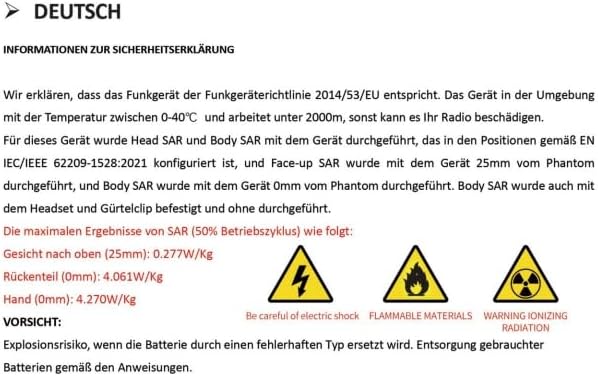
Figure 7: Safety Declaration (German original, summarized above)
8. Maintenance et entretien
Proper care will extend the life of your Radtel RT-6D PRO radio:
- Nettoyage: Utilisez un chiffon doux et sec.amp Utilisez un chiffon pour nettoyer l'extérieur de la radio. N'utilisez pas de produits chimiques agressifs ni de solvants.
- Résistance à l'eau : Cette radio est Non résistant à l'eauÉvitez tout contact avec l'eau, la pluie ou une forte humidité.
- Entretien de la batterie: Store the battery in a cool, dry place when not in use. Avoid overcharging or fully discharging the battery frequently.
- Stockage: When storing for extended periods, remove the battery and store the radio in a dry, dust-free environment.
9. Dépannage
9.1 Problèmes courants et solutions
| Problème | Cause possible | Solution |
|---|---|---|
| La radio ne s'allume pas. | Batterie faible ou déchargée ; batterie mal installée. | Chargez complètement la batterie. Assurez-vous que la batterie est correctement installée. |
| Poor signal reports or audio quality | Loose antenna connection; incorrect microphone gain setting; wrong frequency/channel. | Ensure antenna is securely attached. Adjust microphone gain via CPS if available. Verify correct frequency and channel settings. |
| Difficulty programming via Type-C port | Incorrect CPS version; driver issues; antivirus interference; faulty cable. | Download the latest CPS from the official Radtel website. Install necessary drivers. Temporarily disable antivirus software during installation/programming. Try a different Type-C cable. |
| Incorrect time display or GPS issues | Firmware bug; poor GPS signal reception; incorrect UTC offset setting. | Check for firmware updates. Ensure the radio has a clear view of the sky for GPS signal acquisition. Verify UTC offset settings in the radio menu or CPS. |
| Radio stops receiving intermittently | Software/firmware issue; channel interference. | Restart the radio. Try switching to a different channel and then back. Check for firmware updates from Radtel. |
10. Spécifications
| Fonctionnalité | Spécification |
|---|---|
| Numéro de modèle | RT-6D PRO |
| Poids de l'article | 1.45 livres |
| Dimensions du produit | 1.5 x 2.36 x 9.84 inches (radio body: 1.57"D x 2.36"W x 10.23"H) |
| Type de batterie | 1 pile Li-ion 9V (incluse) |
| Nombre de canaux | 1024 |
| Gamme de fréquences | 144-148 MHz / 420-450 MHz |
| Portée de conversation maximale | 6 kilomètre |
| Voltage | 7.4 volts |
| Niveau de résistance à l'eau | Non résistant à l'eau |
| Caractéristiques spéciales | GPS/APRS, Type C Charging, Digital/Analog, 500K Global Contacts |

Figure 8: Radtel RT-6D PRO Dimensions
11. Garantie et assistance
11.1 Informations sur la garantie
The Radtel RT-6D PRO radio comes with a Garantie d'un anVeuillez conserver votre preuve d'achat pour toute réclamation au titre de la garantie.
11.2 Assistance clientèle
For technical assistance, troubleshooting beyond this manual, or warranty inquiries, please contact Radtel customer support through their official website or the retailer where the product was purchased. Ensure you have your model number and purchase details ready when contacting support.


