1. Introduction
This manual provides comprehensive instructions for the safe and efficient operation of your FLIPSKY FSESC 110100 High Voltage Electronic Speed Controller (ESC). Please read this manual thoroughly before use to ensure proper setup and to prevent damage to the device or connected components.
2. Produit terminéview
The FLIPSKY FSESC 110100 is a high-performance electronic speed controller designed for demanding applications such as fighting robots, electric surfboards, and AGV robots. It features an aluminum PCB for enhanced heat dissipation and supports high voltage entrées.
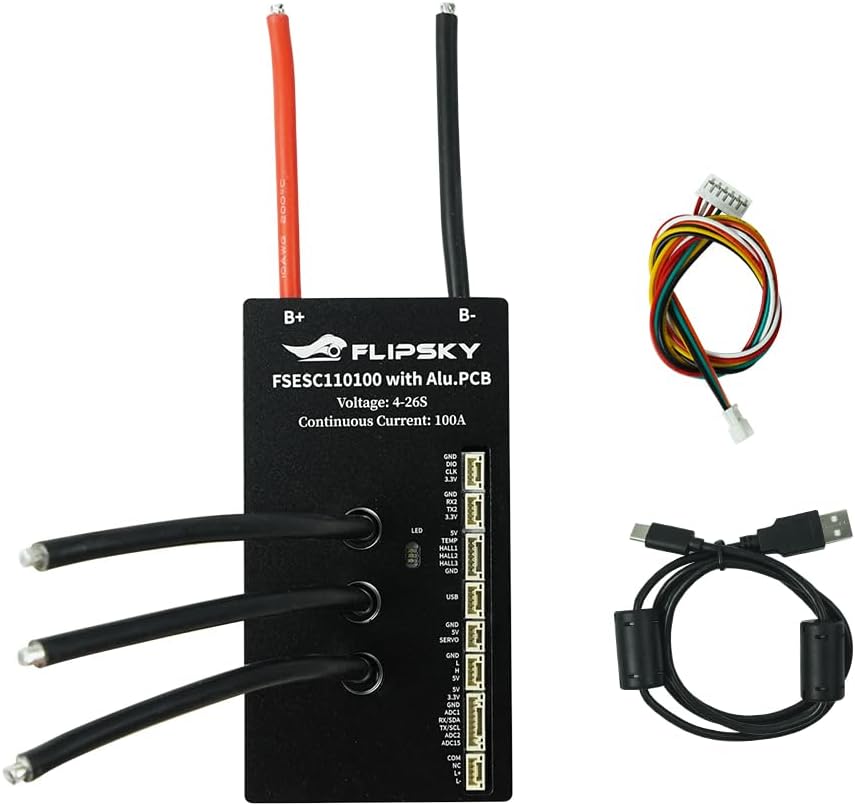
Figure 2.1 : Face avant view of the FLIPSKY FSESC 110100 High Voltage ESC, showing the main power input and motor phase wires.

Figure 2.2: The FSESC 110100 ESC along with its various connection cables and accessories, including a USB cable and sensor wires.
3. Spécifications
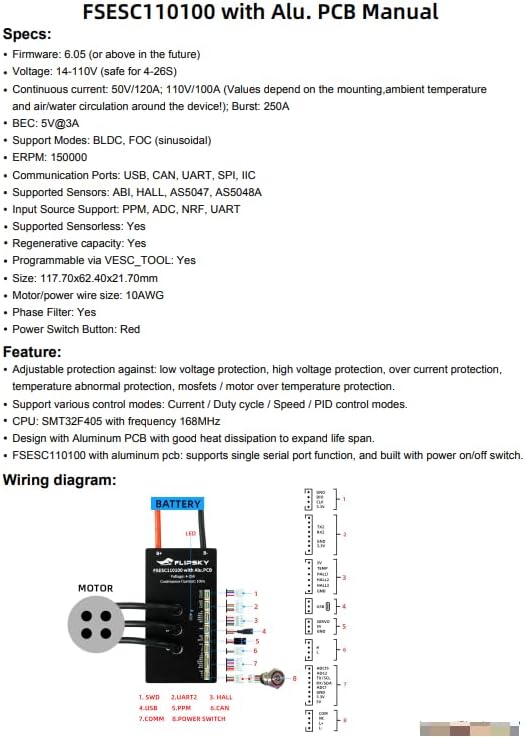
Figure 3.1: Manufacturer's detailed specifications for the FSESC 110100.
- Micrologiciel : 6.05 (ou supérieur)
- Voltage: 14-110V (safe for 4-26S battery configurations)
- Courant continu : 50V/120A; 110V/100A (Note: Values depend on mounting, ambient temperature, and air/water circulation)
- Courant d'éclatement : 250A
- BEC: 5V @ 3A
- Modes pris en charge : BLDC, FOC (sinusoidal)
- ERPM : 150000
- Ports de communication : USB, CAN, UART, SPI, IIC
- Capteurs pris en charge: ABI, HALL, AS5047, AS5048A
- Input Source Support: PPM, ADC, NRF, UART
- Sensorless Operation: Oui
- Capacité de régénération : Oui
- Programmable: Via VESC_TOOL
- Dimensions: 117.70 x 62.40 x 21.70 mm
- Motor/Power Wire Size: 10AWG
- Phase Filter: Oui
- Bouton d'alimentation : Rouge
- Processeur: SMT32F405 with 168MHz frequency
- Matériel: Aluminum Alloy (for PCB)
- Poids: 0.3 kilogrammes
Caractéristiques principales :
- Adjustable protection against: low voltage, volume élevétage, over current, temperature abnormalities, MOSFETs/motor over-temperature.
- Supports various control modes: Current, Duty cycle, Speed, PID control.
- Designed with Aluminum PCB for good heat dissipation and extended lifespan.
- Integrates single serial port function and Bluetooth module for convenient parameter connection and real-time data reading.
- Built-in power on/off switch.
4. Component Identification and Wiring
Understanding the various ports and connections is crucial for correct setup. Refer to the diagrams below for detailed identification.
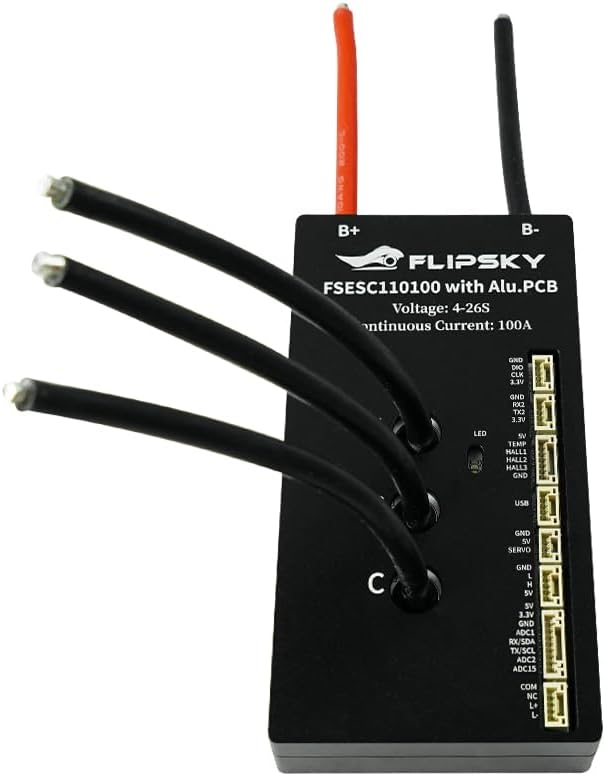
Figure 4.1: Comprehensive wiring diagram illustrating connections for battery, motor, and various communication/sensor ports.

Figure 4.2 : Gros plan view of the various communication and sensor ports on the FSESC 110100, with labels for each connection.
Description des ports :
- B+ / B-: Main battery positive and negative connections.
- Motor Phase Wires (A, B, C): Connect to the motor's three phase wires.
- DIRIGÉ: Voyant d'état.
- USB: For connecting to a computer for configuration via VESC_TOOL.
- UART: Universal Asynchronous Receiver/Transmitter port for communication with external devices (e.g., Bluetooth module, display).
- PEUT: Controller Area Network bus for multi-ESC setups.
- SPI : Serial Peripheral Interface.
- IIC : Inter-Integrated Circuit (I2C) bus.
- SALLE: Hall sensor input for sensored motor operation.
- ppm: Pulse Position Modulation input for remote control.
- ADC: Analog-to-Digital Converter input for analog controls.
- FRN : Nordic Radio Frequency module support.
- Interrupteur: Red button for power control.
5. Instructions de configuration
- La sécurité avant tout : Ensure all power sources are disconnected before making any connections. Wear appropriate safety gear.
- Montage: Securely mount the FSESC 110100 in a location with adequate airflow for heat dissipation. The aluminum PCB is designed for good heat transfer, but proper mounting is still essential.
- Connexion de la batterie : Connect your battery pack (4-26S, 14-110V) to the B+ (positive) and B- (negative) terminals. Ensure correct polarity.
- Connexion du moteur: Connect the three phase wires from your motor to the A, B, and C terminals on the ESC. If using a sensored motor, connect the Hall sensor cable to the HALL port.
- Entrée de contrôle : Connect your chosen control input (e.g., PPM receiver, UART device) to the corresponding port.
- Initial Configuration (VESC_TOOL):
Download and install the latest VESC_TOOL software from the official VESC project website or FLIPSKY support page.
Connect the FSESC 110100 to your computer via the USB port.
Launch VESC_TOOL and follow the motor setup wizard to configure your motor and ESC parameters. This includes motor detection, battery voltage limits, current limits, and control mode settings.
Save your configuration to the ESC.
- Bluetooth Module (Optional): If using the integrated Bluetooth module, you can connect to the ESC via a mobile app (e.g., VESC Tool app) for real-time data monitoring and parameter adjustment.
6. Mode d'emploi
- Mise sous tension : After completing all connections and configuration, press the red power switch button to power on the ESC. The LED indicator will illuminate.
- Contrôle: Operate your device using the configured input source (e.g., remote control, joystick). The ESC will translate your commands into motor control.
- Surveillance: Use VESC_TOOL or a connected Bluetooth app to monitor real-time data such as motor RPM, current, voltage, and temperature during operation.
- Fonctions de protection : The ESC is equipped with various protection features (low/high voltage, over current, over temperature). If a protection limit is reached, the ESC may reduce power or shut down to prevent damage. Identify and resolve the cause of the protection activation.
- Éteindre: When finished, press the red power switch button to power off the ESC.
7. Entretien
- Inspection régulière : Periodically inspect all wiring and connections for signs of wear, damage, or loose contacts.
- Nettoyage: Keep the ESC clean and free from dust, dirt, and moisture. Use a soft, dry cloth for cleaning. Avoid using solvents or harsh chemicals.
- Gestion de la chaleur : Ensure the ESC has adequate ventilation during operation. Avoid operating in excessively hot environments.
- Mises à jour du micrologiciel : Check the FLIPSKY website or VESC project for firmware updates. Updating firmware can improve performance and add new features. Follow update instructions carefully.
8. Dépannage
| Problème | Cause possible | Solution |
|---|---|---|
| Le contrôleur de vitesse électronique (ESC) ne s'allume pas. | No battery connection, incorrect polarity, faulty power switch, discharged battery. | Check battery connections and polarity. Ensure battery is charged. Test power switch. |
| Motor not spinning or erratic behavior. | Incorrect motor wiring, Hall sensor issue, incorrect VESC_TOOL configuration, motor fault. | Verify motor phase and Hall sensor connections. Re-run motor detection in VESC_TOOL. Check motor for damage. |
| ESC overheating. | Insufficient cooling, excessive load, incorrect current limits. | Improve ventilation. Reduce load. Adjust current limits in VESC_TOOL. |
| Communication issues with VESC_TOOL. | Incorrect USB driver, faulty USB cable, incorrect port selection in VESC_TOOL. | Install correct USB drivers. Try a different USB cable. Select the correct COM port in VESC_TOOL. |
| Fermetures inattendues. | Protection limits triggered (voltage, courant, température). | Check VESC_TOOL logs for fault codes. Address the underlying cause (e.g., low battery, overcurrent, overheating). |
9. Garantie et assistance
The FLIPSKY FSESC 110100 comes with a Garantie de 2 mois À compter de la date d'achat, cette garantie couvre les défauts de fabrication dans des conditions normales d'utilisation.
For technical support, troubleshooting assistance, or warranty claims, please contact FLIPSKY customer service through their official website or the retailer from whom you purchased the product. Please have your purchase receipt and product serial number available.
For the latest VESC_TOOL software and documentation, please visit the official VESC project website: www.vesc-project.com


