1. Produit terminéview
The ZWO Seestar TH10 Fluid Tripod Head is designed to provide stable and precise control for your Seestar Smart Telescope, DSLR, mirrorless cameras, and video cameras. It features a hydraulic damping system for smooth movements and offers a wide range of shooting angles, including 360° pan and 180° tilt adjustment. Its compact and portable design, combined with a heavy-duty payload capacity, makes it suitable for various photographic and astrophotography applications.
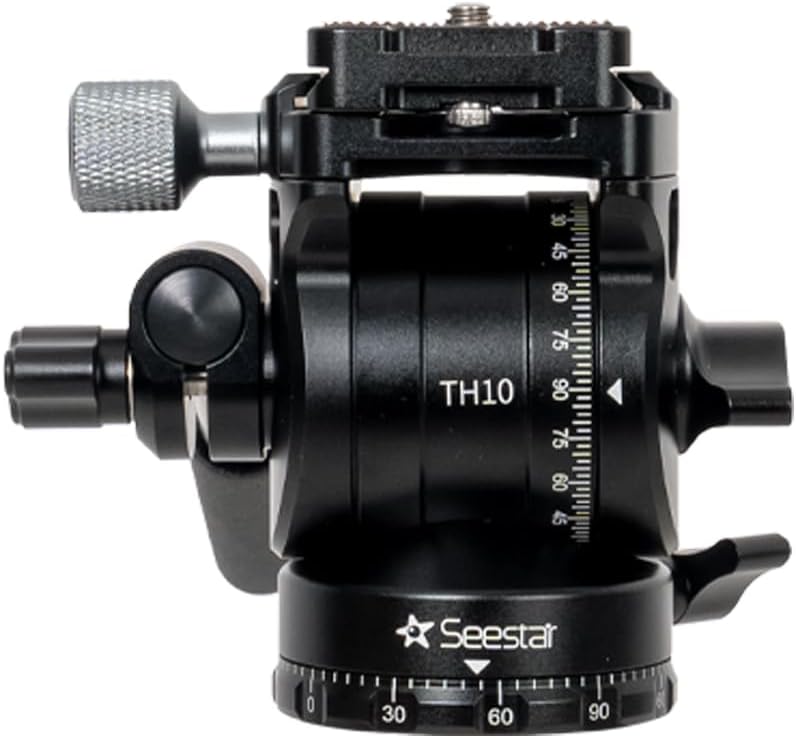
Image 1.1: The ZWO Seestar TH10 Fluid Tripod Head, a versatile accessory for stable imaging.
Caractéristiques principales :
- Equatorial Mode Enhancement: Facilitates accurate polar alignment and stable tracking for astrophotography.
- Compact et portable : Weighs approximately 411g (0.91 lbs) for easy transport.
- Hydraulique DampSystème d'exploitation : Ensures fluid and precise control during adjustments.
- Grande amplitude de mouvement : Offers 360° pan and 180° tilt adjustment for maximum flexibility.
- Heavy-Duty Payload: Supporte un équipement jusqu'à 5 kg (11 lbs).
- Large compatibilité: Suitable for most DSLRs, mirrorless cameras, video cameras, and Seestar S30/S50 Smart Telescopes.
2. Contenu de la boîte
Veuillez vérifier que tous les composants sont présents lors du déballage :

Image 2.1: Visual representation of the items included in the TH10 package.
- Seestar TH10 Fluid Tripod Head (Main Body) x 1
- Plaque de dégagement rapide x 1
- Poignée amovible x 1
- 1/4" to 3/8" Threaded Screw Adapter x 2
- Coin Wrench x 1
3. Instructions de configuration
Follow these steps to correctly set up your ZWO Seestar TH10 Fluid Tripod Head:
3.1. Preparing the Tripod
- Extend and Level the Tripod: Fully extend the legs of your tripod and ensure it is level. This prevents the device from tipping over and ensures stability.
- Attach the Adjustable Head: Securely attach the TH10 Fluid Tripod Head to your tripod. Tighten the knob to prevent any loosening during use.

Image 3.1 : Détail view of the TH10 head with labeled components, including the quick release plate, handle, and various knobs.
3.2. Mounting the Seestar Device
- Attach Quick-Release Plate to Seestar: Secure the quick-release plate to the bottom of your Seestar device. Ensure it is properly aligned before locking it into place.
- Mount Seestar to Tripod Head: Place the Seestar device, with the quick-release plate attached, onto the TH10 Fluid Tripod Head. Lock the quick-release plate securely.
- Balance the Device: Properly balance the Seestar device on the tripod head. Ensure the vertical center of gravity is aligned with the tripod leg pointing north for optimal Equatorial Mode performance. This prevents the device from tipping over.

Image 3.2: Seestar S50 and S30 Smart Telescopes correctly mounted on tripods using the TH10 head.
4. Operating Instructions: Equatorial Mode
The TH10 Fluid Tripod Head is optimized for use with Seestar Smart Telescopes in Equatorial (EQ) Mode. Follow these steps to activate and calibrate EQ Mode:
4.1. Activating EQ Mode via Seestar App
- Open Seestar App: Launch the Seestar application on your mobile device.
- Navigate to Advanced Features: Go to the "My" section (usually located in the lower right corner), then select "Advanced Features."
- Switch to EQ Mode: Within "Advanced Features," find "Mount Mode" and switch it to "EQ Mode."
- Adjust Device Tilt: Adjust the device's tilt according to the angle guide provided in the app. Tighten the knob on the TH10 head to secure it once the correct tilt is achieved.
4.2. Alignement polaire
- Get Polar Align Deviation: Once EQ Mode is successfully switched, tap "Get Polar Align Deviation" in the app. The app will display deviation values for azimuth and latitude.
- Adjust Azimuth and Latitude: Use the adjustment knobs on the TH10 head to fine-tune the azimuth and latitude based on the values displayed in the app. Aim to keep both errors within 1° for optimal performance.
- Sécurisez l'appareil : After achieving satisfactory alignment, ensure all knobs on the TH10 head are securely tightened to maintain position.
Video 4.1: A step-by-step guide on how to set up and use the ZWO Seestar in Equatorial Mode with the TH10 Fluid Tripod Head, demonstrating equipment preparation, mounting, and app-based polar alignment.
5. Spécifications techniques
| Fonctionnalité | Spécification |
|---|---|
| Nom du modèle | TH10 |
| Dimensions du produit | 2.4 x 2 x 3.3 pouces |
| Poids de l'article | 14.6 onces (environ 411 g) |
| Limite de poids (charge utile) | 11 livre (environ 5 kg) |
| Matériel | CNC-Machined Aluminum Alloy |
| Type de tête de trépied | Têtes panoramiques |
| Réglage panoramique | 360° |
| Réglage de l'inclinaison | 180° (±90°) |
| Couleur | Noir |
| Appareils compatibles | DSLR, Mirrorless Cameras, Seestar S30 Smart Telescope, Seestar S50 Smart Telescope, Video Cameras |
| Caractéristiques spéciales | Adjustable, High Quality, Lightweight, Versatile, Hydraulic DampSystème d'ing |
6. Entretien et maintenance
To ensure the longevity and optimal performance of your ZWO Seestar TH10 Fluid Tripod Head, follow these maintenance guidelines:
- Nettoyage: Use a soft, dry cloth to wipe down the tripod head after each use. For stubborn dirt, a slightly damp Un chiffon peut être utilisé, suivi d'un séchage immédiat. Évitez les nettoyants abrasifs ou les solvants.
- Stockage: Store the tripod head in a clean, dry environment, away from extreme temperatures and humidity. If possible, use the original packaging or a protective bag.
- Inspection: Periodically check all knobs, screws, and moving parts for tightness and smooth operation. Do not overtighten components.
- Lubrification: Le d hydrauliqueamping system is designed for long-term, maintenance-free operation. Do not attempt to lubricate internal components, as this may damage the unit.
7. Dépannage
If you encounter issues with your TH10 Fluid Tripod Head, consider the following common solutions:
- Device Tipping Over: Ensure your tripod is fully extended and stable on a flat surface. Verify that the Seestar device is properly balanced on the TH10 head and that all locking mechanisms are secure.
- Unstable Tracking in EQ Mode: Re-check your polar alignment using the Seestar app. Ensure the azimuth and latitude deviations are within 1°. Make sure the tripod leg is pointing north and the vertical center of gravity is aligned.
- Mouvements raides ou lâches : Check the main knob and pan locking knob for appropriate tightness. Adjust them to achieve the desired fluid movement. If the issue persists, ensure no foreign objects are obstructing movement.
- Plaque à dégagement rapide ne se fixant pas correctement : Ensure the quick-release plate is correctly aligned with the mounting slot on the TH10 head and that the locking lever is fully engaged.
For further assistance, please refer to the ZWO official support channels.
8. Garantie et assistance
ZWO products are designed for quality and reliability. For information regarding product warranty, please refer to the official ZWO website or contact your authorized dealer. Technical support and additional resources can be found through the ZWO customer service portal.
Optional protection plans are available for purchase to extend coverage beyond the standard warranty. These plans typically cover accidental damage and mechanical failures.