1. Introduction
Welcome to your new Baseus BC1 Open Ear Earbuds. This manual provides detailed instructions for setup, operation, and maintenance to ensure you get the best experience from your device. The Baseus BC1 earbuds feature a comfortable open-ear design, secure tri-curve clip, rich sound with powerful bass, clear calls with 4-mic AI noise reduction, IP55 water resistance, and precise button control.
2. Contenu du colis
Veuillez vérifier le contenu du colis pour vous assurer que tous les éléments sont présents :
- Baseus BC1 Open Ear Earbuds (Left & Right)
- Étui de chargement
- Manuel d'utilisation
- Câble de charge de type C

3. Produit terminéview
The Baseus BC1 Open Ear Earbuds are designed for comfort and high-quality audio, allowing you to stay aware of your surroundings. The compact charging case provides extended battery life and convenient storage.

4. Installation
4.1. Chargement
Avant la première utilisation, chargez complètement les écouteurs et l'étui de chargement.
- Connectez le câble de chargement Type-C fourni au port de chargement situé sur le boîtier et à une source d'alimentation.
- Le chargement complet de la batterie prend environ 1.5 heure.
- The earbuds offer up to 7.5 hours of listening on a single charge, and up to 38 hours total with the fully charged case.

4.2. Marche/Arrêt
- Mise sous tension : Ouvrez l'étui de chargement et les écouteurs s'allumeront automatiquement.
- Éteindre: Place the earbuds back into the charging case and close the lid; they will power off automatically.
4.3. Couplage Bluetooth
- Ouvrez le boîtier de charge. Les écouteurs passeront automatiquement en mode appairage, indiqué par un voyant LED clignotant.
- Sur votre appareil (smartphone, tablette, etc.), accédez aux paramètres Bluetooth et activez le Bluetooth.
- Rechercher "Baseus BC1" in the list of available devices and select it to connect.
- Once connected, you will hear a confirmation tone, and the LED indicator on the earbuds will turn off.
4.4. Port des écouteurs
Pour un confort et une qualité sonore optimaux, suivez ces étapes pour porter vos écouteurs :
- Gently clip each earbud onto your ear, ensuring the main body rests comfortably behind your earlobe.
- Adjust the earbud to find the most comfortable and secure position. The tri-curve ergonomic clip is designed to adapt to various ear shapes.
- Ensure the sound outlet is aligned with your ear canal to experience the best sound quality.


5. Mode d'emploi
5.1. Commandes des boutons
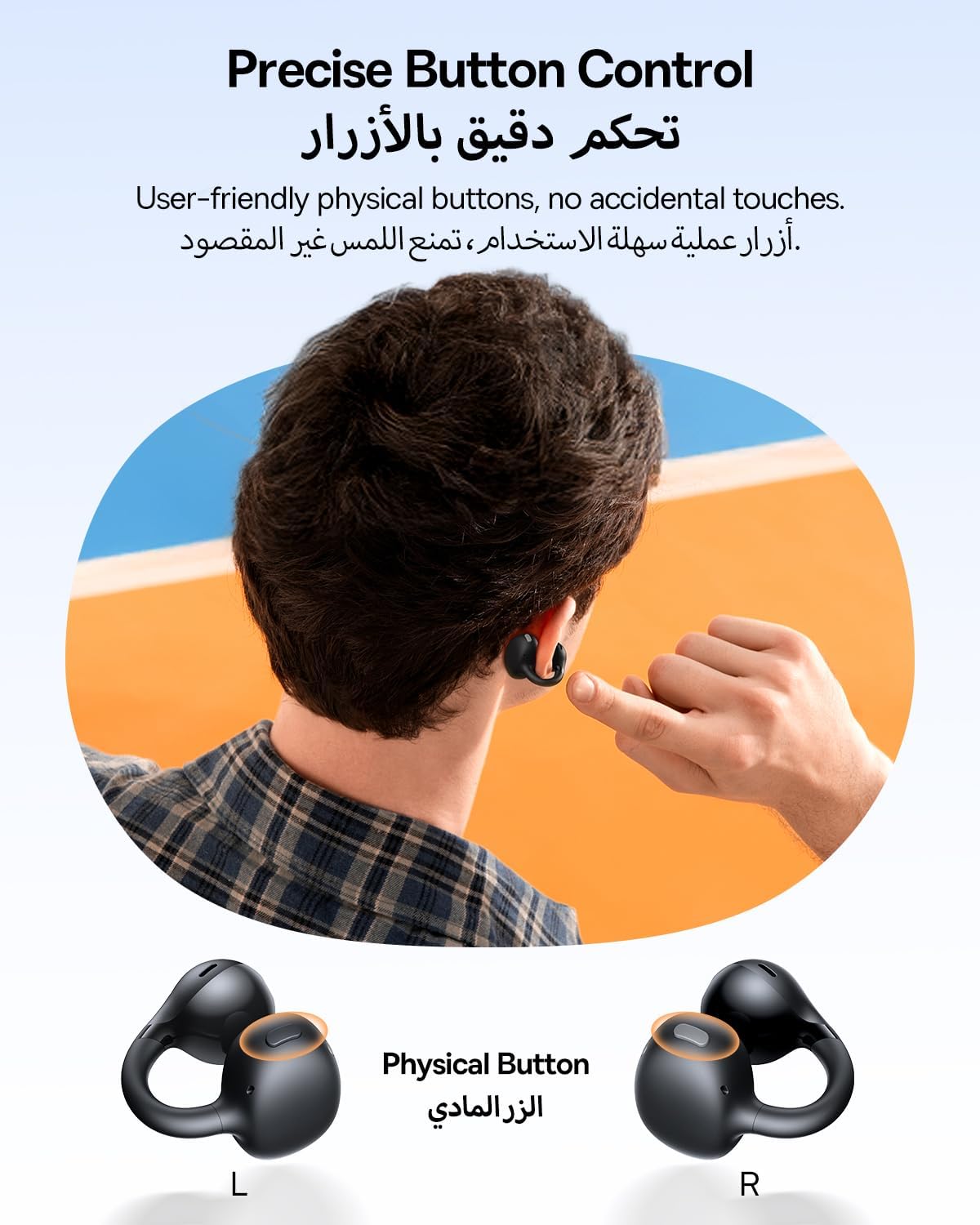
The Baseus BC1 earbuds feature physical buttons for precise control, minimizing accidental touches. The functions are as follows:
- Lecture/Pause : Appuyez une seule fois sur le bouton de l'un ou l'autre écouteur.
- Monter le son: Single press the button on the right earbud.
- Baisser le volume: Single press the button on the left earbud.
- Piste suivante : Long press the button on the right earbud for 1.5 seconds.
- Piste précédente: Long press the button on the left earbud for 1.5 seconds.
- Répondre/Terminer l'appel : Double press the button on either earbud.
- Rejeter l'appel : Long press the button on either earbud for 1.5 seconds during an incoming call.
- Assistant vocal: Triple press the button on the right earbud.
- Cycle Modes (Game/Movie/Normal): Triple press the button on the left earbud.
5.2. Personnalisation de l'application
Download the official Baseus app from your device's app store to unlock advanced features and personalize your listening experience:
- Égaliseur personnalisable : Adjust the equalizer settings to fine-tune the audio to your preference.
- Son Profiles: Choisissez parmi différents préréglages audio professionnelsfiles for different music genres or listening scenarios.
- Touch Control Personalization: Reassign touch control functions to suit your needs.

5.3. Connexion multipoint
The Baseus BC1 earbuds support simultaneous connection to two devices, allowing seamless switching between them:
- Associez les écouteurs à votre premier appareil (par exemple, un smartphone).
- Déconnectez les écouteurs des paramètres Bluetooth du premier appareil. Les écouteurs repasseront en mode de couplage.
- Pair the earbuds with your second device (e.g., tablet or laptop).
- Manually reconnect the earbuds to the first device from its Bluetooth settings.
- The earbuds will now be connected to both devices simultaneously, allowing you to switch audio sources without re-pairing.

6. Entretien
6.1. Nettoyage
To ensure optimal performance and longevity of your earbuds:
- Regularly clean the earbuds and the charging contacts inside the case using a clean, dry cotton swab.
- Si nécessaire, d légèrementampen the cotton swab with alcohol for disinfection.
- Avoid issues such as the earbuds being unable to charge or power on due to prolonged lack of cleaning.
6.2. Stockage
- Lorsqu'ils ne sont pas utilisés, rangez toujours les écouteurs dans leur étui de chargement afin de les protéger de la poussière et des dommages.
- If the earbuds will not be used for an extended period, charge the case at least once every three months to maintain battery health.
7. Dépannage
If you encounter any issues with your Baseus BC1 earbuds, please refer to the following common problems and solutions:
- Les écouteurs ne se connectent pas : Ensure Bluetooth is enabled on your device and the earbuds are in pairing mode. Try forgetting previous pairings on your device and re-pairing.
- Un seul écouteur fonctionne : Place both earbuds back in the charging case, close the lid for 10 seconds, then open it again. If the issue persists, perform a factory reset.
- Mauvaise qualité sonore : Ensure the earbuds are worn correctly and the sound outlet is aligned with your ear canal. Check the EQ settings in the Baseus app.
- Écouteurs ne chargeant pas : Clean the charging contacts on both the earbuds and the case. Ensure the charging cable is properly connected to a working power source.
7.1. Réinitialisation d'usine
If the earbuds are not functioning correctly, a factory reset may resolve the issue:
- Remove the pairing information of the earbuds from your device's Bluetooth settings (e.g., "Forget This Device").
- Place both earbuds into the charging case, ensuring they are securely in place.
- Close the charging case for 3 seconds, then reopen it.
- With the charging case open, long press the button on the charging case for 10 seconds until the indicator light flashes white twice. This indicates that the reset is complete.
- After the factory reset, use the initial Bluetooth pairing method (Section 4.3) to reconnect and resume normal use.
8. Spécifications
| Fonctionnalité | Détail |
|---|---|
| Nom du modèle | BC1 |
| Numéro de modèle de l'article | PM153 |
| Marque | Baseus |
| Couleur | Noir |
| Placement des oreilles | Oreille ouverte |
| Facteur de forme des écouteurs | Oreille ouverte |
| Technologie de connectivité | Sans fil |
| Technologie de communication sans fil | Bluetooth |
| Impédance | 16 ohms |
| Contrôle du bruit | Aucun |
| Prise casque | Pas de Jack |
| Méthode de contrôle | Bouton poussoir |
| Niveau de résistance à l'eau | Résistant à l'eau (IP55) |
| Temps de charge | 1.5 heures |
| Poids de l'article | 111 grammes |
| Dimensions du colis | 13.4 x 8.5 x 4.2 cm |
| Composants inclus | Manuel d'utilisation |
| Matériel | Plastique |
| Appareils compatibles | Phones, tablets, desktop computers, laptops, mobile phones, smart speakers, TVs, digital video game players |
9. Consignes de sécurité
- Avoid prolonged listening at high volume levels to prevent potential hearing damage.
- N’utilisez pas les écouteurs dans des situations où l’incapacité d’entendre les sons ambiants pourrait être dangereuse (par exemple, en conduisant, en faisant du vélo, en marchant dans la circulation).
- Conservez les écouteurs et l'étui de chargement à l'abri des températures extrêmes, de la lumière directe du soleil et de l'humidité.
- Do not attempt to disassemble, repair, or modify the product. This may void the warranty and cause damage.
- Tenir hors de portée des enfants et des animaux domestiques afin d'éviter toute ingestion accidentelle ou toute mauvaise utilisation.
- Mettez au rebut le produit et sa batterie de manière responsable, conformément à la réglementation locale.
10. Garantie et assistance
Pour toute information concernant la garantie, l'assistance technique ou toute question relative aux produits, veuillez consulter le site officiel de Baseus. webconsultez votre site web ou contactez votre distributeur local.
You can also visit the official Baseus Store for more information: Magasin Baseus


