1. Introduction
This manual provides comprehensive instructions for the installation, operation, and maintenance of your Brightever 7-Inch Motion Sensor LED Ceiling Light, Model XD180-04. This hardwired flush mount fixture features a motion sensor, selectable color temperatures, and adjustable timer settings, designed for various indoor applications.
2. Consignes de sécurité
- AVERTISSEMENT: Always turn off the power at the circuit breaker before beginning any electrical installation.
- Consultez un électricien qualifié si vous n’êtes pas sûr du processus d’installation.
- Assurez-vous que tous les branchements électriques sont sécurisés et conformes aux normes électriques locales.
- Ne tentez pas de modifier le dispositif. Toute modification pourrait annuler la garantie et présenter un risque pour la sécurité.
- This fixture is designed for indoor use. While moisture resistant, avoid direct exposure to heavy water spray.
- Gardez les enfants éloignés de la zone d'installation.
3. Contenu du colis
Vérifiez que tous les composants sont présents avant l'installation :
- Brightever 7-Inch Motion Sensor LED Ceiling Light (2 units for 2-pack)
- Matériel de montage (vis, connecteurs de fils)
- Manuel d'instructions (ce document)
4. caractéristiques du produit
- Capteur de mouvement intégré : PIR sensor with 120° detection angle and 6.5-13 ft range.
- 3 modes d'éclairage:
- Toujours activé : Light remains on (controlled by wall switch).
- Motion-Activated Always: Activates with motion regardless of ambient light.
- Dark-Activated: Activates with motion only in low light conditions.
- 3 températures de couleur : Selectable via DIP switch (2700K Warm White, 4000K Natural White, 6500K Cool White).
- 3 Paramètres de la minuterie : Adjustable illumination duration after motion ceases (30s, 60s, 120s).
- Efficacité énergétique : 15W LED, 1200 Lumens output, designed for long lifespan (30,000+ hours).
- Construction durable : Fabriqué à partir de matériau Acrylonitrile Butadiène Styrène (ABS).
- Soins des yeux : Designed for flicker-free illumination with a high CRI (Color Rendering Index) of 90+.
- Protection: Moisture resistant, dustproof, and mosquito proof design.
5. Configuration et installation
Please follow these steps carefully. Ensure power is off at the circuit breaker before starting.
- Couper l'alimentation : Locate your circuit breaker and turn off the power to the area where you will install the light fixture. Verify power is off using a voltage testeur.
- Fix Mounting Bracket: The mounting bracket is located on the back of the light fixture. Remove it. Securely attach the mounting bracket to the ceiling junction box using the provided screws.
- Select Settings (Before Wiring): Before connecting wires, slide the DIP switches on the back of the light fixture to your desired color temperature (2700K, 4000K, or 6500K), lighting mode (Always On, Motion-Activated Always, or Dark-Activated), and illumination duration (30s, 60s, or 120s). These settings are difficult to change after installation.
- Connecter les fils : Connect the household electrical wires to the light fixture wires using the provided wire nuts. Typically, connect black to black (live), white to white (neutral), and green or bare copper to green (ground). Ensure connections are tight and secure.
- Install Light to Base: Align the light fixture with the mounting bracket and twist or push to secure it into place. Ensure it is firmly attached and flush with the ceiling.
- Restaurer l'alimentation : Turn the power back on at the circuit breaker. Test the light fixture to ensure proper operation based on your selected settings.

Figure 5.1: Attaching the mounting bracket to the ceiling.

Figure 5.2: Adjusting DIP switches for color temperature, lighting mode, and timer.

Figure 5.3: Securing the light fixture to the mounting bracket.

Figure 5.4: Completed installation of the ceiling light.
Guide vidéo d'installation
Video 5.1: A step-by-step guide demonstrating the installation process for the 7-inch motion sensor ceiling light.
6. Mode d'emploi
The Brightever Motion Sensor LED Ceiling Light offers versatile operation through its adjustable settings.
6.1 modes d'éclairage
Select one of three lighting modes using the dedicated switch on the fixture (set during installation):
- Always On (ON): The light functions as a standard ceiling light, controlled by your wall switch. The motion sensor is bypassed.
- Motion-Activated Always (Sun Icon): The light will turn on when motion is detected, regardless of ambient light levels (day or night). It will turn off after the set duration if no further motion is detected.
- Dark-Activated (Moon Icon): The light will only turn on when motion is detected in low light conditions (e.g., at night or in a dark closet). It will turn off after the set duration if no further motion is detected.

Figure 6.1 : Plusview of the three selectable lighting modes.
6.2 Sélection de la température de couleur
Choose your preferred light color from three options using the color temperature switch (set during installation):
- 2700K (Blanc chaud) : Offre une ambiance chaleureuse et accueillante.
- 4000K (Blanc naturel) : Offers a balanced and clear illumination, suitable for most tasks.
- 6500K (Blanc froid) : Delivers bright, crisp daylight-like illumination for enhanced visibility.

Figure 6.2: Selecting the desired color temperature.
6.3 réglages de minuterie
Adjust how long the light remains on after motion is no longer detected using the timer switch (set during installation):
- 30 secondes: Light turns off 30 seconds after motion stops.
- 60 secondes: Light turns off 60 seconds after motion stops.
- 120 secondes: Light turns off 120 seconds after motion stops.

Figure 6.3: Adjustable timer settings for illumination duration.
6.4 Fonctionnement du capteur de mouvement
The PIR motion sensor detects movement within a 120° angle and a range of 6.5 to 13 feet. For optimal performance, ensure the sensor is not obstructed. The light will activate when motion is detected and remain on for the selected duration, resetting the timer with continuous motion.
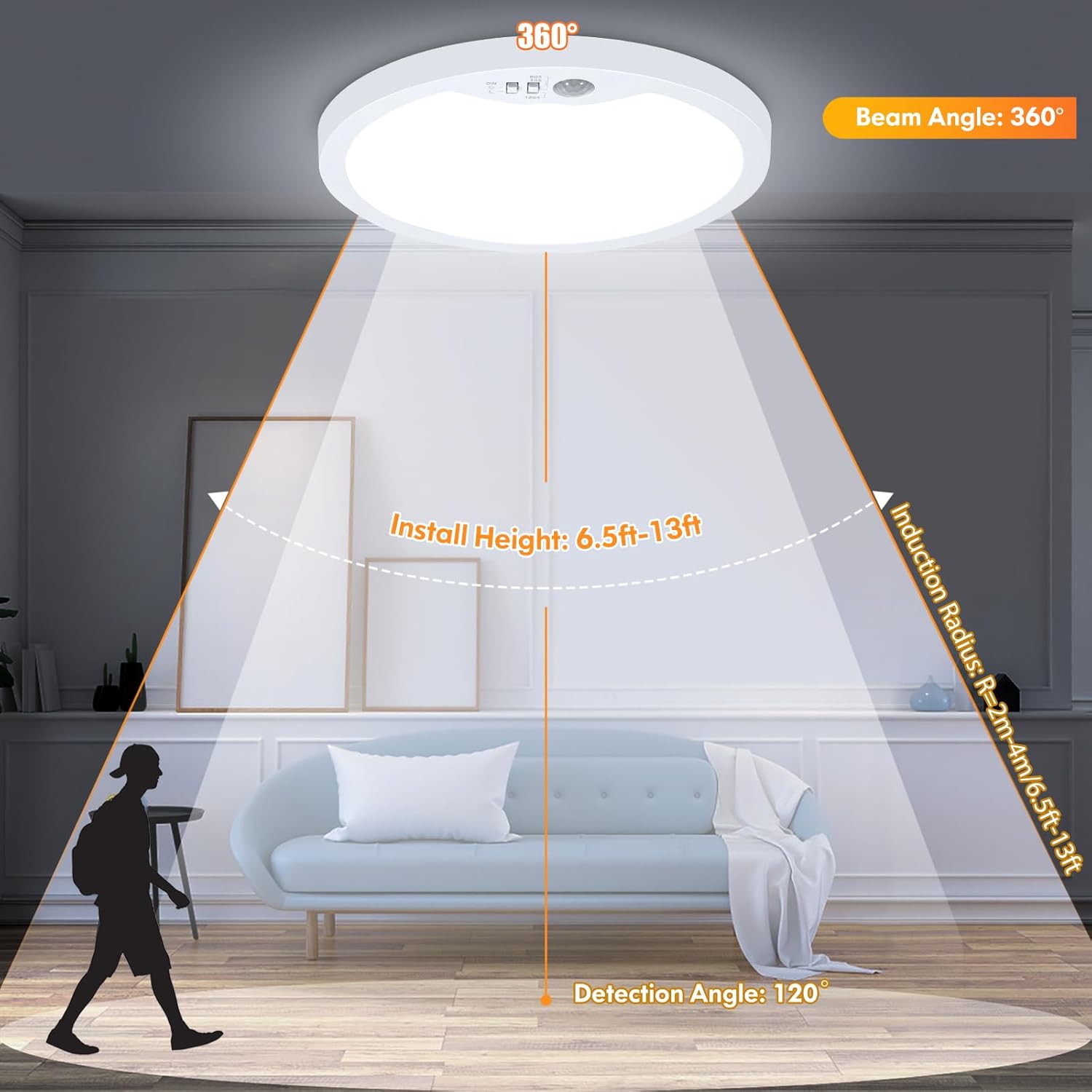
Figure 6.4 : Portée et angle de détection du capteur de mouvement.
7. Entretien
To ensure the longevity and optimal performance of your Brightever LED Ceiling Light, follow these simple maintenance guidelines:
- Nettoyage: Débranchez l'alimentation avant le nettoyage. Utilisez un chiffon doux, sec ou légèrement rêche.amp cloth to wipe the surface of the fixture. Avoid abrasive cleaners, solvents, or harsh chemicals, as these can damage the finish or electrical components.
- Inspection: Periodically check the fixture for any signs of damage, loose connections, or wear. If any issues are found, turn off power and consult a qualified electrician.
- Aucune pièce réparable par l'utilisateur : The LED components are integrated and not user-replaceable. Do not attempt to open the fixture beyond what is required for installation.
8. Dépannage
If you encounter issues with your Brightever LED Ceiling Light, refer to the following common problems and solutions:
| Problème | Cause possible | Solution |
|---|---|---|
| La lumière ne s'allume pas. | No power; loose wiring; incorrect mode selection; faulty fixture. | Check circuit breaker. Verify wire connections. Ensure correct lighting mode is selected (e.g., not in Dark-Activated mode during daylight). If issues persist, contact support. |
| Motion sensor not working or light stays on/off. | Incorrect mode selection; sensor obstructed; constant motion; electrical surge damage. | Ensure the correct motion-activated mode (Sun or Moon icon) is selected. Clear any obstructions from the sensor. Ensure there is no continuous motion in the detection area. If the sensor was damaged by an electrical event, contact support. |
| La lumière vacille ou faiblit de façon inattendue. | Unstable power supply; loose wiring; internal component issue. | Check household wiring and power stability. Ensure all connections are secure. This fixture is non-dimmable; do not connect to a dimmer switch. If flickering continues, contact support. |
| Difficulty mounting flush to ceiling. | Interference with internal switches; uneven ceiling surface. | Ensure the DIP switches are fully recessed and do not interfere with the ceiling surface. If necessary, use small spacers or ensure the ceiling opening accommodates the switch mechanism. |
9. Spécifications
| Attribut | Détail |
|---|---|
| Nom du modèle | XD180-04 |
| Marque | Toujours plus brillant |
| Dimensions du produit | 7"L x 7"l x 0.66"H |
| Poids de l'article | 1.3 livres |
| Source d'énergie | Électrique avec fil |
| Voltage | 120 volts |
| Quoitage | 15 watts |
| Luminosité | 1200 lumens |
| Type de source lumineuse | DIRIGÉ |
| Températures de couleur | 2700K, 4000K, 6500K Selectable |
| Type de commutateur | Détecteur de mouvement |
| Angle de détection du capteur de mouvement | 120° |
| Portée de détection du capteur de mouvement | 6.5-13 pieds |
| Durée de vie | 30,000+ heures |
| Matériel | Acrylonitrile butadiène styrène (ABS) |
| Type d'installation | Plafonnier |
| Utilisation intérieure/extérieure | Intérieur |
| Niveau de résistance à l'eau | Résistant à l'humidité |
10. Garantie et assistance
The Brightever 7-Inch Motion Sensor LED Ceiling Light comes with a Limited Warranty. For specific warranty details, please refer to the documentation included with your purchase or contact Brightever customer support.
If you require further assistance, have questions, or need to report an issue, please contact Brightever customer service through the retailer where the product was purchased or visit the official Brightever website pour obtenir les coordonnées de l'assistance.