1. Introduction
This manual provides essential information for the setup, operation, and maintenance of your MSI MPG Infinite X3 AI 2NVR7-091JP AI Gaming Desktop PC. Please read this manual thoroughly before using the product to ensure proper and safe operation. Keep this manual for future reference.
The MSI MPG Infinite X3 AI 2NVR7-091JP is a high-performance AI gaming desktop PC equipped with an Intel® Core™ Ultra 7 265K processor and NVIDIA® GeForce RTX™ 5070 Ti graphics. It is designed to deliver exceptional performance for gaming, AI processing, video editing, and streaming, supporting high-resolution and high-frame-rate visuals with technologies like DLSS 4 and ray tracing. It also features high-speed connectivity with 5Gbps LAN and Wi-Fi 6E, and a visually appealing design with RGB lighting and a glass side panel.
2. Consignes de sécurité
- Débranchez toujours le cordon d'alimentation de la prise électrique avant de nettoyer ou d'effectuer toute opération d'entretien.
- N’exposez pas l’appareil à la pluie ou à l’humidité afin d’éviter tout risque d’incendie ou d’électrocution.
- Assurez une ventilation adéquate pour éviter toute surchauffe. Ne bloquez aucune ouverture de ventilation.
- Use only the power adapter and cables provided or recommended by MSI.
- Évitez de placer l'appareil sur des surfaces instables.
- N'essayez pas de réparer le produit vous-même. Confiez tout entretien à un personnel de service qualifié.
3. Contenu du colis
Verify that all items listed below are included in your product package. If any item is missing or damaged, contact your retailer.
- MSI MPG Infinite X3 AI 2NVR7-091JP Desktop PC
- Câble d'alimentation x1
- Antenne Wi-Fi x2
- Guide de démarrage rapide x1

Image: Included Accessories. This image shows one power cable, two Wi-Fi antennas, and a Quick Start Guide.
4. Produit terminéview
4.1 Principales caractéristiques
- Système opérateur: Windows 11 Pro
- Processeur: Intel Core Ultra 7 265K (20 Cores, 20 Threads)
- Graphique: NVIDIA GeForce RTX 5070 Ti with 16GB GDDR7 VRAM
- Mémoire: 32GB DDR5 RAM (16GB x2)
- Stockage: SSD M.2 NVMe de 1 To
- Réseau: 5Gbps LAN, Wi-Fi 6E, Bluetooth
- Moteur d'IA : Performance optimization utilizing AI for gaming and entertainment modes.
- Éclairage: Mystic Light compatible RGB lighting.

Image: MSI MPG Infinite X3 AI Gaming Desktop PC. This image shows the desktop PC with RGB lighting, connected to a monitor displaying a game, illustrating high-resolution gaming capabilities.

Image: Intel Core Ultra 7 265K Processor. This image highlights the high-performance Intel Core Ultra 7 265K CPU, excellent for gaming and AI processing.

Image: NVIDIA GeForce RTX 5070 Ti Graphics Card. This image showcases the NVIDIA GeForce RTX 5070 Ti, recommended for WQHD to 4K gaming and AI applications.

Image: DDR5 Memory and M.2 NVMe SSD. This image illustrates the large capacity 32GB DDR5 memory and ultra-fast 1TB M.2 NVMe SSD for superior performance.
4.2 Ports d'entrée/sortie
The desktop PC features various ports for connectivity. Refer to the diagrams below for port locations and types.
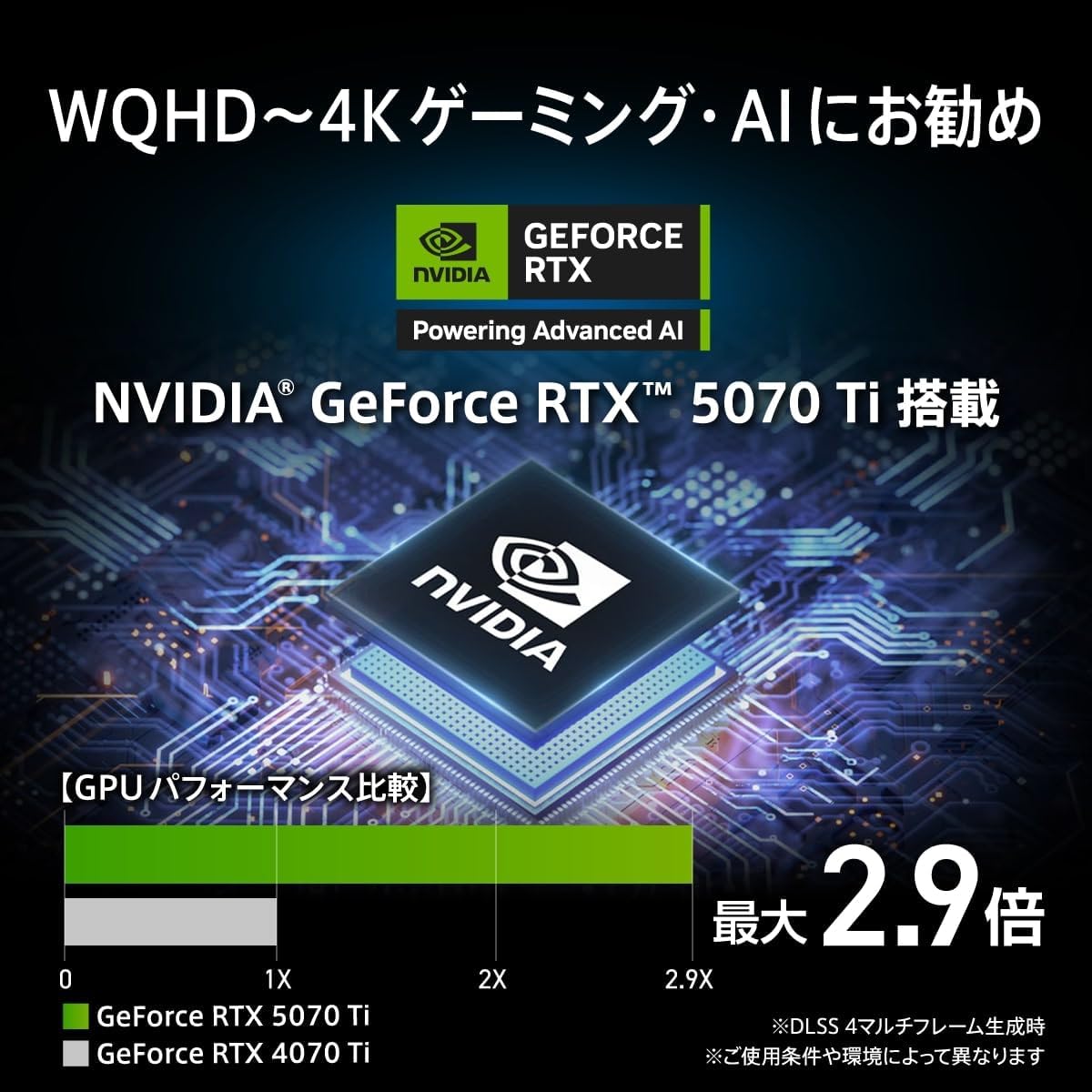
Image: Video Output Terminals. This image displays the rear video output ports, including one HDMI 2.1b port and three DisplayPort 2.1b ports.

Image: Front and Rear Input/Output Terminals. This image details the front ports (USB 3.2 Gen2 Type-C x1, USB 3.2 Gen1 Type-A x1, Headphone/Microphone) and rear ports (USB 2.0 Type-A x2, PS/2, USB 3.2 Gen1 Type-A x2, USB 2.0 Type-A x2, USB 3.2 Gen2 Type-C x1, USB 3.2 Gen2 Type-A x1, Wired LAN, Wi-Fi Antenna connectors, Audio jacks).
4.3 Dimensions
The physical dimensions of the desktop PC are as follows:
- Largeur: 235.1 mm
- Profondeur: 481.3 mm
- Hauteur: 485 mm

Image: Product Body Size Diagram. This diagram illustrates the width, depth, and height of the desktop PC.
5. Installation
5.1 Déballage et placement
- Retirez soigneusement l'ordinateur de bureau et tous ses accessoires de leur emballage.
- Place the PC on a stable, flat surface with adequate ventilation around it. Avoid placing it near heat sources or in direct sunlight.
5.2 Connexion de périphériques
- Moniteur: Connect your monitor(s) to the graphics card's HDMI or DisplayPort outputs using appropriate cables.
- Clavier et souris : Connectez votre clavier et votre souris aux ports USB disponibles.
- Périphériques audio : Branchez des haut-parleurs ou des écouteurs aux prises de sortie audio.
- Antennes Wi-Fi : Screw the two included Wi-Fi antennas onto the corresponding connectors at the rear of the PC.
- Réseau (facultatif) : For a wired connection, connect an Ethernet cable from your router or modem to the LAN port on the PC.
5.3 Connexion d'alimentation
- Branchez le câble d'alimentation à l'entrée d'alimentation située à l'arrière du PC.
- Branchez l'autre extrémité du câble d'alimentation dans une prise électrique mise à la terre.
6. Mode d'emploi
6.1 Démarrage initial
- Appuyez sur le bouton d'alimentation situé à l'avant du PC.
- Suivez les instructions à l'écran pour terminer l'installation de Windows 11 Pro.
6.2 MSI AI Engine
The MSI AI Engine optimizes performance based on your running applications. It automatically recognizes launched applications and adjusts the operating mode, cooling fan speed, and LED lighting effects.
- Mode de jeu: When games are detected, the system switches to a performance-oriented mode, optimizing cooling fan speed and LED lighting for an enhanced gaming experience.
- Mode Divertissement : For applications like music streaming, the system prioritizes quiet operation, reducing fan speed and disabling LED lighting effects.
You can register specific applications to assign custom operating modes. MSI Center 2.0.3.1 or later is required for full functionality.

Image: MSI AI Engine Performance Optimization. This image explains how the MSI AI Engine automatically recognizes applications and optimizes performance, fan speed, and LED lighting for Gaming and Entertainment modes.
6.3 Lumière mystique
The PC supports MSI Mystic Light for customizable RGB lighting effects. You can personalize the lighting to match your preferences or synchronize it with other Mystic Light compatible devices.
Settings for Mystic Light functionality may require the pre-installed MSI Center software.

Image: Mystic Light Compatible RGB Lighting. This image shows the desktop PC with vibrant RGB lighting, indicating Mystic Light compatibility.
7. Entretien
- Nettoyage: Utilisez un chiffon doux et sec pour nettoyer l'extérieur de l'ordinateur. Pour dépoussiérer les conduits d'aération, utilisez de l'air comprimé. N'appliquez pas de nettoyants liquides directement sur l'ordinateur.
- Mises à jour logicielles : Regularly update your operating system, drivers, and MSI software (e.g., MSI Center) to ensure optimal performance and security.
- Ventilation: Ensure that the PC's ventilation openings are not obstructed to maintain proper airflow and prevent overheating.
8. Dépannage
Si vous rencontrez des problèmes avec votre PC, reportez-vous aux étapes de dépannage courantes suivantes :
- Pas d'alimentation : Ensure the power cable is securely connected to both the PC and the electrical outlet. Verify the outlet is functional.
- Pas d'affichage : Check that the monitor is properly connected to the graphics card and powered on. Try a different video cable or monitor if possible.
- Pas de connexion Internet: For wired connections, check the Ethernet cable. For Wi-Fi, ensure antennas are attached, Wi-Fi is enabled in Windows, and you are connected to the correct network. Restart your router/modem.
- Ralentissement du système : Check for background applications consuming resources. Ensure drivers and OS are up to date. Consider running a malware scan.
- Bruits inhabituels : If you hear unusual fan noises, ensure vents are clear of obstructions. If the noise persists, contact support.
Pour les problèmes plus complexes, consultez le support MSI. website ou contacter le service client.
9. Spécifications
| Fonctionnalité | Spécification |
|---|---|
| Marque | MSI |
| Nom du modèle | MPG Infinite X3 AI 2NVR7-091JP |
| Système opérateur | Windows 11 Pro |
| Marque de CPU | Intel |
| Type de processeur | Intel Core Ultra 7 265K |
| Vitesse du processeur | 3.9 GHz |
| Prise de processeur | FCLGA1851 |
| Taille de la mémoire RAM installée | 32 Go (2 x 16 Go) |
| Type de mémoire | DDR5 |
| Capacité de mémoire maximale | 128 Go |
| Capacité de stockage | 1 To |
| Type de disque dur | Disque SSD |
| Interface de stockage | Solid State (M.2 NVMe) |
| Coprocesseur graphique | NVIDIA® GeForce RTX™ 5070Ti |
| Marque de GPU | NVIDIA |
| Type de carte graphique | Dédié |
| Type de VRAM | GDDR7 |
| Capacité de la VRAM | 16 Go |
| Interface de la carte graphique | PCI Express |
| Format de communication | Bluetooth, Wi-Fi |
| Type sans fil | 802.11a/b/g/n/ac, 802.11ax (Wi-Fi 6E), Bluetooth |
| Nombre de ports USB 2.0 | 4 |
| Nombre de ports USB 3.0 | 6 |
| Nombre de ports HDMI | 1 |
| Type de lecteur optique | Aucun |
| Dimensions du produit (L x P x H) | 23.51 x 48.13 x 48.5 cm |
| Poids de l'article | 13.9 kilogrammes |
| Product Use/Application | Gaming, Video Editing, Photo Editing |
10. Garantie et assistance
Your MSI MPG Infinite X3 AI 2NVR7-091JP desktop PC comes with a Garantie constructeur d'un an. This long-term warranty ensures peace of mind after your purchase. In the unlikely event of a problem, domestic repair centers will respond quickly to provide support.
Please note that the manufacturer's warranty for this product applies only to products sold and shipped by "Amazon.co.jp" or "MSI JAPAN Official MSI Store".

Image: MSI 2-Year Domestic Warranty. This image highlights the 2-year manufacturer's warranty and comprehensive domestic support system.
For further assistance, technical support, or warranty claims, please visit the official MSI support website or contact your local MSI service center.


