1. Introduction
Merci pour votre achatasing the LG 43-Inch Class QNED AI 4K Smart TV. This manual provides essential information for the safe and efficient operation of your television. Please read it thoroughly before use and keep it for future reference.
The LG QNED AI 4K TV offers vivid, immersive color with its wide color gamut technology, enhanced by the α7 AI Processor Gen8. It intelligently optimizes picture and sound based on content. Powered by LG webOS 24, it provides a streamlined streaming experience with customizable Quick Cards and the Magic Remote. Enjoy virtual 5.1 surround sound, FILMMAKER MODE, and advanced gaming features like FreeSync, VRR, and GeForce NOW.
2. Consignes de sécurité
Respectez toujours les consignes de sécurité de base lors de l'utilisation de ce produit afin de réduire les risques d'incendie, d'électrocution ou de blessure.
- N'exposez pas le téléviseur à la pluie ou à l'humidité.
- N'ouvrez pas le téléviseur casing; confier toute intervention à un personnel qualifié.
- Assurez une ventilation adéquate et ne bloquez pas les ouvertures de ventilation.
- Utilisez uniquement le cordon d'alimentation fourni avec le téléviseur.
- Tenez le téléviseur éloigné des sources de chaleur et de la lumière directe du soleil.
- Avoid placing heavy objects on the power cord or TV.
3. Contenu de la boîte
Vérifiez que tous les composants sont présents :
- Téléviseur intelligent LG QNED AI 4K de 43 pouces
- Câble d'alimentation
- Télécommande (2 piles AAA incluses)
- Composants du stand
- Manuel de l'utilisateur (ce document)
4. Installation
4.1 Fixation du support
Carefully place the TV screen-down on a soft, flat surface. Attach the stand components to the designated slots on the bottom of the TV using the provided screws. Ensure the stand is securely fastened before placing the TV upright.
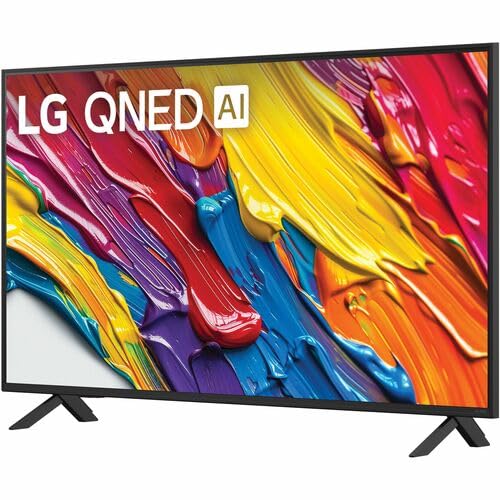
Image : Arrière view of the LG 43QNED82AUA TV with its stand.
4.2 Montage mural (en option)
This TV supports VESA mount standard 200 x 200 mm. For wall mounting, remove the stand and use a compatible wall mount bracket (sold separately). Follow the instructions provided with your wall mount.
4.3 Connexion d'appareils
Connect your external devices (cable box, Blu-ray player, gaming console, etc.) to the appropriate ports on the TV. The TV features 3 HDMI ports, 1 USB port, Ethernet, and S/PDIF (Optical) for audio output.

Image: Connectivity ports on the back of the LG 43QNED82AUA TV.
4.4 Mise sous tension
Plug the power cable into the TV and then into a wall outlet. Press the power button on the remote control or on the TV to turn it on. Follow the on-screen instructions for initial setup, including network connection and channel scanning.
5. Utilisation de votre téléviseur
Télécommande 5.1
The included Magic Remote allows for intuitive control with point-and-click functionality, voice commands, and a scroll wheel. Insert the two AAA batteries (included) into the remote control.
5.2 WebPlateforme intelligente OS 24
Votre téléviseur fonctionne avec des systèmes LG. webOS 24 operating system. Navigate through apps, settings, and inputs using the customizable Quick Cards. Access popular streaming services like Netflix, Prime Video, Disney Plus, HBO Max, and Apple TV directly from the home screen.
5.3 Paramètres d'image et de son
Access the settings menu to adjust picture modes (e.g., Standard, Vivid, Cinema, Filmmaker Mode) and sound modes (e.g., AI Sound Pro, Standard, Cinema). The α7 AI Processor Gen8 automatically optimizes these settings based on the content being viewéd.

Image: Dynamic QNED Color representation.
6. Smart Features and AI
6.1 AI Picture and Sound
The α7 AI Processor Gen8 enhances brightness, improves sound, and refines picture detail with 4K upscaling and Dynamic Tone Mapping. AI Sound Pro provides virtual 5.1 surround sound, and WOW Orchestra integrates TV speakers with compatible LG soundbars for an enhanced audio experience.
6.2 Voice Assistance and AI Search
Your TV has Alexa Built-in. Press the Alexa button on your remote to activate voice commands. Utilize AI Rechercher personalized recommendations and to find content quickly. The TV also supports Google Assistant, Apple AirPlay 2, and Google Cast for seamless integration with your smart home ecosystem.

Image: LG AI Search interface.
7. Fonctionnalités de jeu
The LG QNED AI 4K TV is designed for an optimal gaming experience with a 60 Hz native refresh rate, which can be boosted up to 144 Hz with VRR (Variable Refresh Rate) enabled. It supports FreeSync and features LG Game Optimizer and Game Dashboard for quick access to gaming settings.
- FreeSync & VRR: Réduit les déchirures d'écran et les saccades pour une expérience de jeu plus fluide.
- Optimiseur de jeu et tableau de bord : Centralized hub for adjusting game settings, including genre-specific picture modes.
- Cloud Gaming : Access GeForce NOW and Xbox Cloud Gaming (subscriptions and compatible controllers required).
- ALLM (mode de faible latence automatique) : Passage automatique en mode faible latence lorsqu'une console de jeux est détectée.

Image: Gaming experience on the LG 43QNED82AUA TV.
8. Connectivité
Your LG QNED AI 4K Smart TV offers a variety of connectivity options:
- HDMI: 3 ports for connecting external devices.
- USB: 1 port for media playback or connecting USB devices.
- Ethernet : Pour connexion Internet filaire.
- Wifi: Intégré pour l'accès Internet sans fil.
- Bluetooth 5.0: Pour connecter des casques sans fil, des barres de son ou d'autres appareils Bluetooth.
- Optique (S/PDIF) : Pour la sortie audio numérique vers les systèmes audio.
- Miroir de l'écran: Supports AirPlay 2 and Google Cast for casting content from mobile devices.
9. Entretien
9.1 Nettoyage du téléviseur
Unplug the TV before cleaning. Use a soft, dry cloth to wipe the screen and exterior. For stubborn marks, lightly dampNettoyez le chiffon avec de l'eau ou un nettoyant pour écrans spécialisé. Évitez d'utiliser des produits chimiques agressifs ou des matériaux abrasifs.
9.2 Mises à jour logicielles
Ensure your TV's software is up to date for optimal performance and new features. Software updates auto-download when connected to the internet. If "auto-update" is disabled, you will receive a prompt to update manually.
10. Dépannage
Si vous rencontrez des problèmes avec votre téléviseur, reportez-vous aux solutions courantes suivantes :
| Problème | Solution |
|---|---|
| Pas de courant | Check power cable connection, wall outlet, and remote batteries. |
| Pas d'image, mais le son est présent. | Verify input source, check cable connections, try a different HDMI port. |
| Pas de son, mais l'image est présente. | Check volume, mute status, audio output settings, and external audio device connections. |
| La télécommande ne fonctionne pas | Replace batteries, ensure no obstructions between remote and TV, re-pair Magic Remote if necessary. |
| Mauvaise qualité d'image | Adjust picture settings, check source resolution, ensure strong signal for broadcast channels. |
| Impossible de se connecter au Wi-Fi | Restart router, check Wi-Fi password, ensure TV is within range, try wired Ethernet connection. |
For further assistance, please refer to the full electronic manual available on the LG support webconsultez le site ou contactez le service client LG.
11. Spécifications
| Fonctionnalité | Détail |
|---|---|
| Taille de l'écran | 43 pouces |
| Technologie d'affichage | LED (QNED) |
| Résolution | 4K (3840 x 2160) |
| Taux de rafraîchissement | 60 Hz (Native), up to 144 Hz (VRR) |
| Processeur | Processeur a7 AI Gen8 |
| Prise en charge HDR | HDR10, HLG |
| Système opérateur | webSystème d'exploitation 24 |
| Connectivité | Wi-Fi, Bluetooth 5.0, Ethernet, 3x HDMI, 1x USB, Optical (S/PDIF) |
| Assistants vocaux | Alexa Built-in, Google Assistant compatible |
| Dimensions (avec support) | 10.1"P x 38.1"L x 25"H |
| Poids (sans support) | 20.7 livres |
| Norme de montage VESA | 200 x 200 mm |
| Consommation d'énergie | 82 watts |
| Consommation annuelle d'énergie | 152 kilowattheures par an |

Image: LG 43QNED82AUA TV dimensions.
12. Garantie et assistance
12.1 Informations sur la garantie
This LG TV comes with a 1 Year Parts & Labor Limited Warranty. Please retain your proof of purchase for warranty claims. For full warranty terms and conditions, refer to the warranty card included with your product or visit the official LG website.
12.2 Assistance clientèle
For technical support, product registration, or service inquiries, please visit the LG support website or contact their customer service hotline. Contact information can be found on the LG official websur le site ou dans la documentation fournie avec votre téléviseur.