Introduction
This manual provides detailed instructions for the installation, operation, and maintenance of your Alpine ILX-W670-S 7-inch Double-DIN Digital Multimedia Receiver with Backup Bullet Camera. Please read this manual thoroughly before using the product to ensure proper operation and to prevent damage.
Consignes de sécurité
Always observe the following safety precautions to prevent injury or damage to the unit and vehicle:
- N’utilisez pas l’appareil d’une manière qui vous distrait de la conduite. La sécurité routière doit toujours être votre priorité.
- Ensure all wiring is correctly connected to prevent short circuits or electrical hazards. Incorrect wiring can cause fire or damage.
- Consultez un professionnel pour l'installation si vous avez des doutes sur certaines étapes.
- Réglez le volume à un niveau qui vous permette d'entendre les bruits extérieurs, comme les véhicules d'urgence.
- Do not disassemble or modify the unit. This may cause damage and void the warranty.
Contenu du colis
Vérifiez que tous les éléments sont présents dans le colis :
- Alpine ILX-W670-S Digital Multimedia Receiver
- BULCAMC-1 Backup Bullet Camera
- Wiring Harnesses and Connectors
- Matériel de montage
- Manuel de l'utilisateur (ce document)

Figure 1 : Alpine ILX-W670-S Digital Multimedia Receiver with included Backup Bullet Camera. The image displays the 7-inch touchscreen receiver unit, the compact bullet-style backup camera, and a small key fob accessory.
Installation
Installation du récepteur
The ILX-W670-S is designed for standard double-DIN vehicle openings. Its shallow-mount chassis is beneficial for vehicles with limited dash space. Professional installation is recommended for optimal performance and safety.
- Préparation: Débranchez la borne négative de la batterie du véhicule avant d'entreprendre tout travail électrique.
- Montage: Secure the receiver into the double-DIN opening using the provided mounting hardware. Ensure it is firmly seated.
- Connexions de câblage :
- Connect the main power harness (constant 12V, accessory 12V, ground).
- Connect speaker wires to the vehicle's speaker system.
- Connect the backup camera input cable.
- Connect the USB and AUX input cables as needed.
- For steering wheel control integration, connect the SWC adapter via the 3.5mm mini jack.
- Si vous utilisez un externe amplifiers, connect the 4V pre-outs (front, rear, subwoofer).
- Essai: Rebranchez la batterie et effectuez un test de fonctionnement de base avant de remonter complètement le tableau de bord.
Installation de la caméra de recul
The BULCAMC-1 bullet camera provides a wide-angle view pour une sécurité accrue lors des manœuvres en marche arrière.

Figure 2 : Gros plan view of the BULCAMC-1 Backup Bullet Camera. This image highlights the compact design and mounting bracket of the camera, which is designed for discreet installation.
- Emplacement de montage : Choose a central location at the rear of the vehicle, typically near the license plate, that offers a clear, unobstructed view.
- Montage sécurisé : Drill necessary holes (if required) and securely mount the camera using the provided hardware. Ensure the camera is aimed correctly.
- Câblage :
- Connect the camera's power wire to the vehicle's reverse light circuit (12V) so it activates when the vehicle is in reverse.
- Run the video signal cable from the camera to the camera input on the ILX-W670-S receiver.
- Imperméabilisation : Ensure all connections are properly sealed, as the camera is IP67-68 waterproof rated.
Mode d'emploi
Marche/Arrêt
The unit will power on automatically when the vehicle's ignition is turned to the accessory or on position. To turn off the unit, turn off the vehicle's ignition.
Interface à écran tactile
The ILX-W670-S features a responsive 6.75-inch touchscreen display with 800 x 480 resolution. The home screen is customizable, allowing you to arrange icons and even upload your own background image. The key illumination can be set to one of five colors (red, green, blue, amber, white).
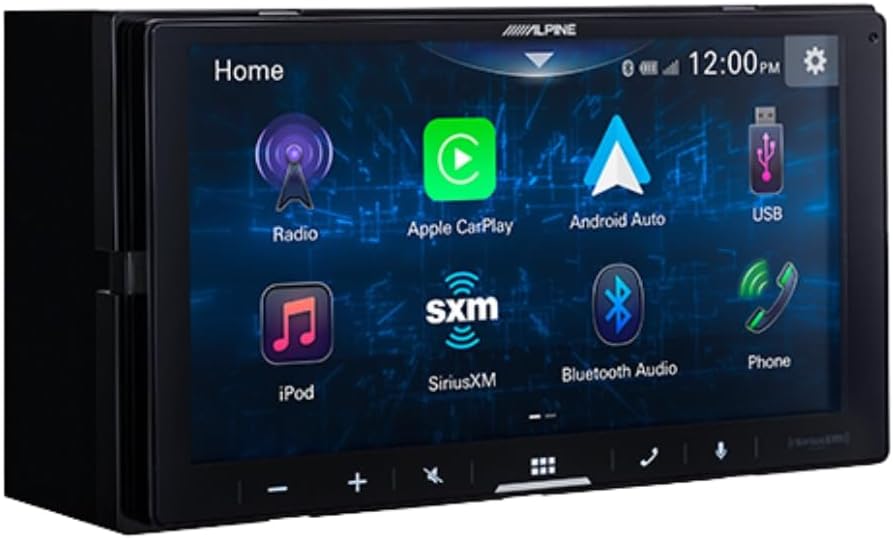
Figure 3 : Alpine ILX-W670-S home screen displaying various application icons. This image shows the customizable interface with options for Radio, Apple CarPlay, Android Auto, USB, iPod, SiriusXM, Bluetooth Audio, and Phone.
Fonctionnalités audio
- Equalizer: Utilize the 13-band graphic EQ to fine-tune audio frequencies to your preference.
- Correction du temps : The 6-channel time correction feature allows for precise adjustment of sound delivery to each speaker, optimizing the sound stage.
- Croisements : Adjust front, rear, and subwoofer crossovers to manage frequency distribution to your speakers.
- Sound Boost Menu: Access dedicated controls for bass, mid-bass, and subwoofer output.
- Formats audio pris en charge : The unit supports AAC, FLAC, MP3, and WMA audio playback.
Connectivité
- Apple CarPlay et Android Auto : Connect your compatible smartphone via USB for wired access to navigation, music, messaging, and other apps directly on the receiver's screen.

Figure 4 : Alpine ILX-W670-S display showing the Apple CarPlay interface. This image illustrates the integration of smartphone applications like Phone, Music, Maps, Messages, and Podcasts onto the receiver's screen.
- Bluetooth : Associez votre smartphone pour passer des appels mains libres et écouter de l'audio en streaming sans fil.
- SiriusXM-Ready: The unit is compatible with SiriusXM satellite radio (requires a separate SiriusXM Connect Vehicle Tuner and subscription).
- Entrée AUX: Connect external audio devices using the 3.5mm auxiliary input.
- Entrée USB: Use the USB port for media playback or smartphone connectivity.
- Commandes au volant (SWC) : Integrate with your vehicle's factory steering wheel controls using a compatible adapter connected to the 3.5mm mini jack.
Lecture vidéo
The receiver supports various video formats including MP4, MKV, MOV, H.264, FLV, MPEG-4, and AVC. Video playback is typically restricted while the vehicle is in motion for safety reasons.
Fonctionnement de la caméra de recul
Lorsque le véhicule est en marche arrière, l'affichage bascule automatiquement sur la caméra. view, providing a 155-degree wide-angle perspective. The camera has a low light sensitivity of 0.5 lux, ensuring visibility in various lighting conditions.
Entretien
- Nettoyage de l'écran : Utilisez un chiffon doux non pelucheux pour essuyer délicatement l'écran tactile. Pour les traces tenaces, frottez légèrement.ampNettoyez le chiffon avec de l'eau ou un nettoyant adapté aux écrans. Évitez les matériaux abrasifs et les produits chimiques agressifs.
- Soins généraux: Veillez à ce que l'appareil soit exempt de poussière et de débris. Assurez-vous que toutes les connexions restent bien fixées.
- Nettoyage de l'appareil photo : Periodically clean the camera lens with a soft cloth to ensure a clear view.
Dépannage
| Problème | Cause possible | Solution |
|---|---|---|
| Pas d'alimentation à l'unité | Fusible grillé ; câblage incorrect ; connexion électrique desserrée. | Check vehicle fuses and the unit's fuse. Verify power and ground connections. Ensure the ignition is on. |
| Pas de sortie audio | Volume too low; mute activated; speaker wires disconnected; incorrect audio source selected. | Increase volume. Check if mute is active. Verify speaker wiring. Select the correct audio source. |
| Apple CarPlay/Android Auto ne se connectent pas | Faulty USB cable; phone not compatible; software issue; phone settings. | Use a high-quality, certified USB cable. Ensure your phone's OS is updated. Check phone settings for CarPlay/Android Auto permissions. Restart phone and receiver. |
| La caméra de recul ne s'affiche pas. | Camera power issue; video cable disconnected; vehicle not in reverse. | Ensure vehicle is in reverse. Check camera power connection (to reverse lights). Verify video cable connection to the receiver. |
| L'écran tactile ne répond pas | Problème logiciel temporaire ; écran endommagé. | Redémarrez l'appareil (éteignez puis rallumez le véhicule). Si le problème persiste, contactez l'assistance. |
Caractéristiques
Alpine ILX-W670-S Digital Multimedia Receiver
- Afficher: 6.75-inch capacitive touchscreen (800 x 480 resolution)
- Éclairage des touches : 5-color customizable (red, green, blue, amber, white)
- Amplifier : Built-in 16W RMS / 45W peak x 4 channels
- Traitement audio: 13-band graphic EQ, 6-channel time correction, Sound Boost menu, Front/Rear/Subwoofer crossovers
- Pré-sorties : 3 pairs (Front, Rear, Subwoofer) at 4V
- Entrées : 1x AUX (3.5mm), 1x USB, 1x Camera, SWC adapter via 3.5mm mini jack
- Connectivité : Wired Apple CarPlay, Wired Android Auto, Bluetooth (hands-free calling & audio streaming), SiriusXM-ready
- Formats audio pris en charge : AAC, FLAC, MP3, WMA
- Formats vidéo pris en charge : MP4, MKV, MOV, H.264, FLV, MPEG-4, AVC
- Dimensions: 8.75 x 6 x 7 pouces (Produit)
- Poids: 3.4 livres
BULCAMC-1 Backup Bullet Camera
- Capteur: CMOS
- Résolution: 420 lignes
- Éclairage minimum : 0.5 XNUMX lux
- View Angle: 155 degrés
- Indice d'étanchéité : IP67-68
- Température de fonctionnement : -30 à 70 ℃ (-22 à 158 ℉)
Informations sur la garantie
Alpine products are manufactured to high-quality standards. For specific warranty terms and conditions, please refer to the warranty card included with your product or visit the official Alpine webConsultez le site. Conservez votre preuve d'achat pour toute réclamation au titre de la garantie.
Soutien
For further assistance, technical support, or to download the latest firmware updates, please visit the official Alpine website à www.alpine-usa.com. You may also contact Alpine customer service directly for personalized support.


