Introduction
Thank you for choosing the GMBACK Wireless Pro Controller. This manual provides detailed instructions for setting up, operating, and maintaining your controller to ensure optimal performance and an enhanced gaming experience. Please read this manual thoroughly before use.
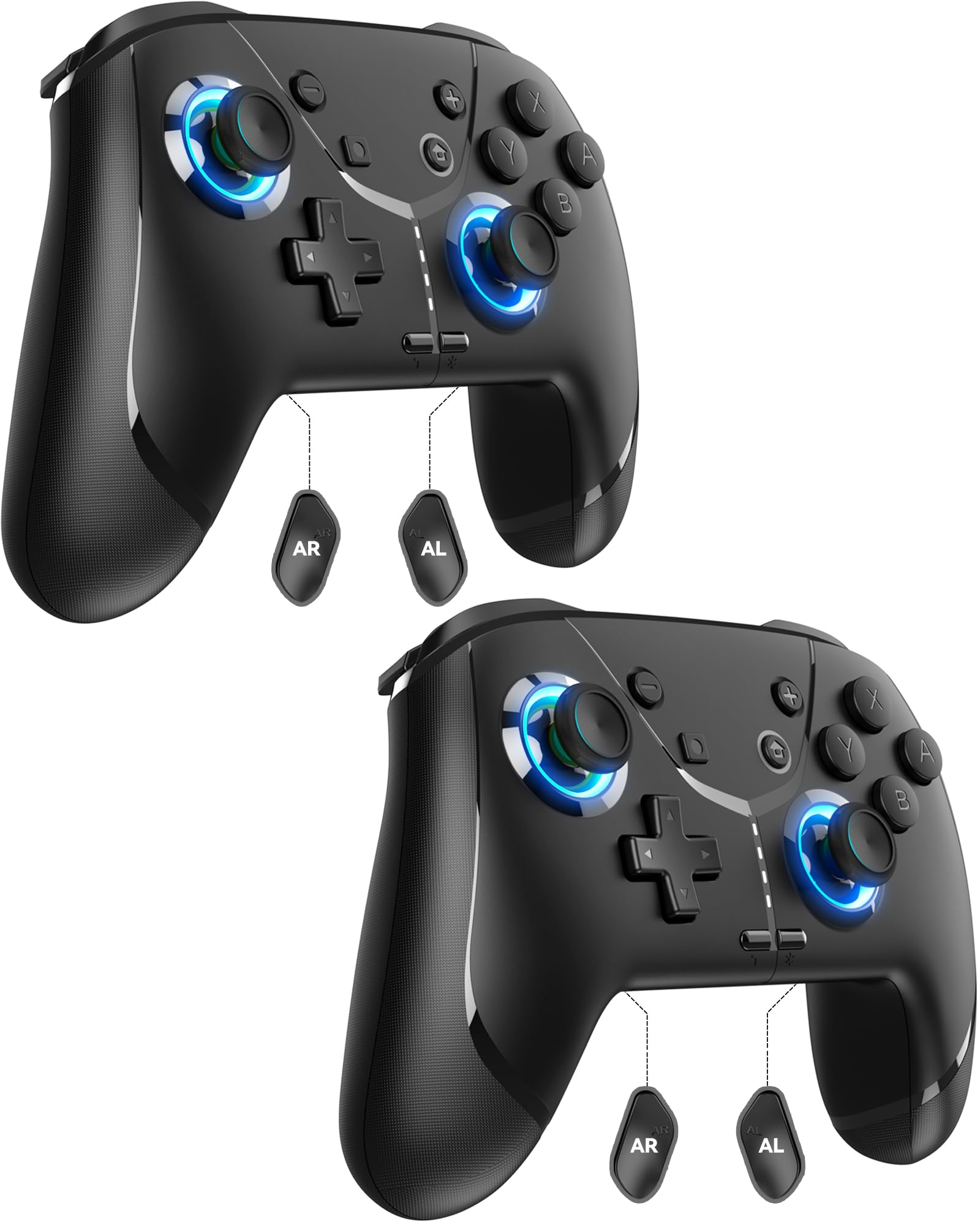
Image: GMBACK Wireless Pro Controller, front view.
Contenu du colis
- 2 x GMBACK Wireless Pro Controllers
- 2 câbles de chargement USB-C
- 1 x Manuel d'utilisation
Commencer
1. Appairage avec la Nintendo Switch
- Assurez-vous que votre console Nintendo Switch est allumée et mise à jour avec la dernière version du logiciel système.
- Dans le menu HOME, sélectionnez « Contrôleurs », alors 'Changer de prise/ordre'.
- On the GMBACK controller, press and hold the Bouton de synchronisation (located on the top edge near the USB-C port) for 3-5 seconds until the LED indicators begin to flash rapidly.
- The controller will automatically pair with the Switch. Once paired, the player LED(s) on the bottom of the controller will light up solid.

Image: GMBACK Wireless Pro Controller connected to a Nintendo Switch console.
2. Connexion à un PC (filaire)
- Connect the GMBACK controller to your PC using the provided USB-C cable.
- The controller will be recognized as a standard gamepad. Drivers may install automatically.
- For optimal compatibility, ensure your PC's operating system is up to date.
3. Chargement du contrôleur
- Connect the controller to a USB power source (e.g., Switch dock, PC, USB wall adapter) using the provided USB-C cable.
- Les indicateurs LED afficheront l'état de charge. Une charge complète prend généralement entre 2 et 3 heures.
- The controller features an 800mAh battery, providing approximately 15-20 hours of playtime on a full charge.

Image: Visual representation of the 800mAh battery, 15-20 hours playtime, and 2-3 hours charging time.
Key Features & Functions
1. Loop Macro Function
The controller supports a loop macro function, allowing you to record and replay a sequence of up to 30 seconds of button presses and joystick movements. This includes joysticks, triggers, D-pad, ABXY, and +/- buttons.
- Enregistrer: Refer to the detailed instructions in the included user manual for specific recording steps.
- To Start/Stop Loop: Tenez le Bouton turbo et le Bouton macro simultaneously. The controller will automatically replay your recorded actions in a continuous loop.

Image : Arrière view of the controller highlighting the AR and AL programmable buttons and the text 'Loop Macro Function'.
2. Capteur gyroscopique à 6 axes
The integrated 6-axis gyro sensor provides precise motion detection, allowing for intuitive control in compatible games that utilize motion sensing. This enhances immersion and gameplay accuracy.

Image: Controller being used for a racing game, illustrating the 6-Axis Gyro Sensor feature.
3. Customizable Turbo Function
The controller offers three adjustable turbo speeds for rapid-fire actions. This feature can be set to either auto-fire or manual-fire mode.
- Pour régler la vitesse du turbo : Refer to the included user manual for specific button combinations to cycle through the three turbo speeds.
- Pour activer/désactiver le mode turbo : Appuyez sur le Bouton turbo along with the desired action button.

Image: Controller displaying the 'Auto & Manual Turbo' feature with a gaming background.
4. Double réglage des vibrations
Experience immersive feedback with four levels of dual vibration intensity: None, Weak, Medium, and Strong. Adjust the vibration to your preference for different games.
- Pour régler les vibrations : Consult the user manual for the specific button combination to cycle through vibration levels.

Image: Controller illustrating the four levels of dual vibration: None, Weak, Medium, Strong.
5. Éclairage RVB
The controller features dynamic RGB lighting around the joysticks, enhancing the visual appeal during gameplay. The lighting can be adjusted or turned off.
- To Adjust RGB Lighting: Refer to the user manual for instructions on changing lighting modes or turning off the lights.

Image : Manette de testasing its RGB lighting feature around the joysticks.
6. Remappable ABXY Buttons
The ABXY buttons can be remapped to switch between Nintendo Switch and Xbox layouts, providing flexibility for different gaming preferences without needing to physically remove any buttons.
- To Remap ABXY: Follow the instructions in the user manual for the specific button sequence to switch layouts.

Image: Controller illustrating the ABXY button function switching between Nintendo Switch and Xbox layouts.
7. Screenshot and Home Wake-up
- The controller includes a dedicated Bouton de capture d'écran for capturing in-game moments.
- Le Bouton d'accueil can be used to wake up your Nintendo Switch console from sleep mode.
Entretien
- Nettoyage: Utilisez un chiffon doux et sec pour nettoyer la manette. Évitez d'utiliser des produits chimiques agressifs ou des matériaux abrasifs.
- Stockage: Rangez la manette dans un endroit frais et sec, à l'abri de la lumière directe du soleil et des températures extrêmes.
- Entretien de la batterie: Pour prolonger la durée de vie de la batterie, évitez de décharger complètement la manette fréquemment. Rechargez-la régulièrement, même si vous ne l'utilisez pas en permanence.
Dépannage
- Le contrôleur ne se connecte pas :
- Assurez-vous que le contrôleur est chargé.
- Vérifiez que la Switch est en mode « Changer la prise/l'ordre ».
- Try restarting both the Switch and the controller.
- Assurez-vous qu'aucun autre appareil sans fil ne provoque d'interférences.
- Les boutons ne répondent pas :
- Vérifiez si la manette est correctement appariée.
- Test button functionality in Switch system settings.
- Ensure the controller's firmware is up to date (if applicable, check GMBACK support webplacer).
- Problèmes de charge :
- Use the provided USB-C cable.
- Essayez une autre source d'alimentation USB.
- Assurez-vous que le port de chargement de la manette est propre et exempt de débris.
Caractéristiques
| Fonctionnalité | Détail |
|---|---|
| Modèle | HD6900 |
| Compatibilité | Nintendo Switch 2, Switch, Switch Lite, Switch OLED, Windows PC (wired) |
| Capacité de la batterie | 800mAh |
| Récréation | 15-20 heures |
| Temps de charge | 2-3 heures |
| Connectivité | Sans fil (Bluetooth), filaire (USB-C) |
| Caractéristiques spéciales | Loop Macro, 6-Axis Gyro Sensor, Dual Vibration (4 levels), Adjustable Turbo (3 speeds), RGB Lighting, Remappable ABXY, Screenshot, Home Wake-up |
| Poids de l'article | 8.5 onces |
| Dimensions du colis | 6.54 x 5.31 x 5.28 pouces |
Vidéo officielle du produit
Vidéo : Plusview of the GMBACK Wireless Switch Controller, demonstrating its features and compatibility with Nintendo Switch, Switch Lite, and Switch OLED consoles.
Garantie et assistance
GMBACK products come with a standard manufacturer's warranty. For detailed warranty information, technical support, or any inquiries regarding your controller, please refer to the contact information provided on the product packaging or visit the official GMBACK website.

Image: Icon representing customer support.
