1. Introduction
This manual provides detailed instructions for the installation, operation, and maintenance of your Suptek MD9442 Dual Monitor Arm Desk Mount and MD9401 Single Monitor Mount Stand. Please read this manual thoroughly before installation to ensure correct setup and safe operation. Keep this manual for future reference.
2. Consignes de sécurité
- Avant l'installation, assurez-vous que tous les composants sont présents et en bon état. Ne pas utiliser si des pièces sont manquantes ou défectueuses.
- Verify that the mounting surface (desk) can safely support the combined weight of the mount and your monitors.
- Do not exceed the maximum weight capacity specified for each mount.
- Tighten all screws firmly, but do not overtighten to avoid stripping threads or damaging the desk.
- Tenir les enfants éloignés de la zone d'installation. Les petites pièces peuvent présenter un risque d'étouffement.
- En cas de doute concernant le processus d'installation, consultez un professionnel qualifié.
3. Contenu du colis
Please check that all parts are included in your package. Components may vary slightly between the dual (MD9442) and single (MD9401) monitor mounts.
- Monitor Arm(s)
- Bureau Clamp (C-clamp)
- Grommet Base (optional installation)
- Poteau de montage
- Plaques VESA
- Kit de visserie (vis, rondelles, clés Allen)
- Clips de gestion des câbles
4. Configuration et installation
Both the MD9442 Dual Monitor Arm and MD9401 Single Monitor Mount Stand offer two installation options: C-clamp and Grommet Base. Ensure your desk thickness is suitable (up to 4 inches for C-clamp).
4.1. Choisissez votre méthode d'installation
Déterminer s'il convient d'utiliser le C-clamp for edge mounting or the grommet base for through-hole mounting. The grommet base requires a minimum desk hole diameter of 1.65 inches (42mm).

This image illustrates the dimensions of the dual monitor mount, including the minimum desk hole diameter of 1.65 inches (42mm) required for grommet installation.
4.2. C-Clamp Installation (Recommended for most desks)
- Attachez le C-clamp to the bottom of the mounting pole.
- Positionnez le C-clamp on the edge of your desk and tighten the knob until the mount is securely fastened.
- Ensure the mount is stable and does not wobble.

This image shows the dual monitor arm securely installed on a desk using the C-clamp méthode.
4.3. Grommet Base Installation (For desks with a pre-drilled hole)
- Démontez le C-clamp s'il est déjà fixé au poteau.
- Insert the mounting pole through the grommet hole in your desk.
- Secure the grommet base plate and tighten the nut from underneath the desk until the mount is stable.
4.4. Attaching Monitor Arms and VESA Plates
- Slide the monitor arm(s) onto the mounting pole at your desired height. Tighten the height adjustment screw.
- Attach the VESA plate to the back of your monitor using the provided screws. Ensure the VESA pattern (75x75mm or 100x100mm) matches your monitor.
- Carefully slide the monitor with the attached VESA plate onto the arm's mounting head. Secure it with the locking mechanism.
- Repeat for the second monitor if using the MD9442 dual arm.

This image demonstrates two monitors mounted on the dual arm, highlighting VESA compatibility (75x75mm/100x100mm) and maximum weight capacity of 22lbs per monitor.
5. Mode d'emploi
Once installed, your Suptek monitor mount allows for various adjustments to achieve an ergonomic viewexpérience de travail.
5.1. Réglage de la hauteur
Desserrez le clamp on the mounting pole to slide the monitor arm(s) up or down. Retighten the clamp firmly at the desired height.

This image shows a single monitor being adjusted vertically along the pole to an ergonomic height.
5.2. Réglage de l'inclinaison
The monitor can be tilted up or down to reduce glare and optimize viewangles d'inclinaison.
- MD9442 (Dual): Tilt range of ±90° (up and down).
- MD9401 (Single): Tilt range of ±45° (up and down).

Cette image offre une vue d'ensemble visuelle.view of the various adjustments, including tilt, rotation, and swivel.
5.3. Réglage pivotant
Faites pivoter le moniteur vers la gauche ou la droite pour partager votre écran ou ajuster votre viewposition de départ.
- MD9442 (Dual): Swivel range of ±90° (left and right).
- MD9401 (Single): Swivel range of ±45° (left and right).
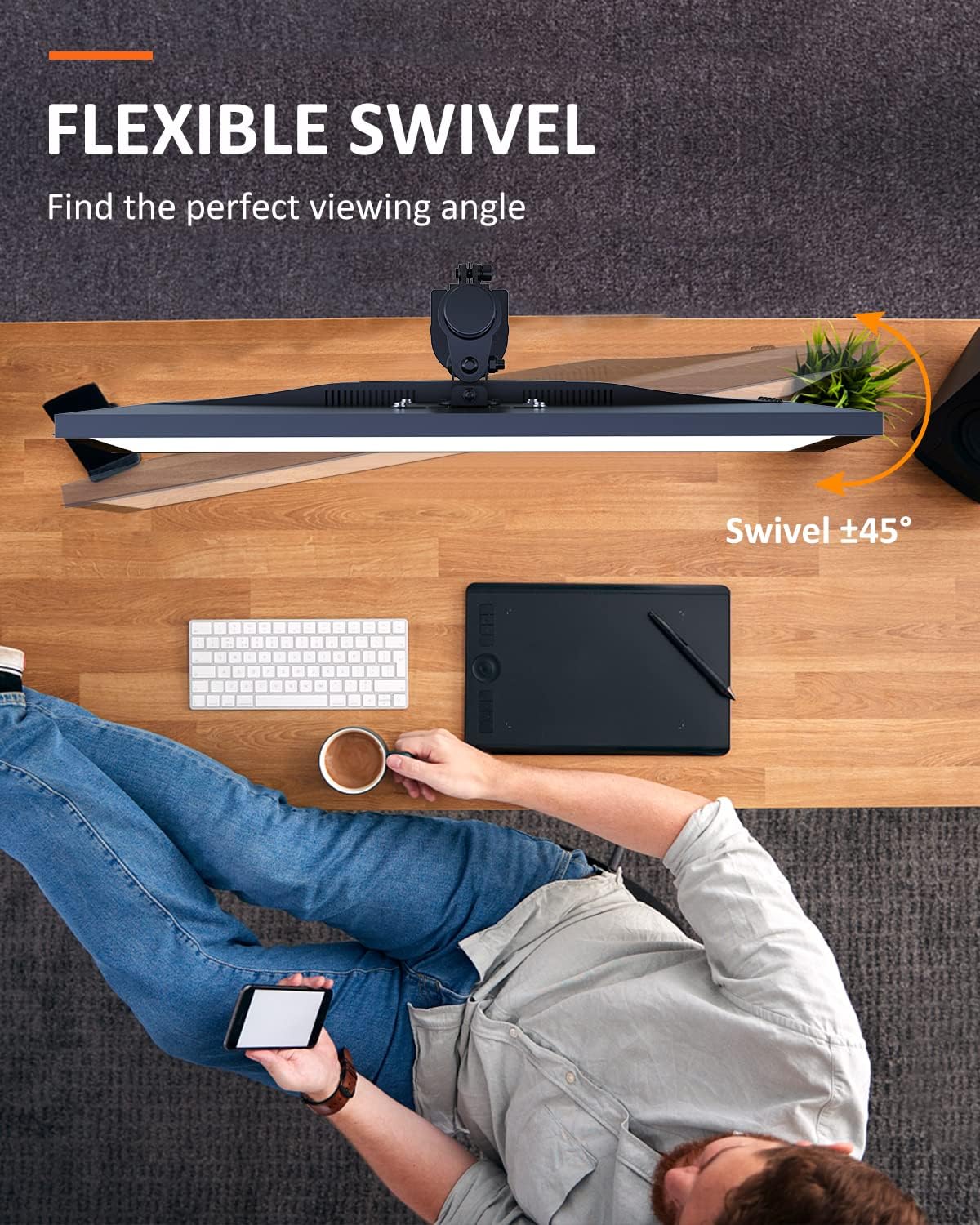
This image shows the flexible swivel capability of the single monitor mount, allowing for easy adjustment of the viewangle de vue.
5.4. Rotation de l'écran
Rotate your monitor 360° for landscape or portrait orientation.
- MD9442 (Dual): Rotation à 360°.
- MD9401 (Single): Rotation à 360°.

This image illustrates the 360° screen rotation feature, allowing monitors to be used in both landscape and portrait modes.
5.5. Gestion des câbles
Utilize the integrated cable management clips or channels on the arm(s) and pole to route and organize your monitor cables for a tidy workspace.
6. Entretien
- Vérifiez régulièrement toutes les vis et les fixations pour vous assurer qu'elles restent bien serrées et sécurisées.
- Nettoyez le support avec un chiffon doux et sec.amp Chiffon. Évitez les nettoyants abrasifs ou les solvants.
- Ensure that cables are not pinched or under excessive tension.
7. Dépannage
- La monture est instable : Assurez-vous que le C-clamp or grommet base is tightened securely to the desk. Verify the desk surface is flat and sturdy.
- Monitor sags or won't hold position: Check that the VESA plate is properly attached to the monitor and the arm. Ensure the weight of the monitor does not exceed the mount's capacity. Adjust tension screws on the arm joints if available (refer to specific model diagrams if provided).
- Difficulté d'adaptation : Loosen adjustment screws slightly before attempting to move the monitor, then retighten. Do not force adjustments.
8. Spécifications
| Fonctionnalité | MD9442 (Dual Monitor Arm) | MD9401 (Single Monitor Mount) |
|---|---|---|
| Compatibilité de la taille de l'écran | Jusqu'à 27 pouces par écran | 13 à 32 pouces |
| Capacité de poids | Up to 22 lbs (10 kg) per screen | Jusqu'à 22 lb (10 kg) |
| Compatibilité VESA | 75x75mm, 100x100mm | 75x75mm, 100x100mm |
| Rotation | 360° | 360° |
| Inclinaison | ±90° (haut/bas) | ±45° (haut/bas) |
| Pivot | ±90° (gauche/droite) | ±45° (gauche/droite) |
| Options d'installation | Cl-Camp, Grommet Base (fits desk up to 4" thickness) | |
9. Garantie et assistance
Suptek products are designed for durability and performance. For warranty information or technical support, please refer to the product packaging or contact Suptek customer service through their official website. Please have your model number (MD9442 or MD9401) and purchase information ready when contacting support.


