1. Introduction
This manual provides essential information for the installation, operation, and maintenance of your GIGABYTE GeForce RTX 5060 WINDFORCE MAX OC 8G Graphics Card. This high-performance graphics card is powered by the NVIDIA Blackwell architecture and DLSS 4, featuring 8GB of 128-bit GDDR7 memory and a PCIe 5.0 interface. It incorporates the WINDFORCE cooling system, a Hawk fan, server-grade thermal conductive gel, and a reinforced structure for optimal performance and durability. Please read this manual thoroughly before installation and use.
2. Consignes de sécurité
- Débranchez toujours l'alimentation électrique de votre ordinateur avant d'installer ou de retirer un composant matériel.
- Wear an anti-static wrist strap or frequently touch a grounded metal object to prevent electrostatic discharge (ESD) damage to the graphics card and other components.
- Manipulez la carte graphique par ses bords pour éviter de toucher les composants sensibles.
- Assurez une ventilation adéquate à l'intérieur du boîtier de votre ordinateur afin d'éviter toute surchauffe.
- Do not attempt to repair the graphics card yourself. Refer to qualified service personnel for assistance.
3. Contenu du colis
Vérifiez que tous les éléments sont présents dans votre colis :
- GIGABYTE GeForce RTX 5060 WINDFORCE MAX OC 8G Graphics Card
- Manuel d'instructions
Note: Additional accessories may vary by region or retailer.
4. Configuration (Installation)
4.1 Installation du matériel
Before proceeding, ensure your system meets the minimum requirements, including a 450W power supply and a compatible PCI Express graphics slot.
- Préparez votre système : Turn off your computer and disconnect the power cable from the wall outlet. Open your computer case.
- Localisez l'emplacement PCI Express : Identifiez un emplacement PCI Express 5.0 x8 disponible sur votre carte mère.
- Retirer les caches des fentes : Retirez les caches métalliques des emplacements situés à l'arrière de votre boîtier d'ordinateur, correspondant à la taille de votre carte graphique.
- Installer la carte graphique : Alignez soigneusement la carte graphique avec le port PCI Express et appuyez fermement jusqu'à ce qu'elle soit bien en place. Assurez-vous que le clip de fixation sur la carte mère s'enclenche correctement.
- Carte graphique sécurisée : Fixez la carte graphique au boîtier de l'ordinateur à l'aide de vis.
- Connecter l'alimentation : Connect the required 1x 8-pin PCIe power connector from your power supply to the graphics card.
- Affaire close : Refermez le boîtier de votre ordinateur et rebranchez le câble d'alimentation.

Figure 1 : Face avant view of the GIGABYTE GeForce RTX 5060 WINDFORCE MAX OC 8G Graphics Card.

Figure 2 : Côté view of the GIGABYTE GeForce RTX 5060 WINDFORCE MAX OC 8G Graphics Card, showing the heatsink and power connector.
4.2 Installation du pilote
After hardware installation, you need to install the latest drivers for optimal performance.
- Mise sous tension : Allumez votre ordinateur.
- Télécharger les pilotes : Visitez le site officiel de GIGABYTE website (www.gigabyte.com) or NVIDIA website (www.nvidia.com) pour télécharger les derniers pilotes pour votre carte graphique GeForce RTX 5060.
- Installer les pilotes : Follow the on-screen instructions to install the drivers. Restart your computer if prompted.
4.3 Vue d'ensembleview et déballage
Watch this official GIGABYTE video for a visual overview of the RTX 50 Series graphics cards and an unboxing experience.
Video 1: GIGABYTE GeForce RTX 50 Series - Official Trailer. This video provides a general overview of the RTX 50 series, highlighting key features and design elements.
Video 2: Gigabyte RTX 5060 8gb OC unboxing review by 'Remember This Tech'. This video demonstrates the unboxing process and initial impressions of the Gigabyte RTX 5060 graphics card, including its physical appearance and included accessories.
5. Fonctionnement
5.1 Connexion des écrans
The GIGABYTE GeForce RTX 5060 graphics card supports multiple display outputs for a versatile setup.
- DisplayPort : Connect up to three DisplayPort 2.1 compatible monitors using DisplayPort cables.
- HDMI: Connect one HDMI 2.1 compatible monitor or TV using an HDMI cable.
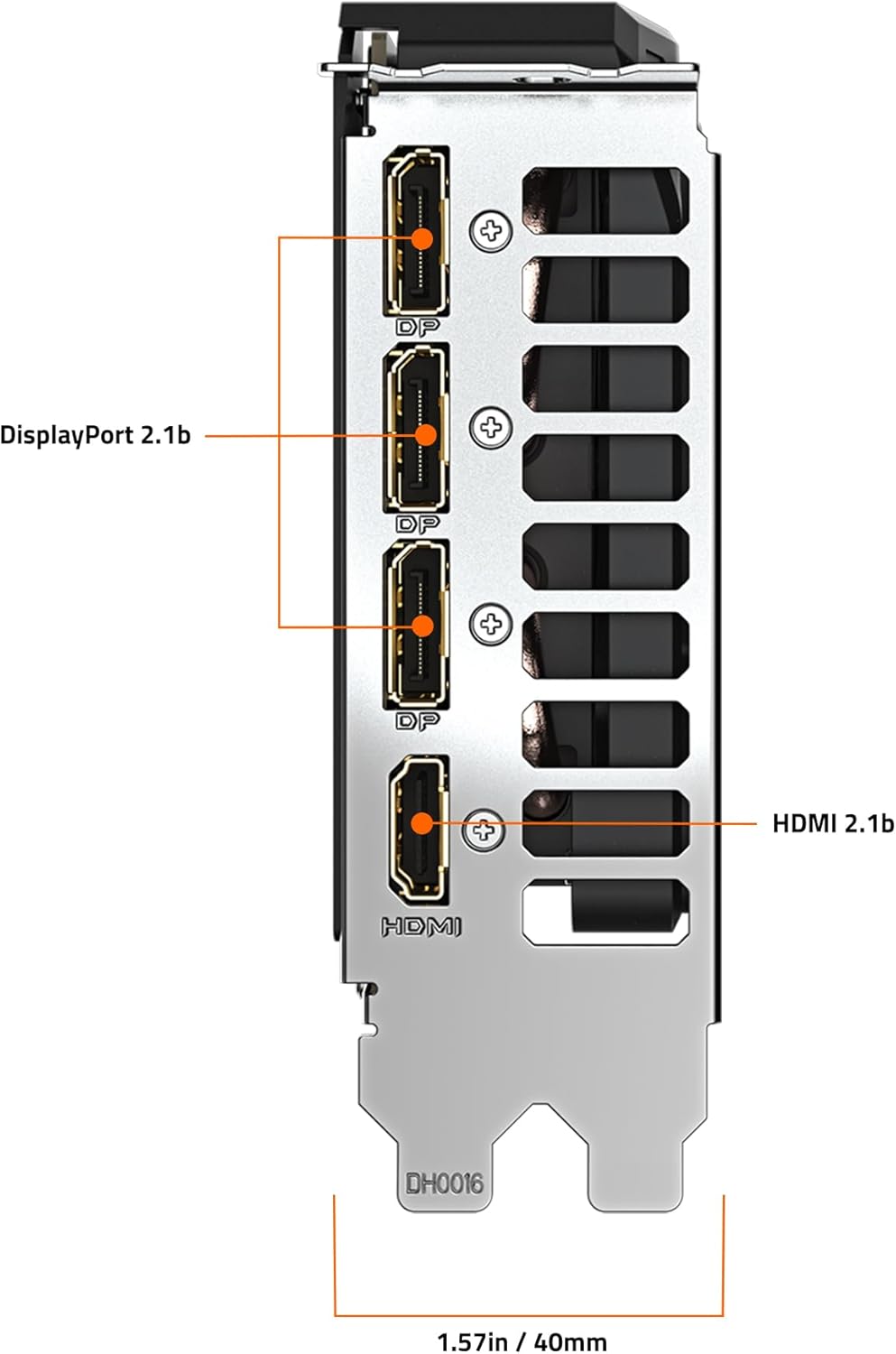
Figure 3 : Arrière view of the GIGABYTE GeForce RTX 5060 WINDFORCE MAX OC 8G Graphics Card, highlighting the DisplayPort and HDMI output connectors.
5.2 Logiciels utilitaires
Utilize GIGABYTE and NVIDIA software for enhanced control and customization:
- Centre de contrôle GIGABYTE : Download from the GIGABYTE website to monitor GPU status, adjust fan speeds, and customize RGB lighting (if applicable).
- Panneau de configuration NVIDIA : Access advanced display settings, manage 3D settings, and configure features like DLSS and Ray Tracing.
6. Entretien
6.1 Nettoyage
Un nettoyage régulier permet de maintenir des performances optimales et prolonge la durée de vie de votre carte graphique.
- Éteindre: Éteignez toujours votre ordinateur et débranchez-le de la source d'alimentation avant de le nettoyer.
- Élimination de la poussière : Use compressed air to gently blow dust from the fans, heatsink fins, and other components. Hold the fans in place to prevent over-spinning.
- Nettoyage de surface : Utilisez légèrement un chiffon doux et non pelucheux.ampened with isopropyl alcohol to clean the exterior surfaces of the card. Avoid harsh chemicals.
6.2 Mises à jour des pilotes
Keep your graphics drivers updated to ensure compatibility with the latest games and applications, and to benefit from performance improvements and bug fixes.
- Vérifiez régulièrement les spécifications de GIGABYTE ou NVIDIA. webSite pour les nouvelles versions de pilotes.
- Follow the provided instructions for driver installation.
7. Dépannage
Si vous rencontrez des problèmes avec votre carte graphique, consultez les problèmes et solutions courants suivants :
| Problème | Cause possible | Solution |
|---|---|---|
| Aucun affichage sur le moniteur | Incorrect cable connection, loose card, power issue, driver problem. | Ensure display cables are securely connected. Re-seat the graphics card. Verify power connectors are attached. Reinstall or update drivers. |
| Faibles performances dans les jeux/applications | Outdated drivers, incorrect settings, insufficient power. | Update graphics drivers. Adjust in-game graphics settings. Ensure adequate power supply. Check for background applications consuming resources. |
| Surchauffe ou bruit de ventilateur excessif | Dust accumulation, poor case airflow, high load. | Clean fans and heatsink. Improve case airflow. Monitor temperatures with GIGABYTE Control Center. Adjust fan curves if necessary. |
| Instabilité ou plantages du système | Driver conflicts, overheating, faulty hardware. | Perform a clean driver installation. Monitor temperatures. Check other system components. |
8. Spécifications
| Fonctionnalité | Détail |
|---|---|
| Unité de traitement graphique | NVIDIA GeForce RTX 5060 (Blackwell architecture) |
| Mémoire vidéo | 8 Go de GDDR7 |
| Interface mémoire | 128 bits |
| Vitesse de la mémoire | 28000 MHz |
| Vitesse d'horloge du GPU | 2512 MHz (Boost Clock) |
| PCI Express | PCIe 5.0 x8 |
| Circuit de refroidissement | WINDFORCE cooling system with Hawk fan |
| Interface de sortie vidéo | 3 ports DisplayPort 2.1, 1 ports HDMI 2.1 |
| Résolution d'écran maximale | 3840x2160 |
| Connecteur d'alimentation | 1x 8 broches |
| Bloc d'alimentation recommandé | 450W or higher |
| Dimensions (L x l x H) | 7.83 x 4.57 x 1.57 pouces (199 x 116 x 40 mm) |
| Poids de l'article | 1.1 livres |
| Caractéristiques principales | DLSS 4, AI Cores, 4th Gen Ray Tracing Cores, Reinforced structure, Server-grade Thermal conductive gel |
9. Garantie et assistance
GIGABYTE products are covered by a limited warranty. For detailed warranty information, technical support, and service inquiries, please visit the official GIGABYTE support website:
Assistance GIGABYTE : https://www.gigabyte.com/Support
Veuillez conserver votre preuve d'achat pour les réclamations au titre de la garantie.