1. Introduction
Thank you for choosing the Ekrist HX100A5 Magnetic Portable Charger. This device is designed to provide convenient and versatile charging for your mobile devices, including iPhones with MagSafe, Apple Watches, and other USB-C and Lightning compatible devices. Please read this manual thoroughly before use to ensure proper operation and to maximize the product's lifespan.

Image 1 : Terminéview of the Ekrist HX100A5 Magnetic Portable Charger's charging capacity for various devices.
2. Contenu du colis
Vérifiez que tous les articles sont présents dans votre colis :
- Ekrist HX100A5 Magnetic Portable Charger
- Câble de chargement USB-C
- Manuel de l'utilisateur (ce document)
3. Caractéristiques
- Dual Magnetic Wireless Charging: Compatible with MagSafe for iPhone 12-17 series and dedicated charging for Apple Watch (Series 1-10/Ultra).
- Câbles intégrés : Integrated Lightning and USB-C cables for direct wired charging.
- Plusieurs ports de sortie : Additional USB-A and USB-C ports for versatile wired charging.
- Haute capacité : La batterie de 20 000 mAh offre une autonomie prolongée pour de multiples recharges.
- Charge rapide PD+QC4.0 25 W : Supports rapid charging for compatible devices, reaching 50% iPhone charge in approximately 30 minutes.
- Affichage numérique LCD : Clear screen shows real-time battery percentage.
- Conception compacte et portable : Idéal pour les voyages et un usage quotidien.
- Plusieurs protections de sécurité : Built-in safeguards against overheating, overcharging, overdischarge, short circuit, overvoltage, overcurrent, and overload.

Image 2: Diagram illustrating the multiple security protections integrated into the power bank.
4. Installation
4.1 Charge initiale de la batterie externe
- Connectez le câble de chargement USB-C fourni au port d'entrée USB-C de la batterie externe.
- Plug the other end of the USB-C cable into a compatible USB wall adapter (not included).
- L'écran numérique LCD affichera l'état de charge et le pourcentage de batterie.tage. Allow the power bank to fully charge before first use. Full recharge typically takes 3-5 hours.
4.2 Comprendre l'écran LCD
The LCD display shows the current battery percentage of the power bank. When charging devices or being recharged, the display will illuminate to show the status. Press the power button briefly to check the battery level.
5. Mode d'emploi
5.1 Charging iPhone via MagSafe (Wireless)
- Assurez-vous que votre iPhone est compatible MagSafe (série iPhone 12 ou plus récente).
- Align the back of your iPhone with the magnetic charging pad on the power bank. The magnets will snap into place, and charging will begin automatically.
- Pour une connexion magnétique et une efficacité de charge optimales, utilisez un iPhone sans coque ou avec une coque compatible MagSafe.
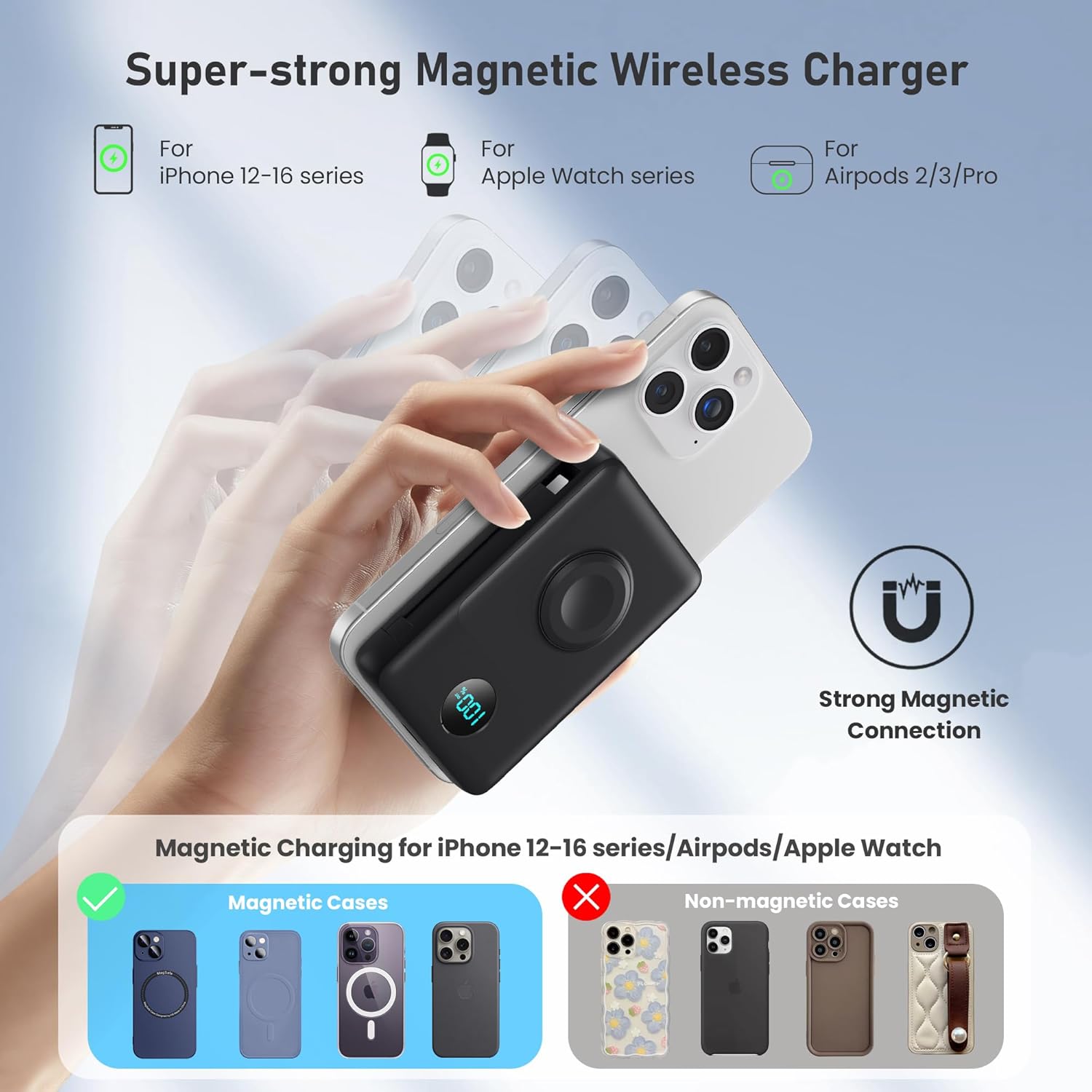
Image 3: Illustration of the strong magnetic connection for wireless charging with an iPhone, showing compatibility with MagSafe cases.
5.2 Charging Apple Watch (Wireless)
- Place your Apple Watch onto the dedicated Apple Watch charging module on the power bank.
- Assurez-vous que la montre est correctement alignée pour que la charge puisse commencer.
5.3 Charging via Built-in Cables
- Pull out the integrated Lightning cable or USB-C cable from its storage slot.
- Connect the appropriate cable to your device's charging port. Charging will start automatically.

Image 4: The power bank demonstrating simultaneous charging of multiple devices using its built-in cables and wireless pads.
5.4 Charging via USB-A/USB-C Ports
- Use your own USB-A or USB-C charging cable.
- Plug one end into the USB-A or USB-C output port on the power bank.
- Connectez l'autre extrémité à votre appareil.

Image 5: The power bank illustrating 25W PD + QC4.0 fast charging capabilities for wired connections.
6. Entretien
- Tenez la batterie externe à l'écart de l'eau, du feu et des températures extrêmes.
- Évitez de laisser tomber ou de soumettre l'appareil à des impacts violents.
- Nettoyez la surface avec un chiffon doux et sec. N’utilisez pas de produits chimiques agressifs ni de matériaux abrasifs.
- Conserver dans un endroit frais et sec lorsqu'il n'est pas utilisé.
7. Dépannage
7.1 L'appareil ne charge pas
- Ensure the power bank is sufficiently charged. Check the LCD display.
- Verify that the charging cable (built-in or external) is securely connected to both the power bank and your device.
- For wireless charging, ensure proper alignment of your device on the charging pad. Remove any non-MagSafe cases that may interfere.
- Try using a different cable or port to rule out a faulty connection.
7.2 Charge lente
- Ensure your device supports fast charging and that you are using a compatible cable and port (e.g., USB-C PD).
- Wireless charging is generally slower than wired fast charging.
- High ambient temperatures can affect charging speed.
Écran LCD 7.3 pouces défectueux
- Appuyez brièvement sur le bouton d'alimentation pour activer l'affichage.
- If the issue persists, try fully recharging the power bank.
8. Spécifications
| Numéro de modèle | HX100A5 |
| Capacité de la batterie | 10800 mAh |
| Dimensions du produit | 4.37 x 2.8 x 1.02 pouces |
| Poids de l'article | 10.5 onces |
| Type de connecteur | 2*Wireless Charging + Built-in 2 Cables (Lightning, USB-C) + USB-C Port |
| Caractéristiques spéciales | Dual magnetic portable charger, Built-in Cables, iWatch charger, 25W Power Delivery Fast Charging for iPhone/Apple Watch, LCD Digital Display, Wireless Charger |
| Fabricant | Dongguan Yuanhaoxun Technology Co., Ltd. |
| Date de première disponibilité | 20 juin 2025 |
9. Garantie et assistance
The Ekrist HX100A5 Magnetic Portable Charger comes with a standard manufacturer's warranty. For detailed warranty information, product support, or technical assistance, please refer to the contact information provided on the product packaging or visit the official Ekrist webVeuillez conserver votre preuve d'achat pour toute réclamation au titre de la garantie.
