1. Introduction
This manual provides comprehensive instructions for the installation, operation, and maintenance of your B2 Audio SixTen 10-Channel Digital Signal Processor (DSP). Please read this manual thoroughly before using the device to ensure proper functionality and to maximize its performance.
2. Produit terminéview
The B2 Audio SixTen DSP is an advanced digital signal processor designed for precise audio customization in car audio systems. It features 6 inputs and 10 outputs, offering extensive control over your sound environment.
Caractéristiques principales :
- Advanced Digital Signal Processing: 6-input, 10-output DSP with 96 kHz, 32-bit resolution for clear audio and precise tuning.
- Contrôle sans fil : Adjust settings via Bluetooth using the dedicated iOS & Android application for real-time customization.
- Haut-Voltage Sortie : Each of the 10 output channels delivers a 4-volt signal for optimal performance.
- Conception compacte : Engineered for seamless integration with a space-saving form factor of 4.5” x 5.75” x 1.5”.
- Son de qualité professionnelle : Designed for precise frequency control, low distortion, and superior sound staging.

Image : inclinée view of the B2 Audio SixTen DSP, highlighting its compact design and various connection points.
Contenu de la boîte :
- (1) B2 Audio SixTen 6-Input, 10-Output 4V DSP

Image: The retail packaging for the B2 Audio SixTen DSP, indicating the product is ready for installation.
3. Consignes de sécurité
Respectez les consignes de sécurité suivantes lors de l'installation et du fonctionnement :
- Débranchez toujours la batterie du véhicule avant d'entreprendre tout travail électrique.
- Assurez-vous d'une bonne mise à la terre pour éviter les risques électriques.
- Do not expose the DSP to moisture or extreme temperatures.
- Consultez un installateur professionnel si vous avez des doutes sur une quelconque étape du processus d'installation.
- Use appropriate gauge wiring for power and signal connections.
4. Configuration et installation
Proper installation is crucial for optimal performance. This section outlines the steps for physically installing and connecting the DSP.
4.1 Installation physique
- Choose a dry, well-ventilated location in your vehicle, away from direct heat sources or moving parts.
- Mount the DSP securely using appropriate fasteners to prevent vibration.
- Ensure sufficient space around the unit for air circulation and cable management.
4.2 Connexions de câblage
The B2 Audio SixTen DSP features 6 RCA inputs and 10 RCA outputs, along with a power terminal block.
- Connexion électrique : Connect the power terminal block to a fused 12V constant power source, ground, and a remote turn-on lead from your head unit.
- Connexions d'entrée : Connect your audio source (e.g., head unit, auxiliary input) to the RCA input jacks (AUX1-AUX6).
- Connexions de sortie: Connect the RCA output jacks (OUT1-OUT10) to your amplifiers. Each output can be configured for specific channels (e.g., front left, front right, subwoofer).

Image: Front panel of the DSP, illustrating the RCA input connections (AUX1-AUX6) and the power terminal block.

Image: Rear panel of the DSP, displaying the 10 RCA output connections (OUT1-OUT10).
5. Mode d'emploi
The B2 Audio SixTen DSP is primarily controlled via a dedicated mobile application available for iOS and Android devices.
5.1 Connexion Bluetooth
- Ensure the DSP is powered on. The "BT" indicator light on the unit should be active.
- Sur votre smartphone ou tablette, activez Bluetooth et recherchez les appareils disponibles.
- Select the B2 Audio SixTen DSP from the list of devices. Follow any on-screen prompts to complete pairing.
- Open the B2 Audio DSP application. The app should automatically detect and connect to the paired DSP.
5.2 Utilisation de l'application mobile
The application provides a graphical interface for all DSP functions, including:
- Routage des entrées/sorties : Assign specific inputs to desired output channels.
- Égalisation (EQ) : Adjust the frequency response for each channel using a multi-band equalizer.
- Croisements : Set high-pass, low-pass, and band-pass filters for each output to direct specific frequency ranges to appropriate speakers.
- Alignement temporel : Adjust the delay for each channel to ensure sound from all speakers arrives at the listening position simultaneously.
- Gain Control: Fine-tune the output level for each channel.
- Limiteur: Monitor and manage output levels to prevent clipping and speaker damage. The unit features "CLIP L" and "CLIP R" indicators.
- Gestion des préréglages : Save and recall multiple audio configurations for different listening preferences or music genres.
Refer to the in-app help or tutorials for detailed guidance on specific tuning parameters.
6. Entretien
The B2 Audio SixTen DSP requires minimal maintenance to ensure long-term performance.
- Veillez à ce que l'appareil reste propre et exempt de poussière et de débris. Utilisez un chiffon doux et sec pour le nettoyer.
- Assurez-vous que toutes les connexions restent bien fixées. Vérifiez régulièrement le câblage afin de déceler tout signe d'usure ou de corrosion.
- Évitez d'exposer l'appareil à des températures extrêmes ou à la lumière directe du soleil pendant des périodes prolongées.
- Ensure adequate ventilation around the unit to prevent overheating, especially during prolonged operation.
7. Dépannage
If you encounter issues with your B2 Audio SixTen DSP, refer to the following common problems and solutions:
| Problème | Cause possible | Solution |
|---|---|---|
| Pas d'alimentation / L'appareil ne s'allume pas | Câblage incorrect, fusible grillé, alimentation électrique insuffisante. | Check power, ground, and remote connections. Verify fuse integrity. Ensure vehicle battery is charged. |
| Pas de sortie audio | Incorrect input/output routing, muted channels, incorrect gain settings, faulty RCA cables. | Verify input source and output connections. Check app settings for muted channels or low gain. Test RCA cables. |
| Son déformé | Input signal too high, output gain too high, clipping. | Reduce input sensitivity or output gain. Monitor "CLIP L/R" indicators and adjust levels to prevent clipping. |
| Problèmes de connexion Bluetooth | DSP not in pairing mode, interference, app issues. | Ensure DSP is powered on. Restart the app and your mobile device. Try re-pairing the device. Move closer to the DSP. |
| L'unité devient chaude | Insufficient ventilation, prolonged high-power operation. | Ensure adequate airflow around the unit. Reduce output levels if operating at maximum for extended periods. |
If the problem persists after attempting these solutions, contact B2 Audio customer support for further assistance.
8. Spécifications
The following are the technical specifications for the B2 Audio SixTen DSP:
| Fonctionnalité | Spécification |
|---|---|
| Numéro de modèle | B2-DSP-SIXTEN-BK |
| Entrées | 6 (3 Left / 3 Right) |
| Connecteurs d'entrée | RCA |
| Niveau d'entrée maximal | 4.00 Vrms (+14dBu) |
| Sorties | 10 |
| Niveau de sortie maximal | 3.50 Vrms (+13dBu) |
| Réponse en fréquence | 10Hz à 24KHz (-1dB) |
| Distorsion harmonique totale + bruit (THD + N) | <0.01% |
| Latence du signal | < 0.6 ms |
| Débit binaire | 32 bits |
| SampFréquence de ling | 96 kHz |
| Vol d'exploitationtage CC | 9.5 - 15 V CC |
| Consommation de courant maximale | 350 mA |
| Technologie de connectivité | Bluetooth, RCA |
| Type de contrôleur | Bluetooth |
| Appareils compatibles | Smartphone, Speaker, Tablet, iPhone |
| Dimensions du produit (L x l x H) | 4.5 x 5.75 x 1.5 pouces |
| Poids de l'article | 1.06 livres |
| Couleur | Noir |
| Mode de sortie audio | Mono (Note: Configurable for multi-channel output via DSP software) |
| Configuration des canaux de son surround | 5.1 (Note: Configurable for various channel setups via DSP software) |
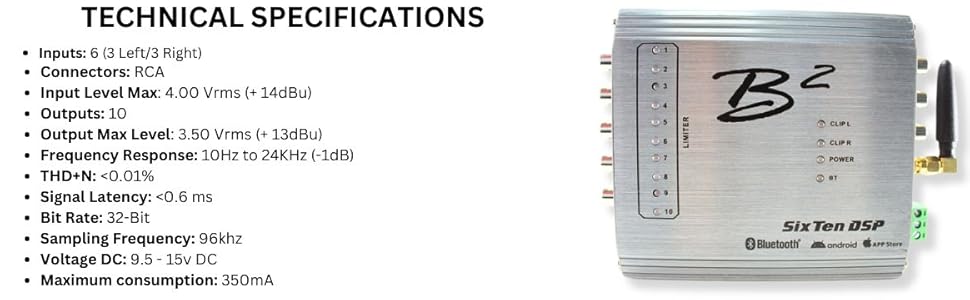
Image: A visual representation of the B2 Audio SixTen DSP's technical specifications, including input/output details and performance metrics.
9. Garantie et assistance
For warranty information and technical support, please refer to the official B2 Audio webConsultez notre site web ou contactez votre revendeur agréé. Conservez votre reçu d'achat comme preuve d'achat pour toute réclamation au titre de la garantie.
Fabricant: B2 Audio
Website: www.b2audio.com


