1. Informations importantes sur la sécurité
Veuillez lire attentivement toutes les consignes de sécurité avant d'utiliser le projecteur. Conservez ce manuel pour toute consultation ultérieure.
- Ne pas obstruer les ouvertures de ventilation. Veiller à laisser suffisamment d'espace autour du projecteur pour une bonne circulation de l'air.
- Évitez toute exposition directe à la lumière de l'objectif du projecteur.
- Ne placez pas le projecteur à proximité de sources de chaleur ou en plein soleil.
- Utilisez uniquement l'adaptateur secteur fourni avec l'appareil.
- N’essayez pas d’ouvrir ou de réparer le projecteur vous-même. Confiez toute réparation à un personnel qualifié.
- Tenez le projecteur éloigné de l'eau ou de tout autre liquide.
2. Contenu du colis
Vérifiez que tous les éléments sont présents dans le colis :
- Aurzen Roku TV Smart Projector (D1R Cube)
- Cordon d'alimentation
- Remote Control (2 AAA Batteries Required, not included)
- Manuel de l'utilisateur (ce document)
3. Produit terminéview
The Aurzen D1R Cube is a compact smart projector featuring built-in Roku TV for integrated streaming. It offers 1080P Full HD resolution, Dolby Audio, and a sealed optical engine for enhanced durability and clarity.
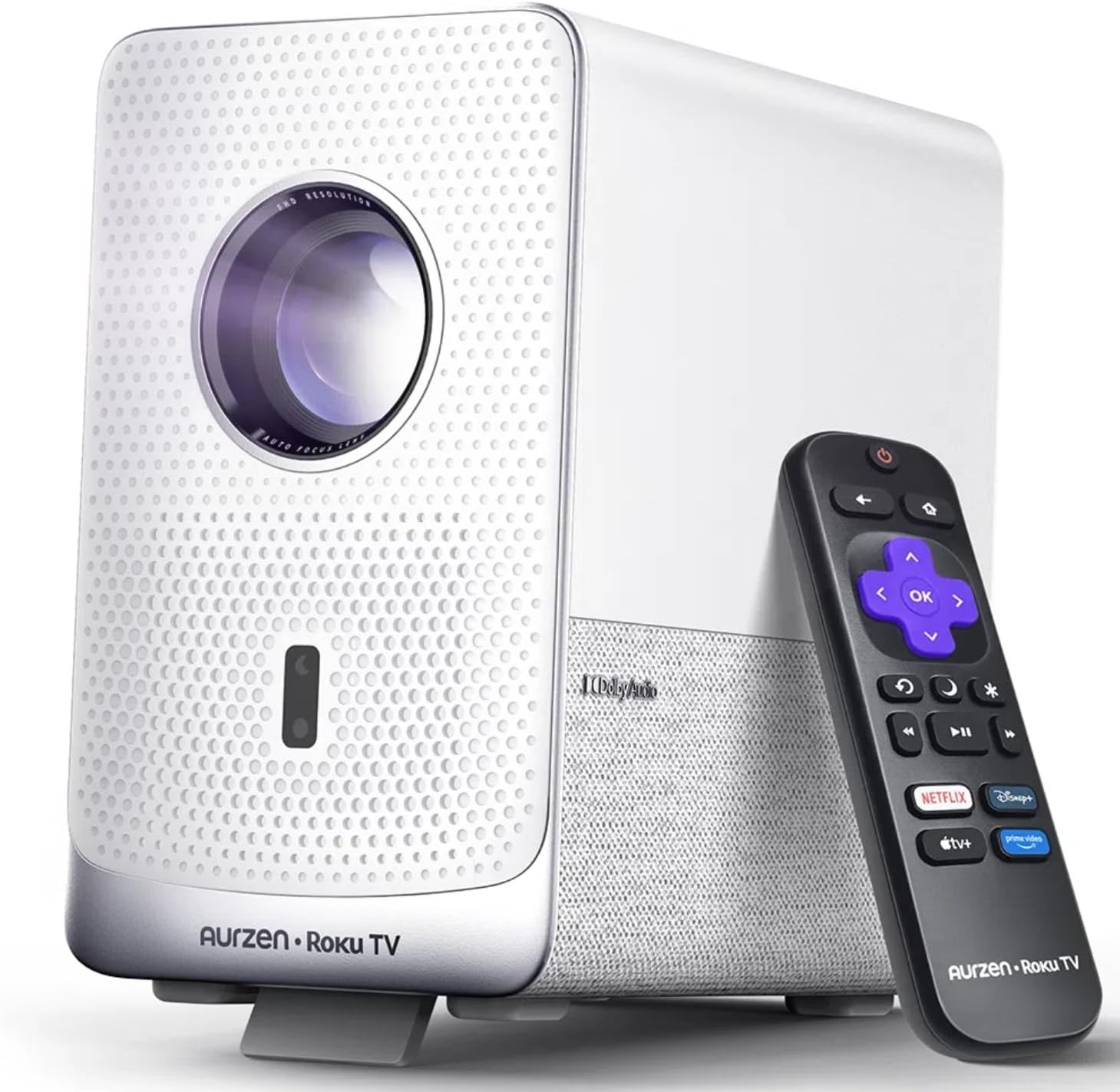
Image: The Aurzen D1R Cube Smart Projector shown with its remote control. The projector is white with a textured front panel and a visible lens.
Caractéristiques principales :
- Roku TV Built-in: Access popular streaming services directly.
- Moteur optique scellé : Protects against dust, maintaining image quality and extending lifespan.
- Résolution 1080p Full HD : Offre des images nettes et précises.
- Audio Dolby : Provides enhanced sound experience.
- Mise au point automatique et correction trapézoïdale : Automatic image adjustment for quick setup.
- Wi-Fi double bande et Bluetooth 5.2 : For seamless connectivity.
- Apple AirPlay : Effortless content sharing from Apple devices.
- Compatibilité avec la maison intelligente : Works with Apple HomeKit, Siri, Alexa, and Google Assistant.

Image: An internal diagram illustrating the sealed optical engine of the Aurzen D1R Cube projector, highlighting its dust-proof design.
4. Installation
4.1 Placement initial
Placez le projecteur sur une surface stable et plane. Pour une qualité optimale viewing, position it directly in front of your projection surface (wall or screen). The projector features automatic focus and keystone correction to adjust the image, but a relatively straight angle is recommended.

Image: A visual representation of the projector's auto-focus and auto-keystone correction features, showing how the image automatically adjusts to create a perfect rectangular display.
4.2 Connexion d'alimentation
- Branchez le cordon d'alimentation au port d'entrée d'alimentation du projecteur.
- Branchez l'autre extrémité du cordon d'alimentation dans une prise électrique appropriée.
- The projector will power on automatically or can be turned on using the power button on the device or remote.
4.3 Configuration de la télécommande
Insert two AAA batteries (not included) into the remote control. Ensure correct polarity. The remote is pre-paired with the projector.
4.4 Configuration initiale de Roku TV
Upon first power-on, follow the on-screen instructions to set up your Roku TV. This includes:
- Sélectionnez votre langue.
- Connecting to a Wi-Fi network (a stable internet connection is required).
- Activating your Roku account. If you do not have one, you will be prompted to create a free account.
- Installing desired streaming channels.
5. Mode d'emploi
5.1 Mise sous/hors tension
Appuyez sur le bouton d'alimentation du projecteur ou sur la télécommande pour allumer ou éteindre l'appareil.
5.2 Roku Home Screen Navigation
Use the directional pad and OK button on the remote to navigate the Roku home screen. Access streaming channels, search for content, and adjust settings.

Image: A screenshot of the Roku TV home screen, displaying various streaming app icons and navigation options.
5.3 Applications de streaming
The Roku TV platform provides access to a wide range of streaming applications such as Netflix, Prime Video, Disney+, Hulu, YouTube, and more. Select an app from the home screen to begin streaming.

Image : Une représentation graphiqueasing various popular streaming service logos available on the Roku TV platform, including Netflix, Disney+, and Hulu.
5.4 Connexion de périphériques externes
Le projecteur comprend des ports HDMI et USB pour la connexion de périphériques externes.
- HDMI: Connect gaming consoles, Blu-ray players, or other HDMI-enabled devices. Select the corresponding HDMI input from the Roku TV menu.
- USB: Play media files (photos, videos, music) from a USB storage device.
5.5 Connectivité Bluetooth
Connectez des écouteurs ou des haut-parleurs Bluetooth pour une expérience audio améliorée.
- Go to the Roku TV settings menu.
- Select 'Remotes & devices' then 'Bluetooth devices'.
- Mettez votre appareil Bluetooth en mode d'appairage.
- Sélectionnez votre appareil dans la liste affichée sur l'écran du projecteur pour l'appairer.

Image: A diagram illustrating the Bluetooth connectivity of the Aurzen D1R Cube projector, showing it connecting to various external audio devices.
5.6 Apple AirPlay
Effortlessly share content from your Apple devices (iPhone, iPad, Mac) to the projector using Apple AirPlay.
- Ensure your Apple device and the projector are connected to the same Wi-Fi network.
- On your Apple device, open the content you wish to share (e.g., photos, videos).
- Appuyez sur l'icône AirPlay (usually a rectangle with an upward-pointing arrow).
- Select your Aurzen D1R Cube projector from the list of available devices.

Image: A family watching content projected from an Apple device onto a large screen via Apple AirPlay using the Aurzen D1R Cube projector.
5.7 Commande vocale et intégration à la maison connectée
The projector supports voice control via the Roku mobile app and is compatible with Apple HomeKit, Siri, Alexa, and Google Assistant for broader smart home integration.
- Application mobile Roku : Download the Roku mobile app to use voice commands, type easily, and control your projector from your smartphone.
- Smart Home Assistants: Link your Roku account to your preferred smart home ecosystem (Apple Home, Amazon Alexa, Google Home) to control the projector with voice commands.
6. Entretien
6.1 Sealed Optical Engine
The Aurzen D1R Cube features a sealed optical engine designed to prevent dust accumulation on internal components. This reduces the need for routine internal cleaning and helps maintain consistent image quality over time.

Image: A side-by-side comparison showing the difference in dust accumulation between a sealed optical engine (left) and an open optical engine (right) after a period of use.
6.2 Nettoyage général
- Extérieur: Essuyez l'extérieur du projecteur avec un chiffon doux et sec. N'utilisez pas de nettoyants abrasifs ni de solvants.
- Lentille: Gently clean the projector lens with a lens cleaning cloth or specialized lens cleaning solution. Avoid touching the lens with your fingers.
- Ventilation: Ensure ventilation openings are clear of dust and debris. Use a soft brush or compressed air to gently clean them if necessary.
6.3 Stockage
When not in use for extended periods, store the projector in a cool, dry place, away from direct sunlight and extreme temperatures. Consider using a protective cover or case to prevent dust accumulation.
7. Dépannage
If you encounter issues with your Aurzen D1R Cube projector, refer to the following common solutions:
| Problème | Solution possible |
|---|---|
| Pas de courant | Ensure the power cord is securely connected to both the projector and the electrical outlet. Test the outlet with another device. |
| Pas d'image | Vérifiez que le projecteur est allumé. Assurez-vous que la source d'entrée (HDMI, USB) est correctement sélectionnée. Retirez le cache-objectif. |
| Image floue | The projector has auto-focus. If the image remains blurry, try repositioning the projector or restarting it to trigger auto-focus again. Ensure the lens is clean. |
| Pas de son | Check the volume level on the projector and any connected external audio devices. Ensure Bluetooth audio is correctly paired or external speakers are properly connected. |
| Problèmes de connectivité Wi-Fi | Ensure your Wi-Fi router is working. Restart the projector and your router. Verify the Wi-Fi password is correct in the Roku TV settings. |
| La télécommande ne répond pas | Replace the AAA batteries in the remote control. Ensure there are no obstructions between the remote and the projector. |
For further assistance, please refer to the online support resources or contact Aurzen customer service.
8. Spécifications
Detailed technical specifications for the Aurzen D1R Cube Smart Projector:
| Fonctionnalité | Spécification |
|---|---|
| Marque | Aurzen |
| Modèle | D1R Cube |
| Résolution d'affichage maximale | 1920 x 1080 (1080P FHD) |
| Technologie de connectivité | WiFi (Dual-band 2.4G/5G), Bluetooth 5.2, HDMI, USB, Audio |
| Caractéristiques spéciales | Roku TV Smart Projector, Sealed Optical Engine, Dolby Audio, Apple AirPlay, Smart Home Compatibility |
| Poids de l'article | 5.68 livres |
| Dimensions du produit | 7.42 x 7 x 7.83 pouces |
| Couleur | Blanc |
9. Garantie et assistance
9.1 Garantie du produit
Aurzen products are covered by a manufacturer's warranty. Please refer to the warranty card included with your product or visit the official Aurzen webConsultez le site pour connaître les conditions générales de garantie spécifiques.
9.2 Assistance clientèle
For technical support, troubleshooting assistance, or warranty claims, please contact Aurzen customer service through their official channels. You can find more information and contact options on the Aurzen Brand Store on Amazon.


