1. Introduction
This manual provides essential instructions for setting up, operating, and maintaining your LEFFOT H618 Plus 4K Ultra HD Streaming Device. Please read this guide thoroughly before use to ensure proper functionality and to maximize your entertainment experience.
2. Consignes de sécurité
- Veillez à placer l'appareil sur une surface stable et plane afin d'éviter toute chute accidentelle.
- N’exposez pas l’appareil à l’eau, à l’humidité ou à des températures extrêmes.
- Évitez de bloquer les ouvertures de ventilation pour éviter la surchauffe.
- Utilisez uniquement l'adaptateur secteur fourni afin d'éviter tout dommage.
- Gardez l'appareil et les accessoires hors de portée des enfants.
- N’essayez pas de démonter ou de réparer l’appareil vous-même. Contactez un technicien qualifié pour obtenir de l’aide.
3. Contenu du colis
Vérifiez que tous les éléments sont présents dans le colis :
- LEFFOT H618 Plus Streaming Device
- Télécommande vocale
- Adaptateur secteur
- Câble HDMI
- Manuel d'utilisation

Figure 3.1 : Contenu de l'emballage
4. Instructions de configuration
4.1 Connexion de l'appareil
- Se connecter à la télévision : Plug one end of the HDMI cable into the HDMI port on the LEFFOT H618 Plus device and the other end into an available HDMI input on your television.
- Connecter l'alimentation : Connect the power adapter to the DC port on the device and then plug the adapter into a wall outlet.
- Mise sous tension : L'appareil devrait s'allumer automatiquement. Si ce n'est pas le cas, appuyez sur le bouton marche/arrêt de la télécommande.

Figure 4.1: Connection Overview
4.2 Configuration de la télécommande
- Insérez les piles : Open the battery compartment on the back of the voice remote control and insert two AAA batteries (included), ensuring correct polarity.
- Jumelage : The remote control should automatically pair with the device upon first use. If not, follow the on-screen instructions or press and hold the pairing button (usually located inside the battery compartment or on the side of the remote) until the indicator light flashes.
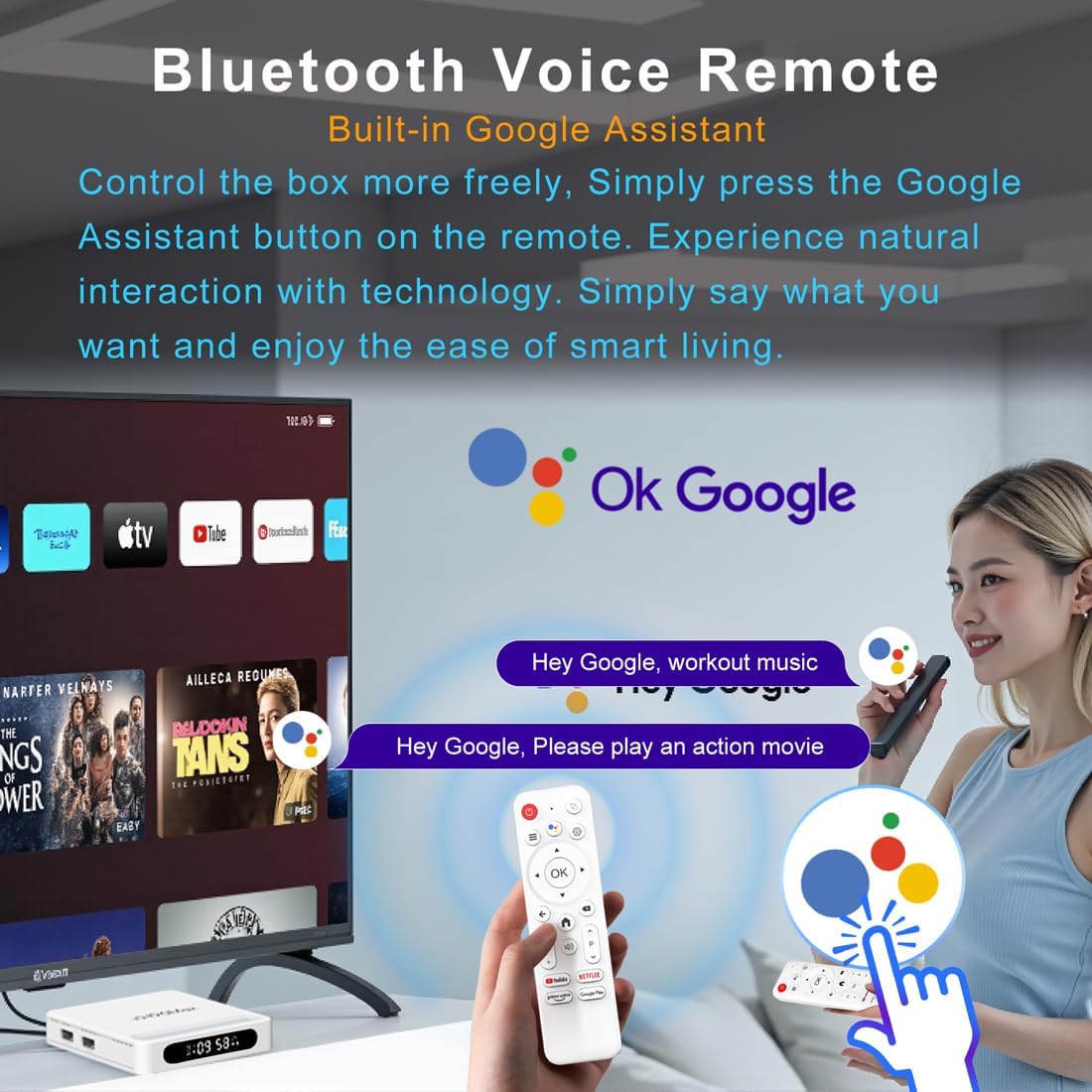
Figure 4.2 : Télécommande vocale
4.3 Configuration initiale du périphérique
Follow the on-screen prompts to complete the initial setup, which typically includes:
- Sélection de la langue.
- Connecting to a Wi-Fi network or Ethernet.
- Se connecter avec votre compte Google.
- Installing essential applications.
5. Mode d'emploi
5.1 Navigation et interface
Use the directional pad (D-pad) on your remote to navigate through the Android TV interface. The 'OK' button confirms selections, 'Back' returns to the previous screen, and 'Home' takes you to the main screen.
5.2 Voice Remote with Google Assistant
Press the Google Assistant button on your remote and speak your commands. You can search for content, open apps, control playback, and more using your voice.
5.3 Accéder aux applications
The device comes pre-loaded with Google Play, allowing access to over 5000+ applications. Navigate to the 'Apps' section on the home screen to browse, download, and manage your applications.

Figure 5.1: Accessing Apps via Google Play
5.4 4K UHD Playback and HDR10
The LEFFOT H618 Plus supports 8K@22fps decoding and 4K@60fps playback with HDR10. Ensure your television is 4K HDR compatible and that you are streaming 4K HDR content for the best visual experience.

Figure 5.2: 4K UHD and HDR10 Visuals
5.5 Diffusion d'écran
Utilize the built-in Airplay and Miracast features to cast content from your smartphone or tablet directly to your TV screen.
6. Spécifications
| Fonctionnalité | Description |
|---|---|
| Marque | LEFFOT |
| Nom du modèle | H618Plus |
| Système opérateur | Android 14 |
| Processeur | Allwinner H618 Quad-Core ARM Cortex A53 |
| GPU | Mali-G31 MP2 |
| BÉLIER | 2 Go |
| ROM | 16 Go |
| Décodage vidéo | 8K@22fps, 4K@60fps with HDR10 |
| Connectivité | Dual-band WiFi 6 (2.4G/5G), 100M Ethernet, Bluetooth 5.4 |
| Ports | HDMI 2.0a, USB 2.0 (x2), AV, DC |
| Caractéristiques spéciales | Voice Remote with Google Assistant, Airplay, Miracast |
| Dimensions | 3.2 x 3.2 x 0.67 pouces |
| Poids | 4.1 onces |

Figure 6.1 : Principales caractéristiquesview
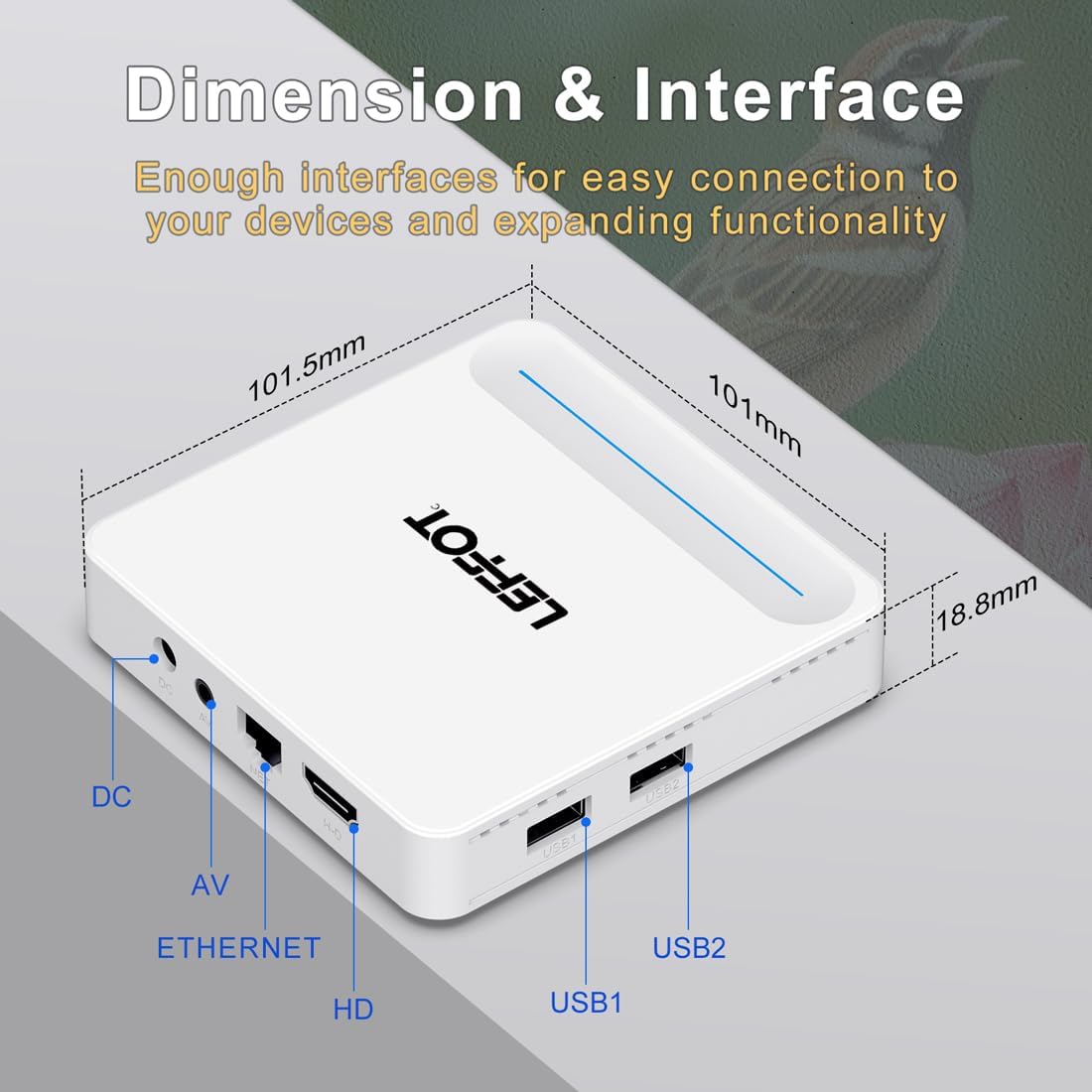
Figure 6.2: Device Dimensions and Interface
7. Dépannage
7.1 Absence d'alimentation / L'appareil ne s'allume pas
- Vérifiez que l'adaptateur secteur est bien connecté à l'appareil et à la prise de courant.
- Ensure the power outlet is functional. Try plugging another device into the same outlet.
- Appuyez sur le bouton marche/arrêt de la télécommande ou de l'appareil lui-même.
7.2 No Signal on TV Screen
- Verify that the HDMI cable is securely connected to both the device and the TV.
- Assurez-vous que votre téléviseur est réglé sur la source d'entrée HDMI appropriée.
- Essayez d'utiliser un autre câble HDMI ou un autre port HDMI sur votre téléviseur.
- Restart the streaming device and your TV.
7.3 Télécommande ne répondant pas
- Vérifiez et remplacez les piles de la télécommande.
- Assurez-vous qu'il n'y a aucun obstacle entre la télécommande et l'appareil.
- Re-pair the remote control with the device by following the instructions in Section 4.2.
7.4 Buffering or Slow Performance
- Check your internet connection speed. A stable and fast connection is crucial for streaming 4K content.
- If using Wi-Fi, try moving the device closer to your router or connecting via an Ethernet cable for a more stable connection.
- Close any unused applications running in the background on the device.
- Clear the cache of streaming applications.
- Restart your router, modem, and the streaming device.
8. Entretien
- Nettoyez régulièrement l'appareil avec un chiffon doux et sec. N'utilisez pas de nettoyants liquides ni d'aérosols.
- Keep the device free from dust and debris, especially around ventilation areas.
- Rangez l'appareil dans un endroit frais et sec lorsqu'il n'est pas utilisé pendant une période prolongée.
9. Garantie et assistance
For warranty information and technical support, please refer to the documentation included with your purchase or visit the official LEFFOT webConsultez le site. Conservez votre preuve d'achat pour toute réclamation au titre de la garantie.


