Introduction
This manual provides detailed instructions for the setup, operation, maintenance, and troubleshooting of your Akko TAC75 Rapid Trigger Gaming Keyboard. Please read this manual thoroughly to ensure optimal performance and longevity of your device.

Image: The Akko TAC75 Rapid Trigger Gaming Keyboard, showcasing its white design and vibrant RGB backlighting.
Guide d'installation
1. Déballage et contenu de l'emballage
Retirez soigneusement tous les composants de l'emballage. L'emballage doit contenir :
- Akko TAC75 Rapid Trigger Gaming Keyboard
- Câble USB-A vers USB-C
- Keycap Puller / Switch Puller (may vary)
2. Connexion du clavier
- Locate the USB-C port on the Akko TAC75 keyboard.
- Connectez une extrémité du câble USB-A vers USB-C fourni au port USB-C du clavier.
- Connectez l'autre extrémité (USB-A) à un port USB disponible sur votre ordinateur.
- The keyboard is plug-and-play and should be automatically recognized by your operating system (e.g., Windows 11).
3. Operating System Compatibility Switch
The Akko TAC75 features a physical switch on the back of the keyboard to toggle between Windows and Mac operating system modes. Ensure the switch is set to the appropriate position for your system to ensure full functionality.
4. Software Installation (Akko Driver)
For advanced customization, including key remapping, actuation point adjustment, and lighting effects, download and install the Akko Driver software from the official Akko website. The software provides a user-friendly interface for fine-tuning your keyboard settings.
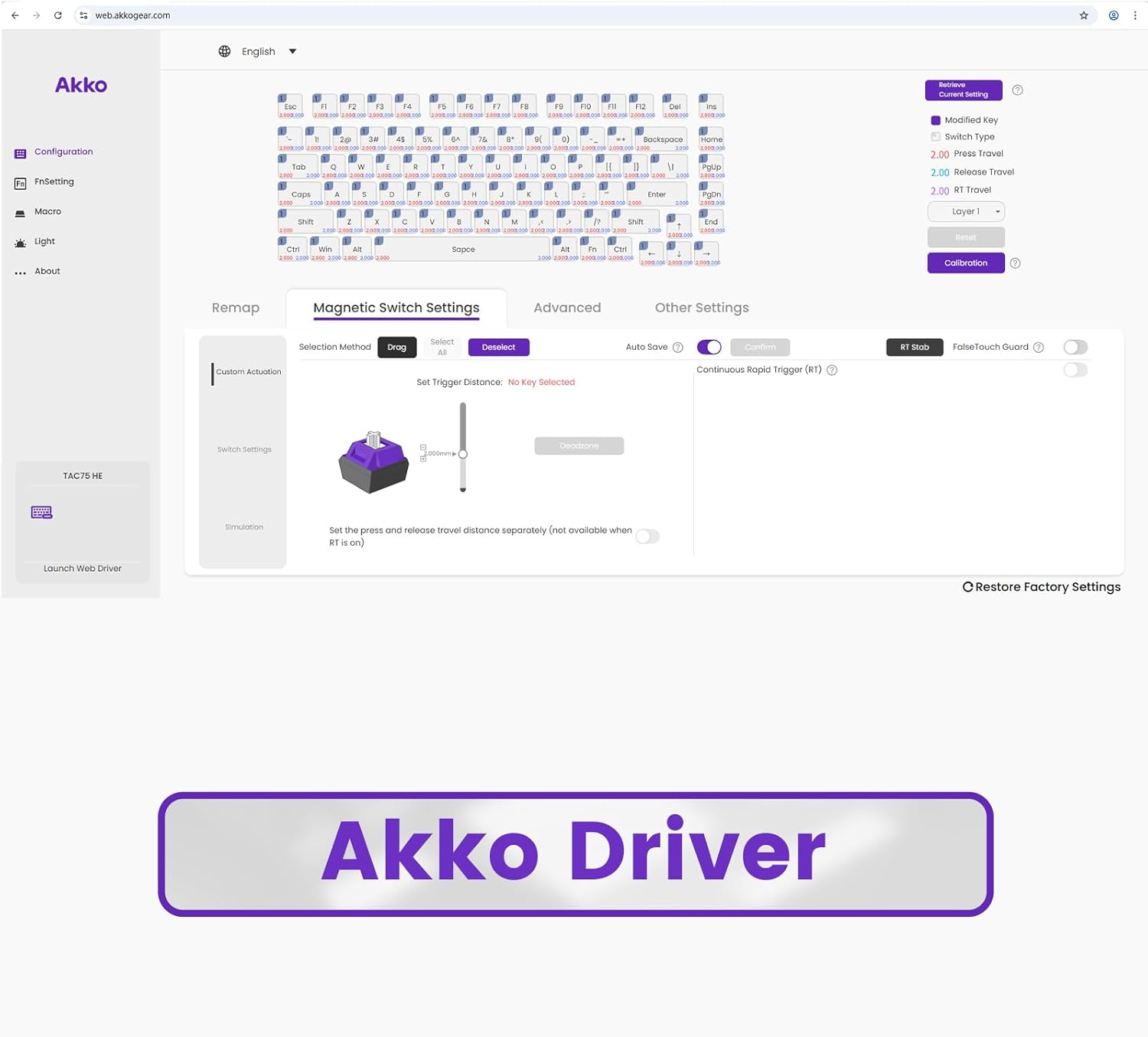
Image: A screenshot of the Akko Driver software, showing options for configuration, remapping, and lighting adjustments.
Mode d'emploi
Fonctionnalités clésview
- 8K Polling Rate & 16K Scan Rate: The keyboard communicates with your computer at an 8K polling rate, sending data 8 times faster than standard 1K keyboards. The 16K scan rate ensures instant detection of key changes, significantly enhancing responsiveness.

Image: A graphic highlighting the 8K Polling Rate and 16K Universal Scan capabilities of the keyboard.
- Déclencheur ultra-précis à déclenchement rapide : The TAC75 HE keyboard offers an ultra-accurate 0.005mm Rapid Trigger feature with adjustable actuation distance in 0.005mm increments. This allows for precise control over key activation and deactivation, crucial for competitive gaming.

Image: A close-up of the keyboard keys with a diagram illustrating the 0.005mm Rapid Trigger actuation precision.

Image: A comparative graph demonstrating the faster response times and precision of magnetic keyboard rapid trigger functionality versus traditional mechanical keyboards.
- Éclairage ARGB : The TAC75 series features ARGB (Addressable RGB) lighting with south-facing LEDs, providing smooth, flicker-free illumination. This allows for rich dynamic effects and can be customized to reduce visual fatigue, enhancing both gaming and aesthetic appeal.

Image: The Akko TAC75 keyboard displaying its customizable ARGB lighting across the keys.
- Snap Key (SOCD): Akko's implementation of SOCD (Simultaneous Opposite Cardinal Directions) prioritizes the most recent keypress for rapid directional changes without requiring the release of previous inputs. This feature is particularly beneficial in FPS games for fluid and responsive movement control.

Image: A diagram illustrating how Akko Snap Key functionality processes simultaneous directional inputs, prioritizing the latest press.
Basic Keyboard Functions and Hotkeys
The keyboard supports various functions accessible via the Function (Fn) key combinations. Some common hotkeys include:
- Fn + Accueil : Change ARGB lighting pattern.
- Fn + | (vertical bar key above Enter): Change ARGB lighting color.
- Other multimedia and function keys may be accessible via Fn combinations, typically indicated by secondary legends on the keycaps.
For a complete list of hotkeys and their functions, refer to the Akko Driver software or the official Akko website.
Entretien
Nettoyage du clavier
Pour préserver l'apparence et le fonctionnement de votre clavier :
- Débranchez le clavier de votre ordinateur avant de le nettoyer.
- Utilisez un chiffon doux et non pelucheux légèrement dampTerminer par un rinçage à l'eau ou avec une solution nettoyante douce pour essuyer les touches et le châssis.
- Évitez d'utiliser des produits chimiques agressifs, des matériaux abrasifs ou une humidité excessive, car ceux-ci peuvent endommager le clavier.
- For cleaning between keycaps, use compressed air to remove dust and debris. A keycap puller can be used to remove keycaps for deeper cleaning, if necessary.
Compatibilité des commutateurs
The Akko TAC75 uses magnetic (Hall Effect) switches, specifically AstroAim Switches. This keyboard is compatible with most downward-facing N-pole magnet switches. However, it is important to note that using non-AstroAim magnetic switches may affect actuation precision. This keyboard is non compatible with traditional mechanical switches.

Image : Une image détaillée view of an AstroAim magnetic switch, highlighting its unique design.
Dépannage
Problèmes courants et solutions
- Le clavier ne répond pas :
- Assurez-vous que le câble USB est correctement connecté au clavier et à l'ordinateur.
- Essayez de connecter le clavier à un autre port USB de votre ordinateur.
- Redémarrez votre ordinateur.
- Verify the OS compatibility switch on the back of the keyboard is set correctly (Windows/Mac).
- Éclairage RVB défectueux ou incorrect :
- Check the lighting settings within the Akko Driver software.
- Use the Fn + Home and Fn + | hotkeys to cycle through lighting patterns and colors.
- Ensure the Akko Driver software is up to date.
- System Stuttering or Performance Issues (with 8K Polling Rate):
- The 8K polling rate is CPU-intensive. If you experience system stuttering, especially during gameplay, consider lowering the polling rate through the Akko Driver software.
- Ensure your computer meets the recommended specifications for high polling rate peripherals.
- Keys Not Actuating Correctly (Rapid Trigger):
- Open the Akko Driver software and check the Rapid Trigger and actuation point settings. Ensure they are configured to your preference.
- Perform a calibration within the Akko Driver software if available.
- Ensure no foreign objects are lodged under the keycaps or switches.
If you encounter issues not covered here, please visit the official Akko support webConsultez notre site web ou contactez notre service client pour obtenir de l'aide supplémentaire.
Caractéristiques
| Fonctionnalité | Détail |
|---|---|
| Numéro de modèle | AKKO01-00015-WH |
| Marque | Acre |
| Type de clavier | Rapid Trigger Gaming Keyboard (Hall Effect) |
| Type de commutateur | AstroAim Switch |
| Connectivité | Filaire (USB-C) |
| Taux de sondage | 8 K Hz |
| Taux de balayage | 16 K Hz |
| Rapid Trigger Actuation | Ultra-precise 0.005mm adjustable |
| Éclairage | ARGB (South-facing LED) |
| Caractéristiques spéciales | Snap Key (SOCD), Akko Driver Software Support |
| Appareils compatibles | PC, ordinateur portable, console de jeu |
| Couleur | Blanc brillant SP |
| Poids de l'article | 1.85 livres |
| Dimensions du colis | 13.82 x 8.11 x 2.01 pouces |
Garantie et assistance
Akko products are manufactured to high-quality standards. For information regarding warranty coverage, terms, and conditions, please refer to the warranty card included with your product or visit the official Akko website.
For technical support, troubleshooting assistance, or general inquiries, please contact Akko customer service through their official website: Akko Official Store.