Introduction
This manual provides essential information for the safe and efficient operation of your Ulefone Armor 34 Pro Plus 5G Rugged Phone. It covers device setup, feature usage, maintenance, and troubleshooting. Please read this manual thoroughly before using your device to ensure optimal performance and longevity.
Video: Ulefone Armor 34 Pro Rugged Phone overview, montrerasing sa conception robuste et ses caractéristiques clés.
Qu'y a-t-il dans la boîte
Vérifiez que tous les éléments sont présents dans l'emballage de votre produit :
- 1 x Téléphone
- 1 x AC Power Charger, 66W
- 1 câble de données Type-C vers Type-C (100 cm)
- 1 film protecteur (préinstallé)
- 1 x protecteur d'écran en verre trempé
- 1 x SIM aiguille
- 1 x cordon
- 1 x Manuel d'utilisation multilingue
- 1 x Carte d'instructions de chargement
- 1 x Carte de consignes de sécurité

Image: Contents of the Ulefone Armor 34 Pro Plus retail package.
Installation
1. Installation de la carte SIM et du stockage
- Repérez le tiroir de la carte SIM sur le côté de l'appareil.
- Insérez l'aiguille SIM fournie dans le petit trou situé à côté du plateau pour l'éjecter.
- Place your Nano-SIM cards and/or a microSD card (up to 2TB) into the designated slots on the tray. Ensure correct orientation.
- Réinsérez soigneusement le plateau dans le téléphone jusqu'à ce qu'il s'enclenche.
2. Mise sous tension et configuration initiales
- Maintenez le bouton Marche/Arrêt enfoncé jusqu'à ce que le logo Ulefone apparaisse.
- Suivez les instructions à l'écran pour sélectionner votre langue, vous connecter au Wi-Fi et configurer votre compte Google.
- Configure security settings such as fingerprint unlock or face unlock for enhanced device protection.
3. Chargement de l'appareil
Connect the provided 66W AC power charger and Type-C cable to the phone's charging port. The device supports fast charging. Ensure the charger is connected to a compatible power outlet. The phone also supports 10W reverse charging, allowing it to act as a power bank for other devices.
Mode d'emploi
1. General Phone Operation
The Ulefone Armor 34 Pro Plus runs on Android 15. Navigate the interface using touch gestures. Swipe up from the bottom for the app drawer, swipe down from the top for notifications and quick settings. Customize your home screen by long-pressing on empty space.
2. Connectivité au réseau 5G
The device supports global 5G networks with dual SIM dual standby functionality. Ensure your SIM cards are properly installed and your mobile data plan supports 5G. Access network settings via Paramètres > Réseau et Internet > Réseau mobile pour configurer les préférences.
3. Projector Functionality
The Ulefone Armor 34 Pro Plus features a built-in DLP projector with 150 lumens brightness and 854x480 resolution. It supports smart autofocus and ±40° keystone correction for clear projection. The integrated 98 dB loudspeaker enhances the audio experience.
- Activation : Use the dedicated projector button or access the projector app to activate.
- Autofocus: The projector automatically adjusts focus. Manual adjustment options are available in the projector settings.
- Correction trapézoïdale : Adjust vertical keystone up to ±40° to correct distorted images.
- Distance de projection : Project a screen size of up to 100 inches from a distance of 3 meters.
Video: Demonstration of the Ulefone Armor 34 Pro Plus projector features, including autofocus and keystone correction.

Image: The Ulefone Armor 34 Pro Plus projecting a movie for outdoor entertainment.

Image: Visual representation of screen sizes achievable with the projector at different distances.
4. Système de caméra
L'appareil est équipé d'un système de caméra polyvalent :
- Caméra de vision nocturne 64 MP : Features 4 infrared LEDs and NightEif Ultra 3.0 algorithm for clear images in low-light conditions.
- Caméra principale de 50 MP : Utilizes a large 1/1.3" sensor for high-resolution photos.
- 50MP Ultra-wide Macro Camera: Offre un champ de vision de 117.3° view for expansive shots and detailed close-ups.
- Caméra frontale 32MP : Pour des selfies et des appels vidéo de haute qualité.

Image: Night vision camera capabilities comparison.
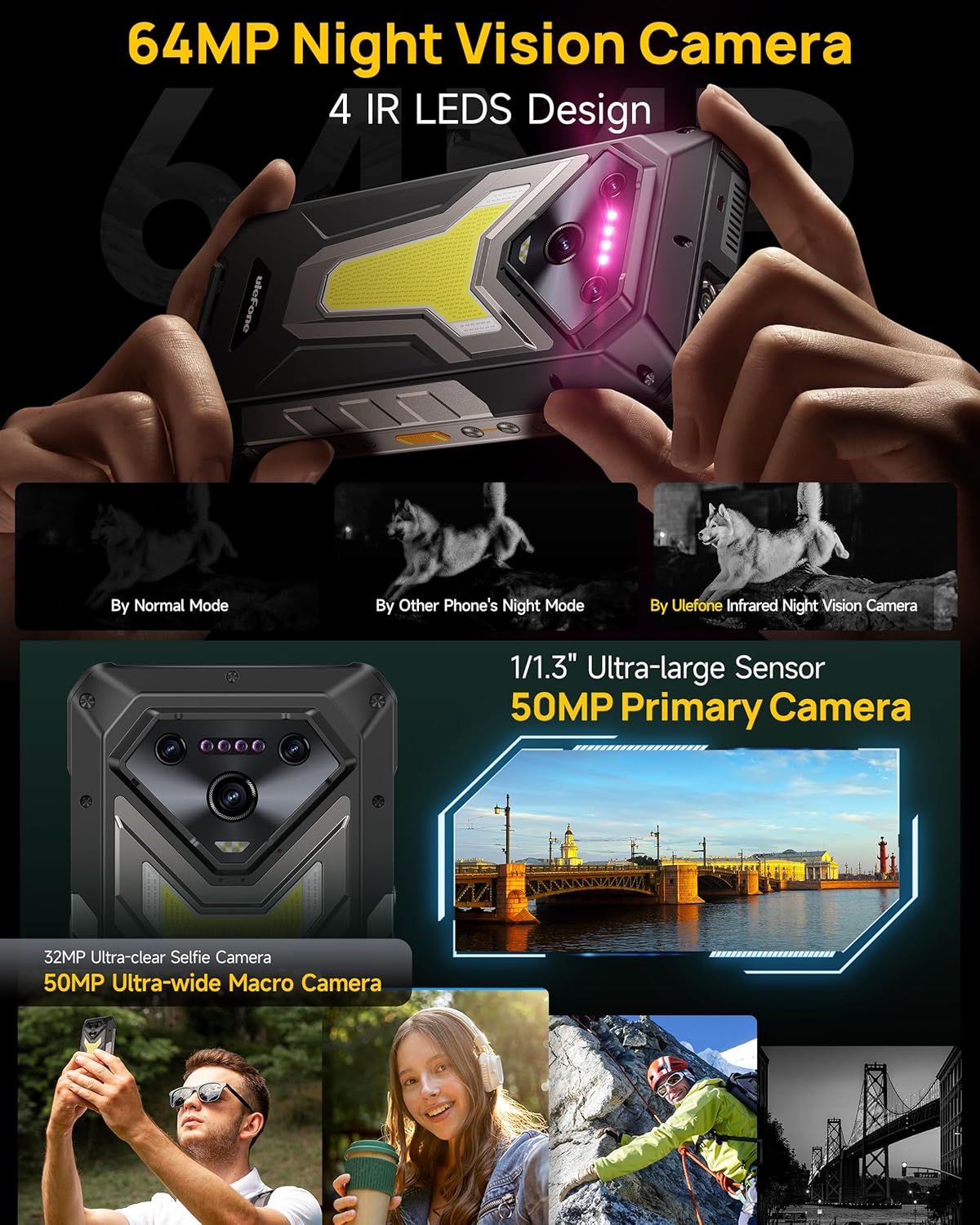
Image : détaillée view of the Ulefone Armor 34 Pro Plus camera setup.
5. Éclairage LED et feux de signalisation
The device integrates an 1100 Lumens camping light and red/blue warning lights for various situations.
- CampLumière ing : Provides powerful illumination for outdoor activities. Adjustable brightness and duration settings are available in the dedicated app.
- Voyants d'avertissement : Red and blue lights can be activated for emergency alerts, signaling for help, or increasinvisibilité g.
Video: Demonstration of the Ulefone Armor 34 Pro Plus LED camping light and warning light functions.

Image: The 1100 Lumens LED light in use during camping.
6. Gestion de la batterie
The Armor 34 Pro Plus features a 25500mAh battery, providing extended usage. It supports 66W fast charging for quick power replenishment and 10W reverse charging to power other compatible devices.

Image: The 25500mAh battery and 66W fast charging feature.
7. Caractéristiques robustes
Designed for durability, the phone is MIL-STD-810H certified and boasts IP68/IP69K ratings for water and dust resistance. The 6.95-inch FHD+ display is protected by Corning Gorilla Glass 5.

Image: Demonstrating the IP68/IP69K and MIL-STD-810H ruggedness of the device.
8. Connecteur d'extension uSmart
The uSmart Expansion Connector allows for integration with various external accessories, such as endoscopes and microscopes, expanding the phone's utility for specialized tasks.
Video: Showcase of various accessories compatible with the Ulefone Armor 34 Pro Plus, including the uSmart ecosystem.

Image: The uSmart Expansion Connector in use with an endoscope accessory.
9. Autres caractéristiques
The device includes additional functionalities:
- NFC: Pour les paiements sans contact et le transfert de données.
- Widevine L1 : Permet la diffusion en haute définition depuis les plateformes compatibles.
- Blaster IR : Contrôler les appareils infrarouges compatibles.
- Déverrouillage par empreinte digitale et déverrouillage facial : Options de sécurité biométriques.
- Clé personnalisée : Bouton programmable pour un accès rapide aux fonctions.
- GPS + GLONASS + Beidou + Galileo : Comprehensive navigation support.

Image : Terminéview of additional functionalities available on the device.
Entretien
To ensure the longevity and optimal performance of your Ulefone Armor 34 Pro Plus, follow these maintenance guidelines:
- Nettoyage: Essuyez l'appareil avec un chiffon doux, damp cloth. Avoid harsh chemicals or abrasive materials. Ensure all ports are dry before charging or connecting accessories.
- Mises à jour logicielles : Vérifiez et installez régulièrement les mises à jour système pour garantir que votre appareil bénéficie des derniers correctifs de sécurité et fonctionnalités. Rendez-vous sur Paramètres > Système > Mise à jour du système.
- Entretien de la batterie: Avoid extreme temperatures. Do not fully discharge the battery frequently. Use only the provided charger for optimal charging.
- Protection d'écran: While the screen is durable, using the provided tempered glass screen protector can offer additional protection against scratches.
Dépannage
Si vous rencontrez des problèmes avec votre appareil, reportez-vous aux étapes de dépannage courantes suivantes :
- L'appareil ne répond pas : Maintenez le bouton Marche/Arrêt enfoncé pendant environ 10 à 15 secondes pour forcer un redémarrage.
- Problèmes de charge : Ensure the charger and cable are securely connected and undamaged. Try a different power outlet. Clean the charging port if necessary.
- Problèmes de connectivité réseau : Check if airplane mode is off. Restart the device. Verify your SIM card is correctly inserted and your mobile data plan is active.
- Projector Not Working: Ensure the projector is enabled in settings. Check for any obstructions in front of the lens. Adjust focus and keystone correction.
- Plantages/blocages de l'application : Videz le cache et les données de l'application via Paramètres > Applications > [Nom de l'application] > Stockage et cacheSi le problème persiste, désinstallez puis réinstallez l'application.
- Surchauffe: Close background applications and reduce screen brightness. Avoid direct sunlight exposure during heavy use or charging.
For more complex issues, refer to the built-in Service Center 2.0 application on your device or contact customer support.

Image: The Service Center 2.0 application for device diagnostics and support.
Caractéristiques
| Fonctionnalité | Spécification |
|---|---|
| Marque | Ulefone |
| Numéro de modèle | Armor 34 Pro Plus |
| Système opérateur | Android 15 |
| Processeur | MediaTek Dimensity 7400X |
| BÉLIER | 32GB (16GB + 16GB adjustable) |
| Stockage interne | 512GB ROM (expandable up to 2TB) |
| Afficher | 6.95 inch FHD+ 120Hz Corning Gorilla Glass 5 |
| Caméra principale | 50MP (1/1.3" sensor) |
| Caméra macro ultra grand-angle | 50MP (117.3° FOV) |
| Caméra de vision nocturne | 64MP (4 IR LEDs) |
| Caméra frontale | 32 MP |
| Projecteur | 150 Lumens DLP (854x480 resolution), Autofocus, ±40° Keystone Correction |
| Capacité de la batterie | 25500mAh |
| Chargement | Charge rapide 66 W, charge inversée 10 W |
| Rugosité | Certifié IP68/IP69K, conforme à la norme MIL-STD-810H |
| Connectivité | 5G, Wi-Fi 6E, Bluetooth 5.4, NFC, IR Blaster |
| Caractéristiques spéciales | 1100 Lumens Camping Light, Red & Blue Warning Lights, uSmart Expansion Connector, Widevine L1, Custom Key, GPS |
| Dimensions | 7.21 x 3.41 x 1.29 pouces |
| Poids | 3.14 livres |
Garantie et assistance
Your Ulefone Armor 34 Pro Plus comes with a Service de garantie du fabricant de 12 mois in the US, covering defects in materials and workmanship under normal use. Please retain your proof of purchase for warranty claims.
For technical assistance, warranty inquiries, or product support, please contact Ulefone customer service through the Service Center 2.0 app on your device or visit the official Ulefone website for contact information. Our support team is available to assist you with any questions or concerns regarding your product.


