Consignes de sécurité importantes
Veuillez lire et comprendre toutes les consignes de sécurité avant d'utiliser ce produit. Conservez ce manuel pour toute consultation ultérieure.
- Ventilation: Assurez une ventilation adéquate. Ne bloquez aucune ouverture de ventilation.
- Eau et humidité : N’exposez pas cet appareil à la pluie ou à l’humidité. Ne placez pas d’objets remplis de liquide, tels que des vases, sur l’appareil.
- Sources de chaleur : Ne pas installer à proximité de sources de chaleur telles que radiateurs, bouches de chauffage, poêles ou autres appareils (y compris amp(échangeurs thermiques) qui produisent de la chaleur.
- Sources d'alimentation : Use only power supplies specified by the manufacturer. Ensure the power cord is protected from being walked on or pinched.
- Nettoyage: Nettoyer uniquement avec un chiffon sec.
- Entretien: N'essayez pas de réparer vous-même ce produit. Confiez tous les travaux d'entretien à du personnel de service qualifié.
Contenu du colis
Vérifiez que tous les éléments énumérés ci-dessous sont inclus dans votre colis :
- Kuephom CD-X2A Boombox
- Cordon d'alimentation secteur
- Manuel de l'utilisateur (ce document)
- Télécommande
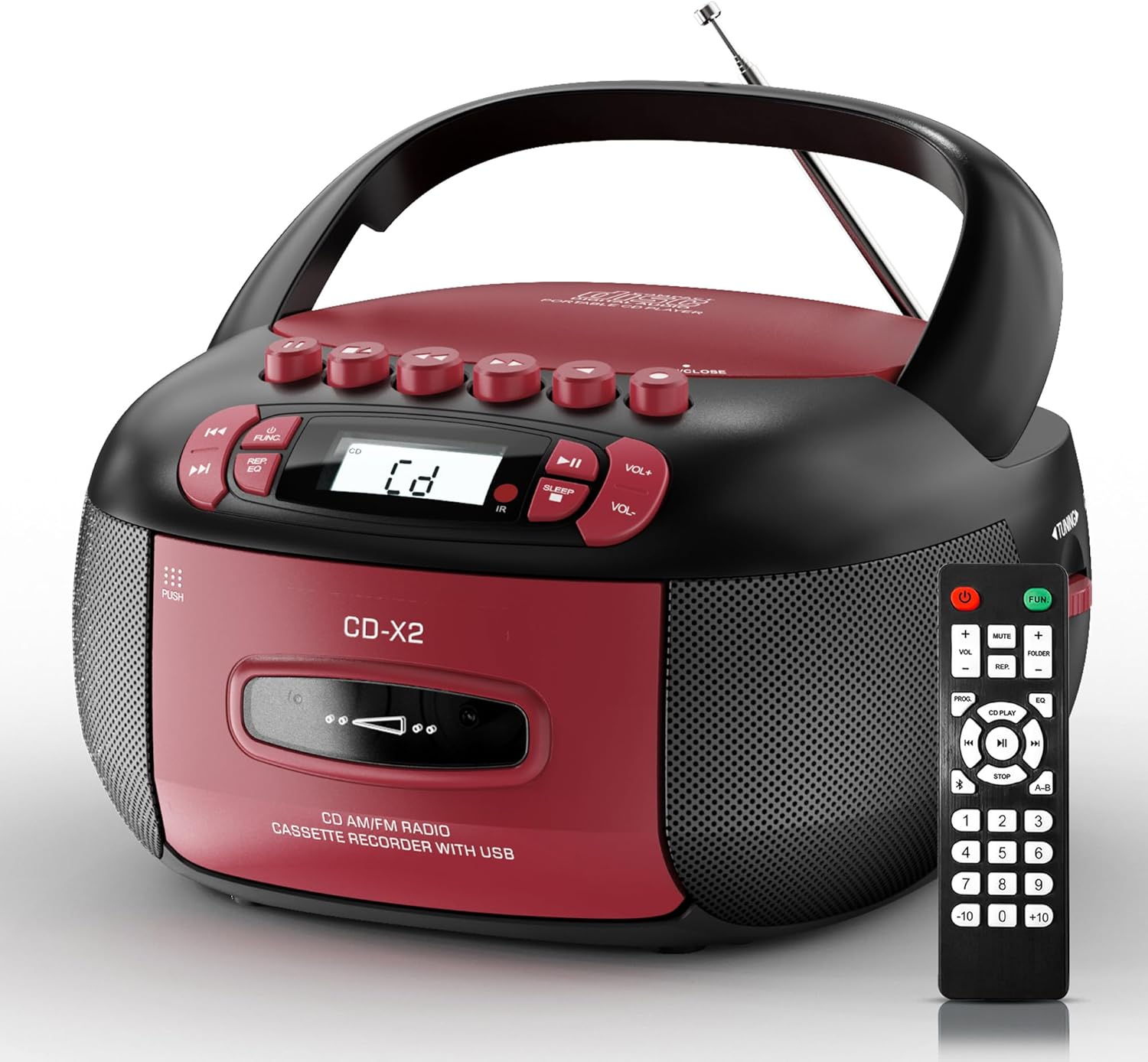
Image: The Kuephom CD-X2A Boombox with its included remote control, showcasing son design compact et ses couleurs rouge/noir.
Produit terminéview
Familiarize yourself with the various components and controls of your Kuephom CD-X2A Boombox.
Commandes du panneau avant
- Bouton d'alimentation/fonction : Press and hold to power on/off. Press to cycle through modes (CD, USB, Bluetooth, Radio, AUX, Tape).
- Boutons de volume +/- : Réglez le volume de lecture.
- Bouton Lecture/Pause : Start or pause playback for CD, USB, Bluetooth, or Tape.
- Bouton d'arrêt: Arrêtez la lecture.
- Boutons Passer/Rechercher : Navigate between tracks on CD/USB or fast forward/rewind on tape.
- Bouton EQ : Sélectionnez les préréglages de l'égaliseur.
- Bouton de minuterie de sommeil : Réglez la minuterie de mise en veille.
Commandes du panneau latéral
- Bouton de réglage : Manually tune AM/FM radio stations.
- Prise casque: Connectez des écouteurs pour une écoute privée.
- Port d'entrée auxiliaire : Connectez des périphériques audio externes.
- Port USB : Insert USB drives for MP3/WMA playback.
Caractéristiques du panneau supérieur
- Compartiment CD : Top-loading compartment for CDs.
- Compartiment à cassette : Front-loading compartment for cassette tapes.
- Antenne télescopique : Étendre pour une meilleure réception radio.

Image: The boombox highlighting its multiple functions including CD/MP3, Bluetooth, Type I/II tape, USB, FM/AM Radios, Sleep timer, Remote, Phone jack, AUX, and Tape recording.

Image : Gros plan views of the boombox's phone jack, top-loading CD player, telescopic antenna, and tape play/record buttons.
Installation
Alimentation du Boombox
Alimentation CA
- Connect the supplied AC power cord to the AC IN jack on the back of the boombox.
- Plug the other end of the power cord into a standard AC wall outlet (120V~60Hz).
Alimentation par batterie
- Open the battery compartment cover located on the bottom of the boombox.
- Insérez 6 piles de type « C » (non incluses), en veillant à respecter la polarité (+/-).
- Fermez soigneusement le couvercle du compartiment à piles.
- When operating on battery power, disconnect the AC power cord.

Image: The boombox demonstrating both AC power connection and the use of 6 C-size batteries for portable operation.
Télécommande
- Insert 2 x 'AAA' batteries (not included) into the remote control, observing polarity.
- Point the remote control towards the boombox's IR sensor for optimal operation.

Image: An individual comfortably operating the boombox using the remote control from a distance.
Mode d'emploi
Fonctionnement général
- Marche/Arrêt : Press and hold the Power/Function button to turn the unit on or off.
- Sélection de fonction: Press the Power/Function button repeatedly to switch between CD, USB, Bluetooth, Radio (AM/FM), AUX, and Tape modes.
Lecture de CD
- Ouvrez le couvercle du compartiment CD.
- Place a CD (CD, CD-R, MP3, WMA compatible) onto the spindle with the label side facing up.
- Fermez le couvercle du compartiment CD.
- Press the Power/Function button to select 'CD' mode.
- Appuyez sur le bouton Lecture/Pause pour démarrer la lecture.
- Utilisez les boutons Passer/Rechercher pour naviguer entre les pistes.
- Press the Repeat button to repeat a single track, folder, or all tracks.
- Press the Program button to program a custom playback sequence.

Image: The boombox's display showing 'CD' mode, with icons indicating compatibility with CD, CD-R, CD-RW, WMA, and MP3 formats, along with single cycle, repeat folder, repeat all, random play, and play in order options.
Lecture et enregistrement de cassettes
- Press the 'OPEN/CLOSE' button on the cassette compartment to open it.
- Insérez une cassette.
- Fermez le compartiment à cassette.
- Press the Power/Function button to select 'TAPE' mode.
- Appuyez sur le bouton Lecture pour démarrer la lecture.
- Use the Fast Forward/Rewind buttons to navigate the tape.
- Enregistrement: In TAPE mode, select the desired source (CD, Bluetooth, USB, or AM/FM radio). Press the Record button to begin recording onto the cassette. The unit features an auto-stop function when the tape reaches its end.

Image: A hand inserting a cassette tape into the boombox's front-loading compartment, with controls for tape operation visible.
Radio AM/FM
- Press the Power/Function button to select 'RADIO' mode. Press again to switch between AM and FM bands.
- Extend the telescopic antenna for better FM reception. For AM, rotate the unit for best reception.
- Use the Tuning knob on the side to manually tune to your desired station. The frequency will be displayed on the screen.

Image: A man relaxing on a couch with the boombox, which displays various FM/AM radio frequencies, indicating good reception.
Connectivité Bluetooth
- Press the Power/Function button to select 'BT' (Bluetooth) mode. The display will show 'BT' and flash, indicating it's in pairing mode.
- On your mobile device, enable Bluetooth and search for 'CD-X2A'.
- Select 'CD-X2A' to pair. Once paired, the 'BT' indicator will stop flashing.
- You can now stream audio wirelessly from your device to the boombox.

Image: A woman in a living room wirelessly streaming audio from her smartphone to the boombox via Bluetooth 5.1, indicating a stable connection.
Lecture USB
- Insert a USB flash drive into the USB port on the side of the boombox.
- Press the Power/Function button to select 'USB' mode.
- The boombox will automatically detect and play compatible MP3/WMA files.
- Utilisez les boutons Lecture/Pause, Arrêt et Suivant/Recherche pour contrôler la lecture.
Entrée AUX
- Connect an external audio device (e.g., smartphone, MP3 player) to the AUX-in port using a 3.5mm audio cable (not included).
- Press the Power/Function button to select 'AUX' mode.
- Contrôlez la lecture directement depuis votre appareil externe connecté.
Minuterie de mise en veille
- While the unit is playing, press the Sleep Timer button.
- Repeatedly press the button to cycle through available sleep timer durations (e.g., 15, 30, 60, 90 minutes).
- L'appareil s'éteindra automatiquement après la durée sélectionnée.

Image: A man sleeping in bed with the boombox on his nightstand, illustrating the sleep timer feature which allows the device to turn off automatically.
Entretien
- Nettoyage: Utilisez un chiffon doux et sec pour nettoyer l'extérieur du boombox. N'utilisez pas de produits nettoyants abrasifs ni de solvants.
- Entretien du CD : Manipulez les CD par les bords. Nettoyez les CD sales avec un chiffon doux non pelucheux, en essuyant du centre vers l'extérieur.
- Entretien de la cassette : Keep cassette tapes away from direct sunlight and heat. Periodically clean the tape heads with a specialized cassette head cleaner.
- Stockage: When not in use for extended periods, disconnect the power cord and remove batteries. Store the unit in a cool, dry place.
Dépannage
En cas de problème, reportez-vous au tableau ci-dessous pour connaître les problèmes courants et leurs solutions.
| Problème | Cause possible | Solution |
|---|---|---|
| Pas de courant | Cordon d'alimentation non branché ; piles déchargées ou mal insérées. | Vérifiez la connexion secteur ; remplacez ou insérez correctement les piles. |
| Pas de son | Volume trop faible ; mode de fonctionnement incorrect sélectionné ; écouteurs connectés. | Increase volume; Select correct mode; Disconnect headphones. |
| Le CD saute ou ne fonctionne pas. | CD dirty or scratched; CD inserted incorrectly; Incompatible CD format. | Clean or replace CD; Insert CD correctly; Ensure CD is compatible (CD, CD-R, MP3, WMA). |
| Réception radio médiocre/parasites | Antenne non déployée/positionnée ; signal faible. | Extend and adjust telescopic antenna; Try repositioning the unit. |
| Bluetooth ne pas appairer | Boombox not in pairing mode; Device Bluetooth off; Device too far. | Ensure boombox is in 'BT' mode and flashing; Enable Bluetooth on device; Move device closer. |
| Cassette ne lisant/n'enregistrant pas | Tape inserted incorrectly; Tape heads dirty; Auto-stop engaged. | Insert tape correctly; Clean tape heads; Check tape end. |
Caractéristiques
| Fonctionnalité | Détail |
|---|---|
| Numéro de modèle | CD-X2A |
| Dimensions du produit (L x l x H) | 8.39 x 4.8 x 8.54 pouces |
| Poids de l'article | 3.45 livres |
| Source d'énergie | AC 120V~60Hz or 6 x 'C' size batteries |
| Technologie de connectivité | Auxiliaire, Bluetooth, USB |
| Type de haut-parleur | Stereo (2W+2W output) |
| Formats de disque pris en charge | CD, CD-R, MP3, WMA |
| Supported Tape Types | Type I/II Cassette |
| Bandes radio | AM/FM |
| Caractéristiques spéciales | Tape Recording, Sleep Timer, Earphone Jack, Remote Control |
Garantie et assistance
Kuephom products are designed for reliability and performance. This product comes with a standard manufacturer's warranty against defects in materials and workmanship under normal use.
For warranty claims, technical assistance, or any questions regarding your Kuephom CD-X2A Boombox, please contact Kuephom customer support. Refer to the contact information provided with your purchase documentation or visit the official Kuephom website pour les détails de l'assistance.
We are committed to providing lifetime service support and 7/24 customer assistance for our products.


