1. Introduction
Thank you for choosing the UREVO S1 Under Desk Treadmill. This manual provides essential information for the safe and effective use, setup, operation, and maintenance of your new walking pad. Please read this manual thoroughly before first use and retain it for future reference.
2. Consignes de sécurité importantes
AVERTISSEMENT: pour réduire les risques de brûlures, d'incendie, d'électrocution ou de blessures corporelles, lisez les précautions et informations importantes suivantes avant d'utiliser le tapis de course.
- Placez toujours le tapis roulant sur une surface plane et stable.
- Gardez les enfants et les animaux domestiques éloignés du tapis roulant pendant son fonctionnement.
- Vérifiez que le cordon d'alimentation n'est ni pincé ni endommagé. Utilisez uniquement l'adaptateur secteur fourni.
- N’utilisez pas le tapis roulant s’il a été endommagé ou s’il a été immergé dans l’eau.
- Portez des chaussures de sport appropriées.
- Ne montez pas sur le tapis roulant et n'en descendez pas pendant que la bande roulante est en mouvement.
- Use the remote control to adjust speed gradually.
- In case of emergency, press the stop button on the remote or power off the unit.
- Poids maximum de l'utilisateur : 242 lb (110 kg).
3. Produit terminéview
The UREVO S1 Under Desk Treadmill is designed for convenient walking and light jogging in home or office environments. Its compact design and quiet operation make it ideal for integrating physical activity into your daily routine.
Caractéristiques principales :
- 6-Point Knee Protection & Quiet Cushioning: Features a 6-point shock absorbing system with 5-layer anti-slip belts and 6 silicone absorbers to reduce impact and noise.
- Powerful & Ultra-Quiet 2.5HP Motor: Engineered for reliable performance with noise levels under 45dB.
- Versatile Walking/Jogging (0.6-4 mph): Easily adjust speed to match fitness goals.
- Compact & Lightweight Body Design: Weighs 35.3 lbs (16 kg) with built-in transport wheels for easy movement and storage.
- Convenient LED Display & Remote Control: Tracks real-time workout progress (time, distance, calories, speed) and allows easy setting adjustments.

Figure 3.1: UREVO S1 Under Desk Treadmill, compact and ready for use.
4. Composants
The UREVO S1 Under Desk Treadmill package includes the following items:
- UREVO S1 Walking Treadmill
- Télécommande
- Outil hexagonal
- Manuel de l'utilisateur (ce document)
- Lubrifiant (pour l'entretien)

Figure 4.1: Included accessories: remote control, hex tool, lubricant, and user manual.
5. Installation
- Déballer: Retirez soigneusement le tapis roulant et tous ses accessoires de leur emballage.
- Placement: Place the treadmill on a firm, level surface, ensuring adequate space around the unit for safe operation.
- Connexion électrique : Branchez le cordon d'alimentation au tapis roulant, puis à une prise électrique mise à la terre.
- Vérification initiale : Ensure the safety key (if applicable, though not explicitly mentioned for this model, it's a common treadmill feature) is in place.
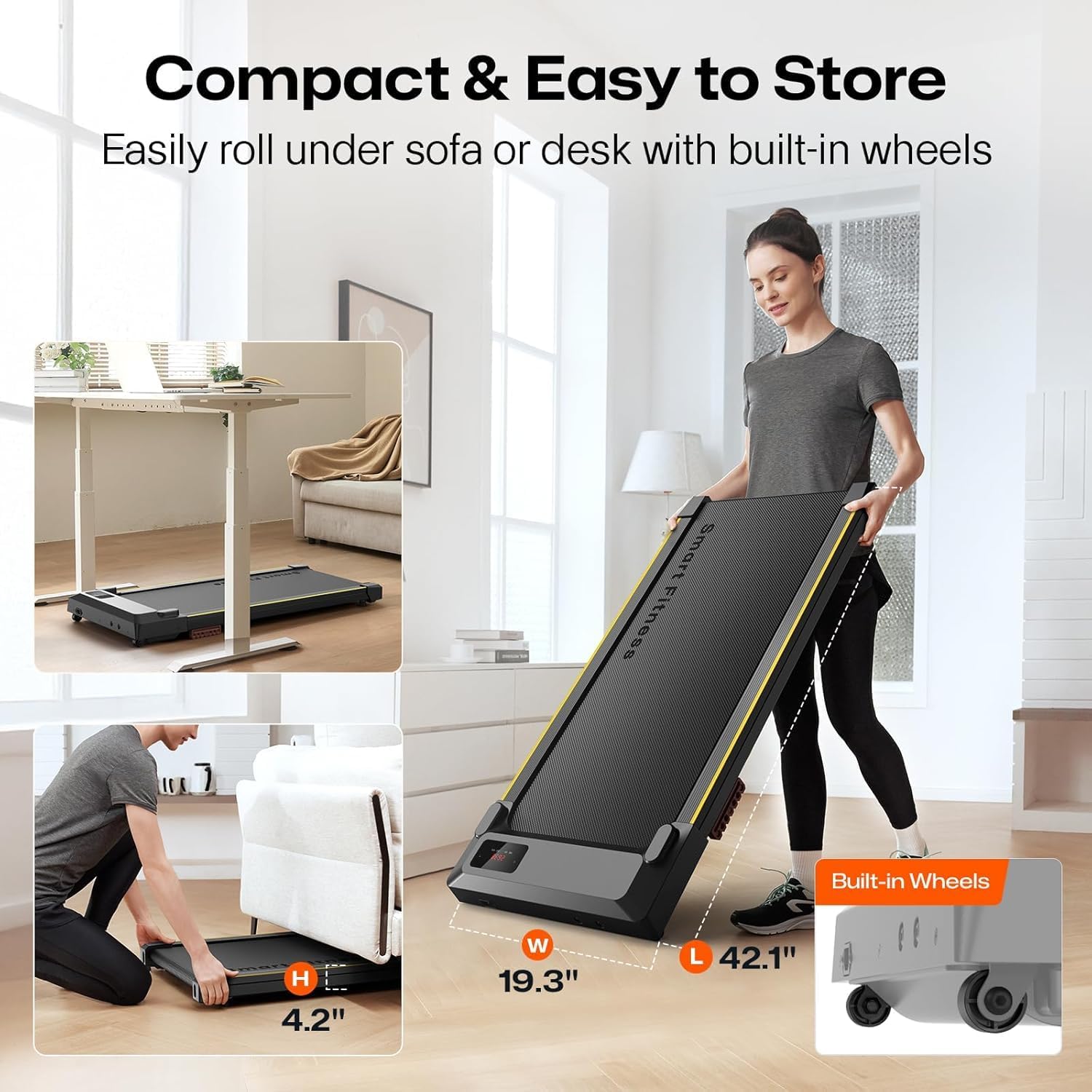
Figure 5.1: The UREVO S1 treadmill features built-in wheels for easy movement and compact storage under furniture.
6. Mode d'emploi
6.1 Mise sous/hors tension
- Mise sous tension : Locate the power switch on the treadmill (usually near the power cord) and flip it to the 'ON' position. The LED display will illuminate.
- Éteindre: To completely power off the treadmill, flip the power switch to the 'OFF' position.
6.2 Utilisation de la télécommande
The remote control allows you to start, stop, adjust speed, and change modes. Ensure the remote is pointed towards the treadmill's display for optimal response.
- Démarrer Pause: Press the Play/Pause button (▶/‖) to start or pause the treadmill. The treadmill will count down from 3 before starting.
- Réglage de la vitesse: Use the '+' button to increase speed and the '-' button to decrease speed. Speed ranges from 0.6 to 4 mph.
- Mode: Appuyez sur le bouton « MODE » pour faire défiler les différentes données affichées (Temps, Distance, Calories, Vitesse).
- Muet: Press the 'MUTE' button to silence any beeping sounds from the treadmill.

Figure 6.1: The LED display shows real-time workout data, controlled by the included remote.
Afficheur à LED 6.3
L'écran LED intégré fournit un retour d'information en temps réel sur votre entraînement :
- TEMPS: Durée de votre entraînement.
- DIST.: Distance parcourue en miles.
- VITESSE: Current walking/jogging speed in mph.
- KCAL : Estimation des calories brûlées.
Réglage manuel de l'inclinaison 6.4
The UREVO S1 features a manual incline adjustment to increase workout intensity. To adjust the incline:
- Assurez-vous que le tapis roulant est éteint et débranché.
- Repérez les pieds réglables à l'arrière du tapis roulant.
- Manually adjust the height of these feet to achieve the desired incline level. Ensure both feet are set to the same level for stability.
- Plug in and power on the treadmill to resume your workout.
Video 6.1: Demonstration of the UREVO S1 walking pad in use, highlighting its quiet operation and compact design.
Vidéo 6.2 : Un bref aperçuview of the UREVO S1 walking pad's features and usage in a home office setting.
7. Entretien
Regular maintenance ensures the longevity and optimal performance of your UREVO S1 treadmill.
- Nettoyage: Essuyez le tapis roulant avec un chiffon humide.amp Essuyez-le après chaque utilisation. Évitez les produits chimiques agressifs.
- Lubrification de la courroie : Lubricate the running belt every 3 months or after 50 hours of use, whichever comes first. Use the provided lubricant or a 100% silicone treadmill lubricant. Refer to the detailed instructions in the separate lubrication guide (if provided) or general treadmill lubrication procedures.
- Ajustement de la ceinture : Periodically check the running belt for proper tension and alignment. Adjust if necessary according to the instructions in the full manual.
8. Dépannage
If you encounter any issues with your UREVO S1 treadmill, please refer to the following common problems and solutions:
| Problème | Cause possible | Solution |
|---|---|---|
| Le tapis roulant ne s'allume pas. | Cordon d'alimentation mal branché ; interrupteur d'alimentation sur la position « éteint » ; disjoncteur déclenché. | Check power connections; ensure power switch is ON; reset circuit breaker. |
| La courroie de course s'arrête ou glisse. | Courroie trop lâche ; lubrification insuffisante ; surcharge du moteur. | Adjust belt tension; lubricate the belt; reduce user weight or speed. |
| Bruit inhabituel pendant le fonctionnement. | Composants desserrés ; frottement de la courroie ; problème de moteur. | Check and tighten all screws; lubricate belt; contact customer support if noise persists. |
| La télécommande ne répond pas. | Dead batteries; remote not pointed correctly; interference. | Replace batteries; ensure direct line of sight to display; remove obstructions. |
Si le problème persiste après avoir essayé ces solutions, veuillez contacter le service client d'UREVO.
9. Spécifications
- Marque: UREVO
- Nom du modèle : URTM025 (S1)
- Couleur: BLACK S1
- Dimensions du produit : 46.8"P x 19.3"L x 4.8"H
- Poids de l'article : 37.5 livres (17 kg)
- Matériel: Acier allié
- Vitesse maximale : 4 miles par heure
- Puissance maximale : 2 CV
- Recommandation de poids maximum: 242 livres (110 kg)
- Type d'affichage : DIRIGÉ
- Source d'alimentation : Électrique avec fil
- Métriques mesurées : Distance, vitesse, temps, calories
10. Garantie et assistance
The UREVO S1 Under Desk Treadmill comes with a Garantie de 1 ans La garantie couvre les défauts de fabrication à compter de la date d'achat. Veuillez conserver votre preuve d'achat pour toute réclamation au titre de la garantie.
For technical support, troubleshooting assistance, or warranty inquiries, please visit the official UREVO store or contact their customer service department.


