1. Introduction
The NORWII N28 is a 2.4 GHz wireless presentation clicker designed to enhance your presentations with ease and control. Featuring a red laser pointer, page navigation, full/black screen functions, hyperlink support, and customizable keys, this device offers a seamless experience for various presentation software and operating systems.
2. Contenu du colis
Veuillez vérifier que le colis contient les éléments suivants :
- 1x NORWII N28 Presenter Pointer
- Récepteur USB 1x
- 1 pochette cadeau
- 1x Manuel d'utilisation
- Note: AAA battery not included.
3. Produit terminéview et composants
Familiarize yourself with the NORWII N28's layout and functions:
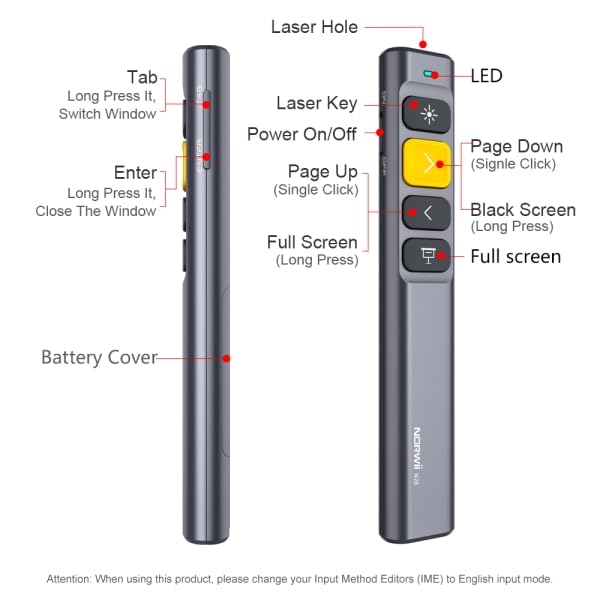
Image: NORWII N28 Presentation Clicker with key components labeled, including Laser Hole, LED indicator, Power On/Off switch, Page Down, Page Up, Black Screen, Full Screen, Tab, Enter buttons, and Battery Cover.
- Trou laser : Émet un faisceau laser rouge.
- Indicateur LED : Shows connection status and low battery alerts.
- Interrupteur Marche/Arrêt : Located on the side, slides to turn the device on or off.
- Page Up/Down Keys: Used for navigating slides. The yellow key is typically Page Down (single click) and the grey key below it is Page Up (single click).
- Black Screen Key: Long press to black out the screen.
- Full Screen Key: Long press to enter full screen mode.
- Touche Tab : Located on the side, used for hyperlink navigation and switching windows.
- La touche Entrée: Located on the side, used to activate selected hyperlinks or close windows.
- Couvercle de la batterie : Located at the bottom, slides open to insert/replace the AAA battery.
4. Installation et fonctionnement de base
Follow these steps to set up and begin using your NORWII N28 presenter:
- Insérer la batterie : Open the battery cover and insert one AAA battery (not included), ensuring correct polarity.
- Connectez le récepteur USB : Take out the mini USB receiver from the presenter's tail (magnetic storage) and plug it into an available USB port on your computer. The device is plug-and-play, requiring no additional drivers.
- Mise sous tension : Slide the Power On/Off switch on the left side of the presenter to the 'ON' position. The LED indicator will light up briefly.
- Activer le laser : Press the 'Laser Key' (often the top button with a sun icon) to emit the red laser dot for highlighting content.
- Navigation des pages : Use the 'Page Up' and 'Page Down' keys to move through your presentation slides.
- Full/Black Screen: Long press the 'Full Screen' key to enter full screen mode. Long press the 'Black Screen' key to black out the screen. Press any page turning key to exit black screen.
Video: A demonstration of the NORWII N28 Wireless Presenter's setup and basic functions, including plugging in the USB receiver, powering on, using the laser, and navigating slides.
5. Advanced Operating Instructions
5.1 Mode Switching for Page Navigation
The N28 supports three modes for page navigation, allowing compatibility with various software. To switch modes, long press the '>' (Page Down) and '<' (Page Up) keys simultaneously for 1-3 seconds. The presenter will remember the last used mode.

Image: Diagram illustrating the three page navigation modes: Mode 1 (Up/Down keys for PowerPoint/Keynote), Mode 2 (Left/Right for Prezi), and Mode 3 (PgUp/PgDn for Browser/Photo viewer software).
- Mode 1 : Touches Haut/Bas (Default) - Typically used for PowerPoint and Keynote presentations.
- Mode 2 : Touches gauche/droite - Suitable for Prezi presentations where left/right navigation is common.
- Mode 3 : Touches Page précédente/Page suivante - Ideal for browsing documents or viewing photos in software that uses these keyboard commands.
5.2 Hyperlink Control
The N28 allows you to control hyperlinks within your presentations:
- Select Hyperlink: Press the 'Tab' key (on the right side) to cycle through available hyperlinks on your slide. A dashed box will appear around the selected hyperlink.
- Open Hyperlink: Once the desired hyperlink is selected, press the 'Enter' key (on the right side) to open it.
5.3 Window Switching and Closing
- Changer de fenêtre : Long press the 'Tab' key to switch between open application windows.
- Close Current Window: Long press the 'Enter' key to close the currently active window.
5.4 Personnalisation des fonctions clés
The NORWII N28 supports key function customization via the Norwii Presenter software. This allows you to assign specific functions to buttons, such as Media Play/Pause, Previous/Next Track, Volume Mute, F5, Esc, Alt+F4, and more.
- Télécharger des logiciels: Visit the official Norwii website to download the 'Norwii Presenter' software.
- Installer et lancer : Install the software on your computer and launch it.
- Connect Presenter: Ensure your N28 presenter's USB receiver is plugged into your computer.
- Personnaliser les touches : Within the software interface, you can select individual keys and assign desired functions from a dropdown list. All functions displayed in blue within the software are customizable.
- Enregistrer les modifications : Save your customized settings.

Image: Screenshot of the Norwii Presenter software, showing options to customize button functions for short press, long press, and double click actions. This allows users to tailor the presenter's controls to their specific needs.
6. Compatibilité
The NORWII N28 wireless presenter offers broad compatibility:
- Systèmes d'exploitation : Compatible with Windows, macOS, Android, and Linux.
- Logiciel: Supports widely used presentation and office software including PowerPoint, Keynote, Prezi, Google Slides, Word, Excel, Photos, ACDSee, OneNote, and others.
- Périphériques d'affichage : Compatible with projection screens. Note: Not compatible with LED LCD TVs.

Image: Icons depicting compatibility with Windows, macOS, Android, Linux operating systems, and various software applications like Word, Excel, PowerPoint, Keynote, Prezi, and Google Slides.
7. Principales caractéristiques
- Portée de contrôle longue durée : Equipped with a top-grade microchip, ensuring a control distance of up to 165 ft (50 meters) and a laser distance of up to 656 ft (200 meters). This allows freedom of movement during presentations.
- Conception ergonomique : Comfortable to hold and easily fits into a pocket. Features vulcanized and upgraded silicone buttons for durability.
- Integrated USB Receiver: The mini USB receiver stores securely in the presenter's tail with a magnetic system, preventing loss.
- Alerte de batterie faible : An indicator light notifies you when the battery is low, ensuring you are prepared.
- Fonction de veille automatique : Helps conserve battery life by entering sleep mode after a period of inactivity.

Image: A hand holding the NORWII N28 presenter, pointing a red laser at a projection screen, with text indicating a laser distance of over 200 meters (656 feet) and a remote control distance of over 100 meters (328 feet).

Image: Close-up of the NORWII N28 presenter demonstrating the integrated magnetic storage for the USB receiver, showing the receiver being inserted into the base of the presenter.

Image: A visual representation of the NORWII N28 presenter with a low battery icon next to it, indicating the low battery alert feature.

Image: The NORWII N28 presenter with a visual cue indicating its automatic sleep function, showing the device in a power-saving state.
8. Spécifications
| Fonctionnalité | Détail |
|---|---|
| Marque | NORWII (E029) |
| Numéro de modèle | N28 (OP-02-LP-N28-SN) |
| Connectivité | 2.4 GHz sans fil |
| Type de laser | Laser rouge |
| Distance de contrôle | Jusqu'à 50 mètres (165 pieds) |
| Distance laser | Jusqu'à 200 mètres (656 pieds) |
| Source d'énergie | 1 piles AAA (non incluses) |
| Dimensions (L x l x H) | 14 x 2.5 x 1.4 cm |
| Poids de l'article | 45 g |
| Systèmes d'exploitation | Windows, macOS, Android, Linux |
9. Dépannage
- Le présentateur ne répond pas :
- Ensure the USB receiver is securely plugged into your computer.
- Check if the presenter is powered on (slide switch to 'ON').
- Replace the AAA battery if the low battery indicator is on or if the device is unresponsive.
- Essayez de brancher le récepteur USB sur un autre port USB.
- Laser défectueux :
- Vérifiez que le présentateur est allumé.
- Press the 'Laser Key' firmly.
- Vérifiez le niveau de la batterie.
- Page navigation issues:
- Verify the correct operating mode is selected for your presentation software (refer to Section 5.1).
- Ensure the presentation software is the active window on your computer.
- Hyperlink control not working:
- Ensure the 'Tab' key is used to select the hyperlink (a dashed box should appear).
- Press 'Enter' to activate the selected hyperlink.
- Personnalisation non applicable :
- Ensure you have downloaded and are using the official 'Norwii Presenter' software from the Norwii website.
- Make sure the USB receiver is connected during customization.
- Remember to save your changes within the software.
- Not compatible with LED LCD TV: This device is designed for use with projection screens and is not compatible with LED LCD televisions.
10. Consignes de sécurité
- Sécurité laser: Do not point the laser beam directly at people's eyes or at highly reflective surfaces. Avoid direct eye exposure to the laser beam.
- Enfants: Gardez l’appareil hors de portée des enfants.
- Démontage: Ne tentez pas de démonter ou de modifier l'appareil. Cela pourrait annuler la garantie et présenter des risques pour votre sécurité.
- Piles : Use only specified battery types. Dispose of used batteries responsibly according to local regulations.
11. Garantie et assistance
For warranty information, technical support, or further assistance, please refer to the documentation included with your product or visit the official NORWII website.


