1. Introduction
The AstroAI P8 4000A Jump Starter is a versatile and powerful device designed to provide reliable jump-starting for vehicles, act as a portable power bank, and offer emergency lighting. This manual provides essential information for safe and effective use of your device.
2. Consignes de sécurité
AVERTISSEMENT : Lisez attentivement toutes les consignes de sécurité et les instructions avant d’utiliser ce produit. Le non-respect de ces consignes peut entraîner un choc électrique, un incendie et/ou des blessures graves.
- This car starter includes 10 built-in comprehensive protections for enhanced safety. These safety features include reverse polarity, overcurrent, overcharge, overdischarge, high & low temperature protection, reverse connection, over voltage, overload, short circuit, and spark-proof clamps.
- Do not attempt to jump start any engine that exceeds the maximum displacement supported by the jump starter (10L Gas or 8L Diesel).
- Ne pas actionner le démarreur pendant plus de 3 secondes à la fois. Laisser refroidir le démarreur pendant au moins 1 minute entre chaque tentative de démarrage.
- Ensure the device has at least 50% charge before use.
- Tenir hors de portée des enfants.
- N'exposez pas le produit à la pluie ou à des conditions humides.
- Ne pas démonter le produit.

Image: AstroAI P8 Jump Starter highlighting its 10 safety protections including reverse polarity, overcurrent, overcharge, overdischarge, high & low temperature protection, reverse connection, over voltage, overload, short circuit, and spark-proof clamps.
3. Contenu du colis
- AstroAI P8 Jump Starter Unit
- Câbles de démarrage intelligents
- Câble de chargement USB-C
- Manuel d'utilisation
- Sac de rangement

Image: The AstroAI P8 Jump Starter, smart jumper cables, USB-C charging cable, user manual, and a storage bag, laid out on a dark background.
4. caractéristiques du produit
- Démarrage puissant : 4000A peak current for 10L gas and 8L diesel engines. Compatible with motorbikes, cars, SUVs, lawnmowers, tractors, and motorboats.
- Batterie externe multifonctionnelle : USB-A output Port works with 5V⎓3A, 9V⎓2A, 12V⎓1.5A (QC 3.0). Serves as a reliable backup power source for electronic devices.
- Compact et portable : Size 7.20in*3.45in*1.53in (183mm*88mm*39mm) for easy carrying and storage in glove boxes and door pockets.
- Lampe torche LED multimode : Provides 3 modes: illumination, SOS, and strobe for convenient lighting in various scenarios.
- Sécurité complète : 10 built-in protections for enhanced safety, including reverse polarity, overcurrent, overcharge, overdischarge, high & low temperature protection, reverse connection, over voltage, overload, short circuit, and spark-proof clamps.

Image: The AstroAI P8 Jump Starter demonstrating its three main functions: jump starter, power bank, and LED flashlight.
5. Produit terminéview (Composants)
The AstroAI P8 features a robust design with clearly marked ports and indicators for ease of use.
- Bouton d'alimentation : Active l'appareil et vérifie le niveau de la batterie.
- Indicateur de niveau de batterie: Affiche la charge restante.
- Port pour câble de démarrage : Pour connecter les câbles de démarrage intelligents.
- USB-A Output Ports (QC 3.0): Pour recharger des appareils externes.
- Port d'entrée/sortie USB-C : Pour recharger le démarreur et les appareils externes.
- Lampe de poche LED: Multi-mode light for illumination, SOS, and strobe.
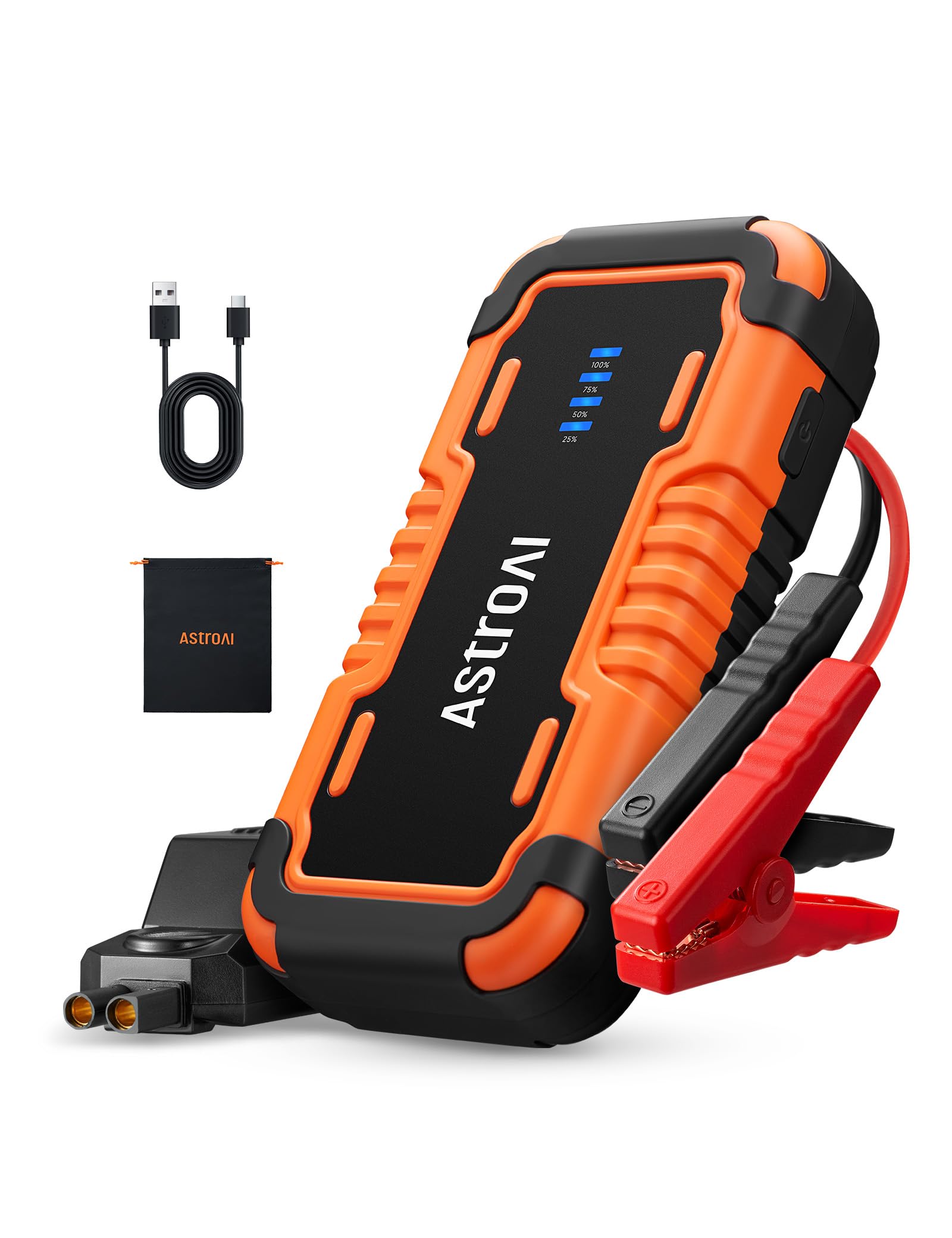
Image: The AstroAI P8 Jump Starter with its smart jumper cables connected, ready for use.
6. Recharge du démarreur
Before first use, fully charge the AstroAI P8. It is recommended to recharge the unit after each use to maintain battery health.
- Connect the provided USB-C charging cable to the USB-C input/output port on the jump starter.
- Plug the other end of the USB-C cable into a compatible USB wall adapter (not included) or car charger.
- The battery level indicator lights will illuminate and flash, indicating the charging progress. All lights will be solid when fully charged.

Image: The AstroAI P8 Jump Starter connected via USB-C to charge a smartphone and a tablet, demonstrating its power bank functionality.
7. Mode d'emploi
7.1. Démarrage rapide d'un véhicule
- Assurez-vous que le démarreur de secours est suffisamment chargé (au moins 50 %).
- Connect the smart jumper cables to the jump starter's port. Ensure a secure connection.
- Fixez le cl rougeamp à la borne positive (+) de la batterie du véhicule.
- Fixez le cl noiramp à la borne négative (-) de la batterie du véhicule.
- Check the indicator light on the smart jumper cable. A solid green light indicates a correct connection and readiness to jump start. If it's flashing or red, check connections or refer to troubleshooting.
- Start the vehicle's engine. If it doesn't start immediately, wait at least 1 minute before trying again. Do not crank for more than 3 seconds per attempt.
- Once the vehicle starts, immediately remove the black clamp from the negative terminal, then the red clamp from the positive terminal.
- Débranchez les câbles de démarrage intelligents du démarreur.

Image: A person connecting the AstroAI P8 Jump Starter to a car battery, illustrating the process of jump starting a vehicle.
7.2. Utilisation comme batterie externe
The AstroAI P8 can charge various electronic devices.
- Connect your device's USB charging cable to one of the USB-A output ports or the USB-C port on the jump starter.
- Le démarreur de secours commencera automatiquement à charger votre appareil.
7.3. Utilisation de la lampe torche LED
The built-in LED flashlight offers multiple modes for different situations.
- Press and hold the power button for 3 seconds to turn on the flashlight (illumination mode).
- Press the power button once to switch to SOS mode.
- Appuyez de nouveau sur le bouton d'alimentation pour passer en mode stroboscopique.
- Press the power button once more to turn off the flashlight.

Image: A person using the AstroAI P8 Jump Starter's multi-mode LED flashlight under the hood of a car at night.
8. Entretien
- Rangez le démarreur dans un endroit frais et sec, à l'abri de la lumière directe du soleil et des températures extrêmes.
- Rechargez l'appareil tous les 3 à 6 mois, même s'il n'est pas utilisé, afin de préserver la durée de vie de la batterie.
- Nettoyez l'extérieur avec un doux, damp tissu. N'utilisez pas de produits chimiques agressifs ou de nettoyants abrasifs.
- Inspectez les câbles et les clôturesamps pour tout dommage avant chaque utilisation.
9. Dépannage
| Problème | Cause possible | Solution |
|---|---|---|
| Le véhicule ne démarre pas. | Low charge on jump starter, incorrect connection, or vehicle battery completely dead. | Ensure jump starter is at least 50% charged. Recheck clamp connections. If battery is extremely dead, allow jump starter to connect for a few minutes before attempting to start. |
| Smart jumper cable indicator is red or flashing. | Reverse polarity, short circuit, or other safety protection activated. | Déconnecter clamps and re-attach them correctly (red to positive, black to negative). If issue persists, check for short circuits or other battery issues. |
| Le démarreur ne charge pas. | Câble de charge ou adaptateur défectueux. | Try a different USB-C cable and wall adapter. Ensure connections are secure. |
10. Spécifications
- Modèle: P8
- Courant de pointe: 4000 Amps
- Compatibilité moteur : Jusqu'à 10 L essence ou 8 L diesel
- Voltage: 12 volts
- Type de batterie : Lithium Polymère (inclus)
- Sortie USB-A (QC 3.0) : 5V⎓3A, 9V⎓2A, 12V⎓1.5A
- Entrée/sortie USB-C : 5 V à 3 A, 9 V à 2 A
- Dimensions: 183 mm x 88 mm x 39 mm (7.20 po x 3.45 po x 1.53 po)
- Poids de l'article : 710 g
- Pays d'origine : Chine
11. Garantie et assistance
AstroAI products come with a manufacturer's warranty. For detailed warranty information, product support, or to register your product, please visit the official AstroAI webou contactez directement leur service client. Conservez votre reçu d'achat pour toute réclamation sous garantie.
Fabricant: AstroAI
Contact: Support@astroai.com