1. Introduction
Merci pour votre achatasing the Supersonic Professional Stereo Amplifier AV-972SA. This amplifier is designed to provide high-fidelity audio for your home entertainment or karaoke system. With its versatile features, including USB/SD card playback, FM radio, and microphone inputs, it offers a powerful and clear sound experience. Please read this manual carefully before operating the unit to ensure proper use and to maximize its performance.
2. Consignes de sécurité importantes
- Alimentation: Assurer l'alimentation voltage matches the requirements specified on the unit (220V~250V/50Hz).
- Ventilation: Ne pas obstruer les ouvertures de ventilation. Procéder à l'installation conformément aux instructions du fabricant.
- Eau et humidité : Ne pas exposer cet appareil à la pluie ou à l'humidité. Ne pas poser d'objets contenant du liquide, tels que des vases, sur l'appareil.
- Chaleur: Ne pas installer à proximité de sources de chaleur telles que radiateurs, bouches de chauffage, poêles ou autres appareils (y compris amp(échangeurs thermiques) qui produisent de la chaleur.
- Nettoyage: Nettoyer uniquement avec un chiffon sec.
- Entretien: N'essayez pas de réparer vous-même ce produit. Confiez tous les travaux d'entretien à du personnel de service qualifié.
- Connexion haut-parleur : Ensure correct polarity when connecting speakers to prevent damage to the amplificateur et haut-parleurs.
3. Principales caractéristiques
- Luxury Color Pointer Screen Display
- High-Fidelity Stereo Dynamic AmpConception de lifier
- Bass-enhancement Technology
- Puissance de sortie de 3000 W
- Professional Karaoke FM Radio Tuner
- USB/SD Card Playback for MP3 files
- Low Leak Magnetic Ring type Voltage
- Optimized for use with 12", 15", and 18" loudspeakers
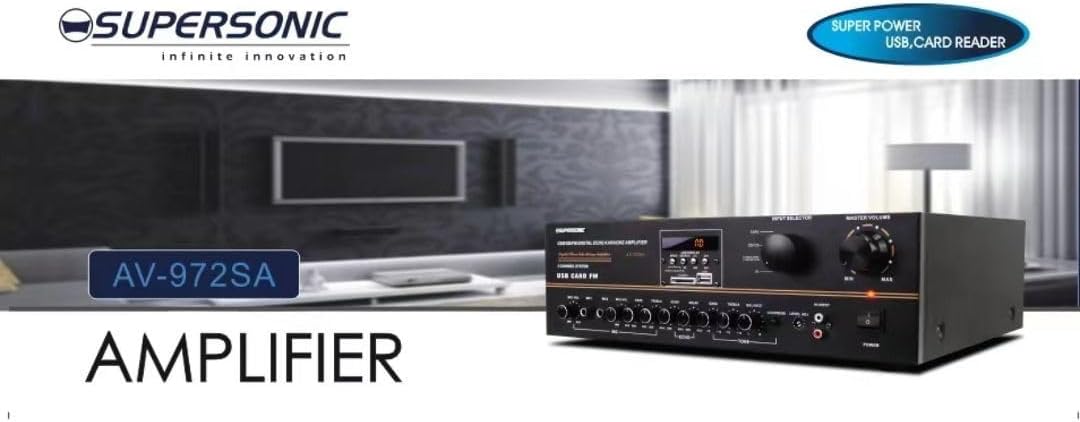
Image 3.1: A visual representation of the key features of the Supersonic AV-972SA amplifier, including its display, power output, and connectivity options.
4. Produit terminéview
The Supersonic AV-972SA amplifier features a user-friendly front panel for easy control and a rear panel for all necessary connections.
4.1 Panneau avant

Image 4.1: Devant view of the Supersonic AV-972SA ampamplificateur, montreasing its controls, display, and input ports in a home setting.
Le panneau avant comprend :
- Bouton d'alimentation : Tourne le amplifier allumé ou éteint.
- Contrôle du volume principal : Ajuste le volume de sortie global.
- Commandes basses/aigus : Ajuste la réponse en basses et hautes fréquences.
- Sélecteur d'entrée: Switches between different audio sources (e.g., USB, SD, FM, AUX).
- Emplacement pour carte USB/SD : Pour la lecture audio filedirectement depuis des clés USB ou des cartes SD.
- FM Tuner Controls: For radio station selection and tuning.
- Entrées microphone: For connecting microphones for karaoke or public address.
- Écran d'affichage : Affiche le mode actuel, les informations de piste ou la fréquence FM.
4.2 Panneau arrière
The rear panel provides all necessary connections for speakers, power, and external audio sources.
- Bornes de haut-parleur : Connect your loudspeakers here. Ensure correct polarity (+ to + and - to -).
- Entrée audio (RCA) : For connecting external audio devices like CD players, DVD players, or other audio sources.
- Entrée du cordon d'alimentation : Branchez ici le cordon d'alimentation fourni.
- Entrée d'antenne FM : Branchez l'antenne FM pour une meilleure réception radio.
5. Guide de configuration
Follow these steps to set up your Supersonic AV-972SA amplifier :
- Placement: Placez le amplifier on a stable, flat surface with adequate ventilation around it. Avoid direct sunlight, heat sources, or areas with high humidity.
- Connexion haut-parleur : Connect your loudspeakers to the speaker terminals on the rear panel. Match the positive (+) terminal on the amplifier to the positive (+) terminal on your speaker, and the negative (-) to the negative (-). Ensure all connections are secure. This amplifier is designed to work best with 12", 15", or 18" loudspeakers.
- Connexion de la source audio :
- Périphériques externes : Connect your CD player, DVD player, or other audio sources to the RCA audio input jacks on the rear panel.
- Carte USB/SD : Insert a USB flash drive or SD card into the respective slot on the front panel.
- Antenne FM : Connect the FM antenna to the designated input on the rear panel for optimal radio reception.
- Connexion électrique : Assurez-vous que amplifier's power switch is in the OFF position. Connect the power cord to the amplifier's power input and then plug it into a suitable 220V~250V/50Hz AC power outlet.
6. Mode d'emploi
6.1 Mise sous/hors tension
Appuyez sur le Bouton d'alimentation sur le panneau avant pour tourner le amplifier ON. The display will illuminate. Press it again to turn the amplificateur OFF.
6.2 Selecting Audio Source
Utilisez le Sélecteur d'entrée button or knob on the front panel to cycle through available audio sources: USB, SD, FM, or AUX (RCA input).
6.3 Contrôle du volume et de la tonalité
- Volume principal : Faites pivoter le Volume principal knob to adjust the overall sound level. Start with a low volume and gradually increase it.
- Graves/Aigus : Utilisez le Basse et Tripler knobs to fine-tune the low and high frequencies of the audio output to your preference.
Lecture de cartes USB/SD 6.4 pouces
Once a USB drive or SD card containing MP3 audio filesi un s est inséré, le amplifier will automatically switch to USB/SD mode and begin playback. Use the control buttons (Play/Pause, Next, Previous) on the front panel to manage playback.
Fonctionnement de la radio FM 6.5
Select the FM input using the Sélecteur d'entrée. Use the FM tuner controls to scan for and select radio stations. The display will show the current frequency.
6.6 Utilisation du microphone (Karaoké)
Connect your microphones to the microphone input jacks on the front panel. Adjust the microphone volume and echo effects (if available) using the dedicated controls. Ensure the main volume is set appropriately to avoid feedback.
7. Entretien
- Nettoyage: Débranchez l'appareil avant de le nettoyer. Utilisez un chiffon doux et sec pour essuyer l'extérieur. ampNettoyeur liquide. N’utilisez pas de nettoyants liquides ni d’aérosols.
- Ventilation: Vérifiez régulièrement que les ouvertures de ventilation sont dégagées de poussière et de débris afin d'éviter toute surchauffe.
- Stockage: Si vous stockez le ampSi vous utilisez l'amplificateur pendant une période prolongée, assurez-vous de le conserver dans un endroit frais et sec, à l'abri de la lumière directe du soleil et des températures extrêmes.
8. Dépannage
| Problème | Cause possible | Solution |
|---|---|---|
| Pas de courant | Cordon d'alimentation non branché ; prise de courant défectueuse ; Amplifier power switch off | Vérifiez le branchement du cordon d'alimentation ; essayez une autre prise ; assurez-vous que l'interrupteur est allumé. |
| Pas de sortie audio | Volume too low; Incorrect input selected; Speaker wires loose or incorrectly connected; Faulty audio source | Increase master volume; Select correct input; Check speaker connections and polarity; Test with a different audio source |
| Mauvaise réception FM | Antenne non connectée ou mal positionnée ; signal faible | Connect FM antenna securely; Adjust antenna position; Try manual tuning |
| Lecture impossible du périphérique USB/SD | Incorrect file format; USB/SD card faulty or not inserted correctly; AmpAmplificateur non en mode USB/SD | Assurer files are MP3 format; Reinsert USB/SD card; Select USB/SD input mode |
9. Spécifications
| Fonctionnalité | Spécification |
|---|---|
| Marque | Supersonique |
| Numéro de modèle | AMP-AV972SA |
| Puissance de sortietage | 3000 W |
| Technologie de connectivité | USB |
| Dossier spécial | Conception compacte |
| Couleur | Noir |
| Dimensions du produit | 25D x 45L x 26H centimètres |
| Poids de l'article | 1 kilogramme |
| Méthode de contrôle | Touche |
| Alimentation électrique | 220V ~ 250V / 50Hz |
10. Garantie et assistance
This Supersonic AV-972SA amplificateur est livré avec un 6 Months Manufacturer's Warranty from the date of purchase. This warranty covers manufacturing defects under normal use. It does not cover damage caused by misuse, accidents, unauthorized modifications, or improper installation.
For warranty claims or technical support, please contact your retailer or the Supersonic customer service department. Please have your proof of purchase and product model number (AMP-AV972SA) ready when contacting support.


