1. Introduction
Thank you for choosing the AIWA FPH-S100/4G Simple Mobile Phone. This device is designed for ease of use, featuring large keys, a clear display, and essential functions like 4G connectivity, an SOS emergency button, FM radio, and a flashlight. This manual provides detailed instructions to help you set up, operate, and maintain your new phone.
2. Produit terminéview
The AIWA FPH-S100/4G is a user-friendly mobile phone with a focus on simplicity and accessibility. It supports 4G LTE for reliable calls and features a 1.8-inch color screen.

Figure 2.1 : Devant view of the AIWA FPH-S100/4G mobile phone, displaying the screen and large, clearly labeled keypad.

Figure 2.2 : Dos view of the AIWA FPH-S100/4G mobile phone, highlighting the prominent orange SOS button and the integrated camera.

Figure 2.3 : Côté view of the AIWA FPH-S100/4G mobile phone, illustrating its ergonomic design.

Figure 2.4 : Haut view of the AIWA FPH-S100/4G mobile phone, featuring the built-in LED flashlight.
Caractéristiques principales :
- Grandes clés : Easy to see and press for comfortable dialing and texting.
- Bouton SOS : Dedicated button for quick access to emergency contacts.
- Écran LCD 1.8 pouces : Clear color screen for easy viewing of numbers and text.
- Connectivité 4G LTE : Ensures clear and stable call quality.
- Radio FM: Listen to your favorite radio stations on the go.
- Lampe de poche LED: Pratique dans les situations de faible luminosité.
- Chargement USB-C: Modern and reversible connector for easy charging.
- Prise en charge double SIM : Utilisez deux cartes SIM simultanément.
- Emplacement pour carte TF: Expandable storage for contacts, photos, and more.
3. Installation
3.1. Contenu du colis
Vérifiez que tous les articles sont présents dans la boîte :
- AIWA FPH-S100/4G Mobile Phone
- Câble USB
- Manuel de l'utilisateur (ce document)
3.2. Installation de la batterie
- Retirez la coque arrière du téléphone en la soulevant délicatement au niveau de l'encoche.
- Alignez les contacts de la batterie avec les bornes à l'intérieur du téléphone.
- Appuyez sur la batterie jusqu'à ce qu'elle soit bien en place.
- Remettez le couvercle arrière en place en vous assurant qu'il s'enclenche correctement.
3.3. Insertion des cartes SIM et de la carte TF
The phone supports two SIM cards and one TF (microSD) card for expandable storage.
- With the back cover and battery removed, locate the SIM card slots and the TF card slot.
- Carefully insert your SIM card(s) into the designated slots with the gold contacts facing down, following the orientation indicated on the phone.
- Insert the TF card into its slot, ensuring it is properly seated.
- Réinstallez la batterie et le couvercle arrière.
3.4. Charge initiale
Avant la première utilisation, chargez complètement la batterie du téléphone.
- Connect the USB-C cable to the charging port on the phone.
- Connectez l'autre extrémité du câble USB à un adaptateur secteur USB compatible (non inclus) ou au port USB d'un ordinateur.
- L'indicateur de batterie à l'écran affichera l'état de charge.
- Une fois complètement chargé, débranchez le chargeur.


Figure 3.1 : Icons representing USB-C charging and the flash card slot.
4. Mode d'emploi
4.1. Marche/Arrêt
- Pour allumer : Appuyez et maintenez enfoncé le Fin/Puissance de l'appel rouge jusqu'à ce que l'écran s'allume.
- Pour éteindre : Appuyez et maintenez enfoncé le Fin/Puissance de l'appel rouge button until the power off options appear, then select 'Power Off'.
4.2. Passer et recevoir des appels
- Faire un appel: Saisissez le numéro de téléphone à l'aide du grand clavier. Appuyez sur Appel vert bouton pour lancer l'appel.
- Pour répondre à un appel : Lorsque le téléphone sonne, appuyez sur la touche Appel vert bouton.
- Pour terminer un appel : Appuyez sur le Fin/Puissance de l'appel rouge bouton.

Figure 4.1 : The phone's simplified interface, showing the large numeric keypad for easy dialing.
4.3. Bouton d'urgence SOS
Le bouton SOS dédié permet de contacter rapidement les numéros d'urgence préenregistrés.
- Setting Up Emergency Contacts: Navigate to the 'SOS Settings' in the phone's menu. Add up to 5 emergency contact numbers. These contacts will be called in sequence when the SOS button is activated.
- Activation de SOS : Appuyez et maintenez l'orange SOS button on the back of the phone for a few seconds. The phone will automatically dial the emergency contacts one by one until a connection is made. It will also send a pre-set emergency SMS message to these contacts.
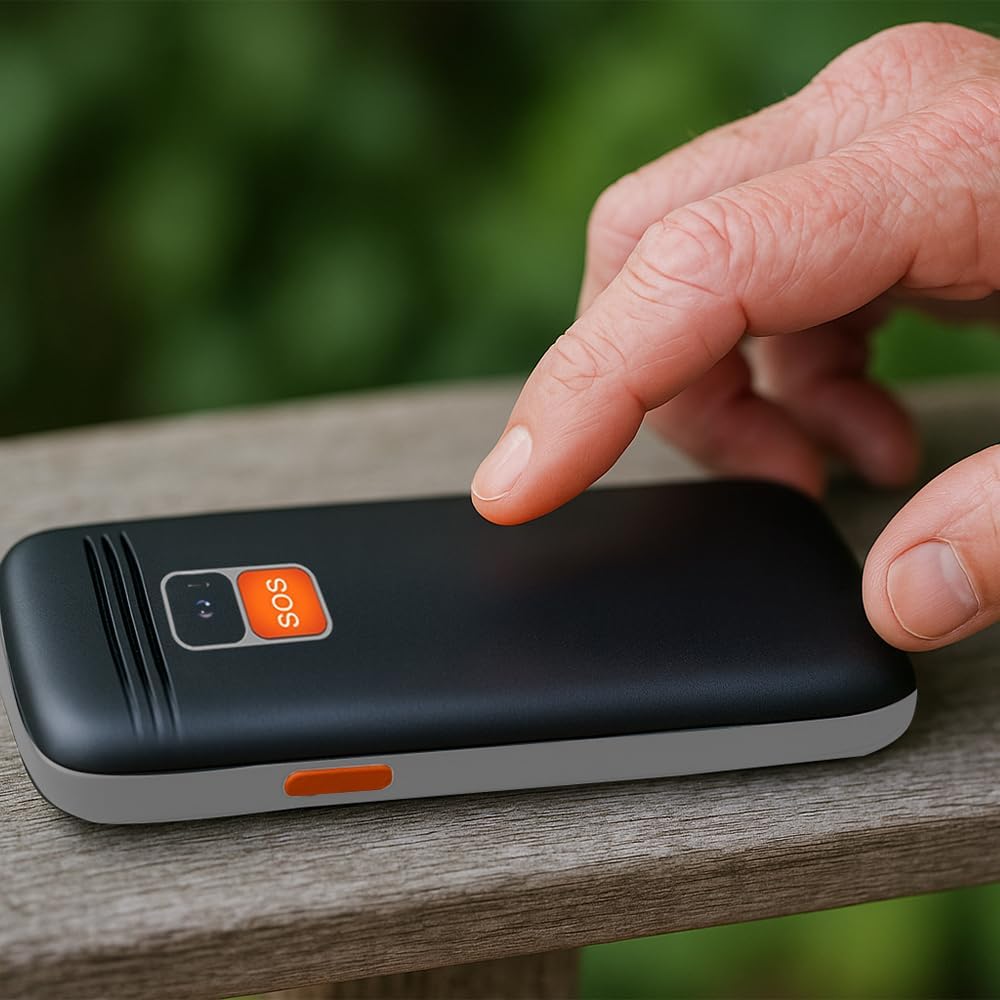
Figure 4.2 : A user activating the SOS emergency function by pressing the dedicated button on the phone's rear.
4.4. Utilisation de la lampe de poche
To turn the LED flashlight on or off, locate the dedicated flashlight button on the side of the phone (or refer to the manual for specific key combination if not a dedicated button). Press and hold or toggle the button as instructed.

Figure 4.3 : Icon indicating the flashlight function.
4.5. Radio FM
To use the FM radio, connect a wired headset (not included) to the 3.5mm audio jack, as it acts as an antenna. Navigate to the 'FM Radio' application in the phone's menu to scan for stations and adjust volume.

Figure 4.4 : Icon representing the earphone output port.
4.6. Connectivité Bluetooth
Pour jumeler avec un appareil Bluetooth:
- Allez dans « Paramètres » > « Bluetooth ».
- Activez le Bluetooth.
- Sélectionner 'Rechercher appareils pour trouver les accessoires Bluetooth disponibles.
- Sélectionnez l'appareil souhaité dans la liste et suivez les instructions à l'écran pour l'appairer.
5. Entretien
5.1. Nettoyage de l'appareil
Use a soft, dry, lint-free cloth to clean the phone's screen and body. Avoid using harsh chemicals, cleaning solvents, or abrasive materials, as these can damage the phone's surface.
5.2. Entretien de la batterie
- Évitez d'exposer la batterie à des températures extrêmes (chaudes ou froides).
- Ne pas perforer, démonter ou modifier la batterie.
- Si vous n'utilisez pas votre téléphone pendant une période prolongée, chargez-le à environ 50 % avant de le ranger.
5.3. Stockage
Rangez le téléphone dans un endroit frais et sec, à l'abri de la lumière directe du soleil et de l'humidité, lorsqu'il n'est pas utilisé.
6. Dépannage
This section addresses common issues you might encounter with your AIWA FPH-S100/4G.
| Problème | Cause possible | Solution |
|---|---|---|
| Le téléphone ne s'allume pas. | Batterie faible ou batterie mal installée. | Chargez la batterie pendant au moins 30 minutes. Assurez-vous que la batterie est correctement insérée. |
| Aucun signal réseau. | SIM card not inserted, out of network coverage, or SIM card issue. | Check SIM card installation. Move to an area with better network coverage. Contact your service provider if the issue persists. |
| Impossible de passer ou de recevoir des appels. | No network signal, incorrect call settings, or insufficient balance (prepaid). | Verify network signal. Check call barring settings. Ensure sufficient credit if using a prepaid SIM. |
| Le bouton SOS ne fonctionne pas. | Contacts d'urgence non configurés ou numéros incorrects. | Go to 'SOS Settings' and ensure emergency contacts are correctly saved. Test the function in a non-emergency situation. |
| La radio FM ne fonctionne pas. | Headset not connected or faulty. | Ensure a wired headset is properly connected, as it functions as the antenna. Try a different headset if available. |
7. Spécifications
Detailed technical specifications for the AIWA FPH-S100/4G mobile phone.
| Fonctionnalité | Spécification |
|---|---|
| Nom du modèle | FPH-S100/4G |
| Marque | Aiwa |
| Système opérateur | Symbian 9.1 |
| Technologie mobile | 4G |
| Fournisseur de services sans fil | Tous les transporteurs |
| Couleur | Noir |
| Type de connecteur | USB Type-C |
| Facteur de forme | Bar |
| Type d'affichage | Écran LCD |
| Taille de l'écran | 1.8 pouces |
| Capacité de la batterie | 800 mAh (amovible) |
| Dimensions (paquet) | 15 x 15 x 10 cm |
| Poids | 58 g |
| Composants inclus | Câble USB |


Figure 7.1 : Icons highlighting the 1.8" LCD display and the phone's light weight of 58g.
8. Garantie et assistance
8.1. Garantie du produit
The AIWA FPH-S100/4G mobile phone comes with a Garantie produit de 2 ans À compter de la date d'achat, cette garantie couvre les défauts de fabrication et les dysfonctionnements dans des conditions normales d'utilisation. Veuillez conserver votre preuve d'achat pour toute réclamation au titre de la garantie.
8.2. Assistance clientèle
For technical assistance, troubleshooting beyond this manual, or warranty inquiries, please contact your retailer or the official Aiwa customer support. Refer to the contact information provided with your purchase or visit the official Aiwa website pour les détails de l'assistance.