1. Introduction
1.1 Produit terminéview
The XUZHID Mechanical Wired Gaming Keyboard is designed to enhance your gaming and typing experience. It features a mechanical feel, backlighting, and an ergonomic design for comfortable and precise input. This keyboard is suitable for a wide range of operating systems and environments, from home use to office tasks.
1.2 Principales caractéristiques
- Sensation mécanique : Offre un retour tactile pour un contrôle précis.
- Rétroéclairage : Enhances visibility and aesthetic appeal.
- Construction durable : Made with ABS material for long-lasting use.
- Conception ergonomique : Contributes to typing comfort and reduces strain.
- Anti-Splash Feature: Offers protection against accidental liquid spills.
2. Installation
2.1 Contenu du paquet
- XUZHID Mechanical Wired Gaming Keyboard
- Manuel d'utilisation
2.2 Connexion du clavier
- Unpack the keyboard and ensure all components are present.
- Localisez un port USB disponible sur votre ordinateur.
- Branchez fermement le connecteur USB du clavier dans le port USB.
- Votre système d'exploitation devrait détecter et installer automatiquement les pilotes nécessaires. Aucune installation de logiciel supplémentaire n'est généralement requise.
- The keyboard is ready for use once detected.

Figure 2.2.1: The XUZHID Mechanical Wired Gaming Keyboard, showcasinet sa mise en page et son design.
3. Mode d'emploi
3.1 Fonctions de base
The keyboard functions as a standard QWERTY layout keyboard. Simply type as you would with any other keyboard. Special function keys (F1-F12) may have secondary functions accessible by pressing the Fn touche en combinaison avec la touche de fonction souhaitée.
Contrôle du rétroéclairage 3.2
The keyboard features integrated backlighting. Specific key combinations, often involving the Fn key and certain function keys (e.g., Fn + Scroll Lock, Fn + Home, or dedicated backlight keys), control backlight brightness, patterns, and on/off states. Refer to the keycap legends for specific backlight control icons.

Figure 3.2.1: The keyboard illuminated by its integrated backlighting, enhancing visibility and aesthetic.
3.3 Conception ergonomique
This keyboard incorporates an ergonomic design to promote a more natural hand and wrist position during extended use. This design aims to reduce discomfort and fatigue, contributing to a more comfortable typing experience.

Figure 3.3.1: An illustration demonstrating the ergonomic design of the keyboard, showing optimal hand placement.
4. Entretien
4.1 Nettoyage
To clean your keyboard, first disconnect it from your computer. Use a soft, dry cloth to wipe down the keycaps and chassis. For stubborn dirt, a slightly damp cloth with a mild cleaning solution can be used, ensuring no liquid enters the keyboard's internal components. Avoid abrasive cleaners or solvents.
4.2 Résistance aux déversements
The keyboard features an anti-splash design, providing a degree of protection against accidental liquid spills. In case of a spill, immediately disconnect the keyboard from your computer, gently shake off any excess liquid, and allow it to air dry completely before reconnecting. This feature is designed to mitigate damage from minor spills but does not guarantee full waterproofing.

Figure 4.2.1: The keyboard with water droplets, visually representing its anti-splash capability.
5. Dépannage
- Le clavier ne répond pas :
- Assurez-vous que le câble USB est correctement connecté au clavier et à l'ordinateur.
- Essayez de brancher le clavier sur un autre port USB.
- Redémarrez votre ordinateur.
- Testez le clavier sur un autre ordinateur pour exclure un problème lié à cet ordinateur.
- Le rétroéclairage ne fonctionne pas :
- Check if the backlight is turned off or set to the lowest brightness level using the designated function key combinations (e.g., Fn + Scroll Lock).
- Vérifiez que le clavier est correctement connecté et alimenté.
- Clés non enregistrées :
- Nettoyez la zone autour de la touche concernée afin de vous assurer qu'aucun débris n'entrave son mouvement.
- If multiple keys are affected, try the steps for 'Keyboard Not Responding'.
6. Spécifications
| Marque | XUZHID |
| Numéro de modèle (ASIN) | B0F6V47CSF |
| Matériel | Acrylonitrile butadiène styrène (ABS) |
| Couleur | White and Blue (as per product variant) |
| Dimensions (environ) | 43.5 cm x 13 cm x 2.5 cm (17.13 pouces x 5.12 pouces x 0.98 pouces) |
| Connectivité | USB filaire |
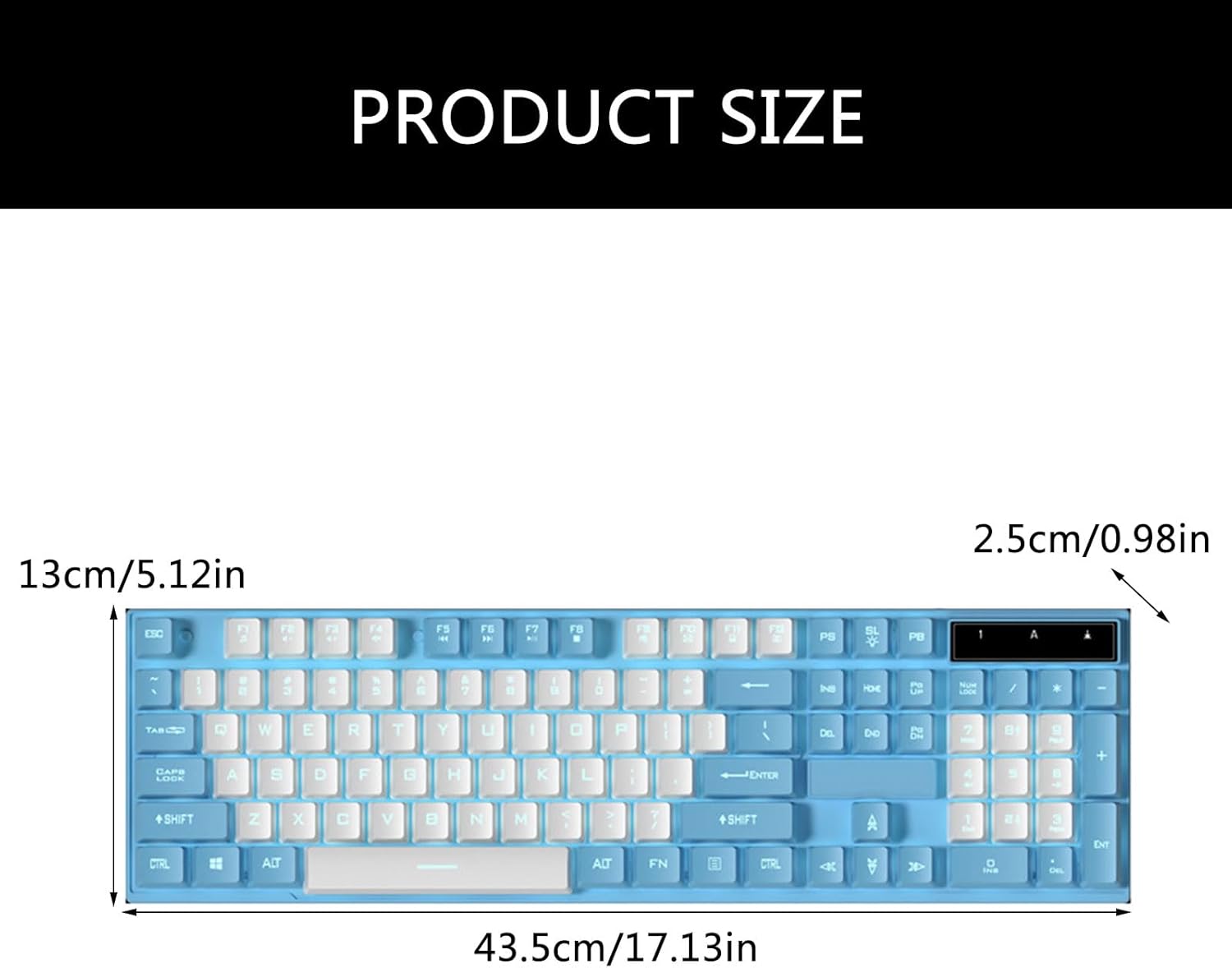
Figure 6.1.1: Product dimensions of the XUZHID Mechanical Wired Gaming Keyboard.