Introduction
Thank you for choosing the Kiwi KAP 6730 Air Purifier. This manual provides essential information for the safe and efficient use of your device. Please read it thoroughly before operation and retain it for future reference.
The Kiwi KAP 6730 is designed to improve indoor air quality using advanced filtration technology, including a medical-grade H13 HEPA filter, to capture various airborne particles and odors.
Consignes de sécurité importantes
Respectez toujours les consignes de sécurité de base lors de l'utilisation d'appareils électriques afin de réduire les risques d'incendie, d'électrocution et de blessures.
- Lisez toutes les instructions avant d’utiliser l’appareil.
- Assurez-vous que l'alimentation électrique correspond au voltage spécifié sur l'étiquette de l'appareil.
- N’utilisez pas l’appareil si le cordon ou la fiche sont endommagés.
- Gardez le cordon d’alimentation éloigné des surfaces chauffées.
- Ne plongez pas l'appareil, le cordon ou la fiche dans l'eau ou d'autres liquides.
- Débranchez le purificateur d'air avant de le nettoyer ou d'effectuer toute opération de maintenance.
- Ne bloquez pas les entrées ou les sorties d’air.
- Cet appareil est destiné à un usage intérieur uniquement.
- Tenir hors de portée des enfants.
Produit terminéview
The Kiwi KAP 6730 Air Purifier features a compact design with an intuitive control panel and multi-stage système de filtration.

Image: Haut view of the Kiwi KAP 6730 Air Purifier, highlighting the circular control panel with various function icons including power, fan speed, timer, and Wi-Fi connectivity. The top grille for air output is also visible.

Image: An exploded diagram of the Kiwi KAP 6730 Air Purifier, illustrating its internal components. The image shows the outer casing, the fan assembly, and the cylindrical multi-layer filter system, with arrows indicating airflow and the capture of dust and pet hair by different filter staget.
Caractéristiques principales :
- Medical-grade H13 HEPA filter for effective air purification.
- Multi-stage système de filtration.
- Panneau de commande intuitif.
- Conception compacte et légère.
- Smart connectivity (Wi-Fi enabled).
Installation
Déballage
- Retirez délicatement le purificateur d'air de son emballage.
- Remove all packaging materials, including any protective films or bags.
- Vérifiez l'état du produit pendant le transport. En cas de dommage, n'utilisez pas le produit et contactez le service client.
Filter Installation (if not pre-installed)
The air purifier comes with a multi-layer filter. Ensure it is properly installed before first use.
- Retournez le purificateur d'air.
- Tournez le couvercle de la base dans le sens inverse des aiguilles d'une montre pour le déverrouiller et le retirer.
- Retirez l'emballage en plastique du filtre.
- Insert the filter into the air purifier, ensuring it sits securely.
- Replace the base cover and twist clockwise to lock it into place.
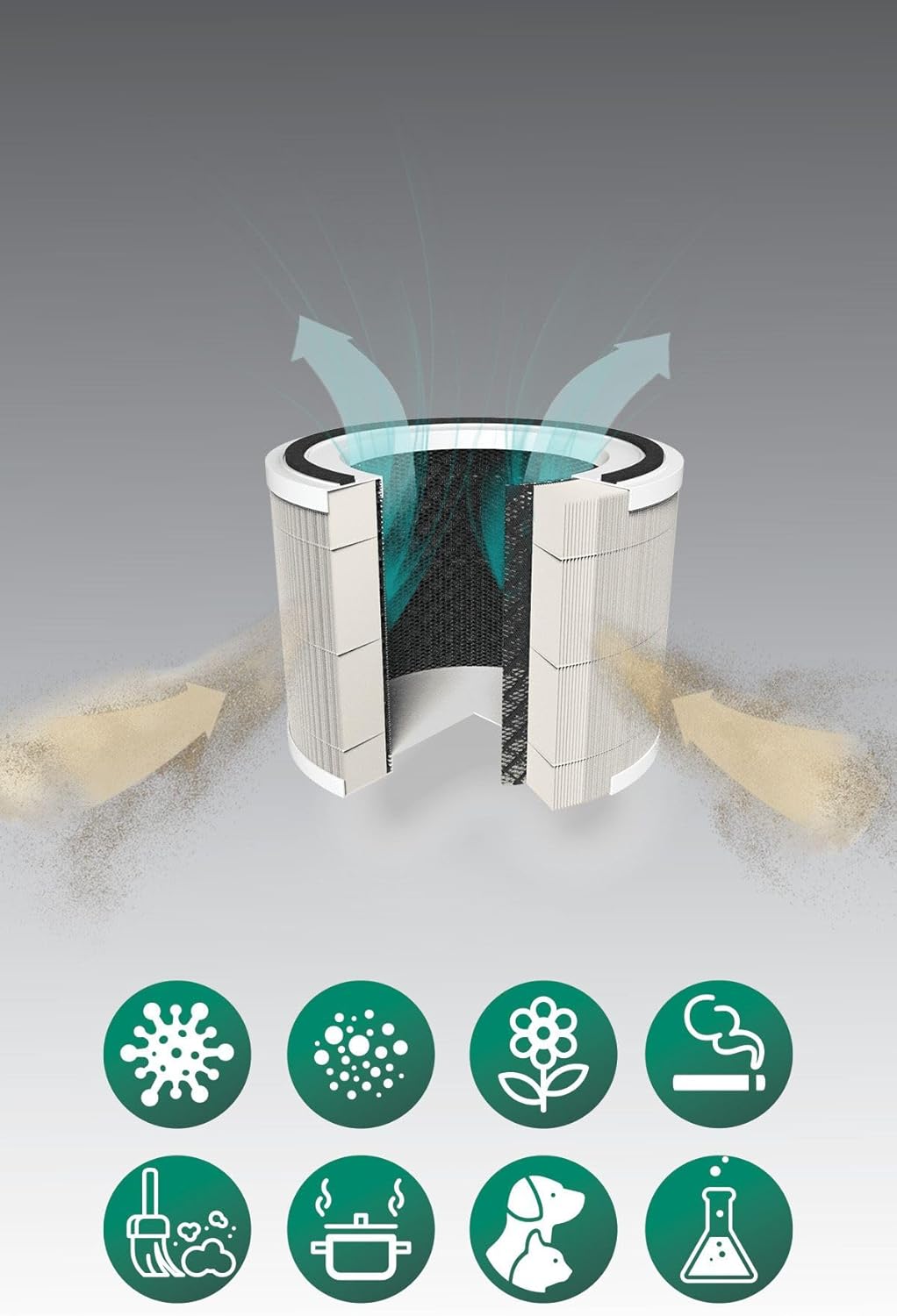
Image: A cutaway diagram illustrating the multi-layer filter system of the Kiwi KAP 6730 Air Purifier. Arrows show air entering and exiting the filter. Below the filter, icons represent various airborne pollutants that the system is designed to filter, including bacteria, dust, pollen, smoke, pet dander, cooking odors, and chemical fumes.
Placement
- Placez le purificateur d'air sur une surface ferme et plane.
- Ensure there is at least 15-30 cm (6-12 inches) of space around all sides for optimal airflow.
- Avoid placing near heat sources, direct sunlight, or in damp environnements.
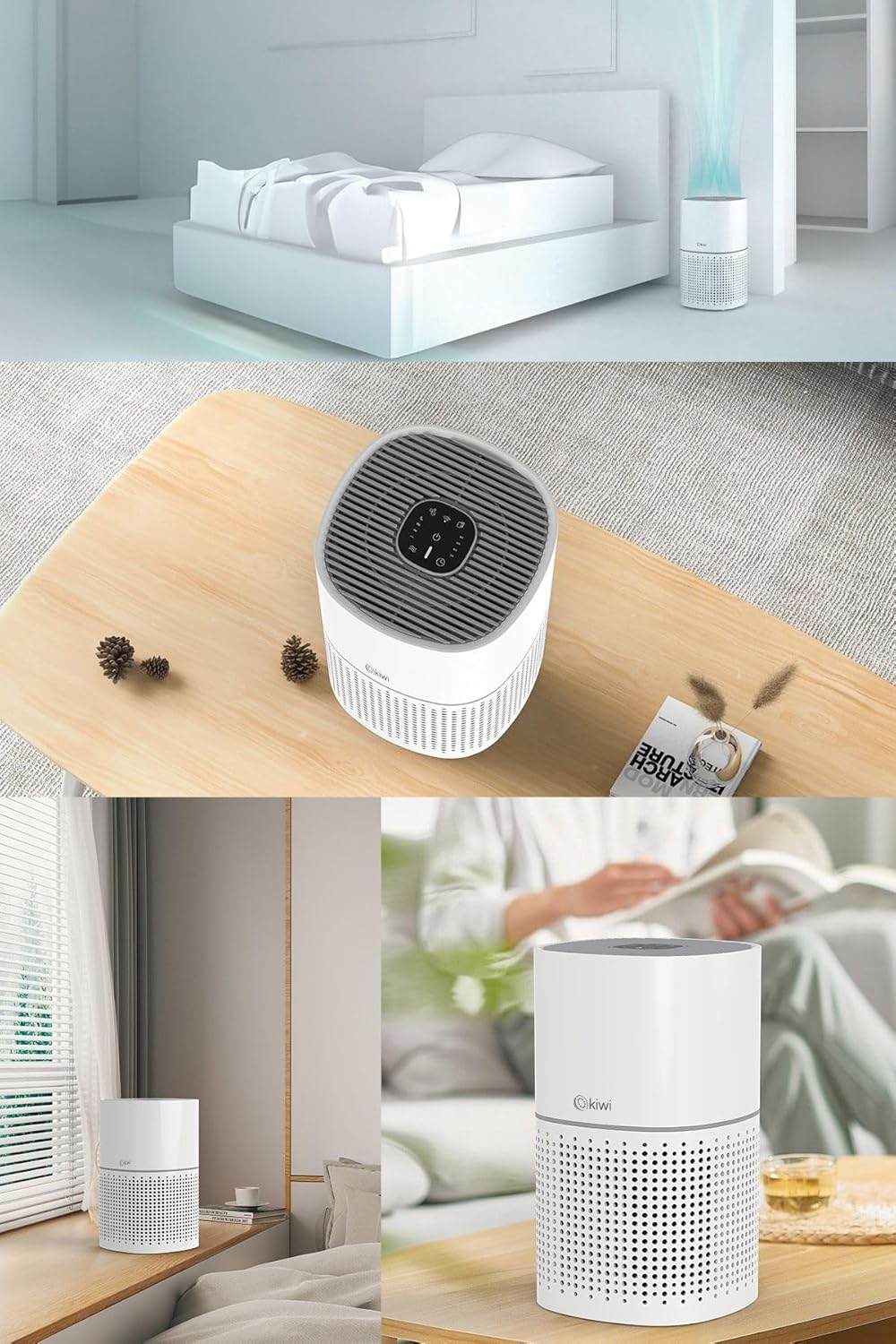
Image: A collage of images showing the Kiwi KAP 6730 Air Purifier in different home environments. It is depicted on a bedside table in a bedroom, on a wooden table in a living area, and on a windowsill, demonstrating its compact size and versatility for placement.
Connexion électrique
Branchez le cordon d’alimentation sur une prise électrique adaptée.
Opération
Fonctions du panneau de contrôle
Le panneau de commande se trouve sur le dessus du purificateur d'air.
Image: Un détail view of the circular control panel on the top of the Kiwi KAP 6730 Air Purifier. Icons for power, fan speed, timer settings (1H, 2H, 4H, 8H), sleep mode, and Wi-Fi connectivity are clearly visible, along with an indicator light.
- Bouton d'alimentation (⏻): Appuyez pour allumer ou éteindre le purificateur d'air.
- Bouton de vitesse du ventilateur (💨): Press to cycle through different fan speeds (e.g., Low, Medium, High, Auto).
- Bouton de minuterie (⏱): Set the operating time (e.g., 1 hour, 2 hours, 4 hours, 8 hours). The unit will automatically turn off after the set time.
- Bouton de mode veille (🌙): Activates sleep mode, reducing fan speed and dimming indicator lights for quiet operation.
- Wi-Fi Button (📶): Press and hold to activate Wi-Fi pairing mode for smart control via a mobile application.
- Indicateur de réinitialisation du filtre : Illuminates when the filter needs replacement. Press and hold after filter replacement to reset.
Smart Control (App)
The Kiwi KAP 6730 can be controlled via a dedicated mobile application. Follow the app's instructions for pairing and remote control.

Image: The Kiwi KAP 6730 Air Purifier positioned in a room, with a hand holding a smartphone in the foreground. The smartphone screen displays a mobile application interface, indicating that the air purifier can be controlled remotely via a smart app, showing air quality readings and control options.
Entretien
Un entretien régulier garantit des performances optimales et prolonge la durée de vie de votre purificateur d'air.
Nettoyage de l'extérieur
- Débranchez toujours le purificateur d'air avant de le nettoyer.
- Essuyez les surfaces extérieures avec un chiffon doux, damp tissu.
- N’utilisez pas de nettoyants abrasifs, de cires ou de solvants.
- Veillez à ce qu'aucune eau ne pénètre à l'intérieur de l'appareil.
Remplacement du filtre
The filter life depends on air quality and usage. The filter replacement indicator will illuminate when a new filter is needed (typically every 6-12 months).
- Débranchez le purificateur d’air.
- Retournez le purificateur d'air.
- Tournez le couvercle de la base dans le sens inverse des aiguilles d'une montre pour le déverrouiller et le retirer.
- Retirez l'ancien filtre et jetez-le correctement.
- Unpack the new filter and insert it into the air purifier.
- Replace the base cover and twist clockwise to lock it into place.
- Plug in the air purifier. Press and hold the Filter Reset button (often the Wi-Fi or a dedicated filter icon) for 3-5 seconds until the indicator light turns off.
Note: Only use genuine Kiwi replacement filters to ensure proper performance and maintain warranty validity.
Dépannage
| Problème | Cause possible | Solution |
|---|---|---|
| Le purificateur d'air ne s'allume pas. | Appareil non branché ; prise électrique défectueuse ; bouton marche/arrêt non enfoncé. | Ensure the power cord is securely plugged in. Try a different outlet. Press the power button firmly. |
| Débit d'air ou efficacité de purification réduits. | Blocked air inlets/outlets; Dirty filter; Filter packaging not removed. | Check for obstructions and clear them. Replace the filter if the indicator is on or if it appears dirty. Ensure all filter packaging is removed. |
| Bruit inhabituel. | Filter not installed correctly; Foreign object inside; Unit not on a level surface. | Check filter installation. Unplug and inspect for foreign objects. Place on a stable, level surface. |
| Le témoin de remplacement du filtre reste allumé après le changement de filtre. | Réinitialisation du filtre non effectuée. | Press and hold the Filter Reset button for 3-5 seconds until the light turns off. |
| Impossible de se connecter au Wi-Fi/à l'application. | Incorrect Wi-Fi password; Router too far; App not updated; Wi-Fi pairing mode not activated. | Ensure correct password. Move unit closer to router. Update app. Press and hold Wi-Fi button to activate pairing mode. Consult app instructions. |
Caractéristiques
| Fonctionnalité | Détail |
|---|---|
| Modèle | CAP-6730 |
| Marque | KIWI |
| Couleur | Blanc |
| Type de filtration | H13 HEPA Filter (Medical Grade) |
| Source d'énergie | Filaire électrique |
| Poids du produit | 2 kilogramme |
| Connectivité | Wi-Fi (Smart App Control) |
| Dimensions (environ) | Conception compacte |
Garantie et assistance
For warranty information and customer support, please refer to the warranty card included with your product or visit the official KIWI website.
You can also contact customer service for assistance with troubleshooting or replacement parts.
KIWI Official Website: www.kiwi.com.tr (Remarque : Ceci est un espace réservé URL, please refer to your product documentation for the correct support website.)


