1. Introduction
Welcome to the user manual for your new Nubia Flip 5G smartphone. This guide provides essential information to help you set up, operate, and maintain your device. The Nubia Flip 5G combines a compact, foldable design with advanced features, including a dual AMOLED display, a versatile external screen, and AI-powered functionalities.
Key features of your Nubia Flip 5G include:
- Double écran AMOLED : Enjoy a fluid 120 Hz refresh rate on both the 6.9-inch internal display and the 3-inch external display.
- Fully Functional External Display: Access 100% of your applications directly from the external screen without unfolding the phone.
- Système de caméra avancé : Capture high-quality photos with the 50 MP main camera, supported by AI features and 4K stabilized video recording. Utilize the external screen for high-resolution selfies.
- Améliorations basées sur l'IA : Benefit from features like AI Magic Photos for editing and live translation for voice calls.
- Batterie longue durée : Equipped with a 4325 mAh battery and 33W fast charging, allowing 50% charge in under 20 minutes.
2. Installation
2.1. Déballage et inspection initiale
Retirez soigneusement tous les éléments de l'emballage. Assurez-vous que les composants suivants sont présents :
- Smartphone Nubia Flip 5G
- Câble USB
- Étui de téléphone
- Film protecteur
Inspect the device for any visible damage. If any components are missing or damaged, contact customer support.
2.2. Insertion de la carte SIM
- Éteignez l'appareil.
- Repérez le tiroir de la carte SIM sur le côté du téléphone.
- Use the SIM ejector tool (not included, typically found with your SIM card) to open the tray.
- Insérez votre ou vos cartes Nano-SIM dans le tiroir, contacts dorés vers le bas. Cet appareil est compatible double SIM.
- Réinsérez soigneusement le plateau dans le téléphone.
2.3. Mise sous tension et configuration initiale
- Press and hold the Power button until the Nubia logo appears.
- Suivez les instructions à l'écran pour sélectionner votre langue, vous connecter à un réseau Wi-Fi et configurer votre compte Google.
- Vous serez guidé tout au long de la configuration des fonctions de sécurité telles que le déverrouillage par empreinte digitale et la reconnaissance faciale.
3. Utilisation de l'appareil
3.1. Understanding the Dual Display

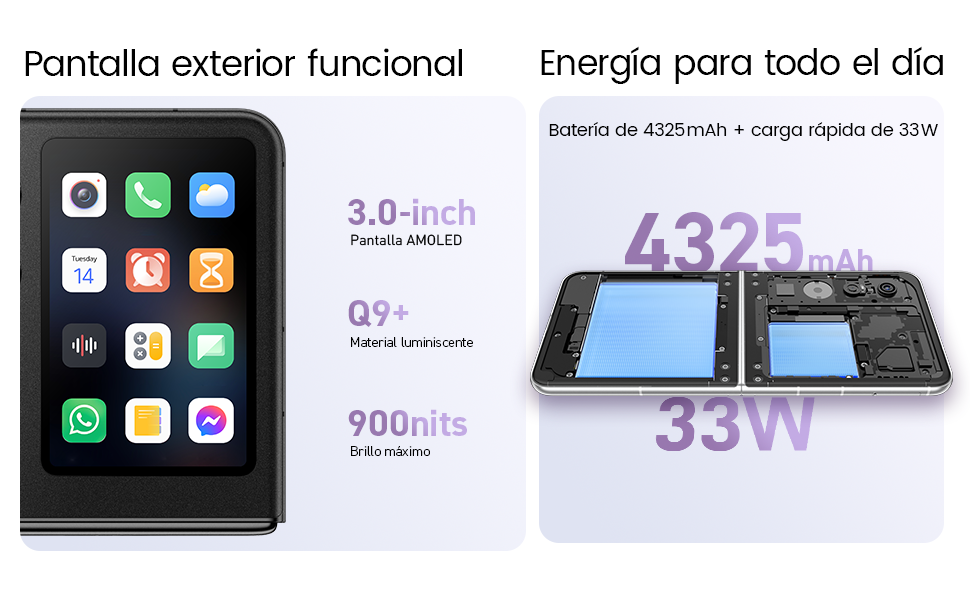
Your Nubia Flip 5G features two displays: a large 6.9-inch internal foldable AMOLED screen and a compact 3-inch external AMOLED screen. Both screens offer a smooth 120 Hz refresh rate for an enhanced visual experience.
- Écran interne : Ideal for immersive content consumption, gaming, and detailed tasks.
- Affichage externe : Provides quick access to notifications, widgets, music controls, and even full applications without needing to unfold the phone. Swipe left or right to navigate through different functions.
3.2. Fonctionnalités de la caméra

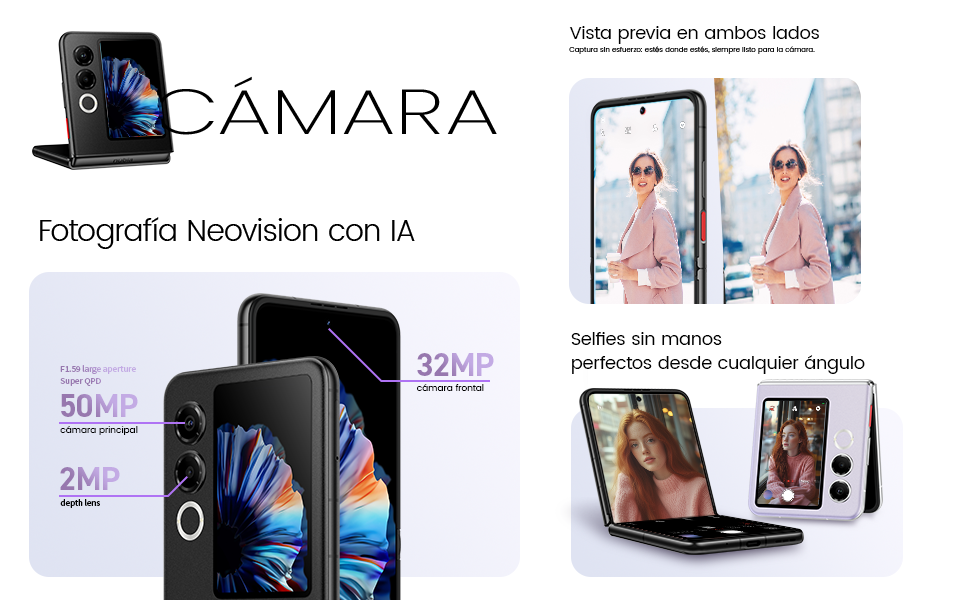
The Nubia Flip 5G is equipped with a powerful 50 MP main camera and a secondary portrait camera, enhanced with AI for superior image quality. The 32 MP front camera ensures clear video calls and selfies.
- High-Resolution Selfies: Use the external screen as a viewfinder to take selfies with the high-quality rear cameras.
- Photographie mains libres : Partially fold the phone and place it on a flat surface to capture photos and videos without needing a tripod.
- 4K Stabilized Video: Record smooth, high-definition videos with advanced stabilization.
3.3. Fonctionnalités d'IA
The device integrates several AI functions to enhance user experience:
- AI Magic Photos: Utilize AI for intelligent photo editing and enhancement.
- Live Call Translation: Experience real-time translation during voice calls, breaking down language barriers.
3.4. Fin de la vidéoview
Vidéo de présentation officielle du produitasing the Nubia Flip 5G's design, versatile external display, hands-free selfie capabilities, and long-lasting battery.
4. Batterie et charge

The Nubia Flip 5G is equipped with a 4325 mAh battery, designed to provide extended usage. It supports 33W fast charging, allowing you to quickly replenish the battery. A 50% charge can be achieved in less than 20 minutes.
- Use the provided USB cable and a compatible 33W charger for optimal fast charging.
- Évitez d'utiliser des chargeurs ou des câbles non certifiés afin de prévenir tout dommage à l'appareil.
5. Entretien
Proper care ensures the longevity and optimal performance of your Nubia Flip 5G.
- Entretien de l'écran : The foldable screen is delicate. Avoid pressing hard on the screen, especially near the crease. Keep sharp objects away from the display.
- Nettoyage: Utilisez un chiffon doux non pelucheux pour nettoyer l'écran et le boîtier. Évitez les produits chimiques agressifs et les matériaux abrasifs.
- Résistance à l'eau : While the device may have some level of splash resistance, it is not fully waterproof. Avoid submerging the phone in water or exposing it to excessive moisture.
- Température: Utilisez l'appareil dans les plages de températures recommandées. Les températures extrêmes, chaudes ou froides, peuvent affecter la durée de vie et les performances de la batterie.
- Mises à jour logicielles : Regularly update your device's software to ensure you have the latest features, security patches, and performance improvements.
6. Dépannage
If you encounter issues with your Nubia Flip 5G, try the following common troubleshooting steps:
- L'appareil ne s'allume pas : Assurez-vous que la batterie est chargée. Branchez le chargeur et attendez quelques minutes avant de tenter de rallumer l'appareil.
- L'écran ne répond pas : Restart the device by pressing and holding the Power button. If unresponsive, perform a forced restart (refer to device-specific instructions if standard restart fails).
- Plantages d'applications : Videz le cache de l'application problématique ou réinstallez-la. Assurez-vous que le logiciel de votre appareil est à jour.
- Mauvaise durée de vie de la batterie: Adjust screen brightness, disable unnecessary background apps, and turn off features like GPS or Bluetooth when not in use.
- Problèmes de connectivité (Wi-Fi/Bluetooth) : Toggle Wi-Fi or Bluetooth off and on. Restart your router or the connected device.
- Surchauffe: Close demanding applications, reduce screen brightness, and avoid direct sunlight. If overheating persists, contact support.
For more complex issues, refer to the official Nubia support website ou contactez leur service client.
7. Spécifications
Below are the detailed technical specifications for the Nubia Flip 5G (Model: 123447101014):
| Fonctionnalité | Spécification |
|---|---|
| Système opérateur | Android 14 |
| Poids de l'article | 193 g |
| Dimensions du colis | 21.1 x 9 x 3.2 cm ; 193 grammes |
| Piles | 1 piles C nécessaires. (inclus) |
| Numéro de modèle | 123447101014 |
| Technologies de connectivité | Bluetooth, NFC, USB, Wi-Fi |
| GPS | Vrai |
| Caractéristiques spéciales | Stereo speakers, Mobile Hotspot capability, Dual SIM, Built-in GPS |
| Autres fonctionnalités d'affichage | Sans fil |
| Entrée de l'interface humaine | Écran tactile |
| Résolution du scanner | 2790 x 1188 |
| Autres fonctionnalités de l'appareil photo | Avant, Arrière |
| Prise audio | Inconnu |
| Facteur de forme | Écran pliable |
| Couleur | Noir |
| Puissance nominale de la batterie | 4325 mAh |
| Temps de conversation téléphonique | 24 heures |
| Taille de la RAM | 8 Go |
| Modèle de processeur | Mediatek Dimension 9000 |
| Vitesse du processeur | 2 GHz |
| Capacité de mémoire | 8 Go |
| Taille de l'écran | 6.9 pouces |
| Taux de rafraîchissement | 120 Hz |
| Nom du modèle | ZTE Nubia Flip |
8. Garantie et assistance
Your Nubia Flip 5G smartphone comes with a standard manufacturer's warranty. Please refer to the warranty card included in your product packaging for specific terms and conditions, including coverage duration and claim procedures.
For technical support, service, or additional information, please visit the official Nubia website or contact their authorized customer service channels. Keep your purchase receipt and device serial number handy when seeking support.