1. Introduction
Thank you for choosing the GTRACING Gaming Desk. This manual provides essential information for the safe and efficient assembly, operation, and maintenance of your new desk. Please read these instructions carefully before beginning assembly and retain them for future reference.
2. Informations importantes sur la sécurité
Always assemble the desk according to the provided instructions. Be cautious when moving the desk, as it can be heavy and may pose a risk of injury if not handled properly.
- Assurez-vous que toutes les connexions sont sécurisées avant utilisation.
- Do not overload the desk or monitor stand beyond the recommended weight capacity (300 lbs).
- Tenez les liquides éloignés des composants électriques (prises de courant, ports USB, lampes LED).
- Les enfants ne doivent pas grimper sur le bureau ni jouer avec.
- Éliminez les matériaux d’emballage de manière responsable.
3. Contenu du colis
Verify that all components are present before assembly. If any parts are missing or damaged, please contact GTRACING customer support.
- Desk components (desktop panels, legs, monitor stand parts)
- Integrated power strip (2 AC outlets, 2 USB ports)
- Bande lumineuse LED
- Extended mouse pad
- Crochets pour casque audio (x2)
- Quincaillerie de montage (vis, boulons, etc.)
- Outils d'assemblage
- Manuel d'instructions
4. Instructions de montage
Assembly is required. Please follow the detailed step-by-step instructions provided in the separate assembly guide included with your package. All necessary tools are included.
- Déballez tous les composants et vérifiez-les par rapport à la liste du contenu de l'emballage.
- Identifier tout le matériel et l'outillage.
- Assemble the desk frame and legs.
- Attach the desktop panels.
- Installez le support du moniteur.
- Mount the integrated power strip.
- Attach the LED light strip.
- Install the headphone hooks.
- Place the extended mouse pad.

Image: All components of the GTRACING Gaming Desk laid out, ready for assembly. This includes the desktop pieces, legs, monitor stand, and various hardware.

Image: A fully assembled GTRACING Gaming Desk, showcasing the monitor stand, LED lighting, and carbon fiber texture.
5. Mode d'emploi
5.1. Système d'éclairage LED
The GTRACING Gaming Desk features an integrated LED light strip to enhance your gaming or work environment. The LED lights offer 16 color changes and 6 dynamic modes.
- Raccordez la bande lumineuse LED à la source d'alimentation prévue à cet effet.
- Use the included remote control to power on/off, change colors, and select dynamic modes.
- Ensure the remote control has a working battery and is pointed towards the LED receiver for optimal functionality.
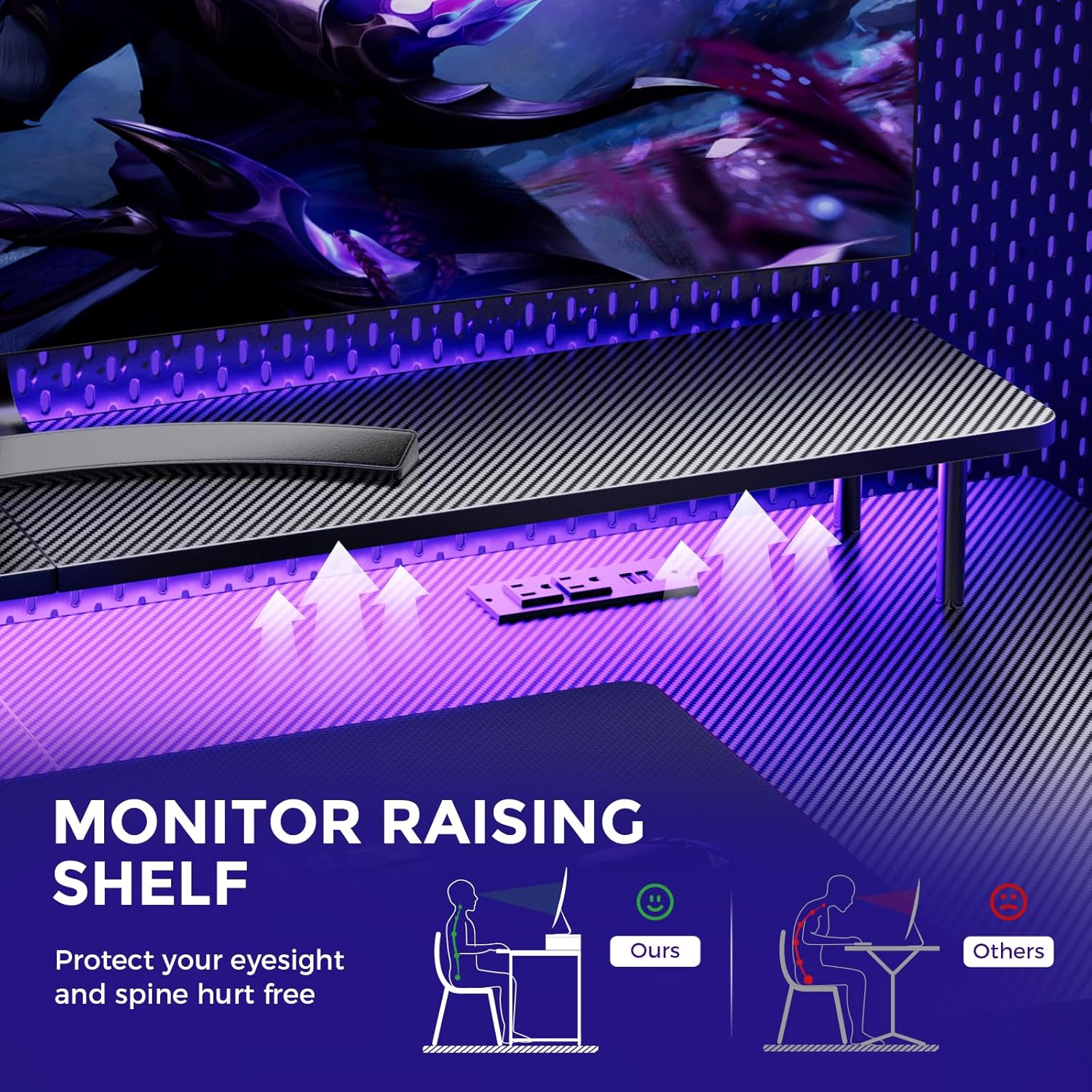
Image: A hand holding a remote control, demonstrating the control over the RGB LED light strip installed beneath the monitor stand of the desk.
Video: An official product video demonstrating the GTRACING 55 Inch Gaming Desk with LED Lights, showcasing its features and aesthetic appeal in a gaming setup.
5.2. Integrated Power Outlets & USB Ports
The desk includes a built-in power strip with 2 AC outlets (120V/12A) and 2 USB charging ports (5V/2A) for convenient device charging and power supply.
- Branchez le cordon d'alimentation principal du bureau à une prise murale.
- Branchez vos appareils aux prises secteur ou aux ports USB selon vos besoins.
- Avoid exceeding the maximum power rating of the outlets.

Image : Un gros plan view of the recessed power strip on the desk, showing two AC outlets and two USB charging ports in use, charging a phone and earbuds.
5.3. Support ergonomique pour écran
The raised monitor stand positions your screen at eye level, promoting better posture and reducing neck strain during extended use. It also provides additional storage space.

Image: A diagram comparing correct ergonomic posture achieved with the monitor stand to incorrect posture without it, highlighting benefits for eyesight and spine.
6. Entretien
- Nettoyage: Essuyez la surface en fibre de carbone avec un chiffon doux et sec.amp tissu. Évitez les produits chimiques agressifs qui pourraient endommager la finition.
- Matériel: Vérifiez régulièrement le serrage de toutes les vis et boulons. Resserrer si nécessaire.
- Composants électriques : Veillez à ce que les prises de courant et les ports USB soient exempts de poussière et de débris. Ne tentez pas de réparer vous-même les composants électriques.
7. Dépannage
7.1. LED Lights Not Working or Remote Not Responding
- Vérifiez la connexion électrique : Ensure the LED light strip is securely plugged into the power source and the desk's main power cord is connected to a live wall outlet.
- Batterie à distance: Verify that the remote control has a fresh battery and is inserted correctly.
- Ligne de mire: Ensure there is a clear line of sight between the remote control and the LED receiver. Obstructions can block the signal.
- Contrôle manuel: If the remote is unresponsive, check if there's a manual button on the LED controller itself to cycle through modes or power on/off.
7.2. Instabilité du bureau
- Serrer le matériel : Revérifiez et resserrez toutes les vis et tous les boulons d'assemblage.
- Surface plane : Veillez à placer le bureau sur une surface plane et de niveau.
8. Spécifications
| Fonctionnalité | Détail |
|---|---|
| Marque | Course GT |
| Numéro de modèle | 114vc07 |
| Dimensions du produit | 24"P x 55"L x 30"H |
| Couleur | Noir de carbone |
| Type de matériau supérieur | Fibre de carbone |
| Matériau de base | Acier inoxydable |
| Poids maximum recommandé | 300 livres |
| Multiprise intégrée | 2 prises secteur (120 V/12 A), 2 ports USB (5 V/2 A) |
| Caractéristiques spéciales | Built-In USB Outlet, Ergonomic, Monitor Stand, LED Lights, Headphone Hook |
| Assemblage requis | Oui (outils inclus) |

Image: A detailed diagram illustrating the dimensions of the GTRACING Gaming Desk, including the main desktop and the monitor stand.
9. Garantie et support client
GTRACING is committed to providing high-quality products and customer satisfaction. For any questions, concerns, or missing parts, please contact our customer service team.
- Free Replacement/Refund: Dans les 30 jours suivant l'achat.
- Free Replacement/Repair: Dans l'année suivant l'achat.
- Coordonnées:
- E-mail: info@gtracing.com
- Phone: 1-888-660-5669 (9:00-5:30 PST Mon-Fri)
- Website: www.gtracing.com

Image: GTRACING customer service representatives ready to assist with product inquiries and support.


