Introduction
The T&G TG112 Portable Bluetooth Speaker is designed to provide high-quality audio in a compact and durable form factor. Featuring seamless Bluetooth connectivity, multi-source playback options, and a long-lasting battery, it is suitable for various indoor and outdoor listening environments. This manual provides detailed instructions for setup, operation, and maintenance of your TG112 speaker.
Consignes de sécurité
Veuillez lire et comprendre toutes les consignes de sécurité avant d'utiliser ce produit. Conservez ce manuel pour toute consultation ultérieure.
- N’exposez pas le haut-parleur à des températures extrêmes ou à la lumière directe du soleil pendant des périodes prolongées.
- Ne démontez pas, ne réparez pas et ne modifiez pas l'enceinte. Cela pourrait annuler la garantie et présenter des risques pour la sécurité.
- Keep the speaker away from water and liquids, even though it is waterproof, excessive exposure or submersion should be avoided.
- Utilisez uniquement le câble de charge et l'adaptateur secteur spécifiés.
- Nettoyez le haut-parleur avec un chiffon doux et sec. N'utilisez pas de produits nettoyants abrasifs ni de solvants.
- Évitez de laisser tomber l’enceinte ou de la soumettre à des chocs violents.
Contenu du colis
Vérifiez que tous les éléments sont présents dans le colis :
- Enceinte Bluetooth portable T&G TG112
- Câble d'alimentation (câble de chargement USB)
- Manuel de l'utilisateur (ce document)
Produit terminéview
Familiarize yourself with the various parts and controls of your TG112 speaker.

Figure 1 : Devant view of the T&G TG112 speaker, showcasing its cylindrical design, blue fabric grille, and orange carrying handle. The T&G logo is visible on the front.
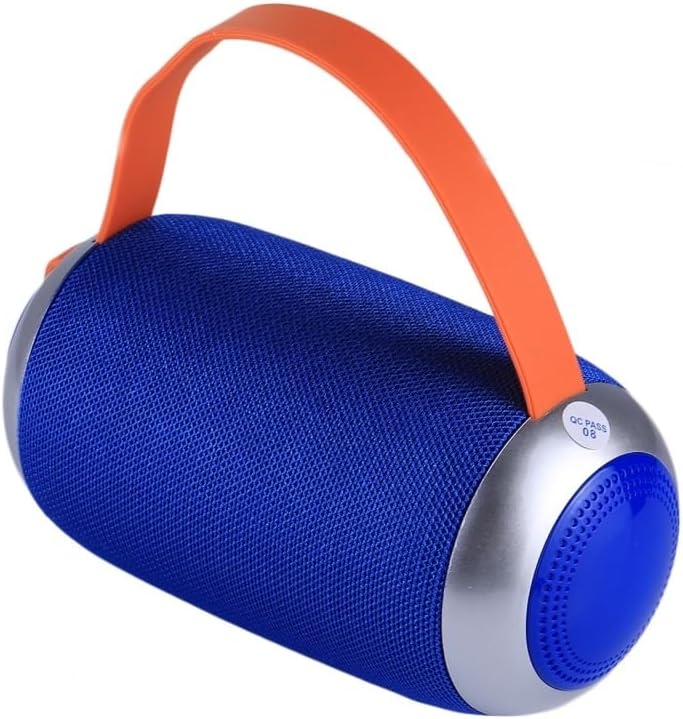
Figure 2 : Côté view of the T&G TG112 speaker, highlighting the control panel with buttons for power, volume, mode selection, and playback controls. The charging port and input slots are typically located near these controls.
Fonctions du panneau de contrôle :
- Bouton d'alimentation : Appuyez longuement pour allumer/éteindre le haut-parleur.
- Bouton de mode (M) : Short press to switch between Bluetooth, FM Radio, AUX-IN, and TF Card/USB modes.
- Bouton Lecture/Pause (▶⏸) : Short press to play or pause audio. In call mode, press to answer/end calls.
- Baisser le volume / Piste précédente (-) : Appui court pour revenir au morceau précédent. Appui long pour baisser le volume.
- Augmenter le volume / Piste suivante (+) : Appuyez brièvement pour passer au morceau suivant. Appuyez longuement pour augmenter le volume.
- Port USB : Pour la lecture de disques USB.
- Emplacement pour carte TF: Pour la lecture sur carte TF (MicroSD).
- Port AUX-IN : Pour une connexion audio filaire utilisant un câble audio de 3.5 mm.
- Port de charge CC 5 V : Pour charger le haut-parleur.
Installation
1. Chargement du haut-parleur
- Connect the provided power cable to the DC 5V charging port on the speaker.
- Connectez l'autre extrémité du câble à un adaptateur secteur USB (non inclus) ou au port USB d'un ordinateur.
- Le voyant de charge s'allumera pendant la charge et s'éteindra une fois la charge complète.
- Une charge complète prend généralement 2 à 3 heures.
2. Mise sous/hors tension
- Pour allumer : Maintenez le bouton Marche/Arrêt enfoncé pendant environ 3 secondes jusqu'à entendre un signal sonore.
- Pour éteindre : Maintenez le bouton Marche/Arrêt enfoncé pendant environ 3 secondes jusqu'à entendre un signal sonore.
Mode d'emploi
1. Couplage Bluetooth
- Ensure the speaker is powered on and in Bluetooth mode. If not, short press the "M" (Mode) button to switch to Bluetooth mode. The speaker will emit a pairing tone, and the Bluetooth indicator light will flash.
- Activez le Bluetooth sur votre appareil (smartphone, tablette, etc.).
- Rechercher "TG112" in the list of available Bluetooth devices.
- Select "TG112" to connect. Once successfully paired, the speaker will emit a confirmation tone, and the Bluetooth indicator light will stop flashing and remain solid.
- L'enceinte se reconnectera automatiquement au dernier appareil apparié lors de sa mise sous tension, si cet appareil se trouve à portée et si le Bluetooth est activé.
2. Mode AUX-IN
- Connectez une extrémité d'un câble audio de 3.5 mm (non fourni) au port AUX-IN du haut-parleur.
- Connectez l'autre extrémité à la prise de sortie audio de votre appareil.
- The speaker will automatically switch to AUX-IN mode, or you may need to press the "M" (Mode) button to select it.
- Contrôlez la lecture et le volume depuis votre appareil connecté.
3. Lecture de carte TF / disque USB
- Insert a TF (MicroSD) card or USB disk containing MP3 audio files dans l'emplacement respectif sur le haut-parleur.
- L'enceinte détectera automatiquement le périphérique de stockage et commencera à diffuser du son. files. If not, press the "M" (Mode) button to switch to the correct mode.
- Utilisez les boutons Lecture/Pause, Piste précédente (-) et Piste suivante (+) pour contrôler la lecture.
4. Mode radio FM
- Appuyez sur le bouton « M » (Mode) pour passer en mode radio FM.
- To auto-scan and save available stations, short press the Play/Pause button. The speaker will scan and store stations automatically.
- Utilisez les boutons Piste précédente (-) et Piste suivante (+) pour naviguer entre les stations enregistrées.
- For better FM reception, connect the charging cable to the DC 5V port; it acts as an antenna.
5. Appels mains libres
- Connecté via Bluetooth à un smartphone, le haut-parleur peut être utilisé pour les appels mains libres.
- Pour répondre à un appel : Appuyez brièvement sur le bouton Lecture/Pause.
- Pour terminer un appel : Appuyez brièvement sur le bouton Lecture/Pause.
- Pour rejeter un appel : Appuyez et maintenez enfoncé le bouton Lecture/Pause.
Entretien
- Nettoyage: Essuyez la surface du haut-parleur avec un chiffon doux, sec et non pelucheux. N'utilisez pas de nettoyants liquides, d'aérosols ni de solvants.
- Stockage: Lorsqu'elle n'est pas utilisée pendant une période prolongée, rangez l'enceinte dans un endroit frais et sec, à l'abri de la lumière directe du soleil et des températures extrêmes.
- Entretien de la batterie: Pour prolonger la durée de vie de la batterie, chargez complètement l'enceinte avant la première utilisation et rechargez-la au moins une fois tous les trois mois si vous ne l'utilisez pas régulièrement. Évitez de décharger complètement la batterie fréquemment.
Dépannage
| Problème | Cause possible | Solution |
|---|---|---|
| Le haut-parleur ne s'allume pas. | Batterie faible. | Chargez complètement l'enceinte. |
| Pas de son. | Volume trop faible ; mode incorrect ; appareil non connecté. | Augmentez le volume ; sélectionnez le mode approprié (Bluetooth, AUX, etc.) ; assurez-vous que l’appareil est apparié/connecté. |
| L'appairage Bluetooth échoue. | Enceinte non en mode appairage ; Bluetooth de l’appareil désactivé ; trop éloignée de l’enceinte. | Ensure speaker is in Bluetooth pairing mode; turn on device Bluetooth; move device closer (within 10m/33ft); clear previous pairings on device. |
| Mauvaise réception radio FM. | Signal faible ; pas d'antenne. | Connect the charging cable to act as an external antenna; try repositioning the speaker. |
| Son déformé. | Volume trop élevé ; batterie faible ; interférences. | Decrease volume; charge speaker; move away from other electronic devices. |
Caractéristiques
| Nom du modèle | TG112 |
| Marque | T&G |
| Technologie de connectivité | Bluetooth |
| Technologie de communication sans fil | Bluetooth |
| Portée Bluetooth | Jusqu'à 10 mètres (33 pieds) |
| Type de haut-parleur | De plein air |
| Caractéristiques spéciales | Bass Boost, Portable, Waterproof |
| Source d'énergie | Alimenté par batterie |
| Capacité de la batterie | 1200mAh |
| Puissance de sortie maximale du haut-parleur | 5 watts |
| Réponse en fréquence | 20 kHz |
| Dimensions du produit | 6"P x 3.46"L x 6"H (16.5 x 8.8 x 8.8 cm) |
| Poids de l'article | 15.7 onces (447 g) |
| Matériel | Plastique |
| Couleur | Bleu |
| Composants inclus | Câble d'alimentation |
| Pays d'origine | Chine |
Garantie et assistance
For warranty information or technical support, please refer to the product packaging or contact the retailer where the product was purchased. Specific warranty terms may vary by region and retailer.


