1. Introduction
Merci pour votre achatasing the ARRIS MN82 PRO LC79 RC Rock Crawler. This 1/12 scale 4x4 Toyota LC79 Off Road RC Pickup Truck is designed for enthusiasts seeking a realistic and high-performance off-road experience. This manual provides essential information for the safe and effective operation, maintenance, and troubleshooting of your new RC crawler. Please read it thoroughly before first use.
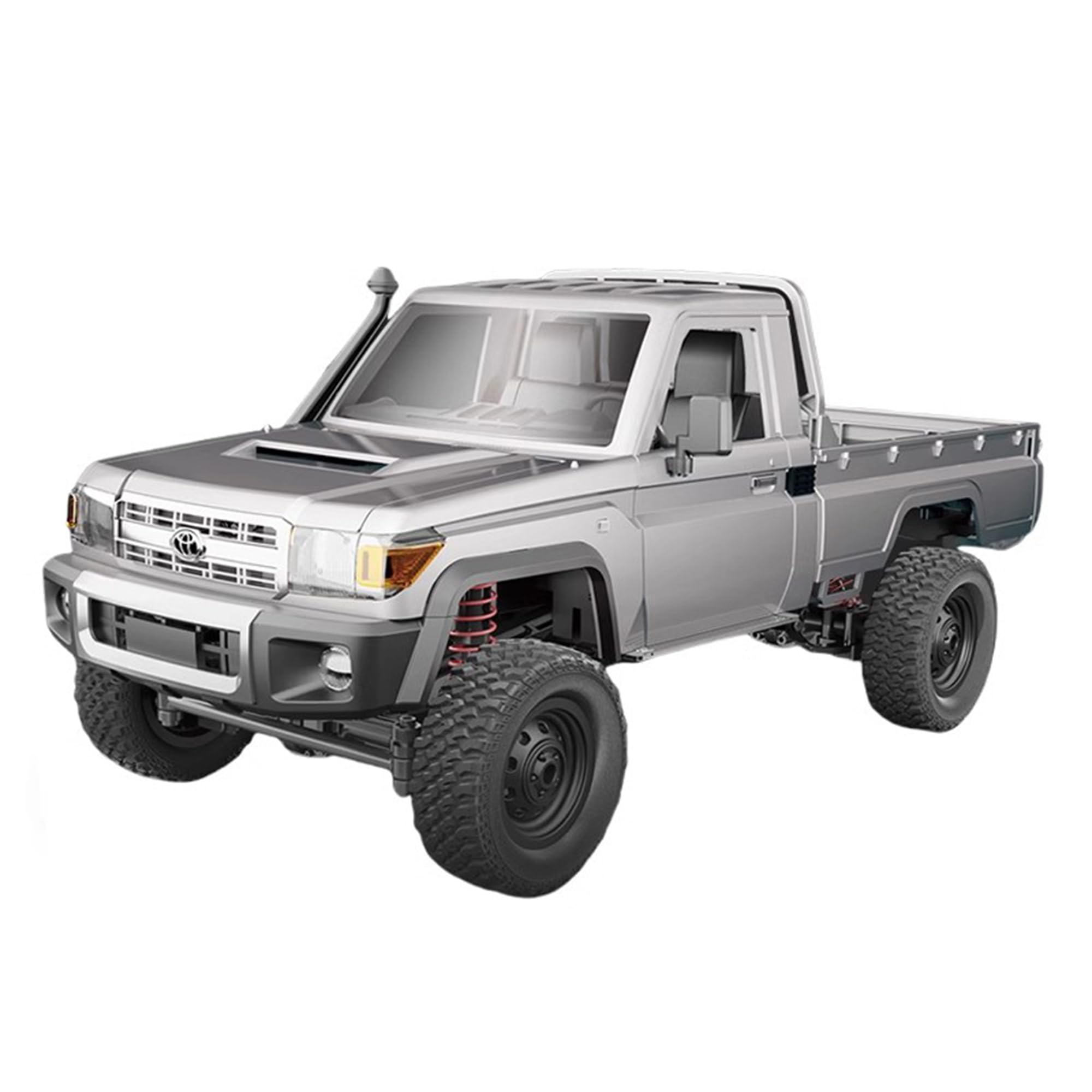
Image: The ARRIS MN82 PRO LC79 RC Rock Crawler, a 1/12 scale model of the Toyota LC79 pickup truck, shown in silver.
2. Consignes de sécurité
- Recommandation d'âge : This product is recommended for adults aged 16 and above. Adult supervision is advised for younger users.
- Sécurité des batteries : Use only the provided charger and battery. Do not overcharge or short-circuit the battery. Disconnect the battery when not in use. Store batteries in a cool, dry place away from flammable materials.
- Environnement d'exploitation : Operate the RC crawler in open areas, away from people, pets, and obstacles. Avoid operating near water unless the product is specifically designed for waterproof use.
- Entretien: Regularly inspect the vehicle for damage or loose parts. Perform maintenance as described in this manual.
- Modifications: Do not modify the product in any way not specified by the manufacturer. Unauthorized modifications may void the warranty and compromise safety.
3. Contenu du colis
Your ARRIS MN82 PRO LC79 RC Rock Crawler package includes the following items:
- 1x MN82 PRO LC79 RC Rock Crawler (1/12 Scale)
- 1x 2.4GHz Remote Controller
- 1x 7.4V 500mAh Lithium-Ion Polymer Battery
- Câble de chargement USB 1x
- 1x Manuel d'instructions
- Additional assembly parts (e.g., side mirrors, windshield wipers, decorative elements)
- Autocollants décoratifs

Image: The product box for the ARRIS MN82 PRO LC79 RC Rock Crawler, showing the truck and various included components.
4. Installation
4.1. Chargement de la batterie
- Connect the provided USB charging cable to the 7.4V 500mAh Li-Po battery.
- Branchez l'extrémité USB du câble à une source d'alimentation USB compatible (par exemple, un port USB d'ordinateur, un adaptateur secteur USB).
- The indicator light on the charging cable will show the charging status (refer to charger instructions for specific light indications).
- Charging typically takes approximately 1-2 hours. Do not leave the battery unattended while charging.
4.2. Installation des piles de la télécommande
La télécommande nécessite 2 piles AA (non incluses).
- Ouvrez le compartiment des piles à l'arrière de la télécommande.
- Insérez 2 piles AA en respectant la polarité (+/-).
- Fermez soigneusement le compartiment à piles.
4.3. RC Crawler Battery Installation
- Open the hood of the RC crawler.
- Connect the fully charged 7.4V 500mAh Li-Po battery to the vehicle's power connector.
- Carefully place the battery inside the compartment and close the hood.
4.4. Fixation des accessoires
Attach the side mirrors, windshield wipers, and any other decorative elements or graphics as desired, following the visual guides in the manual or product images.
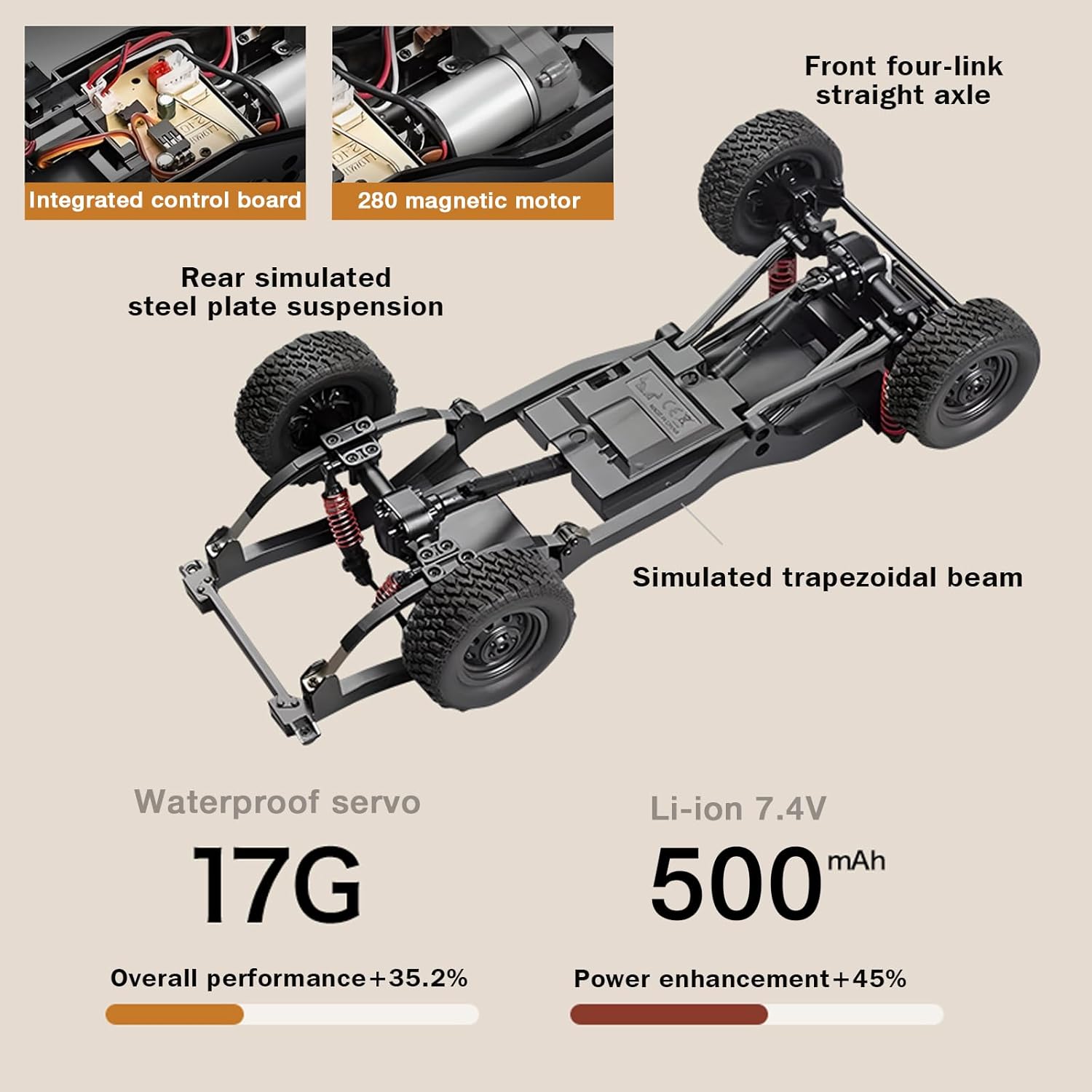
Image : Une explosion view of the RC crawler's chassis, highlighting the integrated control board, 280 magnetic motor, rear simulated steel plate suspension, simulated trapezoidal beam, 17G waterproof servo, and Li-ion 7.4V 500mAh battery.
4.5. Pairing Remote Controller and Vehicle
- Turn on the RC crawler using the power switch located on the underside of the chassis.
- Allumez la télécommande. Le voyant de la télécommande clignotera.
- Wait for a few seconds. The indicator light on the remote will become solid, indicating successful pairing.
Vidéo : Un aperçu détailléview of the MN-82S RC Crawler, including unboxing, assembly of small parts like mirrors and wipers, battery installation, and initial power-up. This video demonstrates the physical setup of the vehicle.
5. Mode d'emploi
5.1. Contrôles de base
- Étrangler: Pull the trigger on the remote controller to move forward. Push the trigger forward to reverse. The throttle is proportional, allowing for precise speed control.
- Pilotage: Turn the steering wheel on the remote controller left or right to steer the vehicle. The steering is also proportional for accurate maneuvering.
5.2. Speed Modes (Two-Speed Switching)
The MN82 PRO features a unique two-speed switching function, allowing you to adapt to different terrains and driving styles. Refer to your remote controller for the specific button to switch between speeds. Typically, one press changes the gear, indicated by a light on the remote.
- Faible vitesse: Ideal for rock crawling, precise maneuvering, and overcoming challenging obstacles.
- Grande vitesse: Suitable for faster driving on less demanding terrain.
5.3. Système d'éclairage
The RC crawler is equipped with a realistic linkage lighting system. Use the designated button on your remote controller to cycle through or activate different lighting functions:
- Controllable Headlights
- Feux arrière
- Clignotants
- Double Flash (Hazard Lights)
- Feu de freinage
- Reversing Light

Image: A visual representation of the MN82 PRO's advanced lighting system, detailing each functional light.
Video: The MN 82 RC Rock Crawler demonstrating its 4x4 capabilities, proportional throttle, and steering on various terrains, including climbing a 46-degree incline. This video highlights the vehicle's performance and control.
Video: The MN82 Remote Control Rock Crawler showcasing its high torque 280 motor and all-terrain capabilities, including navigating rocky and grassy environments. This video emphasizes the power and versatility of the RC truck.
6. Entretien
- Nettoyage: Après chaque utilisation, surtout en conditions poussiéreuses ou boueuses, nettoyez le véhicule avec une brosse douce ou un chiffon. Évitez de mettre de l'eau directement sur les composants électroniques.
- Entretien de la batterie: Always fully charge the battery before storage and discharge it to about 50% if storing for extended periods. Do not store fully charged or fully discharged.
- Inspection: Regularly check for loose screws, damaged parts, or worn tires. Replace any damaged components promptly.
- Lubrification: Periodically lubricate moving parts such as gears and universal joints with appropriate RC lubricant to ensure smooth operation and longevity.
7. Dépannage
| Problème | Cause possible | Solution |
|---|---|---|
| Le véhicule ne répond pas à la télécommande. | Batterie faible dans le véhicule ou la télécommande ; non appariée ; interrupteur d’alimentation éteint. | Charge vehicle battery; Replace remote batteries; Ensure both are powered on and paired. |
| Le véhicule fonctionne lentement ou manque de puissance. | Low vehicle battery; Obstruction in drivetrain; Incorrect speed mode. | Recharge vehicle battery; Check for debris; Switch to high-speed mode if applicable. |
| La direction est imprécise ou ne répond pas. | Damaged servo; Loose steering components; Interference. | Inspect servo and connections; Tighten loose parts; Move to an area with less interference. |
| Les lumières ne fonctionnent pas. | Loose connection; Damaged LED; Low battery. | Check light connections; Replace damaged LEDs; Ensure vehicle battery is charged. |
8. Spécifications
| Fonctionnalité | Spécification |
|---|---|
| Nom de marque | ARRIS |
| Nom du modèle | MN 82PRO |
| Échelle | 1:12 |
| Conduire | 4x4 Mid-Drive Transmission |
| Moteur | Moteur magnétique 280 |
| Servo | Servo étanche de 17 g |
| Batterie | 7.4V 500mAh Lithium-Ion Polymer |
| Autonomie de la batterie | 45 minutes (environ) |
| Vitesse | 8km/h (approx.) |
| Performances d'escalade | ≤45° Ramp |
| Distance du signal | 2.4G / 50m |
| Capacité de remorquage | 1.5 kg |
| Capacité de charge | 3 kg |
| Power & Steering | ≤30° |
| Type de matériau | Plastique |
| Dimensions de l'article | 14.17 x 6.3 x 6.3 pouces |
| Fonctionnalités supplémentaires | Anti-Skid, Flashing Light, Realistic Sound, Remote Controlled, Shock Resistant |
9. Garantie et assistance
For warranty information, technical support, or any inquiries regarding your ARRIS MN82 PRO LC79 RC Rock Crawler, please refer to the contact information provided on the product packaging or visit the official ARRIS website. Our support team is ready to assist you with any issues that may arise.