Introduction
The PNI P16UV is a portable dual-band VHF/UHF radio station designed for reliable communication across various environments. It features 999 programmable channels, dual-band transmission, and 6-band reception, along with functions like VOX, scanning, FM radio, and weather channels. This manual provides detailed instructions for the proper setup, operation, and maintenance of your PNI P16UV radio.
Contenu du colis
Vérifiez que tous les éléments énumérés ci-dessous sont inclus dans votre colis :
- Portable UHF/VHF Radio (PNI P16UV)
- Antenne
- Li-Ion Battery (2600mAh)
- Chargeur de bureau
- Casque avec microphone
- Cordon
- Manuel d'utilisation
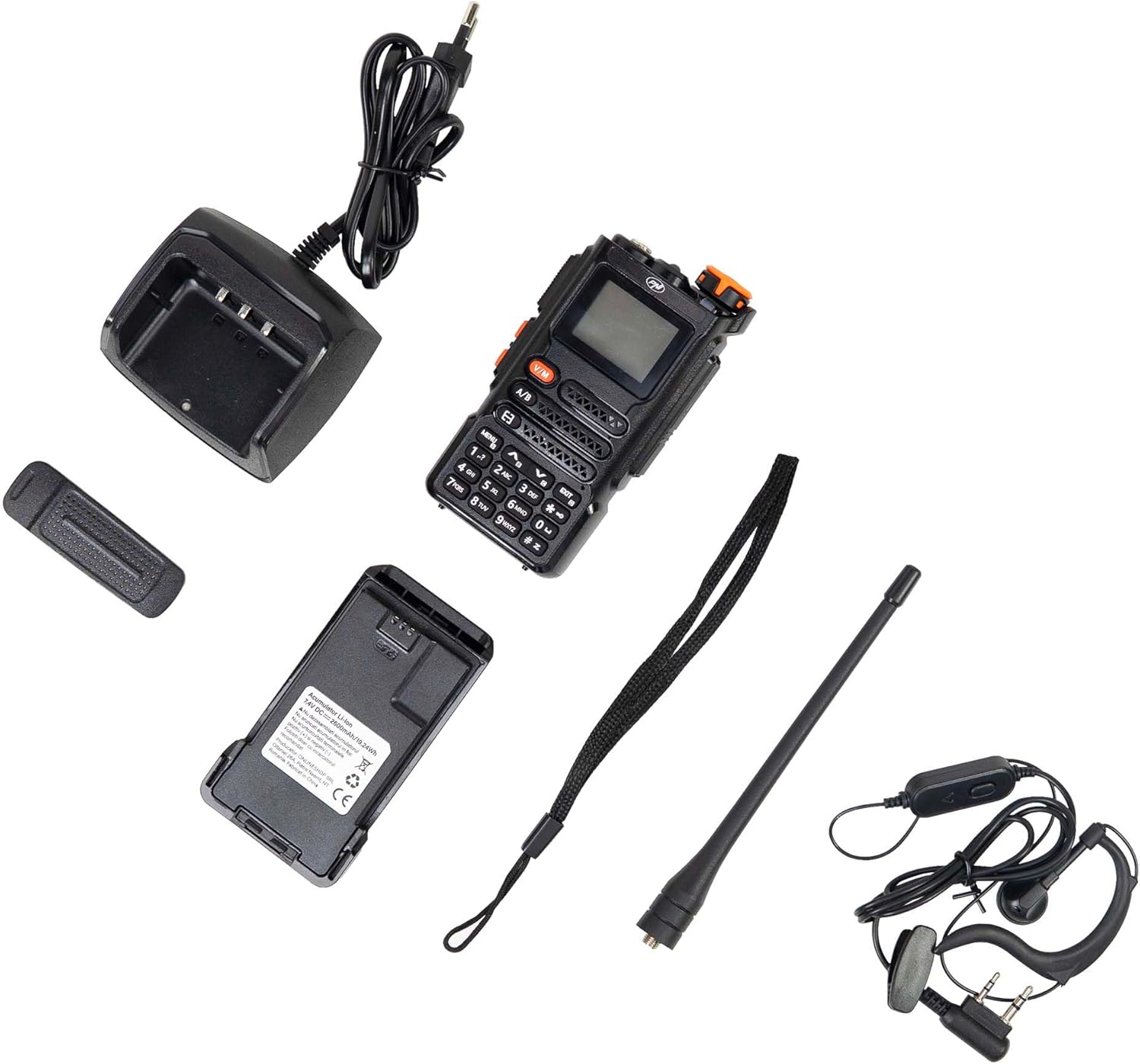
Figure 1: PNI P16UV Package Contents. This image displays the radio unit, antenna, 2600mAh Li-Ion battery, desk charger, headset with microphone, and lanyard, which are all included in the product package.
Produit terminéview
The PNI P16UV radio is equipped with a range of features to enhance your communication experience. Key features include:
- Transmission bi-bande : Operates on both VHF (136-174 MHz) and UHF (400-470 MHz) frequencies.
- Réception à 6 bandes : Extends listening capabilities beyond standard transmission bands.
- 999 canaux : Ample stockage pour différentes fréquences et réglages.
- Puissance réglable : Selectable transmission power (5W High, 1W Low) for efficiency.
- Fonction VOX : Transmission à commande vocale pour une utilisation mains libres.
- Fonction de numérisation : Analyse automatiquement les chaînes pour détecter toute activité.
- Radio FM: Built-in FM radio receiver (87.5-108 MHz).
- Chaînes météo : Access to weather information.
- Batterie Li-Ion : Batterie haute capacité de 12 000 mAh pour une utilisation prolongée.
- Lampe de poche: Lampe torche LED intégrée pour plus de commodité.
- Serrure à clé: Empêche les appuis accidentels sur les boutons.
- Appel d'urgence: Fonction dédiée aux situations urgentes.
- DTMF : Signalisation multifréquence à deux tons.
- Écraser: Adjustable noise reduction.
- Double veille : Surveille deux canaux simultanément.
- BCL (Verrouillage du canal occupé) : Empêche la transmission sur un canal occupé.
Figure 2: Main Features of PNI P16UV. This graphic highlights key functionalities such as FM Radio (87.5-108 MHz), 10 Preset Weather Channels, 1750Hz Tone Burst, Repeater Function, Type-C charging, VOX, DW (Dual Watch), TOT (Time Out Timer), CTCSS/DCS, BCL (Busy Channel Lockout), Keypad lock, SQ (Squelch), Scan, and DTMF.
Installation
1. Installation de la batterie
To install the Li-Ion battery:
- Assurez-vous que la radio est éteinte.
- Alignez la batterie avec les rainures à l’arrière de la radio.
- Faites glisser la batterie vers le haut jusqu'à ce qu'elle s'enclenche correctement.
- Pour retirer la batterie, appuyez sur le loquet de déverrouillage (le cas échéant) et faites-la glisser vers le bas.

Figure 3: Battery Installation. This image shows the radio and its battery pack separated, demonstrating how the battery slides into the back of the unit.
2. Fixation de l'antenne
Vissez l'antenne dans le sens horaire sur le connecteur situé sur le dessus de la radio jusqu'à ce qu'elle soit serrée à la main. Ne serrez pas trop fort.
3. Chargement de la batterie
Before first use, fully charge the battery. Place the radio (with battery installed) into the desk charger. The charger indicator light will typically show red during charging and turn green when fully charged. A full charge can take several hours.

Figure 4: PNI P16UV Radio Ready for Use. This image shows the complete radio unit with the antenna attached and battery installed, displaying its front panel and screen.
Mode d'emploi
1. Commande de l'alimentation (marche/arrêt) et du volume
Rotate the top-right knob clockwise to power on the radio and increase volume. Rotate counter-clockwise to decrease volume and power off.
2. selection de CHAINE
Use the up/down arrow buttons on the keypad to navigate through the 999 available channels. Alternatively, you can directly input channel numbers using the numeric keypad.
3. Dual-Band Operation (VHF/UHF)
The PNI P16UV supports both VHF and UHF bands. Use the A/B button to switch between the primary (A) and secondary (B) frequency displays. The radio can transmit on one band while monitoring another (Dual Watch).
4. VOX Transmission
The Voice Operated Exchange (VOX) function allows for hands-free transmission. When VOX is enabled, the radio will automatically transmit when it detects your voice. Adjust VOX sensitivity in the menu to prevent accidental transmissions or missed voice activation.
5. Fonction de numérisation
Activate the scan function to automatically search for active signals across programmed channels. The radio will pause on an active channel and resume scanning after a set period of inactivity.
6. FM Radio and Weather Channels
The radio includes an FM broadcast receiver and dedicated weather channels. Consult the full user manual for specific instructions on accessing and tuning these features.
7. Verrouillage des touches
To prevent accidental changes to settings or transmissions, activate the keypad lock function. Refer to the radio's on-screen menu or dedicated button for this feature.
8. Emergency Call
The emergency call function, typically activated by a dedicated button, transmits an alert signal on a pre-programmed emergency frequency. Familiarize yourself with its operation for critical situations.
Entretien
1. Entretien de la batterie
- Chargez complètement la batterie avant la première utilisation.
- Évitez de surcharger ou de vider complètement la batterie pour prolonger sa durée de vie.
- Rangez la batterie dans un endroit frais et sec lorsqu'elle n'est pas utilisée pendant une période prolongée.
2. Nettoyage
Essuyez l'extérieur de la radio avec un chiffon doux et sec.amp Chiffon. N’utilisez pas de produits chimiques agressifs ni de nettoyants abrasifs. Assurez-vous que la radio est éteinte et sèche avant utilisation.
3. Stockage
When storing the radio for a long time, remove the battery. Store the radio and battery in a dry, temperature-controlled environment, away from direct sunlight and extreme temperatures.
Dépannage
| Problème | Cause possible | Solution |
|---|---|---|
| La radio ne s'allume pas. | La batterie est mal installée ou déchargée. | Vérifiez que la batterie est correctement installée. Chargez complètement la batterie. |
| Impossible de transmettre ou de recevoir. | Fréquence/canal incorrect, antenne non connectée, batterie faible ou niveau de squelch trop élevé. | Verify frequency/channel. Attach antenna securely. Charge battery. Adjust squelch level. |
| Mauvaise qualité audio. | Weak signal, antenna issue, or squelch setting. | Déplacez-vous dans une zone où le signal est meilleur. Vérifiez la connexion de l'antenne. Réglez le squelch. |
| Le clavier ne répond pas. | La fonction de verrouillage à clé est active. | Deactivate the key lock function (refer to your radio's specific key lock combination). |
Caractéristiques
| Fonctionnalité | Détail |
|---|---|
| Modèle | PNI-P16UV |
| Bande de fréquence | VHF (136-174 MHz), UHF (400-470 MHz), Commercial FM |
| Chaînes | 999 chaînes |
| Puissance de transmission | 5W (Hi), 1W (Lo) |
| Batterie | Batterie lithium-ion de 2600 XNUMX mAh |
| Autonomie | Jusqu'à 22 XNUMX heures |
| Dimensions (avec antenne) | 60 x 40 x 110 mm (radio body), 265 mm (with antenna) |
| Poids | 250 gr (radio body), 439 g (packaged) |
| Température de fonctionnement | -26°C ~ +80°C |
| Connecteur d'antenne | SMA |
| Audio Accessory Pins | 2 PNI-K pins |
| Caractéristiques spéciales | VOX, Scan, FM Radio, Weather Channels, Flashlight, Key Lock, Emergency Call, DTMF, Dual Watch, Squelch, Time out Timer (TOT), Talk Around, BCL (Busy Channel Lockout) |
Garantie et assistance
Pour toute information relative à la garantie, à l'assistance technique ou aux demandes de service, veuillez contacter le fabricant :
- Fabricant: BOUTIQUE EN LIGNE SRL
- Adresse: Olteniei 26A, Piatra Neamt, Neamt, 610206, Romania
- E-mail: comenzi@pni.ro
- Website: www.pni.ro
Veuillez conserver votre preuve d'achat pour toute réclamation au titre de la garantie.

Figure 5: Manufacturer Information. This image displays the back of the product packaging, detailing the manufacturer (ONLINESHOP SRL), address, email (comenzi@pni.ro), and website (pni.ro).