1. Introduction
This manual provides essential information for the safe and efficient installation, operation, and maintenance of your Tbest 63A 4P Automatic Transfer Switch (ATS). This device is designed to automatically switch between a normal power source and a backup power source, ensuring continuous power supply to critical loads. Please read this manual thoroughly before installation and use.
2. Consignes de sécurité
WARNING: Risk of Electric Shock. Installation and servicing must be performed by qualified personnel only.
- Always disconnect all power sources before installing or servicing the switch.
- Assurez-vous d'une bonne mise à la terre pour éviter les risques électriques.
- Vérifiez que toutes les connexions sont bien fixées et correctement câblées conformément aux normes électriques locales.
- N’actionnez pas l’interrupteur s’il semble endommagé ou défectueux.
- Portez un équipement de protection individuelle (EPI) approprié lors de l'installation et de la maintenance.
3. Produit terminéview
The Tbest 63A 4P Automatic Transfer Switch is a robust device designed for reliable power management. Key features include:
- Entraînement à moteur unique : Ensures simple structure and stable conversion with minimal noise and impact.
- Enhanced Mechanism: Features an improved inhibition mechanism for quick closing and breaking, extending mechanical life.
- Construction durable : Made from flame-retardant plastic, offering good insulation, high-temperature resistance, and protection against overload, undervoltage, short circuit, and phase failure.
- Electrical Interlock Protection: Guarantees reliable and non-interfering automatic switching.
- Large application : Suitable for critical power supply needs in fire protection systems, ports, hospitals, shopping malls, banks, and industrial facilities.
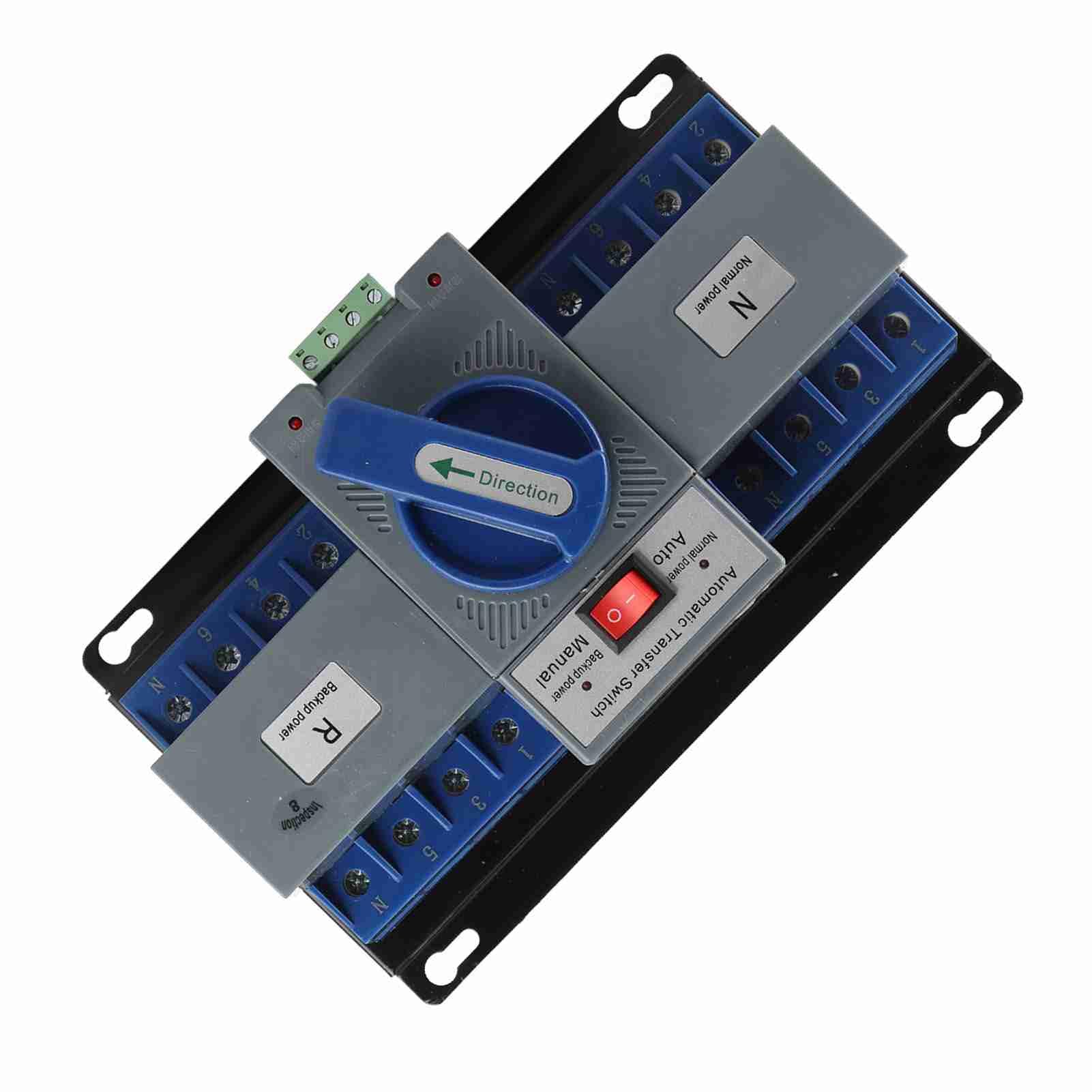
Figure 1 : Face avant view of the Tbest 63A 4P Automatic Transfer Switch, showing the main controls and terminal blocks.
4. Configuration et installation
Follow these general steps for installing the automatic transfer switch. Consult a qualified electrician for specific wiring diagrams and local code compliance.
- Montage: Securely mount the ATS in a suitable enclosure or panel, ensuring adequate ventilation and clearance for wiring.
- Coupure de courant : Ensure all power sources (normal and backup) are completely disconnected and locked out before proceeding with wiring.
- Normal Power Connection: Connect the normal power source (utility) to the designated 'Normal Power' terminals (labeled 'N' on the device). Ensure correct phase and neutral connections.
- Backup Power Connection: Connect the backup power source (e.g., generator) to the designated 'Backup Power' terminals (labeled 'R' on the device). Ensure correct phase and neutral connections.
- Connexion de charge : Connect the electrical load (circuits to be powered) to the 'Load' terminals of the ATS.
- Câblage de contrôle : Connect any necessary control wiring for automatic operation, if applicable.
- Vérification: Vérifiez minutieusement que tous les branchements électriques sont bien serrés et corrects.

Figure 2 : Angulaire view of the ATS, highlighting the 'Normal Power' and 'Backup Power' terminal blocks for wiring connections.
5. Mode d'emploi
The Tbest Automatic Transfer Switch offers both automatic and manual operation modes.
5.1 Sélection du mode
The switch features a selector for operating mode:
- Mode automatique: When the selector is set to 'Auto', the switch will automatically transfer the load between the normal and backup power sources based on power availability. If normal power fails, it will switch to backup. When normal power returns, it will switch back.
- Mode manuel : When the selector is set to 'Manual', the transfer switch will remain in its current position until manually operated.
5.2 Manual Transfer
In 'Manual' mode, or for testing purposes, the large blue 'Direction' handle can be used to manually switch between power sources:
- Rotate the handle towards 'N' (Normal power) to connect the load to the normal power source.
- Rotate the handle towards 'R' (Backup power) to connect the load to the backup power source.

Figure 3 : Gros plan view of the 'Automatic Transfer Switch' selector (Auto/Manual) and the 'Direction' handle for manual operation.
6. Entretien
Regular maintenance ensures the longevity and reliable operation of your ATS.
- Inspection visuelle : Periodically inspect the switch for any signs of damage, loose connections, or overheating.
- Nettoyage: Keep the switch free from dust and debris. Use a dry, non-conductive cloth for cleaning.
- Vérification de la connexion : Annually, or as needed, verify that all electrical connections are tight and secure.
- Test fonctionnel : Periodically test the automatic transfer function by simulating a normal power outage (if safe to do so) to ensure it switches correctly to backup power and back.
7. Dépannage
If you encounter issues with your ATS, refer to the following common troubleshooting steps:
| Problème | Cause possible | Solution |
|---|---|---|
| Le transfert ne s'effectue pas automatiquement. | Selector in 'Manual' mode; no power from backup source; control wiring issue. | Set selector to 'Auto'. Check backup power source. Inspect control wiring. |
| Aucune alimentation pour charger. | No power from normal or backup source; tripped breaker; loose connections. | Check both power sources. Reset breakers. Verify all wiring connections. |
| Overheating or unusual noises. | Overload; loose connections; internal fault. | Reduce load. Tighten connections. Disconnect power and contact qualified personnel. |
If the problem persists after attempting these solutions, contact a qualified electrician or Tbest customer support.
8. Spécifications
| Fonctionnalité | Spécification |
|---|---|
| Numéro de modèle | Tbest946gkyex3c |
| ASIN | B0F1D97DQB |
| Fabricant | Le meilleur |
| Dimensions du colis | 9.06 x 5.91 x 5.12 pouces |
| Poids de l'article | 3.67 livres |
9. Garantie et assistance
For warranty information or technical support, please contact Tbest customer service through their official channels. Keep your purchase receipt and model number (Tbest946gkyex3c) handy for faster service.
Vous trouverez souvent les coordonnées du service d'assistance sur le site du fabricant. websur le site ou auprès du détaillant où le produit a été acheté.