1. Introduction
Thank you for choosing the ZUMIMALL Dual Lens 2K Wireless Outdoor Security Camera. This manual provides detailed instructions for setting up, operating, and maintaining your camera to ensure optimal performance and security for your home or property. Please read this manual thoroughly before use and retain it for future reference.
2. Consignes de sécurité
- Ensure the camera is installed in a location where it is protected from extreme weather conditions beyond its IP65 rating.
- Utilisez uniquement l'adaptateur secteur ou le panneau solaire spécifié pour la charge.
- Ne démontez pas et n'essayez pas de réparer l'appareil vous-même. Contactez le service client pour obtenir de l’aide.
- Gardez l'appareil photo et ses accessoires hors de portée des enfants.
- Évitez de placer la caméra à proximité de champs magnétiques puissants ou de sources d'interférences.
- Mettez au rebut le produit et la batterie de manière responsable, conformément à la réglementation locale.
3. Contenu du colis
Veuillez vérifier que tous les composants sont présents et en bon état :
- ZUMIMALL Dual Lens 2K Wireless Outdoor Security Camera
- Panneau solaire 5W
- Support de montage et vis
- Câble de chargement USB
- Manuel d'utilisation
4. Produit terminéview
The ZUMIMALL Dual Lens 2K Wireless Outdoor Security Camera offers advanced surveillance features with a focus on wide-area coverage and intelligent detection.

Image: The ZUMIMALL Dual Lens 2K Wireless Outdoor Security Camera, featuring a main PTZ camera unit, a separate smaller camera, and a solar panel for continuous power.
Caractéristiques principales :
- Système à double objectif : Combines a fixed lens and a rotating lens for simultaneous viewing of two different areas.
- Résolution HD 2K : Provides clear and detailed images and videos (3MP+3MP for a total of 6MP effective resolution).
- Wide Angle & PTZ: Offers a 220° ultra-wide-angle view from the fixed lens and 360° pan/tilt/zoom (PTZ) capabilities for comprehensive coverage.
- Vision nocturne en couleur : Equipped with white and infrared lamps, offering full-color, infrared, or smart night vision modes.
- Alimentation solaire : Includes a 5W solar panel and a built-in 10000mAh battery for continuous, uninterrupted operation.
- Détection intelligente de l'IA : Advanced AI can identify people, vehicles, pets, and packages, reducing false alerts.
- Conversation bidirectionnelle : Le microphone et le haut-parleur intégrés permettent une communication en temps réel.
- Connectivité WiFi 2.4 GHz : Ensures a stable and reliable wireless connection.
- Résistance aux intempéries IP65 : Conçu pour résister aux différentes conditions météorologiques extérieures.
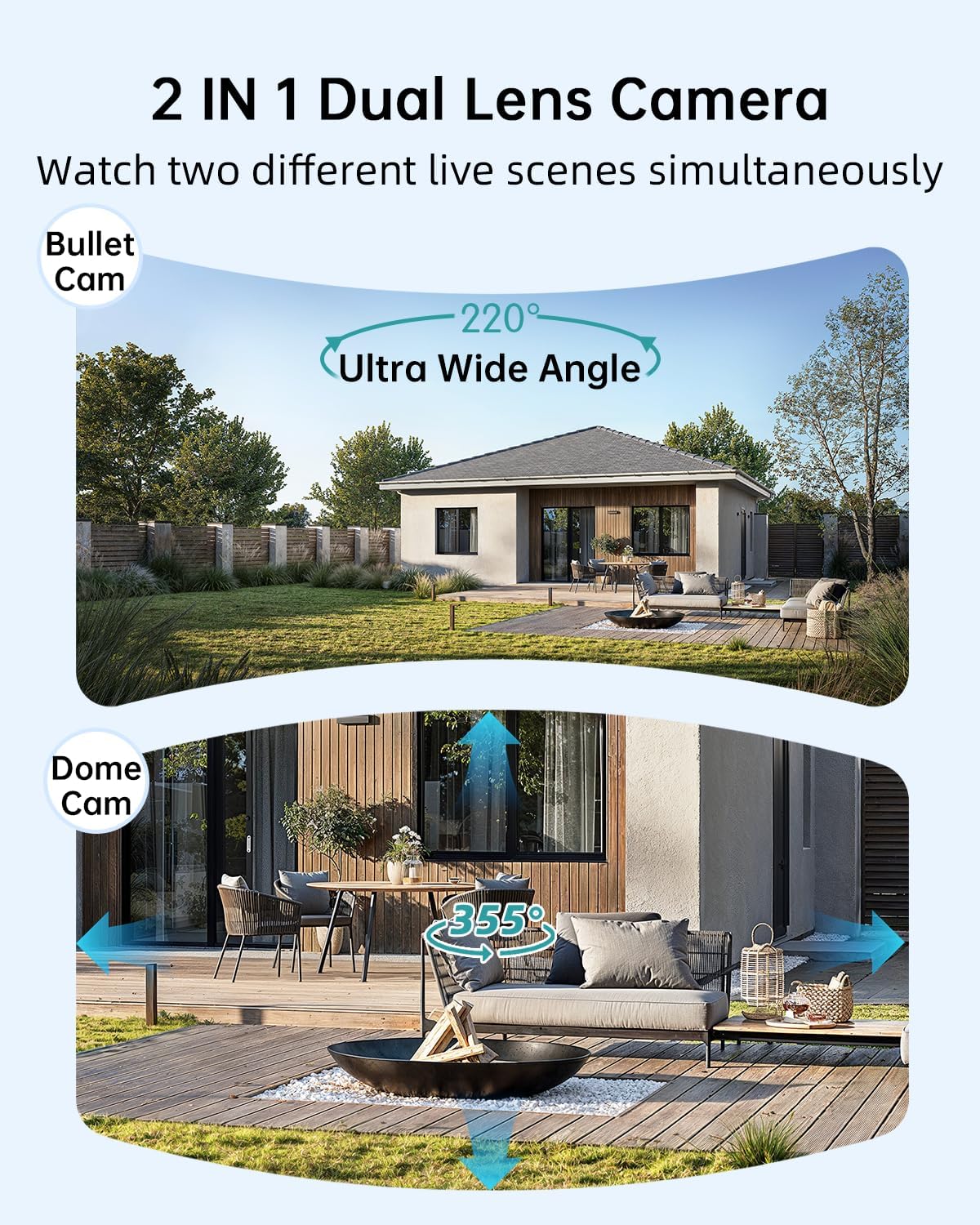
Image: Illustration of the dual-lens functionality, displaying a wide-angle 'Bullet Cam' view and a pan-tilt-zoom 'Dome Cam' view simultanément.

Image: The ZUMIMALL camera connected to its 5W solar panel, highlighting its non-stop solar power capability and IP66 water resistance (note: product specification is IP65).

Image: A demonstration of the 2K ultra-colorful image quality, showing a clear view of a car's license plate at night, with indicators for 3MP FHD Image, 4X Digital Zoom, and 55FT Night Vision Range.

Image: The ZUMIMALL camera shown enduring heavy rain and snow, illustrating its IP65 waterproof rating and suitability for outdoor use in various weather conditions.
5. Installation
5.1 Charge initiale
Before first use, fully charge the camera's built-in 10000mAh battery using the provided USB cable and a 5V/2A power adapter (not included). A full charge typically takes several hours.
5.2 Téléchargement de l'application et inscription au compte
- Scan the QR code on the packaging or search for 'ZUMIMALL' in your mobile app store (iOS or Android).
- Download and install the ZUMIMALL app.
- Ouvrez l'application et créez un nouveau compte ou connectez-vous si vous en avez déjà un.
5.3 Connexion au Wi-Fi
- Assurez-vous que votre smartphone est connecté à un réseau Wi-Fi 2.4 GHz. L'appareil photo n'est pas compatible avec le Wi-Fi 5 GHz.
- In the ZUMIMALL app, tap '+' to add a new device.
- Follow the on-screen instructions to power on the camera and enter Wi-Fi configuration mode.
- Scannez le code QR affiché sur l'écran de votre téléphone avec l'objectif de l'appareil photo.
- Wait for the camera to connect to your Wi-Fi network. Once connected, you will hear a confirmation sound.
5.4 Montage de la caméra et du panneau solaire
The camera offers flexible installation options, including magnetic support and bracket support.

Image: Demonstrates two installation methods for the ZUMIMALL camera: a compact magnetic mount for easy placement and a more robust bracket mount for secure, permanent installation.
- Choisissez un emplacement : Choisissez un emplacement qui offre les conditions souhaitées viewing angle, is within Wi-Fi range, and receives ampla lumière directe du soleil pour le panneau solaire.
- Installez le support : Use the provided screws to securely attach the mounting bracket to a wall or ceiling.
- Fixez la caméra : Secure the camera to the bracket. For magnetic support, simply attach the camera to the magnetic base.
- Positionner le panneau solaire : Mount the 5W solar panel in a location that receives maximum direct sunlight throughout the day. Connect the solar panel cable to the camera's charging port.
- Ajuster l'angle : Ajustez l'angle de la caméra pour couvrir la zone de surveillance souhaitée.
6. Mode d'emploi
6.1 En direct View et contrôle à double objectif
Open the ZUMIMALL app and select your camera to access the live view. The app will display two video feeds simultaneously from the fixed and PTZ lenses. You can switch between views or control the PTZ lens by swiping on the screen or using the directional controls within the app.
6.2 Modes de vision nocturne
The camera offers three night vision modes, configurable in the app settings:
- Vision nocturne en couleur : Utilizes the built-in white light to provide color images in low-light conditions.
- Vision nocturne infrarouge: Utilise des LED infrarouges pour des images en noir et blanc dans l'obscurité totale.
- Vision nocturne intelligente : Bascule automatiquement entre l'infrarouge et la couleur en fonction du mouvement détecté ou de la luminosité ambiante.

Image: A comparison of night vision modes, showing a scene with a spotlight on (color night vision) and a spotlight off (infrared night vision), demonstrating the camera's ability to capture clear images in various low-light conditions.
6.3 Détection par IA intelligente
Configure AI detection settings in the app to receive alerts for specific events.

Image: An illustration of the camera's Intelligent AI Analysis feature, highlighting its capability to detect and differentiate between humans, packages, vehicles, and pets within the surveillance area.
- Types de détection : The camera can identify humans, vehicles, pets, and packages.
- Alertes : When motion is detected, an alert notification will be sent to your smartphone.
- Sensibilité: Ajustez la sensibilité de la détection de mouvement pour minimiser les fausses alarmes.
6.4 Communication bidirectionnelle
Use the two-way talk feature to communicate with visitors or deter intruders.

Image: Depicts scenarios where the two-way voice intercom is used, showing a user communicating with a delivery person at the door and a parent speaking to a child playing outside.
- En direct view, appuyez sur l'icône du microphone pour parler via le haut-parleur de la caméra.
- Relâchez l'icône pour écouter.
6.5 Enregistrement et lecture
The camera records events triggered by motion detection. Recordings are stored on a local SD card (not included) or in cloud storage (subscription may be required).
- Lecture: Access recorded videos through the 'Playback' section in the ZUMIMALL app.
- Télécharger: Téléchargez les clips vidéo importants sur votre téléphone.
7. Entretien
- Nettoyage: Nettoyez régulièrement l'objectif de l'appareil photo et le panneau solaire avec un chiffon doux et sec.amp Tissu pour garantir des images nettes et une recharge solaire efficace. Ne pas utiliser de produits chimiques agressifs.
- Entretien de la batterie: For optimal battery life, avoid prolonged exposure to extreme temperatures. Ensure the solar panel is free from obstructions to maintain consistent charging.
- Mises à jour du micrologiciel : Check the ZUMIMALL app regularly for firmware updates. Keeping your camera's firmware updated ensures the latest features and security enhancements.
8. Dépannage
8.1 La caméra ne se connecte pas au Wi-Fi
- Assurez-vous que votre réseau Wi-Fi fonctionne en 2.4 GHz.
- Vérifiez la puissance du signal Wi-Fi à l'emplacement de la caméra.
- Vérifiez que le mot de passe Wi-Fi saisi est correct.
- Redémarrez votre routeur et votre caméra.
8.2 La batterie se décharge rapidement
- Assurez-vous que le panneau solaire reçoive la lumière directe du soleil pendant plusieurs heures par jour.
- Réduire la sensibilité de la détection de mouvement ou la fréquence des enregistrements.
- Check for excessive live view streaming, which consumes battery.
8.3 Mauvaise qualité d'image
- Nettoyez l'objectif de l'appareil photo.
- Assurez-vous qu'aucun obstacle ne se trouve dans le champ de vision de la caméra. view.
- Vérifiez la vitesse de votre connexion Wi-Fi.
8.4 Fausses alertes de mouvement
- Ajustez la sensibilité de la détection de mouvement dans l'application.
- Utilize AI detection filters (human, vehicle, pet, package) to ignore irrelevant motion.
- Ensure the camera is not pointing at busy public areas or moving foliage.
9. Spécifications
| Fonctionnalité | Spécification |
|---|---|
| Modèle | B0F189QLFH |
| Résolution | 2K (3MP + 3MP Dual Lens) |
| Domaine de View | 220° Ultra Wide Angle (fixed lens), 360° PTZ (rotating lens) |
| Capacité de la batterie | 10000mAh |
| Puissance du panneau solaire | 5W |
| Connectivité Wi-Fi | 2.4 GHz (IEEE 802.11b/g/n) |
| Résistance aux intempéries | IP65 |
| Vision nocturne | Full-Color, Infrared, Smart |
| Détection | Smart AI (Human, Vehicle, Pet, Package) |
| Audio | Conversation bidirectionnelle |
| Fabricant | ZUMIMALL |
| Première date disponible | 12er mars 2025 |
10. Informations sur la garantie
ZUMIMALL products are covered by a limited warranty from the date of purchase. Please refer to the warranty card included with your product or visit the official ZUMIMALL webConsultez le site pour connaître les conditions générales de garantie détaillées.
11. Assistance clientèle
If you encounter any issues or have questions regarding your ZUMIMALL camera, please contact our customer support team:
- E-mail: support@zumimall.com (Example)
- Website: ZUMIMALL Official Store
Please have your model number (B0F189QLFH) and purchase information ready when contacting support.