Introduction
The Oclean X Lite Electric Toothbrush is designed to provide a superior oral cleaning experience for adults. Featuring a smart screen display, multiple cleaning modes, and long-lasting battery life, it helps ensure comprehensive plaque removal and promotes overall oral health.

Image: The Oclean X Lite Electric Toothbrush, shown both in its retail packaging and as a standalone unit, highlighting its sleek design and smart display.
Contenu du colis
Avant la première utilisation, veuillez vérifier que tous les éléments sont présents dans l'emballage :
- Oclean X Lite Electric Toothbrush Handle (x1)
- Brush Head (x1)
- Câble de charge USB Type-C (x1)
- Manuel d'utilisation (x1)

Image: A visual representation of the Oclean X Lite package contents, including the toothbrush handle, brush head, USB-C cable, and user manual.
Installation
1. Charger la brosse à dents
The Oclean X Lite features a long-lasting battery, providing up to 30 days of usage on a single charge. For optimal performance, fully charge the toothbrush before first use.
- Repérez le port de chargement USB Type-C au bas du manche de la brosse à dents.
- Ouvrez le couvercle de protection du port de chargement.
- Insert the provided USB Type-C cable into the port.
- Connectez l'autre extrémité du câble USB à un adaptateur secteur USB compatible (non inclus) ou à un port USB d'ordinateur.
- The screen display will indicate the charging status. A full charge typically takes approximately 3 hours.

Image : Un gros plan view of the Oclean X Lite's USB-C charging port, illustrating how to connect the charging cable for power.
2. Fixation de la tête de brosse
Alignez la tête de brosse avec la tige métallique du manche et appuyez fermement jusqu'à ce qu'elle s'enclenche. Assurez-vous qu'elle est bien fixée avant utilisation.
Mode d'emploi
1. Mise sous/hors tension et sélection du mode
Press the power button to turn the toothbrush on or off. While the toothbrush is on, press the power button repeatedly to cycle through the available cleaning modes. The smart screen will display the selected mode.
2. Modes de nettoyage
L'Oclean X Lite propose 5 modes de nettoyage distincts pour répondre à divers besoins en matière de soins bucco-dentaires :
- Nettoyage quotidien : Mode standard pour l'élimination quotidienne de la plaque dentaire.
- Nettoyage en profondeur : Permet un nettoyage plus intense pour une élimination complète de la plaque dentaire.
- Sensible: Nettoyage doux pour les dents et les gencives sensibles.
- Blanchiment: Conçu pour aider à éliminer les taches superficielles et révéler des dents plus blanches.
- Massage: Gently massages gums to improve circulation and health.
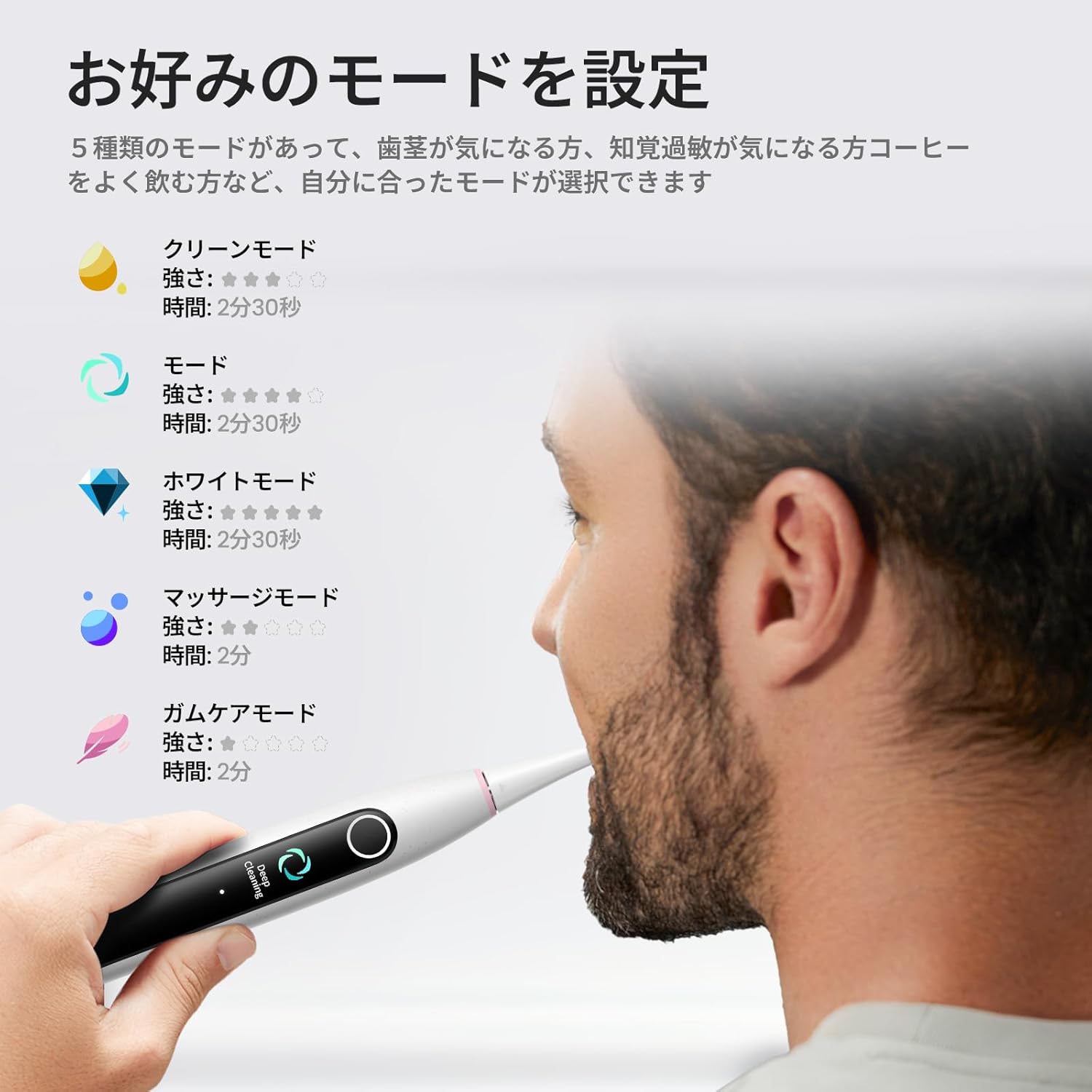
Image: The Oclean X Lite's smart screen displaying the various cleaning modes, illustrating the options available for customized brushing.
3. Brushing Technique and Smart Display
Apply a small amount of toothpaste to the brush head. Place the brush head against your teeth at a slight angle towards the gumline. Move the brush slowly across each tooth, allowing the 40,000 vibrations per minute to clean effectively.
The smart display screen provides real-time feedback on your brushing. It shows brushing zones, helping you ensure no area is missed for a thorough clean. The toothbrush also features a brushing timer and pressure sensor to guide optimal brushing.
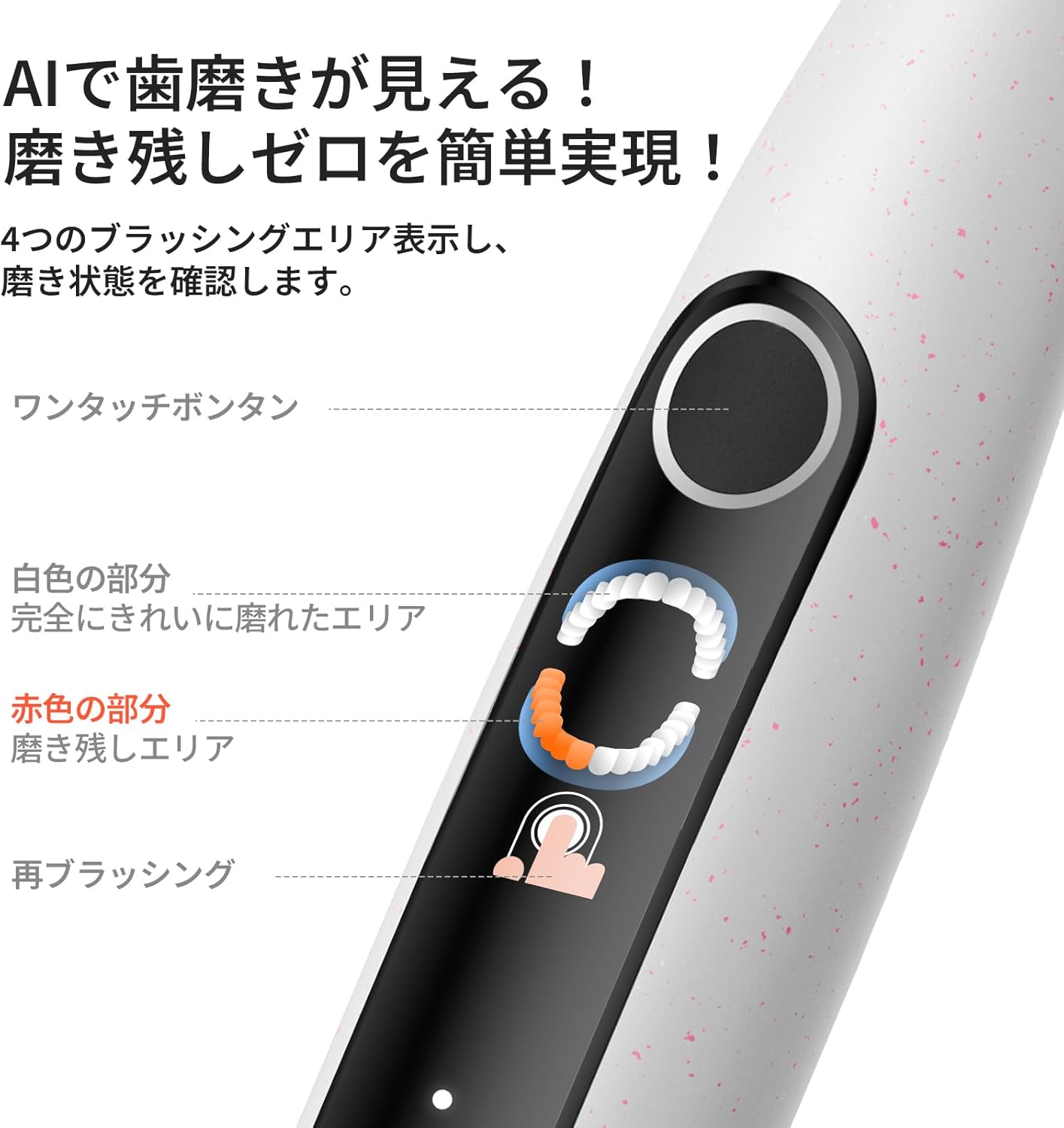
Image: A close-up of the Oclean X Lite's screen showing real-time brushing feedback, indicating areas that have been cleaned and those that require more attention.

Image: An illustration demonstrating the high-frequency sonic vibrations of the Oclean X Lite's bristles, highlighting its powerful cleaning action.
4. Supplementary Brushing Guidance
The Oclean X Lite automatically sets a supplementary brushing guide to target missed areas. After your initial brushing session, the screen may highlight areas that need more attention. With one click, you can activate this guidance to achieve up to 38% more plaque removal for a deeper clean.

Image: A step-by-step visual guide on how the Oclean X Lite provides supplementary brushing guidance to ensure no areas are missed during cleaning.
Entretien
1. Nettoyage de la brosse à dents
After each use, rinse the brush head thoroughly under running water. You can also detach the brush head and rinse both the head and the handle separately. Wipe the handle with a soft, damp cloth. Do not immerse the entire toothbrush handle in water for extended periods, although it is IPX7 waterproof.
2. Remplacement de la tête de brosse
Dentists recommend replacing your toothbrush head every 3 months, or sooner if the bristles become frayed. To replace, simply pull the old brush head off the handle and push a new one into place until it clicks.

Image : Une illustration montrantasing different types of Oclean brush heads, including a professional clean brush head, W-shaped brush head, and tongue cleaner, emphasizing their features.
Dépannage
| Problème | Cause possible | Solution |
|---|---|---|
| La brosse à dents ne s'allume pas. | La batterie est épuisée. | Chargez complètement la brosse à dents à l'aide du câble USB-C fourni. |
| Les vibrations semblent faibles. | Low battery or brush head not securely attached. | Recharge the toothbrush. Ensure the brush head is firmly clicked into place. |
| L'écran ne fonctionne pas. | Problème logiciel ou batterie faible. | Try restarting the toothbrush. Ensure it is fully charged. If the issue persists, contact customer support. |
| La brosse à dents s'arrête pendant son utilisation. | Battery depleted or automatic timer activated. | Recharge the toothbrush. The toothbrush has a built-in timer; simply restart if you wish to continue brushing. |
Caractéristiques
- Modèle: X Lite
- Marque: Ocléen
- Vibrations: 40,000 XNUMX VPM (Vibrations par minute)
- Modes de nettoyage: 5 (Daily Clean, Deep Clean, Sensitive, Whitening, Massage)
- Autonomie de la batterie : Up to 30 days (based on typical usage)
- Chargement : USB Type-C, approx. 3 hours for full charge
- Caractéristiques spéciales : Smart Screen Display, Brushing Timer, Pressure Sensor, Supplementary Brushing Guidance
- Source d'alimentation : Fonctionne sur piles (1 pile 12V incluse)
- Description de la fermeté de l'article : Moyen
- Fabricant: Shenzhen Yunding Information Technology Co., Ltd.
- ASIN: B0DXZ9PDLC
- Dimensions du colis : 8.82 x 3.86 x 1.26 pouces; 7.05 onces
Garantie et assistance
For warranty information, product support, or to purchase replacement parts and accessories, please visit the official Oclean website or contact their customer service. Refer to the original product packaging or purchase documentation for specific warranty terms and contact details.
Fabricant: Shenzhen Yunding Information Technology Co., Ltd.
Boutique de la marque : Visit the Oclean Store on Amazon


