1. Introduction
This manual provides detailed instructions for the proper installation, operation, and maintenance of the GODIYMODULES High Voltage DC Converter Module Board. This module is designed to provide stable high voltage DC and filament voltage, suitable for applications such as powering Nixie tubes and Magic Eye tubes.

Image 1.1 : Vue de dessus view of the GODIYMODULES High Voltage DC Converter Module Board. This image shows the overall layout of the components, including capacitors, inductors, the DC input jack, and the terminal blocks for input and output connections.
2. Consignes de sécurité
WARNING: This module generates high voltage. Improper handling can result in electric shock, injury, or damage to equipment. Always exercise extreme caution when working with high voltage circuits.
- Assurez-vous que l'alimentation électrique est débranchée avant d'effectuer tout branchement ou réglage.
- Do not touch any components on the board when power is applied.
- Use appropriate insulation and safety equipment.
- Verify all connections are correct before applying power.
- This module is intended for experienced electronics hobbyists and professionals.
3. Caractéristiques
- Designed for Nixie and Magic Eye Tube anode and filament power supply.
- Vol élevé réglabletage DC output.
- Dedicated 6.3V filament voltage sortie.
- Compact board design.
4. Spécifications
| Paramètre | Valeur |
|---|---|
| Vol d'entréetage | 9 V-12 V CC |
| DC Socket Specification | 5.5*2.1 mm (Inner Positive, Outer Negative) |
| Vol élevétage Sortie | DC 150V-280V / 15mA (Adjustable) |
| Filament Voltage Sortie | DC 6.3V / 1500mA |
| Dimensions | Dimensions approximatives : 5.24 x 3.82 x 1.34 pouces (emballage) |
| Poids | Environ 0.634 onces |
| Matériel | Métal, plastique |
5. Installation et connexions
Follow these steps to correctly connect the High Voltage DC Converter Module Board to your system. Ensure all power is disconnected before proceeding.
5.1 Connexion de l'alimentation d'entrée
The module accepts a DC input voltage between 9V and 12V. There are two methods for providing input power:
- Prise d'alimentation CC : Use a DC power adapter with a 5.5*2.1 mm plug. The plug must be inner positive and outer negative.
- Bornier : Connect your DC 9V-12V power supply to the designated input terminals on the green screw terminal block. Observe correct polarity.
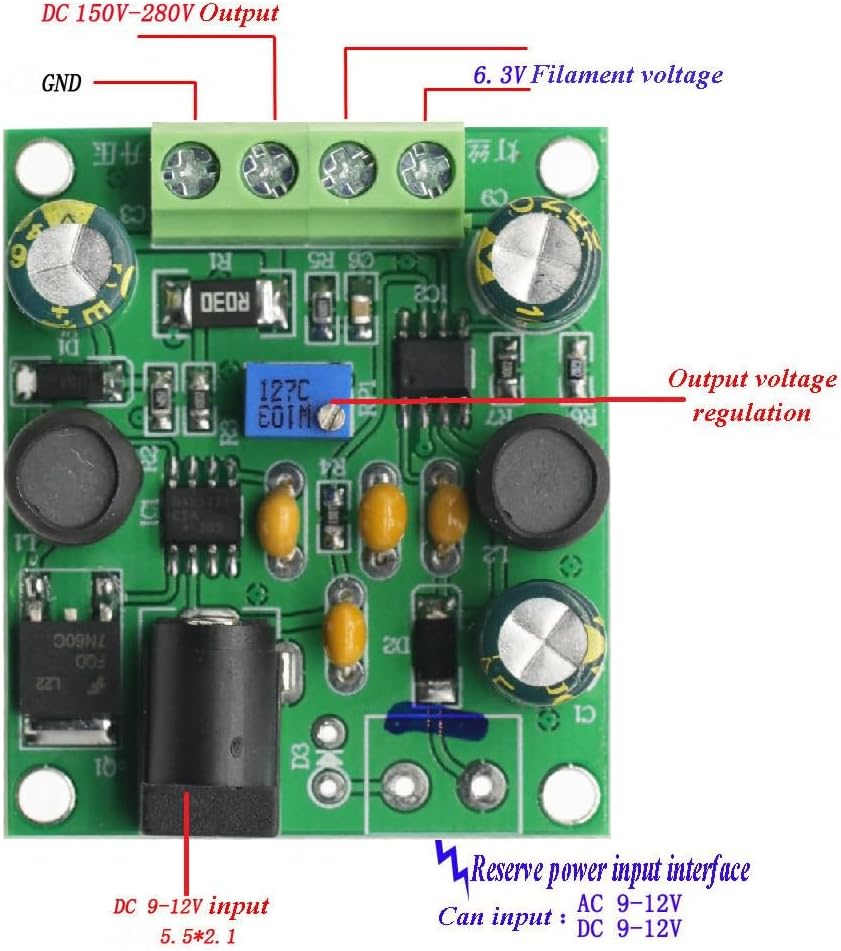
Image 5.1: Connection diagram showing input and output terminals. The DC 9-12V input can be connected via the barrel jack (5.5*2.1mm, inner positive, outer negative) or the screw terminal block. The image also indicates the output voltage regulation potentiometer.

Image 5.2: Detailed connection diagram illustrating the input power options (DC 9-12V via barrel jack or screw terminals) and the output connections for 6.3V filament voltage, GND, and adjustable DC 150-280V. The output voltage adjustment potentiometer is also clearly marked.
5.2 Connexions de sortie
The module provides two main outputs via the green screw terminal block:
- DC 150V-280V Output: C'est le haut volumetage output, adjustable via the onboard potentiometer. Connect the anode of your Nixie or Magic Eye tube to this output.
- Sortie CC 6.3 V : This output provides 6.3V for tube filaments. Connect the filament of your tube to this output.
- GND : Common ground connection for both outputs.
Assurez-vous que toutes les connexions sont bien fixées et correctement polarisées avant de mettre l'alimentation sous tension.
6. Mode d'emploi
6.1 Mise sous tension
Once all connections are verified and secure, connect the DC 9V-12V power supply to the module. The module will immediately begin generating the output voltaget.
6.2 Adjusting High Voltage Sortie
Le haut voltage output (DC 150V-280V) is adjustable using the blue potentiometer located on the board. Use a small screwdriver to carefully turn the potentiometer:
- Tournant dans le sens des aiguilles d'une montre volonté augmenter le volume de sortietage.
- Tournant dans le sens antihoraire volonté diminuer le volume de sortietage.
Always use a multimeter to measure the output voltage while adjusting to prevent over-voltage damage to your connected components.

Image 6.1 : Haut view of the module, clearly showing the blue potentiometer used for adjusting the high voltage sortie.
7. Entretien
The GODIYMODULES High Voltage DC Converter Module Board is designed for reliable operation and requires minimal maintenance.
- Veillez à ce que le module reste propre et exempt de poussière et de débris.
- Assurez une ventilation adéquate autour du module pour éviter toute surchauffe.
- Évitez d'exposer le module à l'humidité ou à des températures extrêmes.
- Regularly inspect connections for looseness or corrosion.
8. Dépannage
- Pas de volume de sortietage:
- Verify the input power supply is connected and providing 9V-12V DC.
- Check the polarity of the input DC power plug (inner positive, outer negative).
- Ensure all output connections are secure.
- Volume de sortie incorrecttage:
- Pour haut voltage output, adjust the potentiometer as described in Section 6.2.
- Use a multimeter to accurately measure the output voltaget.
- Assurez-vous que le volume d'entréetage est stable et se situe dans la plage spécifiée.
- Surchauffe du module :
- Assurez une circulation d'air adéquate autour du module.
- Verify that the load connected to the outputs does not exceed the specified current limits (15mA for HV, 1500mA for 6.3V).
9. Assistance
For further assistance or technical inquiries, please refer to the seller's contact information on the product purchase page or visit the GODIYMODULES official support channels.


