Introduction
This manual provides comprehensive instructions for the operation, maintenance, and troubleshooting of the EXTECH SDL600 Sound Meter SD Logger. The SDL600 is a precision instrument designed for environmental sound level measurements and data logging, meeting ANSI and IEC 61672-2013 Class 2 standards.
Please read this manual thoroughly before using the device to ensure proper functionality and accurate readings.
Contenu du colis
Lors du déballage, vérifiez que tous les articles sont présents et en bon état :
- EXTECH SDL600 Sound Meter
- Carte SD
- Pare-brise
- 6 piles AA
- Sacoche de transport
- Manuel d'instructions (ce document)
An optional AC Adaptor (UA100-240) may be purchased separately.
Produit terminéview
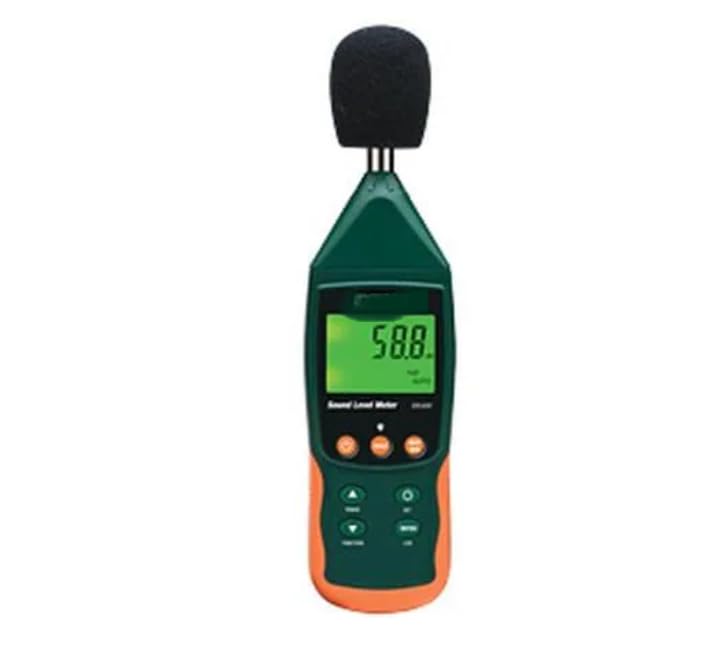
Figure 1 : Devant view of the EXTECH SDL600 Sound Meter. The device features a digital display, control buttons, and a microphone with a windscreen.
The SDL600 is designed for accurate sound level measurements. Key components include the microphone (with windscreen), LCD display, and control buttons for various functions such as power, data hold, min/max, and logging.
Installation
1. Installation de la batterie
- Repérez le couvercle du compartiment à piles à l'arrière de l'appareil.
- Open the cover and insert the 6 AA batteries, ensuring correct polarity.
- Replacez soigneusement le couvercle du compartiment à piles.
2. Insertion de la carte SD
- Locate the SD card slot, typically on the side or bottom of the device.
- Insérez la carte SD fournie dans l'emplacement jusqu'à ce qu'elle s'enclenche.
- Ensure the card is inserted correctly to prevent damage.
3. Windscreen Attachment
Gently slide the foam windscreen over the microphone at the top of the device. The windscreen helps to minimize wind noise during outdoor measurements.
Mode d'emploi
1. Mise sous/hors tension
Appuyez et maintenez enfoncé le POUVOIR bouton pour allumer ou éteindre l’appareil.
2. Modes de mesure
The SDL600 supports both Rangement automatique et Rangement manuel. Refer to the on-screen indicators and specific buttons (if available) to switch between these modes for optimal measurement range.
3. Data Hold and Min/Max/Peak Hold
- Appuyez sur le PRISE Appuyez sur ce bouton pour figer la lecture actuelle affichée. Appuyez de nouveau pour relâcher.
- Utilisez le MIN MAX button to display the minimum and maximum sound levels recorded during a measurement session.
- Le TENUE DE PIC function captures and displays the highest instantaneous sound pressure level.
4. Data Logging to SD Card
The SDL600 can log data directly to the inserted SD card in Excel format. This allows for easy transfer to a PC for analysis.
- Ensemble SampTaux de ling: Le sampling rate is user-programmable from 1 to 3600 seconds. Access the menu settings (refer to device interface) to configure your desired interval.
- Démarrer la journalisation : Appuyez sur le bouton dédié ENREGISTRER button to begin recording data. The device will record readings with a date and time stamp.
- Stop Logging: Appuyez sur le ENREGISTRER à nouveau pour arrêter l'enregistrement.
- Données de transfert : Remove the SD card and insert it into a computer to access the logged data files.
5. Internal Memory Storage
The device's internal memory can store up to 99 readings manually. Consult the device's interface for instructions on how to save and recall these readings.
6. Mise hors tension automatique
The SDL600 features an Auto Power Off function to conserve battery life. This feature can be disabled through the device's settings menu if continuous operation is required.
Entretien
1. Nettoyage
Wipe the device with a soft, dry cloth. Do not use abrasive cleaners or solvents. Ensure the microphone and display are kept clean for accurate readings.
2. Stockage
When not in use for extended periods, remove the batteries to prevent leakage. Store the device in its hard carrying case in a cool, dry place, away from direct sunlight and extreme temperatures.
3. Étalonnage
Regular calibration is recommended to maintain measurement accuracy. Refer to professional calibration services or the manufacturer's guidelines for calibration procedures.
Dépannage
| Problème | Cause possible | Solution |
|---|---|---|
| L'appareil ne s'allume pas. | Piles mortes ou mal installées. | Remplacez les piles par des neuves en respectant la polarité. |
| Lectures inexactes. | Microphone obstructed, device needs calibration, or incorrect measurement mode. | Ensure microphone is clear. Perform calibration. Check if Auto/Manual ranging is set appropriately. |
| SD card logging not working. | SD card not inserted correctly, card full, or card error. | Reinsert SD card. Check available space. Try a different SD card. Ensure logging function is activated. |
| L'écran est vide ou figé. | Batterie faible ou erreur système. | Replace batteries. If problem persists, remove batteries for a few minutes and reinsert to reset the device. |
Caractéristiques
- Modèle: SDL600
- Précision: ±1.4 dB
- Normes : Meets ANSI and IEC 61672-2013 Class 2
- Variant: Auto ou Manuel
- Enregistrement des données : External SD card (Excel format), User programmable samptaux de ling (1 à 3600 secondes)
- Mémoire interne : Stores 99 readings manually
- Fonctions: Min/Max, Peak Hold, Data Hold
- Pouvoir: 6 AA batteries (included), Optional AC Adaptor UA100-240
- Arrêt automatique : Yes, with disable capability
- Poids: Environ 11.99 livres (5.44 kg)
- Fabricant: EXTECH
Garantie et assistance
For warranty information and technical support, please refer to the official EXTECH webou contactez votre distributeur local. Conservez votre ticket de caisse comme preuve d'achat pour toute réclamation sous garantie.
Fabricant: EXTECH
ASIN: B0DVYXV4CS


