Informations importantes sur la compatibilité
This ESR Rebound Magnetic Keyboard Case is designed for specific iPad models. Please verify your iPad model number to ensure compatibility before use.
- Compatible avec : iPad Air 13-inch (M3/M2 2025/2024), iPad Pro 12.9-inch (6th/5th/4th/3rd Gen).
- Numéros de modèles compatibles : A2764, A2437, A2436, A2378, A2379, A2461, A2462, A2229, A2069, A2232, A2233, A1876, A2014, A1895, A1983.
- NON compatible avec : iPad Pro 13-inch (M4) 2024 (Models: A2925, A2926, A3007) and iPad Pro 13-inch (M5) 2025 (Models: A3360, A3361, A3362).
To verify your iPad model, go to Paramètres > Général > À propos on your device, or find the model number on the back of your iPad.

Figure 1: Compatibility warning indicating the keyboard case is not for iPad Pro 13-inch (M4) 2024.

Figure 2: Visual guide for compatible iPad models and how to locate your iPad's model number for verification.
Contenu du colis
Vérifiez que tous les articles sont présents dans le colis :
- ESR Rebound Magnetic Keyboard Case
- Câble de charge USB-A vers USB-C
- Manuel d'utilisation
Vidéo 1 : Déballage et présentationview of the ESR Rebound Magnetic Keyboard Case for iPad Air 13 & iPad Pro 12.9. This video demonstrates the contents of the package and initial setup.
Instructions d'installation
1. Fixation de votre iPad
- Ouvrez l'étui du clavier.
- Align your iPad with the magnetic back of the case. The iPad will securely snap into place.
- Adjust the floating cantilever stand to your desired viewangle de vue.

Figure 3: Quick-set magnetic stand in use, showing an iPad securely attached and adjusted to an optimal angle.

Figure 4: Demonstration of the strong magnetic hold, securing the iPad to the case with 1,500g of holding force.
2. Mise sous tension et appairage Bluetooth
- Long press the power button on the keyboard for 2 seconds to turn it on. The Bluetooth status indicator will flash.
- Sur votre iPad, accédez à Paramètres > Bluetooth et assurez-vous que le Bluetooth est activé.
- Select "ESR Keyboard" from the list of available devices.
- Confirm the pairing request on your iPad. The Bluetooth indicator on the keyboard will turn solid blue once connected.
Video 2: Detailed instructions on how to power on the keyboard and pair it via Bluetooth with your iPad.
Mode d'emploi
Utilisation du clavier
The keyboard features well-spaced, responsive keys for comfortable and accurate typing. It includes a dedicated function row for quick access to common iPad functions.
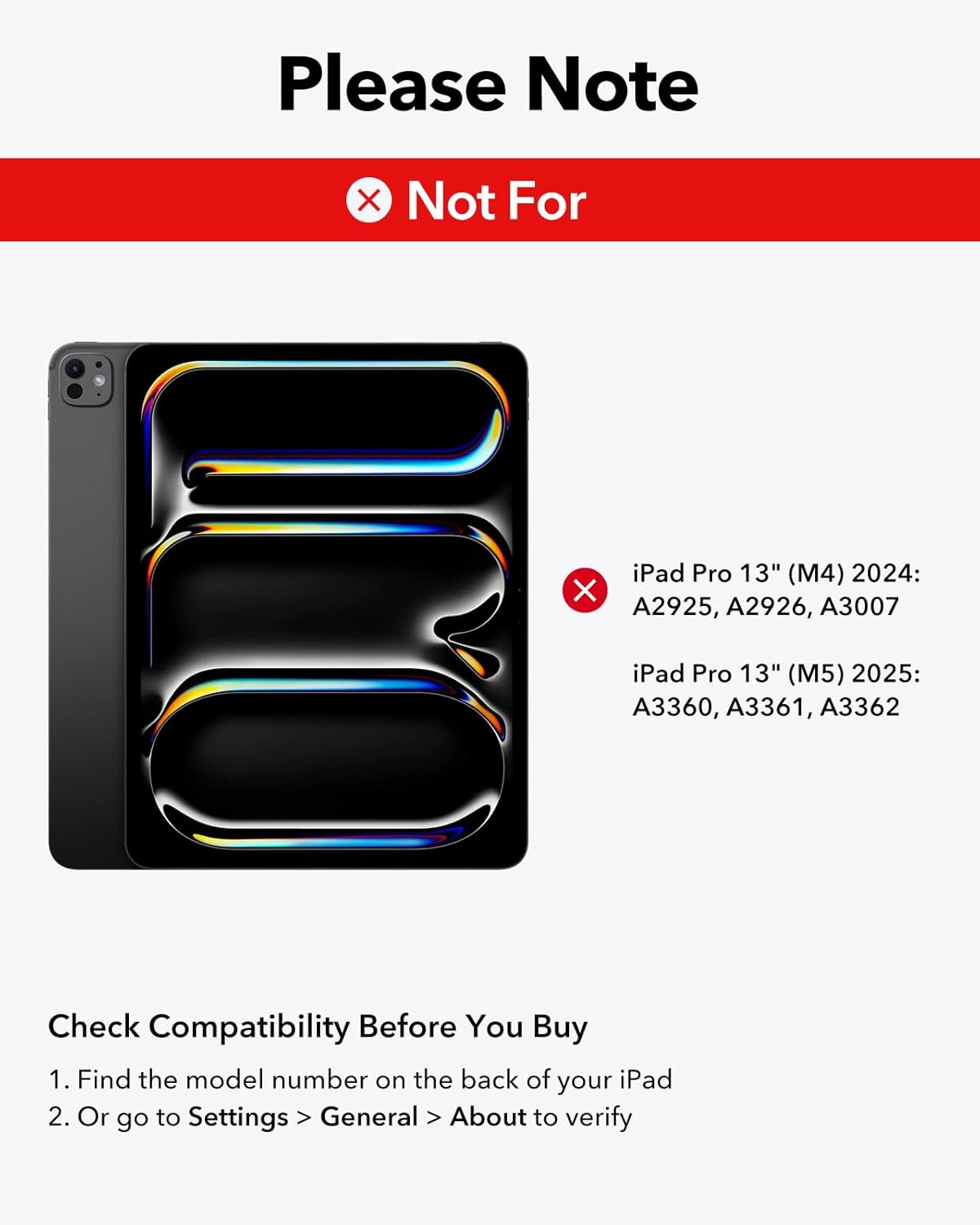
Figure 5: Close-up of hands typing on the keyboard, highlighting the laptop-style keys and their comfortable feel.
Touches rétroéclairées
The keyboard features adjustable 7-color backlighting with 3 brightness levels. Use the dedicated backlight key (often represented by a sun icon) to cycle through colors and adjust brightness.

Figure 6: The keyboard's backlit keys, demonstrating 12 color modes and 3 brightness levels for enhanced visibility in various lighting conditions.
Utilisation du pavé tactile
The precision multi-touch trackpad supports full iPadOS gestures, allowing for efficient navigation and interaction with your iPad. Multi-touch gestures require iPadOS 14.5 or higher.
- Cliquez sur: Appuyez une seule fois ou maintenez la pression sur le pavé tactile.
- Rouleau: Utilisez deux doigts pour faire défiler vers le haut ou vers le bas.
- Zoom: Pincez avec deux doigts pour effectuer un zoom avant ou arrière.
- Rentrez chez vous : Swipe up with three fingers to return to the home screen.

Figure 7: A hand demonstrating multi-touch gestures on the precision trackpad, enabling responsive navigation.

Figure 8: Visual guide to common multi-touch trackpad gestures, including click, scroll, zoom, and returning to the home screen.
Floating Cantilever Stand
The floating cantilever design allows your iPad to be positioned at various angles for optimal viewing and typing comfort. Simply open the case and adjust the iPad's position to achieve the perfect angle.

Figure 9: The floating cantilever stand in action, providing an adjustable and stable platform for the iPad.
Magnetic Clasp and Pencil Holder
The case features a secure magnetic clasp that not only keeps the case closed but also provides a dedicated holder for your Apple Pencil or other styluses, ensuring they are safely stored and charged (if compatible).

Figure 10: The secure magnetic clasp with an integrated pencil holder, designed to keep your Apple Pencil or other styluses safely attached.
Entretien
- Nettoyage: Utilisez un chiffon doux et sec.amp cloth to wipe down the exterior of the case and keyboard. Avoid harsh chemicals.
- Stockage: Lorsque vous ne l'utilisez pas, gardez l'étui-clavier fermé afin de protéger à la fois l'iPad et le clavier.
- Chargement : Charge the keyboard using the provided USB-A to C charging cable. The iPad cannot be charged through the keyboard case.
Dépannage
Keyboard Not Responding / Touchscreen Unresponsive
If the keyboard is not responding or the iPad touchscreen becomes unresponsive after double-clicking the trackpad, follow these steps:
- Aller à Settings > Accessibility > Touch.
- Turn off "AssistiveTouch".
- Ensure the keyboard is sufficiently charged. Low battery can affect performance.
Video 3: Troubleshooting guide for issues related to incorrect size, fit, or wrong purchase. This video also addresses touchscreen unresponsiveness after trackpad use.
Problèmes de connectivité
- Assurez-vous que le clavier est complètement chargé.
- Re-pair the keyboard with your iPad by following the "Powering On and Bluetooth Pairing" steps.
- Redémarrez votre iPad et votre clavier.
Caractéristiques
| Marque | ESR |
| Appareils compatibles | iPad Air 13-inch (M3/M2 2025/2024), iPad Pro 12.9-inch (6th/5th/4th/3rd Gen) |
| Technologie de connectivité | Bluetooth |
| Description du clavier | Magnétique |
| Disposition du clavier | QWERTY |
| Dossier spécial | Ergonomic, Floating Cantilever Stand, Multi-Touch Trackpad, Backlit Keys |
| Matériel | Plastique |
| Couleur | Violet |
| Source d'énergie | Alimenté par batterie |
| Poids de l'article | 2.64 livres |
| Dimensions du colis | 12.91 x 9.53 x 1.06 pouces |
Garantie et assistance
ESR offre un support client complet pour ce produit :
- Garantie: This product includes a comprehensive 12-month warranty.
- Soutien: Lifetime support and personalized help are available.
- Ressources: Detailed setup videos and FAQs can be found on the ESR support website.
For further assistance, please visit the official ESR support webConsultez le site ou contactez le service client via votre plateforme d'achat.