1. Introduction
This manual provides comprehensive instructions for the Saqico Q22 Charging Dock, designed to efficiently charge and organize your Meta Quest 2, Meta Quest 3, and Meta Quest 3S headsets and their respective controllers. This dock offers magnetic charging, integrated rechargeable batteries for controllers, customizable RGB lighting, and additional USB charging ports for a streamlined VR experience.
2. Contenu du colis
Veuillez vérifier que tous les éléments suivants sont inclus dans votre colis :
- 1 x station de chargement
- 1 x câble USB-C
- 1 x USB-C Adapter (30W)
- 2 piles rechargeables AA
- 1 x Quest 2 Battery Covers (for controllers)
- 1 x Quest 3 & 3S Battery Covers (for controllers)
- 1 x Mounting Pillar
- 4 x USB-C Magnetic Ports
- 1 x Manuel d'utilisation

Image: All components included in the Saqico Q22 Charging Dock package.
3. Instructions de configuration
3.1. Installation de la batterie du contrôleur
- Open the battery compartment of your Meta Quest controllers.
- Remove the original disposable batteries.
- Insert the provided 2100mAh rechargeable AA batteries into each controller, ensuring correct polarity (+/-).
- Replace the original battery covers with the magnetic battery covers provided (Quest 2 or Quest 3/3S specific). Ensure the silver electrode area on the battery corresponds to the aluminum piece on the battery cover for proper charging.

Image: Step-by-step guide for installing the rechargeable batteries and magnetic covers into the controllers.
3.2. Headset Magnetic Charging Port Setup
- Insert one of the provided USB-C magnetic ports into the charging port of your Meta Quest headset. This allows for easy magnetic connection to the dock.

Image: Illustration of inserting the magnetic USB-C adapter into the headset's charging port.
3.3. Connexion de la station de charge
- Connect the provided USB-C cable to the input port on the back of the charging dock.
- Plug the other end of the USB-C cable into the 30W USB-C adapter.
- Plug the adapter into a standard wall outlet. The dock's RGB lights will illuminate, indicating it is powered on.
Video: This video demonstrates the initial setup of the charging dock, including connecting the power and placing the headset and controllers. It highlights the magnetic connection and RGB lighting.
4. Mode d'emploi
4.1. Chargement de vos appareils
- casque: Gently place your Meta Quest headset onto the central stand of the charging dock. The magnetic USB-C port you installed earlier will automatically align and connect, initiating charging. The indicator light for the headset will turn orange while charging and blue when fully charged.
- Contrôleurs : Place your controllers into their designated slots on either side of the dock. The magnetic battery covers will connect with the charging pins, and the controller indicator lights will turn orange while charging and blue when fully charged.

Image: The Meta Quest headset and controllers placed on the charging dock, illustrating simultaneous charging.
4.2. Contrôle de l'éclairage RVB
The charging dock features 7 RGB lighting modes to enhance your gaming environment. A dedicated button on the dock allows you to cycle through different colors or turn the lights on/off according to your preference.
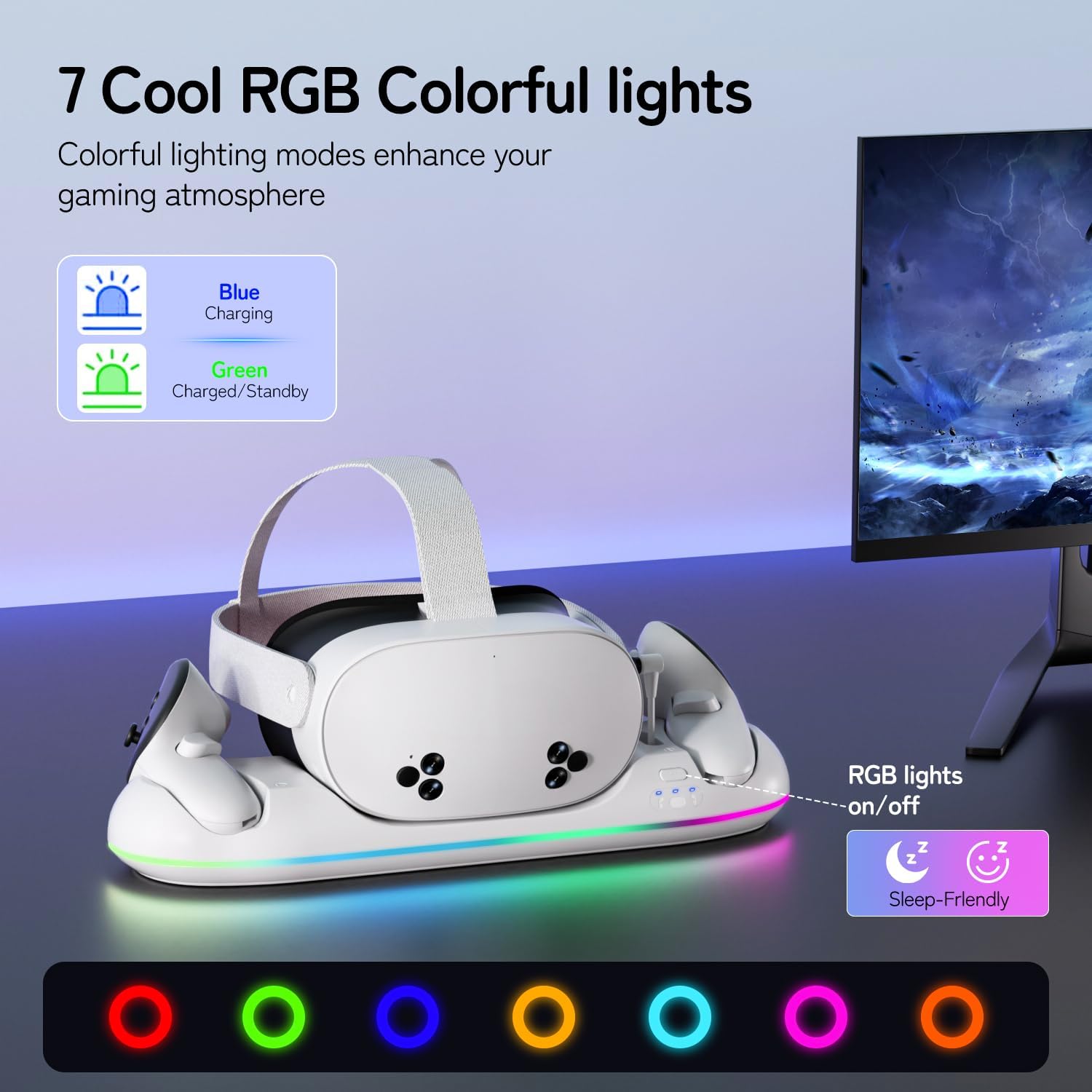
Image: The charging dock displaying various RGB lighting modes, with an explanation of the charging status indicators (blue for charging, green for charged/standby).
4.3. Additional USB Charging Ports
The upgraded version of this charging dock includes extra USB charging ports. These ports can be used to charge other devices such as smartphones, power banks, or speakers, providing additional convenience.

Image: The charging dock with a smartphone connected to an additional USB port, demonstrating its versatility.
5. Charging Features
The Saqico Q22 Charging Dock is engineered for fast and efficient charging:
- Temps de chargement du casque : Environ 2 à 3 heures pour une charge complète.
- Temps de charge du contrôleur : Environ 3 heures pour une charge complète.
- Chargement magnétique : The magnetic design ensures secure and hassle-free placement, reducing wear on ports.
- Batteries rechargeables: The included 2100mAh rechargeable batteries for controllers support over 2,000 charging cycles, offering long-term use and reducing the need for frequent replacements.

Image: Visual representation of the fast charging capabilities for both the Meta Quest headset and controllers.
6. Consignes de sécurité
The charging dock incorporates multiple protection features to ensure the safety of your devices:
- Protection contre la surcharge : Empêche la surcharge des batteries, prolongeant ainsi leur durée de vie.
- Protection contre les surcharges : Mesures de protection contre les surintensités.
- Protection contre les surintensités: Protège contre les surtensions.
- Protection de court circuit: Prévient les dommages causés par les courts-circuits.

Image: Diagram illustrating the smart charging protection features, including overcharge and short-circuit protection.
7. Entretien
To ensure optimal performance and longevity of your charging dock:
- Keep the charging dock and your devices clean and free from dust. Use a soft, dry cloth for cleaning.
- Ensure the charging pins on the dock and the magnetic contacts on the controller covers are clean. If necessary, gently clean with a cotton swab lightly dampfini avec de l'alcool.
- Avoid using protective grip covers on your controllers that cover the battery compartment, as this may prevent proper charging.
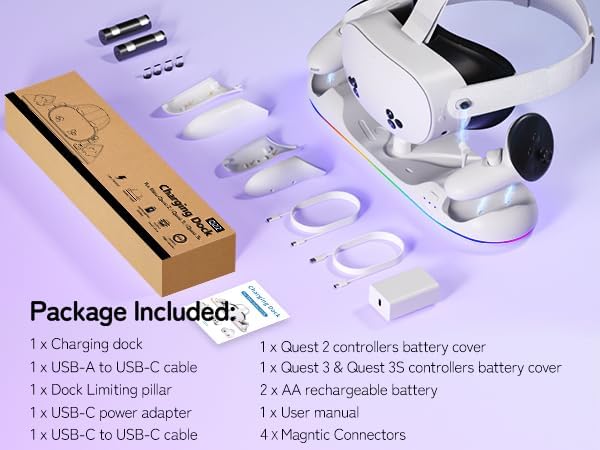
Image: Visual warning indicating that certain controller covers are not compatible with the charging dock due to interference with charging contacts.
8. Dépannage
If you encounter issues with your charging dock, please refer to the following common solutions:
- L'appareil ne charge pas : Ensure the power adapter is securely plugged into a wall outlet and the USB-C cable is firmly connected to the dock. Verify that the magnetic charging port is correctly inserted into the headset and that the controller battery covers are properly aligned with the dock's charging pins.
- Les lumières RGB ne fonctionnent pas : Check if the power adapter is connected. Press the RGB button on the dock to cycle through modes or turn the lights on.
- Charging pins stuck or deformed: Carefully inspect the charging pins on the dock and the magnetic contacts on the controller covers. If any are stuck or deformed, contact customer support.
- Charge lente : Ensure you are using the provided 30W USB-C adapter and cable. Using a lower wattage adapter may result in slower charging times.
9. Spécifications
| Fonctionnalité | Détail |
|---|---|
| Dimensions du produit | 2.36 x 4.41 x 15.39 pouces |
| Poids de l'article | 1.5 livres |
| Numéro de modèle de l'article | Q22 |
| Piles | 2 piles rechargeables AA (incluses) |
| Puissance d'entrée | Adaptateur USB-C 30 W |
| Temps de chargement du casque | 2-3 heures |
| Controller Charging Time | 3 heures |
| Modes d'éclairage RVB | 7 modes |
| Ports supplémentaires | Extra USB charging ports |
| Compatibilité | Meta Quest 2, Meta Quest 3, Meta Quest 3S |
| Couleur | Blanc |
10. Garantie et assistance
Ce produit est livré avec un GARANTIE DE 24 MOIS. To activate your warranty or for any product support, please use the following contact information:
- Website: www.dobe-us.com
- E-mail: support@dobe-us.com
Please contact us if you have any questions or concerns regarding your product. We aim to reply and resolve your problem within 24 hours.


