Introduction
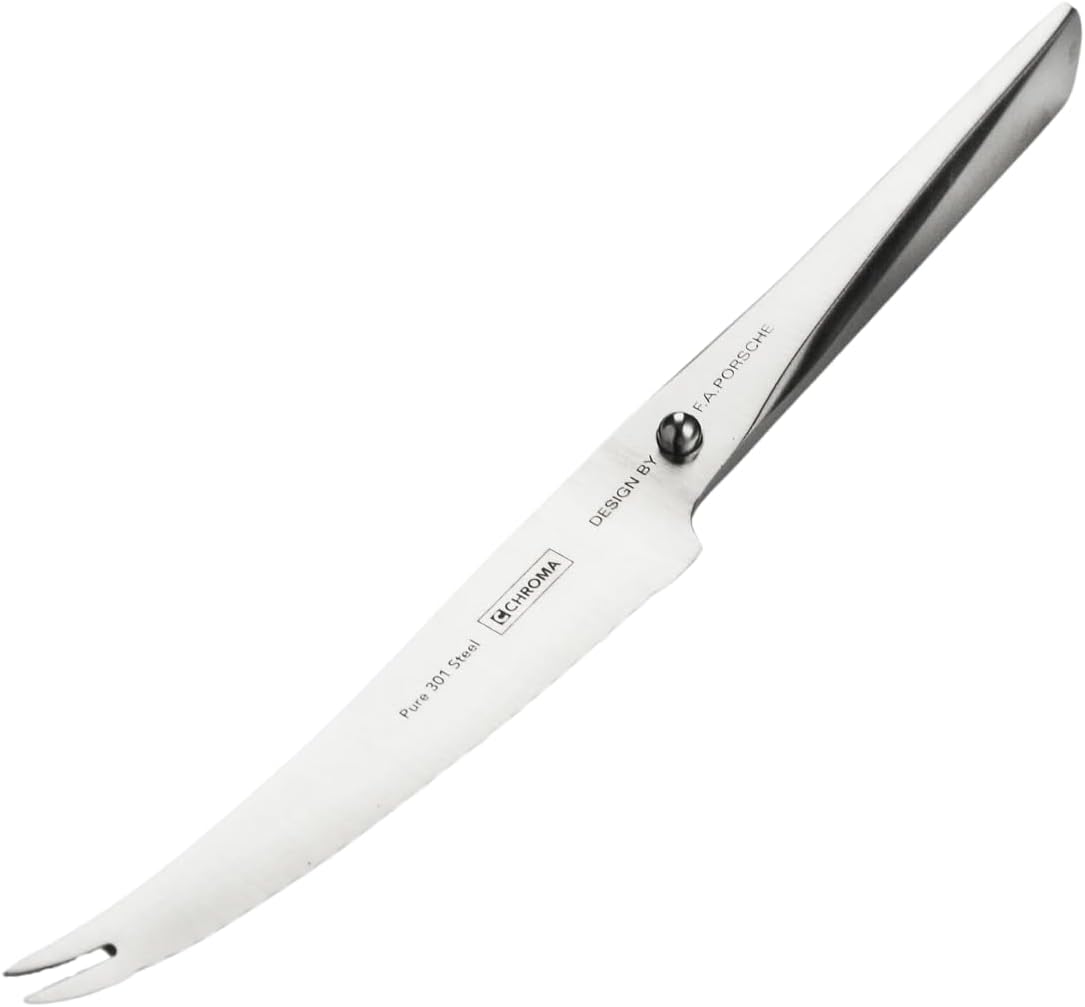
The Chroma P10 Type 301 Tomato Knife is engineered for precision slicing of delicate fruits and vegetables, particularly tomatoes. Its unique serrated blade and specialized tip are designed to cut without crushing, allowing for effortless preparation and serving. Crafted from premium Japanese 301 steel, this knife offers exceptional sharpness and durability, making it a valuable tool for both home chefs and professionals.
This manual provides essential information on the proper use, care, and maintenance of your Chroma P10 Tomato Knife to ensure its longevity and optimal performance.
Produit terminéview



Installation
- Déballage : Carefully remove the Chroma P10 Tomato Knife from its premium gift box. Retain the packaging for storage or transport if desired.
- Premier nettoyage : Before first use, hand wash the knife with warm, soapy water. Rinse thoroughly and dry immediately with a soft cloth. This removes any manufacturing residues.
- Inspection: Visually inspect the blade and handle for any signs of damage or manufacturing defects. If any issues are found, refer to the "Support" section.
Mode d'emploi
The Chroma P10 Tomato Knife is specifically designed for precision cutting of soft-skinned fruits and vegetables.
- Poignée: Hold the knife firmly by the stainless steel handle. The inlaid metal "pearl" is designed to provide a comfortable and secure grip, ensuring better control during use.
- Slicing Tomatoes: Place the tomato on a stable cutting surface. Position the serrated edge of the blade at the desired cutting point. Apply gentle, even pressure and use a sawing motion to slice through the tomato skin and flesh. The fine serrations are designed to pierce the skin without crushing the delicate interior.
- Picking Up Slices: The unique teeth on the tip of the blade allow you to effortlessly pick up and transfer sliced pieces of fruit or vegetables.
- Précautions de sécurité :
- Toujours coupé de votre corps.
- Use a stable cutting board.
- Keep fingers clear of the blade path.
- Do not attempt to catch a falling knife.
- Rangez le couteau en lieu sûr lorsqu'il n'est pas utilisé.
Entretien et soins
Proper care is crucial for maintaining the sharpness and longevity of your Chroma P10 Tomato Knife.
- Lavage des mains uniquement : To preserve the ultra-sharp edge and the integrity of the Japanese 301 steel, the Chroma P10 knife must be hand washed after every use. Do not wash in a dishwasher, as harsh detergents and high temperatures can dull the blade and damage the handle.
- Procédure de nettoyage : Use warm water and a mild dish soap. Gently clean the blade and handle with a soft sponge or cloth. Avoid abrasive scrubbers.
- Séchage immédiat : After washing, immediately dry the knife thoroughly with a clean, soft towel. This prevents water spots and corrosion.
- Stockage: Store the knife in a safe place, such as a knife block, magnetic strip, or the original gift box, to protect the blade and prevent accidental injury. Avoid storing it loosely in a drawer where it can come into contact with other utensils and dull the edge.
- Affûtage: Due to its serrated edge, traditional sharpening steels are not suitable. If the knife's performance diminishes over time, it is recommended to seek professional sharpening services specializing in serrated blades or consult Chroma's official support for guidance.
Dépannage
Most issues with knife performance can be resolved with proper maintenance.
| Problème | Cause possible | Solution |
|---|---|---|
| Knife is not cutting cleanly / crushing tomatoes. | Blade is dull or has food residue. | Ensure the knife is clean. If dull, consider professional sharpening for serrated blades. |
| Rust spots appearing on blade. | Not dried immediately after washing; left in water; exposure to corrosive substances. | Always dry the knife immediately and thoroughly after washing. Avoid prolonged contact with acidic foods or moisture. |
| La poignée est glissante. | Grease or moisture on the handle. | Ensure hands and handle are clean and dry before use. |
Caractéristiques
| Fonctionnalité | Détail |
|---|---|
| Numéro de modèle | P10 |
| Matériau de la lame | Japanese 301 Steel |
| Tranchant de la lame | Cranté |
| Longueur de la lame | 5 pouces |
| Matériau de la poignée | Acier inoxydable |
| Longueur totale | 9 pouces |
| Couleur | Argent |
| Poids de l'article | 1 livre |
| Fabricant | Chroma |
| Pays d'origine | USA |
Informations sur la garantie
Specific warranty details for the Chroma P10 Tomato Knife are not provided in this manual. For information regarding warranty coverage, terms, and conditions, please refer to the product packaging or contact the manufacturer directly.
Soutien
If you have any questions, require assistance, or need to report an issue with your Chroma P10 Tomato Knife, please contact the manufacturer, Chroma, through their official websites ou canaux de service client.
Fabricant: Chroma
Website: www.chroma-cutlery.com (Example lien (le lien réel peut varier)


